
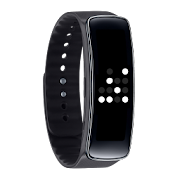
Introducing Binary V Clock for Samsung Gear Fit.
Don't know how the binary clock works? Check this on Wikipedia: https://en.wikipedia.org/wiki/Binary_clock
If you want horizontal version check out the Binary Clock: https://www.google.com/url?q=https://play.google.com/store/apps/details?id=pl.toro.fitwatchface.binary
How to set the watch face
Install the Gear Fit Manager and pair your Gear Fit
Install the Binary Clock app
Open Gear Fit Manager
Choose Home screen styler > Clock > Style Clocks settings icon
Select the Binary Clock to display as watch face on your Gear Fit
SAMSUNG_GEAR_FIT_CLOCK SAMSUNG_CUP_ENABLED
Don't know how the binary clock works? Check this on Wikipedia: https://en.wikipedia.org/wiki/Binary_clock
If you want horizontal version check out the Binary Clock: https://www.google.com/url?q=https://play.google.com/store/apps/details?id=pl.toro.fitwatchface.binary
How to set the watch face
Install the Gear Fit Manager and pair your Gear Fit
Install the Binary Clock app
Open Gear Fit Manager
Choose Home screen styler > Clock > Style Clocks settings icon
Select the Binary Clock to display as watch face on your Gear Fit
SAMSUNG_GEAR_FIT_CLOCK SAMSUNG_CUP_ENABLED
Reviews for Binary V Clock for Gear Fit
Click Here to Read Reviews for Binary V Clock for Gear Fit >> Click Here to Submit Reviews for Binary V Clock for Gear Fit >>