
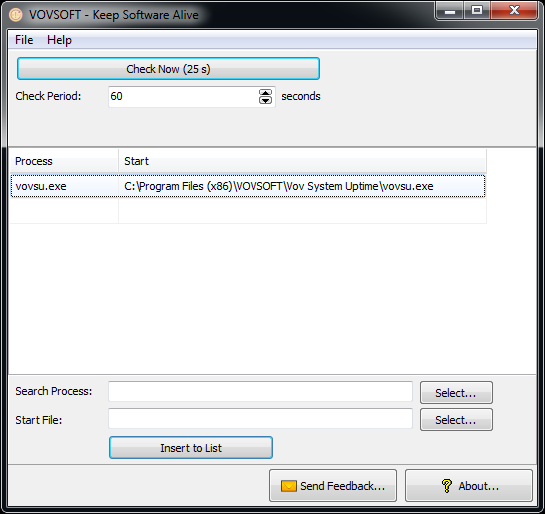
Keep your applications running if crashed or closed. Some applications are prone to crash. Keep Software Alive automatically restarts this kind of applications. All you have to do is to set check interval in seconds and select the applications you wish to restart. The utility is built for system administrators and power users. You can minimize application stoppages by using this utility. It runs on Windows XP, Vista, 7, 8, 8.1, 10 and Windows Server editions.
Official Product Description
Overview
What Does Keep Software Alive Do?
Keep Software Alive is a specialized utility designed to maintain the persistent operation of critical Windows applications. Built primarily for system administrators and power users, the tool addresses the issue of software instability by automatically restarting processes that have crashed or been closed unexpectedly. This functionality is intended to reduce downtime on workstations and servers where continuous application uptime is required.
The configuration process requires the user to define a specific check interval, measured in seconds. After establishing this timeframe, the user selects the specific applications they wish to monitor. The utility then performs periodic status checks based on the defined interval; if it detects that a selected program is no longer active in the system memory, it executes a restart command automatically. This automation ensures that background tasks or crash-prone services remain active without requiring manual intervention.
The software supports a broad range of operating systems, making it a viable solution for managing both modern and legacy infrastructure. Compatibility includes the following environments:
- Windows XP, Vista, 7, 8, and 8.1
- Windows 10
- Windows Server editions
By delegating process monitoring to this utility, users can ensure that essential applications remain operational. The tool provides a factual, lightweight solution for stabilizing software environments across various Windows-based platforms.
Top 5 Reasons To Download Keep Software Alive
- Uninterrupted Productivity and Maximum Uptime: Keep Software Alive ensures that your critical applications remain active, automatically relaunching them the moment they crash or are accidentally closed.
- Customizable Automation Through Precision Intervals: Users have full control over the monitoring frequency, allowing for a tailored balance between system responsiveness and resource management.
- Extensive Legacy and Modern OS Support: From Windows XP and Vista to Windows 10 and various Server editions, this tool provides a safety net for virtually any Windows-based environment.
- Professional Grade Reliability for Power Users: Designed specifically with system administrators in mind, the utility offers a streamlined, no-nonsense approach to managing unstable or vital software.
- Ultra-Lightweight System Footprint: Unlike heavy monitoring suites, this utility operates with minimal resource consumption, ensuring that it doesn't slow down the very machine it is trying to protect.
In the fast-paced world of digital productivity, there is nothing quite as frustrating as a software crash. You know the feeling: you leave a critical process running overnight, or you set up a dedicated server for a specific task, only to return hours later and find that the application disappeared without a trace. Perhaps it was a memory leak, a background conflict, or a simple "program has stopped working" error that required manual intervention. For the average user, this is a nuisance. For the power user or system administrator, this is a catastrophic loss of time and data. This is exactly where Keep Software Alive by Vovsoft steps in to save the day, and why you absolutely need to jump on this giveaway opportunity.
1. Uninterrupted Productivity and Maximum Uptime
The primary reason anyone should download Keep Software Alive is the sheer peace of mind that comes with knowing your applications are being watched. We live in an era where we rely on "set it and forget it" workflows. Whether you are running a file synchronization tool, a local web server, a crypto-miner, or a specialized data logging script, these applications need to be running 24/7. When one of these programs fails, the entire chain of productivity breaks.
By using this utility, you are essentially hiring a digital security guard for your software. The tool doesn't just wait for you to notice a problem; it actively checks the status of your selected programs. If a program crashes due to an internal error or is closed by an errant click, Keep Software Alive detects the absence of the process and triggers a restart command immediately. This level of automation ensures that "downtime" is measured in seconds rather than hours. In a professional environment, uptime is everything. If you are managing a remote machine that you cannot physically access every hour, this software becomes an essential part of your toolkit. It bridges the gap between software instability and operational reliability.
Imagine running a long-term rendering project or a complex calculation that takes days. If the software crashes at hour twelve and you don't check it until hour twenty-four, you've lost half a day of progress. With this giveaway, that risk is effectively neutralized. You are not just downloading a utility; you are downloading a guarantee of continuity.
2. Customizable Automation Through Precision Intervals
One of the most impressive aspects of Keep Software Alive is its simplicity, particularly regarding its timing mechanism. The software allows you to set a "check interval" in seconds. This might seem like a small detail, but for a tech reviewer and a power user, this is the hallmark of a well-thought-out utility. Not every application needs the same level of oversight. For a mission-critical server application, you might want the software to check every 5 or 10 seconds. For a less vital background app, a check every 60 seconds might be more appropriate.
This customization allows you to fine-tune how your system resources are allocated. By selecting the exact applications you wish to restart and defining the frequency of the checks, you create a bespoke monitoring environment. The user interface is refreshingly clean, avoiding the cluttered "dashboard" look that plagues modern apps. You simply add the executable file to the list, set your seconds, and let the software do the heavy lifting. This transparency is vital. You don't want a monitoring tool that is a "black box"—you want to know exactly what it is checking and how often. This giveaway provides a professional-level control scheme that is accessible even to those who aren't career IT professionals but want their home setups to run with professional efficiency.
Furthermore, the ability to select multiple applications means you can protect an entire ecosystem of software. If you have three or four "finicky" programs that tend to conflict with one another, you can list them all within Keep Software Alive and ensure that they are constantly policed. It takes the manual labor out of system maintenance.
3. Extensive Legacy and Modern OS Support
In the tech world, we often see developers abandon older operating systems in favor of the "latest and greatest." However, many power users and system administrators know that some of the most stable and important industrial or specialized software still runs on legacy versions of Windows. One of the standout reasons to grab this giveaway is its incredible range of compatibility. Keep Software Alive supports everything from Windows XP and Vista to Windows 7, 8, 8.1, and 10. Perhaps even more importantly, it is fully compatible with Windows Server editions.
This makes the utility a "Swiss Army Knife" for anyone maintaining a variety of hardware. Do you have an old laptop in the garage acting as a print server running Windows 7? This software works there. Do you have a high-end workstation running Windows 10 for video editing? It works there, too. Are you managing a rack of servers? This utility is built for those environments. The inclusion of Windows XP support is particularly noteworthy, as many specialized medical, manufacturing, and laboratory devices still rely on XP-based controllers. Keeping those legacy applications running is a major challenge, and having a modern, reliable utility that can operate in those environments is a rare find.
By downloading this tool, you are ensuring that regardless of how your hardware evolves or what version of Windows you are forced to use for a specific project, you have a reliable way to keep your software running. It is a future-proof (and past-proof) investment in your digital infrastructure.
4. Professional Grade Reliability for Power Users
While the interface of Keep Software Alive is simple enough for a novice, its "under the hood" logic is built for the power user and the system administrator. In the world of IT, we often talk about "resilience." A resilient system is one that can recover from failure without human intervention. This software is the embodiment of that philosophy. System admins often have to write complex batch scripts or use Task Scheduler hacks to achieve what this utility does in two clicks.
For a power user, time is the most valuable resource. Every minute spent manually restarting a crashed application or checking a Task Manager list is a minute taken away from more important work. This utility is a force multiplier. It allows one person to manage a system with the efficiency of a much larger team because the "babysitting" aspect of software management is automated. The software handles the "process check" loop elegantly, ensuring it doesn't create "zombie" processes or conflict with the operating system's own process management.
The "utility" nature of this software means it doesn't try to be anything it's not. It doesn't have social media integration, it doesn't have flashy animations, and it doesn't try to upsell you on other products while it's running. It is a focused tool built for a specific, vital task. In a world of bloated "software-as-a-service" models, having a standalone, reliable utility that performs its function perfectly is a breath of fresh air. It is the kind of tool that you don't realize you need until you have it, and once you have it, you wonder how you ever managed your system without it.
5. Ultra-Lightweight System Footprint
One of the biggest concerns users have when installing "monitoring" software is the impact on system performance. There is an inherent irony in running a program to keep other programs alive if that monitoring program itself consumes so much CPU and RAM that it causes the system to crash. Fortunately, Vovsoft has optimized Keep Software Alive to be incredibly lightweight. This is a crucial point for anyone running older hardware or systems that are already pushed to their limits by their primary tasks.
The application sits quietly in the background, consuming a negligible amount of memory. It doesn't perform heavy disk I/O operations, and its CPU usage is almost non-existent during the idle periods between checks. This efficiency is why it is so highly recommended for Windows Server environments and legacy systems. It provides the "watchdog" functionality that is often built into high-end industrial controllers but brings it to the standard Windows desktop environment without the overhead.
Because it is so small and efficient, you can run it on a low-powered atom-processor tablet or a high-end threadripper workstation with the same level of confidence. It doesn't interfere with the registry in a way that slows down your boot times, and it doesn't require a constant internet connection to function. It is local, fast, and unobtrusive. When you download this giveaway, you are getting a high-performance tool that respects your system's resources. Keep Software Alive is the definition of "lean" software development, focusing on doing one thing exceptionally well without adding unnecessary weight to your OS.
In conclusion, Keep Software Alive is a must-download for anyone who values their time and the stability of their Windows environment. Whether you are a system administrator looking to automate server maintenance or a home user tired of your favorite media player or browser crashing during long sessions, this utility offers a robust, easy-to-use solution. The combination of its wide OS support, customizable intervals, and lightweight design makes it a top-tier tool in the "utility" category. Don't miss the chance to add this professional-grade "watchdog" to your digital arsenal—your productivity (and your sanity) will thank you.
The giveaway of this software represents a significant value for anyone who relies on their computer for critical tasks. In a landscape where software reliability can often be unpredictable, having a dedicated tool to ensure your applications stay "alive" is not just a luxury—it's a necessity for any power user. Download it, set your intervals, and enjoy a more resilient computing experience.
Reviews for Keep Software Alive
Click Here to Read Reviews for Keep Software Alive >> Click Here to Submit Reviews for Keep Software Alive >>