What Does Amberlight Do?
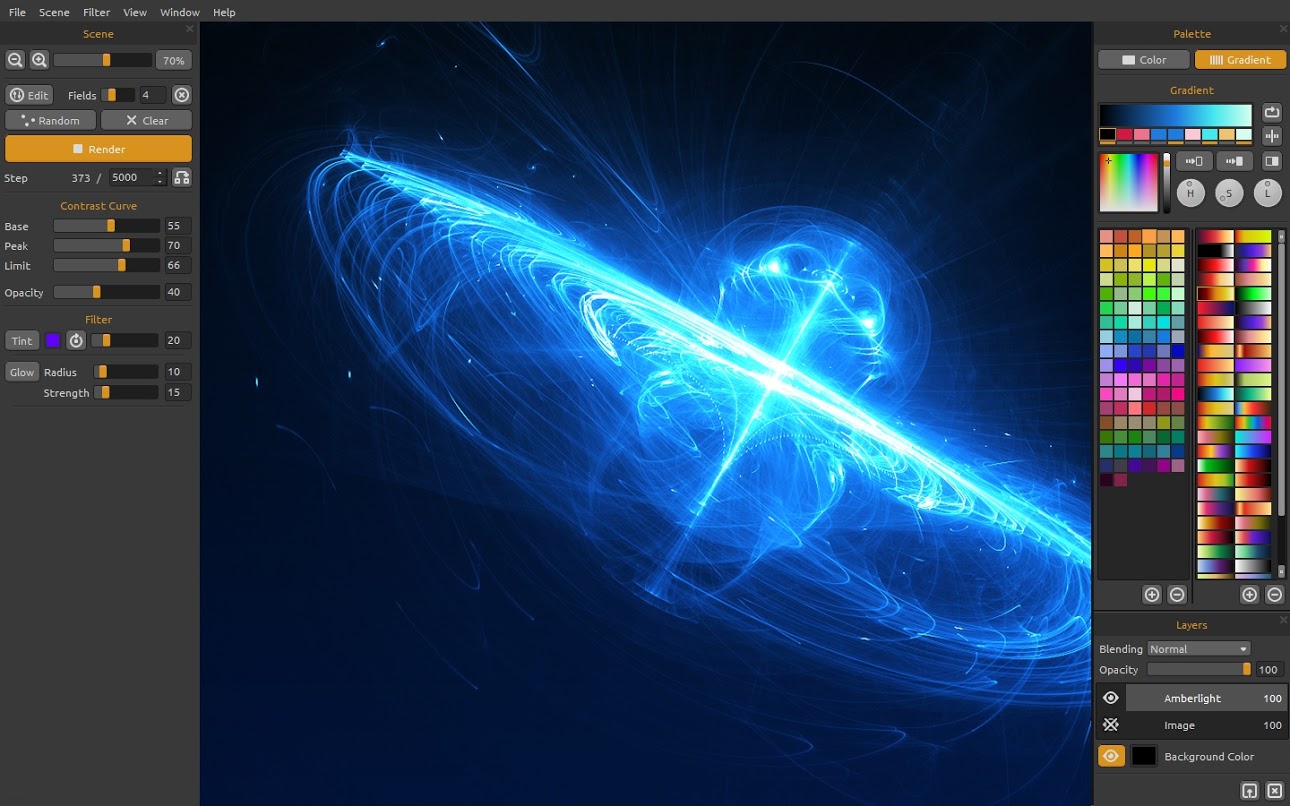
Amberlight is a specialized digital art application designed for generating complex imagery through particle physics. Developed by designer Peter Blaškovič as part of his "I am an Artist" experiment, the software utilizes a proprietary algorithm to simulate millions of particles moving across a digital canvas. Users interact with these particles by applying special fields that dictate movement, flow, and density, resulting in unique visual compositions that are difficult to replicate in traditional painting software.
The tool serves a dual purpose in the creative market. It provides functionality for several types of users:
- Professional artists: Generating high-resolution backgrounds, special effects, and light-based elements.
- Hobbyists: Exploring digital creativity through an intuitive sandbox environment.
- Designers: Creating procedural assets for integration into larger illustrative projects.
Amberlight focuses on the intersection of mathematics and visual design. By manipulating the underlying fields, users control the trajectory of the particle stream to produce abstract light effects, glows, and organic structures. The software emphasizes accessibility, providing a platform where users can produce original digital assets through procedural generation and experimental play. It functions as both a standalone creative suite and a supplementary tool for producing one-of-a-kind artworks.
Top 5 Reasons To Download Amberlight
Before we dive into the nitty-gritty of why this software is going to transform your digital canvas, let’s look at the core benefits. If you are looking for a reason to hit that download button, here are the absolute top five reasons why Amberlight is a mandatory addition to your creative toolkit:
- A Revolutionary Particle-Field Engine: Unlike traditional brush-based tools, Amberlight uses a sophisticated algorithm that simulates millions of particles driven by magnetic-like fields, creating visuals that are impossible to replicate by hand.
- Bridge the Gap Between Amateur and Pro: It was designed specifically to allow people with zero technical drawing skills to produce professional-grade, ethereal artwork while still offering deep customization for veteran artists.
- The "I Am An Artist" Experiment: Downloading this gives you access to a unique philosophy of creation—shifting the focus from labor-intensive manual sketching to a collaborative "experiment" between the user and the software’s intelligent algorithm.
- Versatility in Design and Post-Production: Whether you need high-resolution wallpapers, complex textures for 3D modeling, or glowing accents for graphic design projects, Amberlight produces high-quality assets that fit into any professional workflow.
- Unpredictable Creative Discovery: The software encourages "happy accidents." Because the particles respond to fields in dynamic ways, every session leads to a unique discovery, making it a perfect tool for overcoming "creative block."
Alright, now that you have seen the highlights, let’s get into the deep dive. As someone who has spent thousands of hours testing various creative suites—from the industry giants to the niche indie gems—I can tell you that Amberlight is something truly special. It doesn’t just sit on your hard drive; it changes the way you think about digital light and form. Let’s break down exactly why this giveaway is something you cannot afford to miss.
1. A Revolutionary Particle-Field Engine
When you first open Amberlight, you’ll realize very quickly that this isn’t your father’s painting program. There are no pencils, no erasers, and no airbrushes. Instead, you are dealing with pure mathematical beauty. The heart of this software is its unique particle system. Imagine millions of tiny points of light, each behaving like a physical object influenced by gravity, magnetism, and flow.
As a reviewer, I see a lot of "particle emitters" in video editing and motion graphics software, but they are often clunky and difficult to control without a degree in physics. Amberlight simplifies this by giving you "fields." You place these fields on your canvas, and they act as the "conductors" of your light orchestra. You can tell the particles to swirl around a point, be repelled by a boundary, or flow in a specific direction. The result is a stunning, organic swirl of light that looks like a photograph of a nebula or a high-speed capture of electrical discharge.
The beauty here is in the interaction. You aren't just placing a static image; you are manipulating a living system. By adjusting the strength and reach of these fields, you watch the light evolve in real-time. It feels less like "working" and more like "sculpting with light." For anyone interested in generative art, this engine is the gold standard for creating fluid, ethereal structures that look both digital and strangely biological at the same time.
2. Bridge the Gap Between Amateur and Pro
One of the biggest barriers to entry in the world of digital art is the steep learning curve. If you want to paint a realistic galaxy in traditional software, you need to understand layers, blending modes, brush opacity, and have a steady hand. Amberlight throws those requirements out the window. It was built on the premise that creativity should be accessible.
If you consider yourself a "non-artist," this is the software for you. You don’t need to know how to draw a straight line. You just need an eye for composition and a willingness to experiment. Because the algorithm handles the complex distribution of light and shadow, the output always looks polished. You can start with a blank canvas, drop three or four fields, tweak the color palette, and within five minutes, you have a piece of art that looks like it took hours of meticulous work.
However, don’t let that simplicity fool you into thinking it’s a toy. For the advanced artist, Amberlight serves as a powerful "element generator." Many professional illustrators use Amberlight to create specific "light fx" layers—like glowing magical spells, futuristic HUD elements, or atmospheric dust—and then export them into other programs. It bridges the gap by being simple enough for a child to enjoy but sophisticated enough to meet the demands of a professional concept artist's pipeline.
3. The "I Am An Artist" Philosophy
This software didn't just appear out of nowhere; it was born from a specific vision by creator Peter Blaškovič. The "I am an Artist" experiment is a fascinating backdrop for this tool. The goal was to prove that technology could be used to unleash the latent creativity inside everyone. We often tell ourselves, "I’m not creative," or "I don’t have an artistic bone in my body," simply because we lack the fine motor skills to replicate what we see in our heads.
Amberlight challenges this by acting as a collaborator. When you use it, you aren't just a user; you are a director. You provide the intent—the colors, the general shape, the intensity—and the software provides the execution. This philosophical shift is incredibly liberating. It removes the frustration of "messing up" a drawing. In Amberlight, there are no mistakes, only different configurations of energy.
By downloading this giveaway, you are participating in this experiment. You are exploring a tool that was designed to make you feel empowered. In an era where many creative tools feel like they are becoming more complex and "industrial," Amberlight feels deeply personal and experimental. It’s a breath of fresh air that reminds us that the primary purpose of art software should be joy and exploration.
4. Versatility in Design and Post-Production
Let's talk about the practical side of things. Why do you need this on your computer right now? Because the assets you can create with Amberlight are incredibly versatile. If you are a content creator, a blogger, or a graphic designer, you are always in need of high-quality backgrounds and textures. Stock photos can be expensive and often look generic. With Amberlight, you can create your own custom, high-resolution textures that no one else has.
The software supports high-definition exports, meaning you can create artwork that is crisp enough for large-scale printing or 4K displays. I have used Amberlight-generated images for everything from book covers to desktop wallpapers, and even as "overlays" in video editing. Because you can control the transparency and the glow intensity, these images are perfect for layering.
Imagine you have a photo of a landscape and you want to add a "mystical" or "sci-fi" feel. You can generate a swirling light pattern in Amberlight, export it with a transparent background, and drop it right onto your photo. The way the particles interact with color allows for beautiful gradients that look far more natural than anything you could create with a standard gradient tool. It’s a Swiss Army knife for anyone who needs to add a touch of visual magic to their projects.
5. Unpredictable Creative Discovery
We’ve all been there: staring at a blank screen, waiting for inspiration to strike, and feeling completely stuck. This is what we call "the blank canvas syndrome." One of the best things about Amberlight is that it is a creativity engine. It doesn't wait for you to have an idea; it helps you find one.
Because the particles respond to the fields in such complex ways, you will often find yourself stumbling upon a shape or a pattern that you never could have planned. You might be aiming for a circular burst of light and end up with something that looks like a futuristic wing or a crystalline flower. This element of unpredictability is what makes the software so addictive. It turns the act of creation into a game of discovery.
In my experience, using Amberlight is almost meditative. You move a field slightly to the left, and the entire composition ripples and changes. You switch the color palette from "Cool Blues" to "Volcanic Oranges," and the mood of the piece shifts instantly. This makes it an incredible tool for brainstorming. If I’m working on a design project and I feel uninspired, I’ll spend twenty minutes in Amberlight just playing with the particles. More often than not, I’ll see a shape or a color combination that sparks the idea I need for my main project. It’s not just an art tool; it’s a brain-storming machine.
Final Thoughts: Why You Should Hit Download Now
In the world of tech and software, we often see "more of the same." We see the tenth iteration of a photo editor or a slightly faster version of a drawing app. Amberlight is different. It is a "one-of-a-kind" tool that occupies its own unique space in the digital landscape. It doesn’t try to be Photoshop, and it doesn’t try to be a 3D modeling suite. It tries to be a generator of beauty, and in that, it succeeds brilliantly.
Whether you are a seasoned professional looking for a way to add unique flares and textures to your work, or a hobbyist who just wants to make something beautiful to share on social media, this software is for you. It’s fun, it’s experimental, and it produces results that are consistently breathtaking. The algorithm developed by Peter Blaškovič is a testament to what happens when you combine a designer’s eye with a programmer’s precision.
The fact that this is available as a giveaway is an opportunity you shouldn't pass up. Software this specialized and this polished usually comes with a price tag that reflects its uniqueness. Getting your hands on it for free means you have a risk-free way to explore your own artistic side. You might just find that you are more of an artist than you ever thought possible.
So, stop reading and start creating. Download Amberlight, throw some fields onto the canvas, and watch the particles fly. You’ll be amazed at what you can create when you have the right fields to guide your vision. It is time to unleash your creativity and see where the light takes you. Trust me, once you see those millions of particles dancing across your screen, you’ll wonder how you ever managed your digital art workflow without it. Happy creating!

Reviews for Amberlight
Click Here to Read Reviews for Amberlight >> Click Here to Submit Reviews for Amberlight >>