What Does Dose for Excel Do?
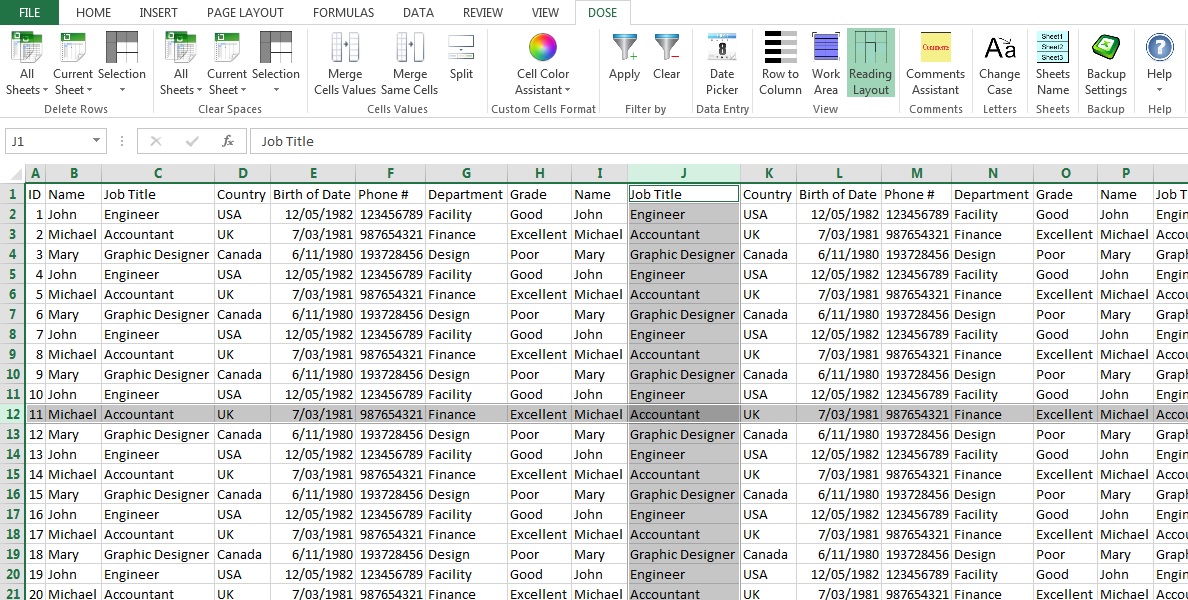
Dose for Excel is a feature-rich add-in for Microsoft Excel designed to automate repetitive spreadsheet tasks. The software integrates directly into the Excel command ribbon, providing centralized access to a suite of tools that simplify data manipulation and formatting. It is built to streamline workflows for users who frequently manage large datasets.
The utility offers specialized editing functions, such as the ability to delete empty rows, duplicates, or lines containing specific values with a single click. These actions can be applied to the current sheet, selected sheets, or the entire workbook. Additionally, a Clear Spaces tool allows for the bulk removal of leading, trailing, and extra spaces within cell data.
For cell and data management, the add-in includes features to merge or split cells, convert rows to columns, and utilize an integrated date picker. A dedicated comment assistant provides options to display specific comments, toggle symbols, or convert comment text into cell contents. The software also features a case changer for switching text between upper, lower, and proper case formats.
To ensure data integrity, Dose for Excel includes a backup utility. Users can generate backups manually or configure the software to save data automatically upon closing the application. Every feature within the tool includes an internal description to assist users with implementation.
Top 5 Reasons To Download Dose for Excel
If you have ever spent hours staring at a Microsoft Excel spreadsheet, squinting at thousands of rows of data, and wondering why a program so powerful makes simple tasks so difficult, then you are not alone. Excel is the backbone of the modern professional world, yet it remains notoriously finicky. This is exactly where Dose for Excel comes into play. As a tech reviewer who has tested hundreds of productivity plugins, I can tell you that this isn't just another add-in; it is a fundamental upgrade to your workflow. If you are looking for a reason to jump on this giveaway, I have five compelling arguments that will change the way you look at spreadsheets forever.
- Instantaneous Data Cleaning and Row Management: Eliminate empty rows, duplicates, and specific values across multiple sheets with a single click.
- Seamless Cell and Text Manipulation: Bridge the gap between Excel and Word with advanced case changing, space clearing, and effortless cell merging or splitting.
- Professional-Grade Workspace Customization: Transform your view with a dedicated date picker, row-to-column converters, and a full-screen work area toggle.
- The Ultimate Comment and Visual Assistant: Gain total control over your spreadsheet annotations with tools to convert comments to cells or batch-edit their visibility.
- Automated Data Security and Redundancy: Never lose a minute of work again thanks to a robust, integrated backup system that saves your progress automatically upon closing.
1. Instantaneous Data Cleaning and Row Management
Let’s be honest: most of our time in Excel isn't spent performing high-level financial modeling; it is spent cleaning up messy data. Whether you are importing a CSV from an old database or copy-pasting information from the web, you usually end up with a disaster of empty rows, duplicate entries, and "junk" data that needs to be purged before you can even begin your analysis. Normally, this involves complex filters or writing custom macros that might break at any moment.
Dose for Excel turns this tedious chore into a victory lap. The "Delete Rows" functionality is, quite frankly, a masterpiece of efficiency. Within the dedicated command ribbon, you have the power to delete entire empty lines or rows that contain even a single empty cell. Think about the time saved when dealing with a sheet of 50,000 rows. Instead of scrolling and hunting, you click a button, and the "ghost" data is gone. More impressively, this tool allows you to target rows based on specific values. If you need to wipe every row that mentions a specific discontinued product or a certain date range, you can do it across the current sheet, all selected sheets, or the entire workbook simultaneously.
Furthermore, the Clear Spaces option is a feature I didn't know I needed until I had it. We’ve all dealt with those annoying trailing or leading spaces that make VLOOKUP functions fail for no apparent reason. Dose for Excel identifies these invisible culprits and nukes them from your sheet. It ensures your data is "lean and mean," allowing your formulas to work exactly as intended without the manual labor of cleaning every cell individually.
2. Seamless Cell and Text Manipulation
One of the biggest gripes users have with Excel is that it handles text like a calculator rather than a word processor. If you want to change the case of a column from lowercase to UPPERCASE, you usually have to create a helper column, use the =UPPER() formula, copy the results, and then "Paste as Values" over the original data. It is a four-step process for a one-second job. Dose for Excel fixes this by integrating a dedicated Case Changer directly into the ribbon. You can switch between upper, lower, or proper case instantly, just like you would in Microsoft Word.
But it doesn’t stop at text formatting. Cell management is where this add-in truly shines. Have you ever tried to merge cells while keeping all the data? Usually, Excel warns you that "merging cells only keeps the upper-left value and discards the rest." That is a nightmare for data integrity. Dose for Excel provides a much smarter approach, allowing you to merge or split selected cells without losing your precious information. It treats your data with the respect it deserves, ensuring that your layout changes don't result in data loss.
The tool also introduces a "Date Picker" and data filters that feel much more intuitive than the native Excel versions. If you are tired of typing out dates in the specific MM/DD/YYYY format and praying Excel recognizes them as dates rather than text, the integrated date picker is a godsend. It ensures consistency across your entire team, which is vital for any collaborative project. When you download this add-in, you aren't just getting "features"; you are getting a smoother, more logical way to interact with your data.
3. Professional-Grade Workspace Customization
Excel’s interface is crowded. Between the ribbon, the formula bar, the status bar, and the scroll bars, your actual "work area" often feels like a small window in a sea of gray buttons. For those of us working on laptops or smaller monitors, this real estate is precious. Dose for Excel understands the need for focus. It includes features that allow you to easily customize the size of your work area, stripping away the clutter so you can see more of your data at once.
One of my favorite "hidden gems" in this tool is the row-to-column converter. We have all reached a point in a project where we realize the data would make much more sense if the axes were flipped. While Excel has a "Transpose" feature, it is often clunky and requires several steps to get the formatting right. Dose for Excel simplifies this conversion, making it a routine task rather than a dreaded chore.
Everything about the Dose for Excel UI is designed for the power user who wants to stay in the "flow state." Because each function comes with its own "how to use" description inside the tool, you never have to leave the app to search for a tutorial. It feels like a natural extension of the Excel environment. It’s as if Microsoft themselves finally listened to the community and added all the "missing" features we’ve been asking for over the last decade. By downloading this giveaway, you are essentially upgrading to "Excel Pro" without the steep learning curve of advanced VBA programming.
4. The Ultimate Comment and Visual Assistant
Comments are essential for collaboration, but they are a visual mess in native Excel. Those tiny red triangles in the corners of cells are easy to miss, and if you have too many comments, they overlap and obscure the data they are meant to explain. Dose for Excel includes a dedicated Comment Assistant that is worth the download price alone. It gives you surgical control over how your annotations are displayed and managed.
With this tool, you can choose to display only the comments for selected cells, or even better, convert comments into actual cell values. This is incredibly useful when you need to export your spreadsheet to a different format where comments might not be supported. You can also batch-edit comments, changing their symbols or visibility in one go. This level of control ensures that your spreadsheet remains a professional document rather than a cluttered whiteboard of sticky notes.
In addition to comment management, the tool allows you to add background colors to fields with a level of ease that outpaces the standard "Fill" bucket. This is perfect for "Heat Mapping" your data or visually categorizing different sections of a report. When you combine these visual tools with the ability to toggle specific Excel elements on and off, you gain the ability to present your data in a way that is clean, readable, and—most importantly—impressive to your clients or supervisors. It takes your work from "standard spreadsheet" to "bespoke data tool."
5. Ironclad Data Security with Automated Backups
We have all felt that cold pit in our stomachs when Excel crashes and the "Auto-Recover" version is from three hours ago. Or worse, when you realize you made a massive error in your logic, saved the file, and now your original data is overwritten forever. Dose for Excel provides a safety net that is far superior to the default settings in Microsoft Office. Its dedicated backup function is a total lifesaver.
You can configure the add-in to automatically generate a backup of your workbook every single time you close the application. This creates a chronological history of your work, allowing you to roll back to a previous version if something goes wrong. If you prefer to have more control, you can trigger backups on demand with a single click. This isn't just about saving files; it's about peace of mind. When you are working on high-stakes projects, knowing that your data is being redundantly saved in the background allows you to experiment and innovate without the fear of losing everything.
The integration here is key. Because Dose for Excel creates its own individual section in the command ribbon, these backup tools are always just an inch away from your cursor. You don't have to navigate through deep menus or file explorer settings. It is integrated, intuitive, and indispensable. In the world of data management, "better safe than sorry" is the golden rule, and this tool makes being "safe" easier than it has ever been.
Final Thoughts: Why You Need This Now
In conclusion, Dose for Excel is the rare kind of software that pays for itself in time saved within the first week of use. It takes the most frustrating aspects of spreadsheet management—the cleaning, the formatting, the organization, and the security—and automates them. It is user-friendly enough for a beginner who just wants to delete empty rows, yet powerful enough for a data analyst who needs to manage complex workbooks across multiple sheets.
The "giveaway" aspect of this is particularly exciting because it provides full access to a premium suite of tools that are usually reserved for high-end corporate environments. You are getting a collection of editing functions, cell management features, and workspace optimizations that will make you the most efficient person in your office. Don't let your data control you; take control of your data. Download Dose for Excel today and experience what it feels like to actually enjoy working in a spreadsheet. It’s not just an add-in; it’s the secret weapon your productivity has been waiting for.
Whether you are a student trying to organize research, a manager tracking KPIs, or a small business owner handling your own accounting, the advantages are clear. The tool is lightweight, integrates perfectly with the existing Excel ribbon, and provides a level of utility that you will find yourself relying on every single day. Make the smart move and add this to your digital toolbox before the giveaway ends. Your future, less-stressed self will thank you.
Efficiency is about working smarter, not harder. Dose for Excel is the definition of working smarter.


Reviews for Dose for Excel
Click Here to Read Reviews for Dose for Excel >> Click Here to Submit Reviews for Dose for Excel >>