What Does Bulk QR Code Generator Do?
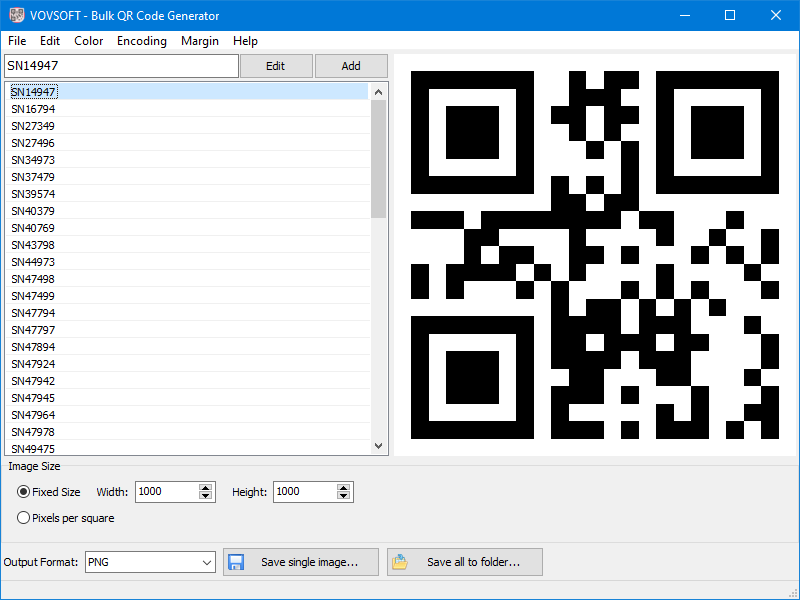
Vovsoft Bulk QR Code Generator is a desktop-based utility designed for the high-volume creation of two-dimensional barcodes. Unlike web-based alternatives, this tool functions entirely offline, ensuring that sensitive data remains localized on the user's hardware rather than being transmitted over the internet.
Users can generate thousands of unique QR codes for URLs, plain text, Wi-Fi credentials, or digital business cards by importing a single text file. The software automates the conversion process, outputting batch images in formats including PNG, JPEG, GIF, and BMP. The application allows for granular adjustments to margins, colors, and overall image resolution to meet specific print or digital requirements.
For branding purposes, the tool supports the integration of custom transparent logos centered within each code. To maintain error correction integrity, it is recommended that these logos occupy less than 30% of the code's surface area. This ensures the barcodes remains scannable by standard smartphone cameras.
To manage massive datasets, the software includes dynamic naming features. Files can be automatically labeled using sequential numbering, the specific text contained within the code, or extracted vCard fields such as names. This functionality streamlines the organization of assets for inventory management, marketing campaigns, or corporate employee ID systems.
Top 5 Reasons To Download Bulk QR Code Generator
Before diving into our comprehensive analysis, here is a quick breakdown of the top five reasons you need to jump on this software giveaway immediately:
- Lightning-Fast Bulk Automation: Instantly convert massive lists of raw text, URLs, or credentials into thousands of distinct QR codes in a single click, completely eliminating manual copy-paste fatigue.
- 100% Offline Privacy and Security: Operates fully on your local machine, keeping sensitive internal Wi-Fi passwords, personal contact records, and confidential corporate links safe from third-party cloud servers.
- Built-In Professional Logo Placement: Seamlessly embed custom brand icons and graphics directly into the heart of your codes while preserving total scan integrity.
- Extensive Aesthetic and Format Flexibility: Tailor colors, margins, output dimensions, and character encodings, and effortlessly export your work into standard image formats like PNG, JPEG, GIF, and BMP.
- Intelligent Dynamic File Renaming: Automatically organize massive batches using smart variable tags based on content, sequential numbering, or parsed vCard details such as first and last names.
Every once in a while, a software utility comes across our review desk that makes us wonder why someone had not perfected the concept sooner. If you have spent any time dealing with modern marketing collateral, inventory control, event ticketing, or digital business cards, you already know that QR codes have made an undeniable, aggressive comeback. What was once seen as an oddity has transformed into the de facto bridge between the physical and digital universes. With a simple point of a smartphone camera, users are instantly directed to landing pages, connected to secure office Wi-Fi networks, or given instant access to rich vCard profiles.
However, generating these codes at scale has historically been an absolute headache. Most creators find themselves trapped using clunky web utilities that throttle production, demand monthly software-as-a-service subscriptions, plaster watermarks everywhere, or force you to manually click a download button hundreds of times. This is precisely why the desktop-based Vovsoft Bulk QR Code Generator is such an essential addition to your utility toolkit. As a special giveaway, it transforms from an attractive buy into an absolute must-have utility. Below, we examine the five core pillars that make this program a game-changing power tool for power users, marketers, and systems administrators alike.
1. Lightning-Fast Bulk Automation
The single greatest bottleneck in production design and data management is repetitive manual labor. Imagine a scenario where you are tasked with creating four hundred personalized QR codes for attendees at an upcoming industry conference. Using typical consumer-grade online generator tools, an administrator must paste an entry, configure the parameters, generate the graphic, right-click, save the image, rename it, and repeat the cycle four hundred times. It is a soul-crushing, error-prone waste of valuable billable hours.
The primary reason you want to secure this giveaway download is its raw, unbridled bulk processing capability. The utility solves the volume problem by acting as an industrial-grade batch processing engine. Instead of hand-feeding data one link at a time, you simply construct a standard text document containing your varied data—be it URLs, distinct identification numbers, or localized strings—load it into the software interface, designate an output directory, and hit the start button. The application churns through the input queue with incredible speed, spitting out an entire folder filled with perfectly rendered, clean image files ready for deployment.
This automated throughput fundamentally transforms commercial operations. Warehouses managing thousands of product SKUs can automate inventory label creation in moments. Educational institutions can issue bulk student ID codes in an afternoon. Marketing agencies running multi-variant campaigns can produce hundreds of trackable, parameter-specific UTM codes without breaking a sweat. By offloading this labor to a desktop engine, you reclaim hours of productivity and eliminate the risks of human error that naturally accompany repetitive manual workflows.
2. 100% Offline Privacy and Air-Gapped Security
In our modern computing environment, virtually every software tool wants to pull your workflow into the cloud. While cloud computing has its perks, it introduces massive compliance vulnerabilities, surveillance vectors, and security risks. Whenever you paste private customer information, confidential internal intranet URLs, or enterprise Wi-Fi passphrases into a random web-based code generator, you have surrendered custody of that data. That web platform now has your information stored in server cache files, tracking logs, or remote analytical databases.
This software operates entirely offline. It does not require an active internet connection to execute its core functions, nor does it establish hidden background connections to ship your data back to a remote host. The software acts as an air-gapped generation station residing solely on your personal storage drive. For security-minded IT professionals, legal teams, healthcare systems, and privacy-conscious users, this architectural distinction cannot be overstated.
Consider the task of printing bulk digital business cards featuring comprehensive vCard data. A standard vCard can hold home addresses, personal cell phone numbers, direct corporate extensions, and full names. Uploading an entire corporate directory to an online generator is a massive data governance nightmare that could violate regulatory compliance frameworks like GDPR or HIPAA. By using this local software utility, sensitive employee credentials, proprietary manufacturing codes, and critical connection strings never leave your workstation. You maintain complete sovereignty over your data pipeline from beginning to end.
3. Professional Custom Branding with Logo Embeds
Let us be completely candid about typical QR codes: they are visually uninspired. A standard, generic grid of chaotic black-and-white pixels does very little to build brand trust or entice a discerning consumer to whip out their smartphone. In an era where digital safety is a high priority, random pixel grids can look suspicious to savvy users who are cautious about scanning unidentified barcodes in public spaces. Adding a recognizable brand identity is the single most effective way to elevate scan conversion rates and project corporate professionalism.
One of the most impressive features packed into this software is its native ability to embed custom, transparent logos directly into the center of each generated code across your entire batch. Doing this manually in a vector graphics suite like Illustrator or Photoshop for thousands of items is virtually impossible without extensive scripting knowledge. This tool automates the visual compositing pipeline completely. You supply your company mark, brand symbol, or social icon, and the software effortlessly places it in the dead center of every single file rendered.
The software takes advantage of the native error correction capabilities built into modern QR standards. Because these codes utilize advanced Reed-Solomon mathematical algorithms to reconstruct obscured data, you can cover a portion of the visual matrix without rendering the code unreadable. The software works within these safe technical boundaries, allowing you to scale your logo comfortably up to thirty percent of the total area. The result is a stunning, brand-aligned visual asset that maintains scan reliability across both entry-level budget phones and high-end flagship mobile devices.
4. Extensive Aesthetic and Format Flexibility
A mass generation utility is only as useful as its output adaptability. In modern graphic production, a one-size-fits-all approach is a recipe for failure. A graphic intended for a small glossy business card has drastically different pixel dimension and contrast requirements than an asset destined for an enormous outdoor vinyl billboard or trade show banner backdrop. Cheap generators often lock you into a single low-resolution export, forcing you to deal with blurry, unreadable artifacts when scaled.
This giveaway equips you with comprehensive control over how your codes look and how the underlying visual data is formatted. You are not trapped in a basic monochromatic palette. You can easily adjust the foreground color of the data modules as well as the background canvas, matching your exact corporate color scheme or design layout. Furthermore, you have complete authority over border margins, quiet zones, and overall pixel dimensions, ensuring that your print team gets precisely the composition they need to prevent scanning errors caused by bleeding ink or uneven trims.
Equally critical is the breadth of export options provided. The program supports versatile output configurations including PNG, JPEG, GIF, and BMP. Whether you require uncompressed clarity, lightweight files for web asset distribution, or specific legacy image types for specialized industrial barcode printers, the software delivers. Add in deep support for character encoding adjustments—ensuring that localized characters, special alphabets, and specialized strings are parsed accurately by global devices—and you have a powerhouse utility capable of satisfying demanding print shops, commercial sign-makers, and web design teams alike.
5. Intelligent Dynamic File Renaming and Organization
Imagine generating three thousand unique QR codes, navigating to your destination folder, and discovering three thousand files sequentially labeled from image0001.png to image3000.png. How do you know which file points to the marketing landing page, which one belongs to the Vice President of Sales, and which one tracks an inventory item on shelf fourteen? Without intelligent naming conventions, mass generation quickly creates an administrative disaster that requires hours of tedious verification scanning to resolve.
The developers behind this utility clearly understood this friction point and implemented an exceptionally clever dynamic filename customization engine. Instead of forcing you into rigid default names, the software allows you to build sophisticated automated naming rules using contextual keywords. You can instruct the export engine to name each individual file based on the exact text string embedded within the code, attach automated sequential indexes, or extract metadata from structured input types.
This capability shines brightest when handling contact cards. When generating codes from vCard payloads, the application can automatically parse the source details and generate individual filenames based on the recipient's first name, middle name, and last name. When the process wraps up, your output folder is populated with clearly marked, self-evident files like John_Doe_Contact.png instead of an ambiguous string of numbers. For logistics coordinators, brand managers, and operations leads, this automated file organization eliminates confusion and integrates smoothly into existing distribution pipelines.
Real-World Versatility Across Every Industry
To truly appreciate why downloading this giveaway is an essential move, consider how universally applicable this utility is across virtually any professional discipline:
- Hospitality and Dining: Restaurants can rapidly generate distinct, table-specific codes that route customers directly to individualized ordering systems, digital menus, or contactless payment gateways without printing broad, generic signage.
- Retail and Warehouse Logistics: Supply chain operators can generate thousands of location markers, shelf tags, and asset management codes matched directly to local internal database queries.
- Corporate Events and Networking: Event planners can turn massive CSV registration rosters into fully customized, branded credentials and badges that streamline the attendee check-in pipeline.
- Commercial Real Estate: Property managers and agents can attach sleek, branded code stickers to physical yard signs, effortlessly routing drive-by shoppers to virtual property video tours and specific pricing sheets.
- IT Infrastructure and Office Management: Network administrators can place secure, pre-configured Wi-Fi login codes on conference room walls, allowing visitors to connect without handing out complex plaintext passwords.
The Final Verdict
Most giveaway software fails to impress because it attempts to tackle tasks that are already handled adequately by native operating system tools. This software is completely different. It targets a distinct, agonizing workflow bottleneck that affects virtually every modern digital creator, marketer, and IT professional, and it resolves that friction with elegance, speed, and uncompromising utility.
Instead of wrestling with the bandwidth limits, subscription paywalls, and privacy risks of ephemeral online tools, you get a robust, dependable, offline desktop engine. You gain the power to churn out tens of thousands of codes in seconds, seamlessly stamp your enterprise branding into every asset, modify every aesthetic parameter, and organize your files with surgical precision. It is lightweight, does not strain system resources, and asks for nothing in return once installed on your machine.
Opportunities to add genuine, permanent productivity boosters to your software library do not come around every day. Whether you have an immediate batch production project on your desk or simply want to prepare your system for the inevitable day your marketing or operations team requires bulk code creation, grabbing this software giveaway is an easy choice. Download it, install it, and unlock complete control over your QR code workflow today.

Reviews for Bulk QR Code Generator
Click Here to Read Reviews for Bulk QR Code Generator >> Click Here to Submit Reviews for Bulk QR Code Generator >>