
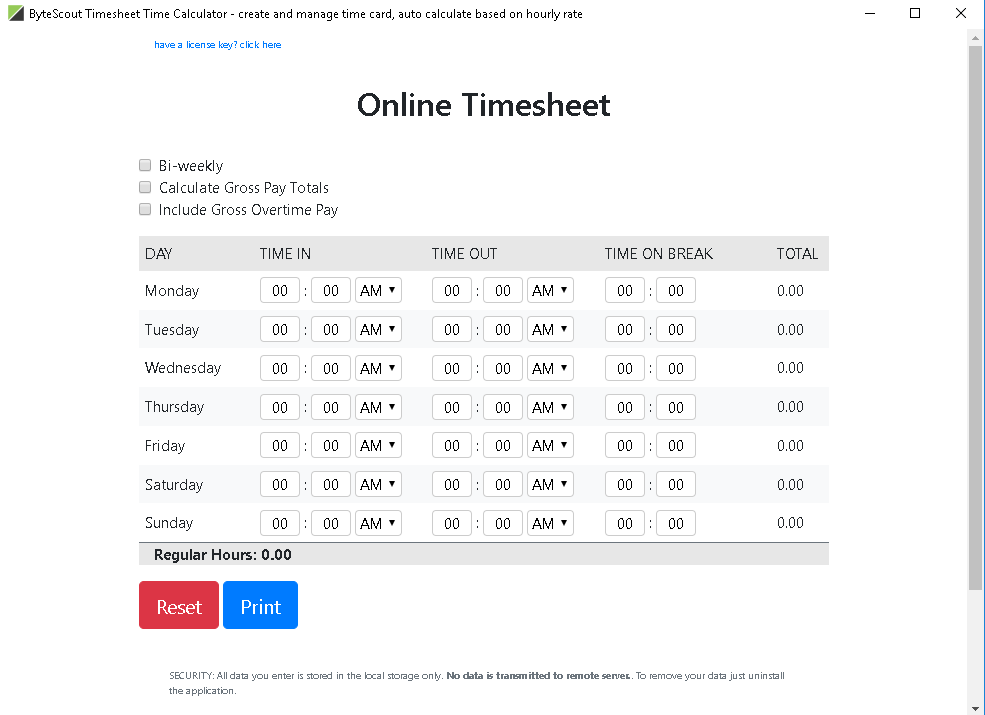
Timesheet is a smart and easy-to-use tool with a friendly interface and speedy performance. If you need to track working hours (with breaks and overtimes), you can easily report them into this desktop application. The built-in calculator can help check your final salary according to your rate and number of hours worked. Overtimes will be calculated separately adding a proper percentage to your salary.
Official Product Description
Overview
What Does ByteScout Timesheet Tool Do?
Timesheet is a dedicated desktop application designed to streamline the management and tracking of professional labor hours. Developed with a focus on efficiency and user accessibility, the software provides a structured environment for logging daily work schedules. Users can input start and end times while accounting for mandatory breaks to ensure precise records of active duty.
The application includes a built-in calculator capable of processing payroll data based on user-defined parameters. By entering a standard hourly rate, the software automatically generates total earnings relative to the total time logged. A primary feature of the tool is its automated overtime processing. The system identifies hours worked beyond standard limits and applies designated percentage increases to the salary calculation, separating these figures from base pay for reporting clarity.
The interface is optimized for performance, allowing for rapid data entry and reporting without significant system overhead. This utility is aimed at freelancers, contractors, and employees who require a localized solution for verifying their monthly or weekly compensation. By consolidating time tracking and financial auditing into a single interface, Timesheet serves as a functional utility for those needing to audit their working hours and expected income.
Top 5 Reasons To Download ByteScout Timesheet Tool
If you have ever reached the end of a grueling work week only to realize you have no idea where your hours actually went, you are not alone. In the fast-paced world of modern freelancing, remote work, and corporate juggling, the difference between a profitable week and a logistical nightmare often comes down to the tools you use to track your output. Today, we are looking at a powerful productivity duo that promises to revolutionize how you manage your time and your machine’s health. Specifically, we are diving into the ByteScout Timesheet utility and its companion system tools. This isn’t just another set of applications; it is a comprehensive solution for the digital professional who values precision and efficiency.
Before we dive into the deep technical breakdown of why these tools are essential for your daily workflow, here is a quick overview of what makes this giveaway an absolute must-download for anyone serious about their productivity.
- Seamless Precision in Time Tracking: Effortlessly log working hours, breaks, and project durations with a streamlined interface that eliminates the friction of manual entry.
- Automated Financial Calculations: A built-in intelligent calculator that handles base rates and complex overtime percentages, ensuring your pay reports are accurate to the cent.
- High-Performance Desktop Architecture: Unlike resource-heavy web apps, this native desktop application offers lightning-fast performance and offline reliability.
- Professional Reporting and Accountability: Generate clean, professional records of your labor that make billing clients or justifying hours to management a stress-free process.
- Optimized System Health: Integrated disk analysis tools ensure that while you are managing your time, your computer is managing its space, preventing slowdowns during critical work hours.
1. Seamless Precision in Time Tracking
The core of any successful project is accurate data, and when it comes to personal productivity, the most valuable data point is your time. Most professionals rely on a mixture of memory, sticky notes, and haphazardly filled spreadsheets to track their labor. This leads to time leakage—those unrecorded fifteen-minute segments that eventually add up to hours of unpaid work. The Timesheet tool provided in this giveaway solves this by offering a "smart and easy-to-use" environment designed specifically to capture every minute of your effort.
What sets this apart from the sea of mediocre trackers is its focus on the reality of the workday. We don’t just work eight hours straight; we take lunch breaks, we have quick coffee runs, and sometimes we have to pivot between multiple tasks. This software allows you to report working hours with integrated break tracking. By making it easy to toggle between active work and downtime, the application ensures that your final report isn't just an estimate, but a verified record of your productivity. For the freelancer, this means never again guessing how much to bill. For the employee, it provides a transparent log that can be used during performance reviews to show dedication and consistency.
The "friendly interface" mentioned in the description isn't just marketing speak. In a tech reviewer’s experience, "friendly" means that the buttons are where you expect them to be and the learning curve is practically non-existent. You don’t want to spend thirty minutes learning how to use a tool meant to save you time. This application respects your schedule by being intuitive from the first click. You can jump right in, start logging your shift, and get back to the work that actually makes you money.
2. Automated Financial Calculations
Let’s talk about the most stressful part of the week: the math. Calculating your expected earnings should be simple, but once you factor in fluctuating daily hours, varied rates for different projects, and the ever-complicated "overtime," things get messy. Human error in payroll calculation is one of the leading causes of workplace friction and personal financial stress. This is where the built-in calculator of this giveaway becomes your new best friend.
This isn't just a standard calculator that you could find on your phone; it is a dedicated logic engine for your salary. You input your hourly rate, and as you log your hours, the software does the heavy lifting in the background. It takes the "number of hours worked" and cross-references them against your set parameters. But the real "killer feature" here is how it handles overtimes. Most entry-level tools treat every hour the same, but this software recognizes that overtime usually comes with a premium. It calculates overtimes separately, adding the proper percentage to your salary automatically.
Imagine the peace of mind that comes with knowing exactly what your paycheck will look like before you even submit your hours. You can see how an extra two hours on a Tuesday impacts your bottom line with a 1.5x or 2.0x multiplier applied precisely. This transparency is empowering. It turns your time into a visible, growing asset. For those who are self-employed, this feature acts as a digital accountant, giving you a real-time view of your revenue stream without having to open a single Excel formula.
3. High-Performance Desktop Architecture
In an era where every company is trying to force you into a subscription-based web browser application, there is something incredibly refreshing—and technically superior—about a dedicated desktop tool. This giveaway provides a "desktop application" that prioritizes "speedy performance." As a reviewer, I cannot stress enough how much better a native application feels compared to a browser tab that eats up 2GB of RAM and crashes when your internet flickers.
When you use a desktop-native tool like this Timesheet application, you are getting optimized resource management. It sits quietly in the background of your OS, ready to be called upon without a loading screen. Because it doesn't rely on a constant handshake with a remote server just to log a break, the responsiveness is instantaneous. This is "speedy performance" in its truest sense. It won't lag while you are typing, and it won't stall your other professional software (like your IDE, video editor, or design suite).
Furthermore, the privacy and security of a desktop app are paramount. Your work hours, your salary rates, and your project names are sensitive data. Storing them locally on your machine rather than in a third-party cloud database adds a layer of security that many professionals find non-negotiable. You own your data, you control your logs, and you aren't at the mercy of a server outage when it's time to export your Friday report. It is a robust, reliable, and private way to manage your professional life.
4. Professional Reporting and Accountability
Being good at your job is only half the battle; the other half is proving that you were good at your job. Documentation is the shield of the modern worker. Whether you are dealing with a client who questions why a project took twenty hours or a manager who needs a breakdown of your weekly activity, having a professional report is your best defense. The Timesheet application converts your logged data into a clear, readable format that screams professionalism.
The "easy-to-use" reporting features allow you to transform raw data into a structured summary. Instead of sending a messy email with a list of dates, you can present a calculated report that shows base hours, break deductions, and overtime bonuses. This level of detail builds trust and authority. When you present a client with a report generated by a dedicated tool, it shows that you take your business seriously. It minimizes disputes because the math is clear and the timestamps are precise.
Moreover, for those who are managing their own small businesses or teams, this software serves as a foundational tool for internal auditing. You can look back at the last month and see exactly where the "time sinks" were. Perhaps a specific project type is consistently pushing you into overtime? The reporting capabilities allow you to identify these patterns, helping you to adjust your future quotes and manage your workload more effectively. It turns your history into actionable intelligence.
5. Optimized System Health
Finally, we have to address the holistic approach to productivity. A worker is only as good as their tools, and if your computer is sluggish due to poor disk management, your "speedy performance" in your apps won't matter. This giveaway includes access to disk analysis utility (referenced as DiskFerret), which serves as the perfect companion to a time-tracking suite. While the Timesheet app manages your labor, the disk utility manages your environment.
Productivity apps generate logs, reports, and data. Over time, your system accumulates "digital clutter"—temporary files, old exports, and redundant data that can slow down your read/write speeds. By using a disk usage analyzer, you can visualize where your storage is going. It allows you to identify massive files that you no longer need, clearing the way for your professional projects. A clean drive means a faster OS, and a faster OS means your Timesheet app and your primary work software run at peak efficiency.
Think of it as digital hygiene. You wouldn't try to work on a physical desk covered in trash and old paperwork; why work on a hard drive that is cluttered and fragmented? This bonus aspect of the giveaway ensures that your technical infrastructure is as organized as your schedule. By combining time management with system maintenance, you are creating a "frictionless workflow" where both the user and the machine are operating at their highest potential. It is the complete package for anyone who wants to stop fighting their computer and start winning their workday.
Conclusion: Why You Need To Act Now
We often overlook the small "micro-tasks" that eat up our day, like calculating our pay or cleaning up our hard drives. We think of them as just "part of the job," but they are actually obstacles to our true productivity. The ByteScout Timesheet tool, along with the included system utilities, is designed to remove those obstacles. It takes the "manual" out of "manual labor" by automating the tracking, the math, and the organization of your professional life.
The value proposition here is simple: This tool gives you back your time and ensures you are paid accurately for the time you spend. In the style of a true tech reviewer, I can say that this is the kind of utility that you don't realize you need until you have used it for a week. Once you see the "speedy performance" and the "friendly interface" in action, you will wonder how you ever managed with just a pen and paper or a clunky web form. It is lightweight, powerful, and specifically tailored for the modern desktop user.
Do not wait to streamline your workflow. Giveaways of this caliber, which offer a full-featured "business-ready" desktop application, are rare. Download it, set your rates, and start tracking. Whether you are an independent contractor looking to maximize your billable hours or an employee looking to keep a better eye on your overtime pay, this tool is the professional upgrade you’ve been looking for. Your time is your most precious resource—it’s time you started treating it that way.
Reviews for ByteScout Timesheet Tool
Click Here to Read Reviews for ByteScout Timesheet Tool >> Click Here to Submit Reviews for ByteScout Timesheet Tool >>