What Does CrococryptMirror Pro Do?
CrococryptMirror is a folder-mirroring utility designed to provide file-based backup with integrated encryption. The software replicates user-selected directories to destination folders on external storage, network shares, or local directories linked to cloud services. It is important to note that this tool focuses specifically on file backups rather than full system images or partition cloning.
The application utilizes industry-standard AES-256 and Twofish-256 encryption algorithms. Keyfiles are secured using the PKCS#5/PBKDF2 standard. Data is stored in individual, compressed files, which facilitates fast incremental updates since only modified files require re-uploading. As a mirroring service, it synchronizes deletions and changes either through manual on-demand triggers or an automated background sync service that detects directory changes on the fly.
This portable version stores all settings and keyfiles within its own directory, allowing users to run the software from an external drive across different machines without installation. Key technical features include:
- Recursive synchronization: Replicating entire folder structures into encrypted containers.
- Filename encryption: Obfuscation of file names and metadata within the destination.
- Multi-destination support: Simultaneous backup of a single source to multiple locations, such as a USB drive and a cloud-synced folder.
- Network compatibility: Support for network drives as both source and destination points.
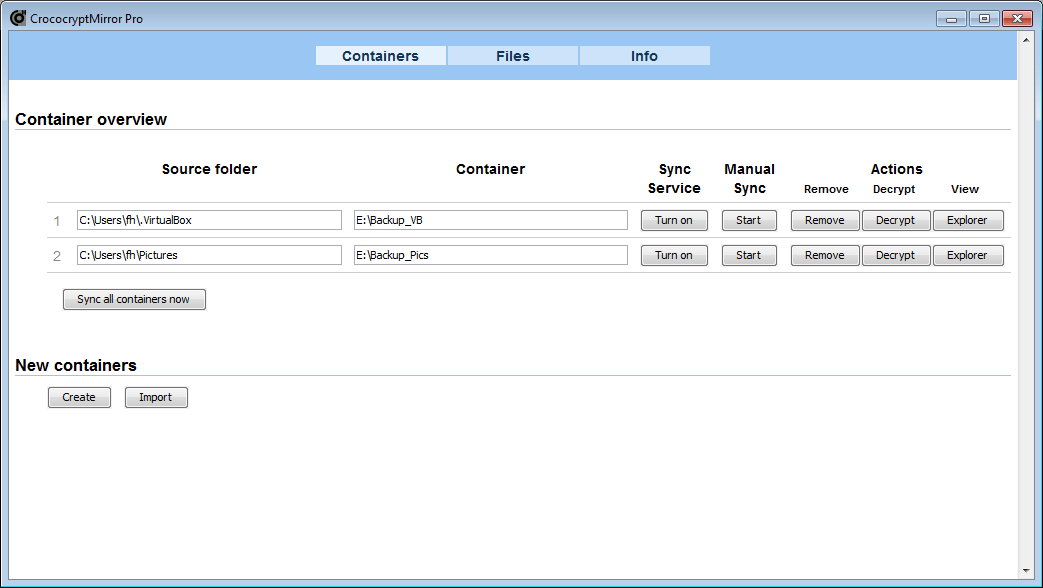
- Explorer view: A built-in interface to browse and read encrypted containers.
Top 5 Reasons To Download CrococryptMirror Pro
1. Uncompromising Dual-Layer Encryption: Utilizing both AES-256 and Twofish-256 standards to ensure your data is mathematically impossible to breach.
2. Perfect Cloud Synergy: Optimized for incremental updates, making it the ideal companion for services like Dropbox, Google Drive, and OneDrive by only uploading changed files.
3. Total Portability: The software requires no installation and stores all settings and keys within its own folder, allowing you to run your entire backup suite from a thumb drive.
4. Complete Metadata Privacy: Unlike standard backup tools, it encrypts your filenames, ensuring that even the structure and nature of your data remain a total mystery to prying eyes.
5. Real-Time "Mirror" Synchronization: It functions as a true mirror, automatically detecting changes in your source folders and updating your encrypted destination on the fly without manual intervention.
In an era where digital privacy is becoming increasingly scarce, the tools we use to protect our most sensitive information must be more than just "good enough." We are living in a world where data breaches are a daily occurrence, and cloud providers—while convenient—are often the primary targets for sophisticated cyber-attacks. This is why, as a tech reviewer, I am always on the hunt for a utility that balances high-end security with everyday usability. Enter CrococryptMirror. This isn't just another backup utility; it is a sophisticated encryption engine that simplifies the complex task of securing your digital life. If you have been looking for a reason to finally get your personal files under lock and key, this giveaway is your golden ticket. Let us dive deep into why this software is a mandatory addition to your digital toolkit.
1. Uncompromising Dual-Layer Encryption
When we talk about encryption, the conversation usually starts and ends with AES-256. While AES-256 is the industry standard—used by governments and financial institutions worldwide—CrococryptMirror goes a step further by offering Twofish-256 as well. For the uninitiated, Twofish was a finalist in the competition to become the Advanced Encryption Standard, and many cryptographers actually prefer it for its complex key schedule and robust architecture. By giving users the choice of these two heavy hitters, CrococryptMirror ensures that your data is protected by the most scrutinized algorithms in history.
But the software doesn't stop at the algorithm level. The security of an encrypted file is only as strong as the key used to lock it. This software utilizes the PKCS#5/PBKDF2 standard for its keyfiles. This means that even if a hacker managed to get their hands on your encrypted backup, they couldn't simply "brute-force" their way in. The software uses a high iteration count to derive the keys, making it computationally expensive and practically impossible for modern hardware to guess your credentials. In the style of a true pro-grade tool, it treats your data with the respect it deserves, ensuring that your tax returns, private photos, and business contracts are wrapped in a digital vault that would take a supercomputer lifetimes to crack.
Moreover, the encryption is performed locally. This is a critical point that I cannot stress enough. Your unencrypted data never leaves your computer. By the time it hits your external drive or the cloud, it is already a scrambled mess of high-entropy bits. You aren't trusting a third-party provider to encrypt your data on their servers; you are taking control of the process yourself. That is the hallmark of true security.
2. Perfect Cloud Synergy and Incremental Efficiency
One of the biggest headaches with traditional encryption software—think of tools that create massive virtual "containers"—is that they play very poorly with cloud storage. If you have a 50GB container and you change one tiny text file inside of it, your cloud sync service (like Google Drive or Dropbox) often sees the entire 50GB file as "changed" and tries to re-upload the whole thing. It is a nightmare for bandwidth and productivity.
CrococryptMirror solves this brilliantly by using a file-based backup approach. It mirrors your directory structure but encrypts each file individually into compressed, encrypted counterparts. When you update a single document in your source folder, CrococryptMirror only updates that single encrypted file in your destination folder. This makes it the perfect "bridge" for secure cloud storage. You can point your source to your "My Documents" folder and your destination to your "Dropbox" folder. The software works in the middle, ensuring that everything heading to the cloud is encrypted instantly, but only the specific bytes that changed are ever uploaded.
This efficiency is a game-changer for anyone working with limited upload speeds or massive amounts of data. You get the benefits of a "mirror"—where your backup perfectly reflects your current work—without the technical overhead of legacy encryption methods. It is a slick, modern solution for a modern problem, allowing you to use the convenience of the cloud without sacrificing an ounce of your privacy.
3. Total Portability and No-Installation Footprint
We live in a mobile world, and our software should be just as flexible as we are. One of the standout features of this specific version of CrococryptMirror is its portability. In a world where every app wants to bury itself deep into your Windows Registry and start five different background processes at boot-time, a portable app is a breath of fresh air. You can simply unzip the folder onto a USB stick, and you are ready to go.
Because the keyfiles and settings are stored within the application's own directory, your entire security environment is self-contained. You can take your external hard drive to a work computer, a library, or a friend’s house, plug it in, and access or update your encrypted backups without having to install a single thing on the host machine. This "zero-footprint" approach is excellent for security-conscious users who don't want to leave traces of their encryption software on every computer they touch.
Furthermore, portability means easier disaster recovery. If your main computer dies, you don't have to worry about hunting down license keys or reconfiguring complex settings. You just grab your backup drive, run the executable, and your data is right there, ready to be decrypted. It simplifies the backup workflow to its most basic, most reliable form. It is the definition of "set it and forget it" portability.
4. Complete Metadata Privacy with Filename Encryption
Most people don't realize that filenames themselves are a massive security leak. If a hacker or a nosey interloper sees a file named "2023_Tax_Return_Final.pdf" or "Confidential_Merger_Project_X.docx," they already know 90% of what they need to know, even if they can't open the file. Metadata tells a story, and in a high-security environment, you want that story to be unreadable.
CrococryptMirror features robust filename encryption. When your files are mirrored to the encrypted destination, the names are obfuscated into random strings of characters. The folder structure is maintained in a way that the software can reconstruct it, but to anyone looking at the destination folder through a standard File Explorer, it looks like a pile of digital gibberish. There are no clues as to what is inside, how many files there are, or what the file types might be.
This adds a vital layer of "security through obscurity" on top of the already ironclad AES-256/Twofish encryption. It protects you against forensic analysis and ensures that your private life remains private. Whether you are storing sensitive client data or just personal journals, the peace of mind that comes from knowing even your filenames are hidden is something you won't find in standard zip-and-tuck backup tools. It is a feature usually reserved for high-end enterprise software, but you get it right here in this giveaway.
5. Real-Time Synchronization and Multi-Destination Support
A backup is only useful if it is current. We have all been in a situation where we lost data because our last backup was three weeks old. CrococryptMirror eliminates this risk with its built-in sync service. You don't have to remember to click "Backup" every night; the software can watch your folders in real-time. The moment you save a file, the software detects the change and mirrors the encrypted version to your destination. It is proactive protection that works in the background so you can focus on your work.
What makes this even more powerful is the support for multiple destinations. In the world of professional data management, we talk about the "3-2-1 rule": three copies of your data, on two different media, with one copy off-site. CrococryptMirror makes this incredibly easy to implement. You can set the software to mirror your source folder to an external USB drive (local backup) and a cloud-synced folder (off-site backup) simultaneously. This redundancy is the ultimate insurance policy against hardware failure, theft, or natural disasters.
The software also handles network drives with ease. If you have a NAS (Network Attached Storage) at home or a shared drive at the office, you can use those as either sources or destinations. This flexibility means that whether you are a power user with a complex home server setup or a casual user with a single laptop and a thumb drive, the software scales to your needs. It provides a professional-grade "explorer view" that allows you to browse your encrypted containers as if they were regular folders, making the process of retrieving a single file just as easy as backing it up.
Conclusion: Why You Should Grab This Now
It is rare to find a tool that manages to be both incredibly powerful and refreshingly simple. CrococryptMirror doesn't try to be a "do-it-all" system imaging tool that bloats your OS; it focuses on doing one thing—secure folder mirroring—and it does it better than almost anything else on the market. By combining the world's most trusted encryption algorithms with a portable, file-based architecture, it provides a level of data sovereignty that is hard to come by.
Think about the data you have on your computer right now. Your family photos, your financial records, your saved passwords, and your work projects. If those were compromised today, what would the cost be? This giveaway offers you a way to eliminate that anxiety. You get a tool that encrypts your filenames, syncs your data in real-time, and works perfectly with the cloud storage you already use. It is an efficient, robust, and completely portable solution for anyone who takes their digital security seriously.
As a tech reviewer, my final verdict is simple: This is a no-brainer. In the landscape of security software, CrococryptMirror stands out as a lean, mean, encryption machine. It doesn't ask for a subscription, it doesn't track your usage, and it doesn't require a complex installation process. It just works. Whether you are looking to secure your personal life or add a layer of professional protection to your business files, this is the utility you have been waiting for. Don't leave your data's safety to chance—download this giveaway, set up your mirrors, and enjoy the peace of mind that comes with knowing your digital world is encrypted, backed up, and completely under your control.
Summary of Key Features:
- Recursive synchronization of directories to encrypted containers.
- High-level encryption of filenames to prevent metadata leaks.
- Ability to mirror to multiple destinations (Cloud, USB, NAS) at once.
- On-the-fly change detection for automatic, "hands-off" backups.
- Integrated Explorer view for easy browsing of encrypted files.
The clock is ticking on your digital privacy. Take the proactive step today and secure your folders with the best in the business. Your future self will thank you when your data remains safe, sound, and encrypted.

Reviews for CrococryptMirror Pro
Click Here to Read Reviews for CrococryptMirror Pro >> Click Here to Submit Reviews for CrococryptMirror Pro >>