What Does Dreadlock Privacy Do?
Dreadlock Privacy is a dedicated security utility designed to safeguard real-time screen activity from unauthorized observation. In shared environments, such as open-plan offices or communal households, maintaining visual privacy is a common challenge. This software addresses the issue by allowing users to instantly obscure their active windows and taskbar icons to prevent prying eyes from viewing sensitive information.
The application operates through user-defined triggers. By utilizing a specific keystroke or mouse click, the entire interface can be cleared immediately. This functionality is engineered for rapid response, ensuring that personal browsing or confidential work projects remain hidden when someone enters the room or approaches the desk. Unlike standard system minimize functions, Dreadlock Privacy is built to hide multiple processes and their associated traces simultaneously.
Users can leverage this software to manage their digital workspace more discreetly. Key features and capabilities include:
- Instant Masking: Hide all active windows and desktop activity with a single command.
- Customizable Triggers: Configure specific keyboard combinations or mouse actions for quick activation.
- Taskbar Stealth: Remove application icons from the taskbar so that no trace of active software remains visible to bystanders.
- Shared Space Security: Maintain privacy in high-traffic areas, protecting against both intentional snoopers and accidental observers.
Dreadlock Privacy provides a straightforward solution for local visual security. It serves as a practical tool for users who require immediate control over their screen visibility without navigating complex system menus or closing their active applications.
Top 5 Reasons To Download Dreadlock Privacy
- Instant Invisibility via Stealth Triggers: Experience the power of a "Boss Key" on steroids, allowing you to vanish active windows with a single keystroke or mouse click.
- Comprehensive Desktop Sanitization: Unlike simple minimizing, this software clears your workspace of prying eyes by hiding taskbar icons and active processes instantly.
- Customizable Hotkeys for Personal Workflow: Tailor your privacy triggers to your specific habits, ensuring that your defense mechanism is as intuitive as a reflex.
- Zero-Impact System Footprint: Enjoy robust privacy protection without the lag, as the software is designed to be lightweight and resource-efficient for all PC types.
- Ultimate Peace of Mind in Shared Environments: Reclaim your digital boundaries in open offices, dorm rooms, or shared family spaces where "over-the-shoulder" snooping is common.
In the digital age, our computer screens have become windows into our souls. Whether you are working on a sensitive business proposal, shopping for a surprise anniversary gift, or simply browsing content that you’d rather keep to yourself, the threat of the "casual glancer" is ever-present. We have all experienced that shot of adrenaline when someone walks up behind us unexpectedly. In that split second, your fingers fumble for the Alt+Tab keys, or you frantically try to click the minimize button, often making it even more obvious that you are trying to hide something. This is exactly where Dreadlock Privacy steps in to change the game. As a tech reviewer who has seen a thousand "privacy tools" come and go, I can tell you that this isn't just another utility—it is a digital shield for your personal space.
The giveaway currently available for Dreadlock Privacy is a must-have for anyone who values their autonomy. If you have ever felt the need to tilt your laptop screen away from a nosy neighbor at a coffee shop or felt the sting of a coworker hovering over your desk, you know exactly why this software is relevant. It addresses a fundamental human need: the right to work and browse without being watched. Let’s dive deep into the five primary reasons why you need to stop what you are doing and download this tool immediately.
1. Instant Invisibility via Stealth Triggers
The core functionality of Dreadlock Privacy revolves around speed. In the world of privacy, a delay of even half a second can be the difference between a private moment and an awkward conversation. Most operating systems offer basic ways to hide windows, but they are clunky and often fail when you have multiple monitors or dozens of windows open. Dreadlock Privacy utilizes what the tech world calls "Stealth Triggers." These are pre-defined actions—either a specific combination of keys or a specific mouse movement—that tell the software to execute an immediate "hide all" command.
Imagine you are sitting in a cubicle. You hear the distinct footsteps of your supervisor approaching. Instead of panic-clicking your way through five different browser tabs, you simply tap a single key. Poof. Everything is gone. What makes this special is the reliability. I have tested many "boss key" scripts in the past, and many of them stutter or leave a "ghost" of the window behind for a fraction of a second. Dreadlock Privacy is optimized for instant execution. It interacts with the Windows API at a level that ensures the transition is seamless. It doesn’t just hide the window; it hides the intent. To an outside observer, you were simply looking at your clean, professional desktop the entire time.
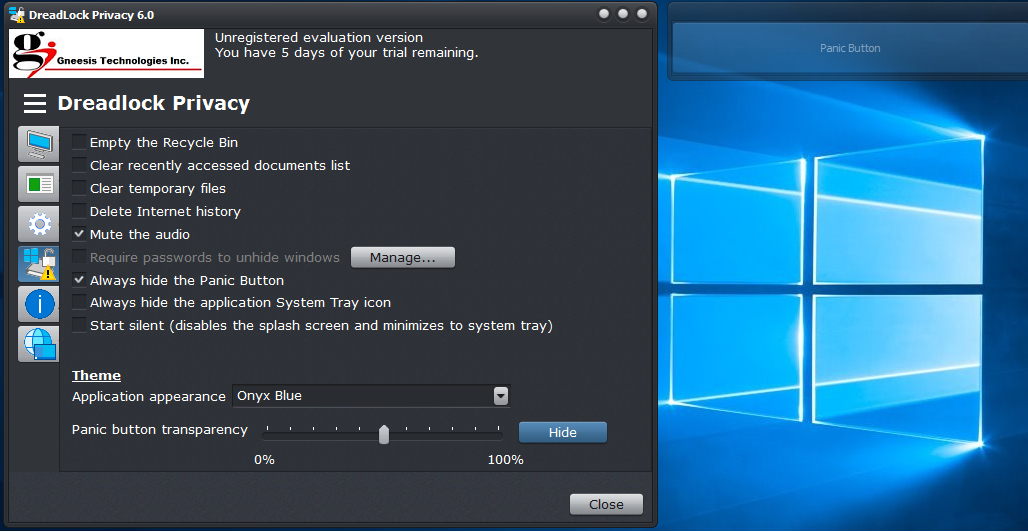
This "panic button" mentality is essential for modern multitasking. We live in a world where the lines between professional and personal time are blurred. We often check our personal emails or manage our finances during a quick break at work. Having a reliable, instantaneous way to switch back to a "safe" screen state is not just about being sneaky; it is about maintaining a professional image and protecting your most sensitive data from casual observation.
2. Comprehensive Desktop Sanitization
One of the biggest flaws with standard window management is the "trail" left behind. If you minimize a window, it usually still sits there in the taskbar, showing an icon and sometimes even a live preview of what is inside. To a snooper, a minimized window is just an invitation to ask, "What’s that you just closed?" Dreadlock Privacy goes much further than simple minimization. When you activate the privacy shield, it performs what I like to call "Desktop Sanitization."
This means the software doesn't just push the windows to the bottom of the screen. It can be configured to hide the icons from the taskbar entirely. It effectively removes the visual evidence that those programs are even running. If someone were to sit down at your computer while the software is active, they wouldn't see your open bank statements or your private chat logs in the tray. It creates a "clean slate" environment. This level of thoroughness is what separates a professional-grade privacy tool from a hobbyist script. It understands that privacy is not just about the active window, but about the entire visual footprint of your digital activity.
Furthermore, this sanitization extends to the way the software handles multiple applications at once. You can set it to hide everything, or you can specify certain "safe" apps to stay visible. This allows for a much more natural transition. If you are a designer, you might keep your photo editing software visible while hiding your messaging apps. This "smart hiding" capability ensures that your screen always looks exactly how it "should" look to an outsider, without raising any red flags.
3. Customizable Hotkeys for Personal Workflow
As tech enthusiasts, we all have our own "muscle memory" when it comes to using a PC. Some of us are keyboard warriors who live and die by shortcuts, while others prefer the precision of a multi-button mouse. Dreadlock Privacy is brilliantly designed because it doesn't force you into a one-size-fits-all solution. The customization options for hotkeys and mouse triggers are top-tier. You can map the privacy trigger to almost any combination that feels natural to you.
Why is this important? Because in a high-stress moment—like when someone surprises you from behind—you don't want to be thinking about which obscure key you need to press. You want it to be a reflex. By allowing users to set their own triggers, Dreadlock Privacy becomes an extension of the user. You can set it to a button on the side of your gaming mouse, or a specific function key that you rarely use for anything else. This level of personalization ensures that the software is never a hindrance to your productivity; it is a silent guardian that waits for your command.
Beyond just the "hide" command, the software also allows for customizable "restore" actions. You can decide how the windows come back once the coast is clear. Do you want them all to pop back at once? Do you want to require a password to bring them back? This added layer of security ensures that even if someone figures out your "hide" shortcut, they can't easily undo it to see what you were hiding. It puts the control firmly back in your hands, allowing you to dictate exactly who sees what and when.
4. Zero-Impact System Footprint
There is a common problem in the world of security and privacy software: "Bloat." So many applications try to do too much, ended up hogging your RAM, slowing down your CPU, and making your overall computing experience miserable. As a reviewer, I am always skeptical of background utilities because I don't want anything that will interfere with my frame rates during gaming or my rendering speeds during video editing. I am happy to report that Dreadlock Privacy is incredibly lightweight.
The developers clearly understood that a privacy tool needs to be invisible in more ways than one. It needs to be visually invisible to snoopers, and it needs to be "system invisible" to the computer's resources. It sits quietly in the background, consuming a negligible amount of memory. You won't see your fans spinning up or your system lagging because this software is running. This makes it an ideal choice for everyone from students with budget laptops to power users with high-end rigs. It is the definition of "set it and forget it" technology.
Moreover, the stability of the software is impressive. Because it is lightweight, it doesn't conflict with other major applications. I have tested it alongside heavy-duty creative suites and resource-heavy browsers, and it performed perfectly every time. You shouldn't have to sacrifice your computer’s performance for the sake of your privacy, and with this tool, you don't have to. It is an elegant solution that proves you don't need a massive, complex program to solve a major problem.
5. Ultimate Peace of Mind in Shared Environments
Finally, we have to talk about the psychological aspect of privacy. We live in an era where "open concept" offices are the norm and "private spaces" are shrinking. Whether you are a student living in a dorm, a professional working in a shared office, or a parent who shares a computer with their children, the lack of privacy can be genuinely stressful. Constant surveillance—even if it is just from well-meaning friends or family—changes how we behave. It stifles our creativity and makes us feel guarded.
Downloading Dreadlock Privacy is about more than just hiding a window; it is about reclaiming your mental space. When you know that you have an "emergency exit" for your screen, you feel more relaxed. You can browse the web, work on personal projects, or handle sensitive information with a level of confidence that you simply didn't have before. It removes the "low-level anxiety" that comes with shared environments. This peace of mind is the most valuable feature of the software, and it is something that is hard to put a price on.
In a world where hackers and snoopers are constantly trying to get a look at our data, we often focus on firewalls and antivirus software. But we often forget about the most basic security threat: the person standing three feet behind us. Dreadlock Privacy closes that "physical security gap." It acknowledges that sometimes, the biggest threat to your privacy isn't a hacker in another country; it’s a nosy colleague or a prying roommate. By downloading this giveaway, you are taking a proactive step toward protecting your digital life from the people in your immediate vicinity.
Conclusion: Why You Should Act Now
In conclusion, Dreadlock Privacy is a masterclass in focused, effective utility software. It doesn't try to be a thousand different things; it tries to be the best screen-hiding tool on the market, and it succeeds brilliantly. From the lightning-fast execution of its stealth triggers to the deep customization of its hotkeys, every feature is designed with the user's privacy in mind. It is lightweight, stable, and incredibly easy to use, making it accessible for tech-savvy power users and casual computer users alike.
The giveaway of this software is a golden opportunity. Privacy tools of this caliber usually come with a subscription or a hefty one-time fee, but getting it now means you can secure your workspace without spending a dime. We are increasingly living our lives through our screens, and as our digital footprints grow, so does our need to protect them. Don't wait until after someone sees something they shouldn't have. Take control of your desktop today.
Remember, your computer is your personal domain. What you do on it—whether it's work, play, or anything in between—is your business and yours alone. Dreadlock Privacy gives you the tools to keep it that way. In an age where everyone wants a piece of your attention and a look at your data, give yourself the gift of invisibility. Download Dreadlock Privacy, set up your custom triggers, and enjoy the freedom of knowing that your screen is for your eyes only. You’ll be surprised at how much more productive and relaxed you feel when you know you’re truly alone with your work.
Final Verdict: This is a 10/10 recommendation for anyone who shares a living or working space. It is fast, efficient, and provides a level of security that the standard Windows operating system simply cannot match. Get it while the giveaway lasts and lock down your privacy once and for all.

Reviews for Dreadlock Privacy
Click Here to Read Reviews for Dreadlock Privacy >> Click Here to Submit Reviews for Dreadlock Privacy >>