What Does Excel Merger Pro Do?
Excel Merger is a dedicated Windows utility designed to streamline the consolidation of spreadsheet data. Unlike standard office suites, this standalone tool functions without requiring Microsoft Excel or Office to be installed on the system. It offers a specialized environment for handling bulk data operations that are often cumbersome in traditional spreadsheet applications.
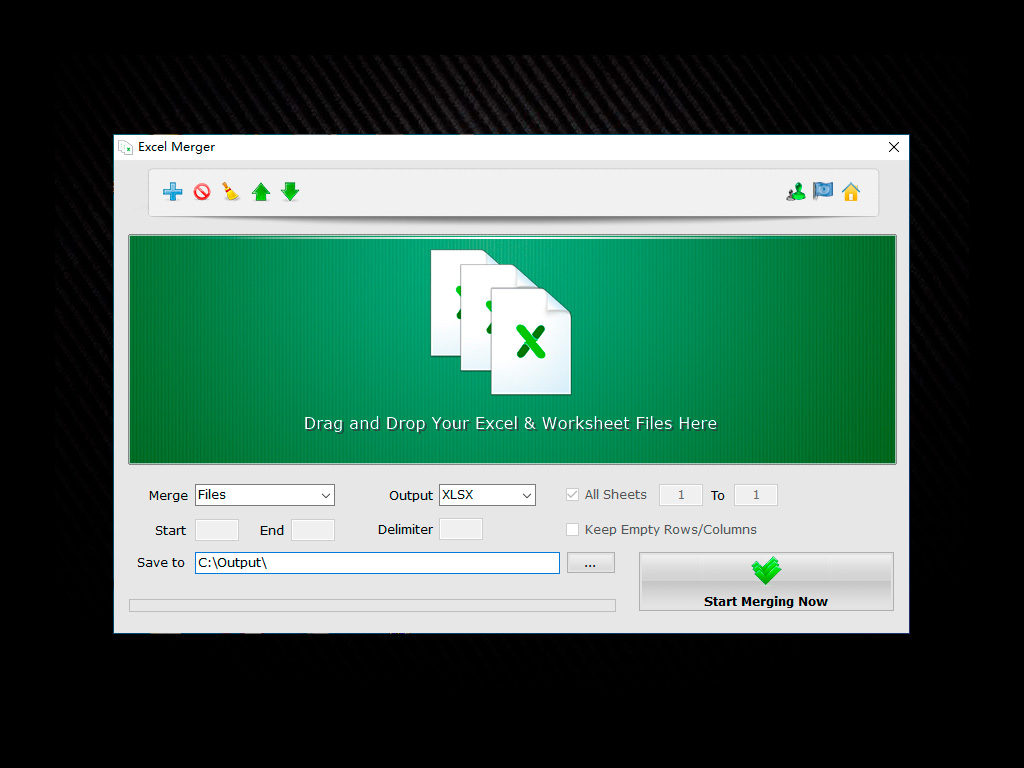
The software supports a wide range of input and output formats, including XLS, XLSX, ODS, CSV, and XML. Users can aggregate multiple independent files into a single workbook or combine disparate workbooks into one unified worksheet. This functionality is particularly efficient for managing large-scale data sets across dozens of table files simultaneously. Beyond basic file merging, the utility provides granular control through a sheet range option, allowing for the selection of specific data sets rather than entire documents.
Key technical features of the application include:
- Batch Processing: Combine several files, spreadsheets, or workbooks into one file or worksheet in bulk.
- Row and Column Merging: Support for merging individual rows and columns across dozens of table files.
- Mixed Format Support: The ability to join different file types, such as CSV and XLSX, in a single operation.
- Ultra-fast Performance: A compact 3 MB installer designed for high-speed processing without third-party dependencies.
- Multi-format Export: Export consolidated data to XLS, XLSX, ODS, CSV, or XML formats.
Top 5 Reasons To Download Excel Merger Pro
- Zero Dependencies: Full Functionality Without Microsoft Office or Excel Installed
- Ultimate Format Flexibility: Support for Mixed Merging of XLS, XLSX, ODS, CSV, and XML
- Granular Control: Merge Specific Sheet Ranges and Workbooks Instead of Entire Files
- Bulk Row and Column Consolidation: Automated Data Structuring Across Dozens of Tables
- High-Performance Lightweight Architecture: A 3MB Powerhouse with Ultra-Fast Processing
In the modern digital workplace, data is the lifeblood of every decision, strategy, and report. However, as any data professional or office administrator can tell you, data rarely arrives in a single, perfectly organized package. Instead, it comes in fragments: dozens of CSV files from the marketing department, legacy XLS files from accounting, modern XLSX workbooks from sales, and perhaps even some ODS or XML files from external vendors. The manual labor involved in consolidating these disparate sources is not just tedious; it is a recipe for human error and a massive drain on productivity. This is where Excel Merger enters the scene, offering a streamlined, robust, and incredibly efficient solution to one of the most persistent headaches in data management. As someone who has spent years reviewing productivity software, I can tell you that it is rare to find a tool that balances simplicity with such raw utility. If you deal with spreadsheets on a daily basis, this is the giveaway you cannot afford to miss. Here is why Excel Merger deserves a permanent spot on your Windows desktop.
1. Zero Dependencies: Full Functionality Without Microsoft Office or Excel Installed
The most striking feature of Excel Merger, and the reason it stands head and shoulders above many of its competitors, is its total independence. Most spreadsheet utilities act as "add-ins" or "macros" that require a fully licensed and installed version of Microsoft Excel to function. This creates a significant barrier for many users. Perhaps you are working on a dedicated data-processing server that doesn't have an Office suite installed. Perhaps you are a devotee of open-source software who prefers LibreOffice or Apache OpenOffice. Or maybe you are simply trying to keep your system lean and avoid the resource-heavy overhead of the Microsoft 365 ecosystem.
Excel Merger bypasses these requirements entirely. It features a built-in processing engine that reads, interprets, and writes spreadsheet data natively. This means you can merge, convert, and manipulate complex XLSX and XLS files without ever opening a Microsoft application. From a reviewer's perspective, this is a massive win for portability and system stability. You don't have to worry about version conflicts, "missing DLL" errors, or the dreaded Excel "Not Responding" screen when dealing with large datasets. By operating independently, Excel Merger ensures that your file consolidation tasks are handled by a dedicated, optimized engine designed for one thing: speed and accuracy. This makes it an ideal tool for IT professionals who need to deploy a merging solution across various machines with different software configurations.
Furthermore, the "No Office Required" philosophy extends to the output quality. Even though it doesn't use Excel's engine, the resulting files are perfectly formatted and fully compatible with all major spreadsheet viewers. You get the professional results of the Microsoft ecosystem without the associated costs or system bloat. For anyone managing high-volume data tasks on a budget or on specialized hardware, this feature alone makes the software an essential download.
2. Ultimate Format Flexibility: Support for Mixed Merging of XLS, XLSX, ODS, CSV, and XML
We live in a multi-format world. In a single project, you might be asked to combine a modern .XLSX file with an older .XLS archive, a .CSV export from a web database, and an .ODS file from a colleague using Linux. In a standard workflow, this would require opening each file individually, saving them into a common format, and then beginning the merging process. This "pre-processing" phase is where time is lost and formatting errors often creep in.
Excel Merger eliminates this friction by supporting mixed merging. You can literally drag and drop a collection of files with different extensions into the interface, and the software will treat them as a cohesive dataset. Whether it is a Comma-Separated Values (CSV) file, an eXtensible Markup Language (XML) file, or an Open Document Sheet (ODS), the software harmonizes them into your desired output format instantly.
This flexibility is particularly valuable for developers and data analysts who often deal with XML and CSV exports. These formats are great for data transfer but are notoriously difficult to merge manually without technical scripts. Excel Merger brings "Point-and-Click" simplicity to these complex formats. You can export your combined data back into any of these formats as well. Need to merge ten XLSX files and save the result as a single CSV for a database import? It’s done in seconds. Need to take five CSVs and turn them into a professional XLSX workbook? It is just as easy. This level of cross-format versatility turns a multi-step conversion and merging nightmare into a single, seamless action.
3. Granular Control: Merge Specific Sheet Ranges and Workbooks Instead of Entire Files
One of the most common complaints about basic merging tools is that they are "all or nothing." Usually, if you want to merge two workbooks, the software just dumps every single tab from File A and File B into a new file. But what if you only need the "Q4 Totals" tab from twenty different files? What if you only need the first five rows of data from 100 different spreadsheets? Manually deleting the extraneous data after a "dumb" merge is often more work than the merge itself.
This is where the Sheet Range option in Excel Merger proves its worth as a pro-level tool. It gives the user surgical precision over what data actually makes it into the final document. You can specify a range of sheets to be merged, ensuring that only the relevant data is captured. This is a game-changer for administrative tasks like consolidating monthly expense reports or student grades where only a specific section of the workbook contains the necessary information.
Additionally, the software offers multiple merging modes to suit your specific organizational needs:
- File to File: Combine multiple separate documents into one large document containing all the original workbooks.
- Workbook to Worksheet: This is perhaps the most powerful mode. It takes every sheet within every selected file and flattens them into one single worksheet. Imagine having 50 files, each with 3 tabs, and turning those 150 tabs into one continuous, searchable list in seconds.
- Selective Merging: Use the sheet range settings to cherry-pick exactly what you need, leaving the clutter behind.
This level of control ensures that the final output is clean, organized, and ready for immediate analysis, without the need for further manual cleanup.
4. Bulk Row and Column Consolidation: Automated Data Structuring Across Dozens of Tables
Beyond simply "stacking" files on top of each other, Excel Merger offers advanced functionality for merging rows and columns in bulk. This is a feature that elevates the software from a simple utility to a powerhouse for data engineering. In many business scenarios, you don't just want to combine files; you want to combine the content within those files. For example, if you have 50 different spreadsheets each containing 10 rows of customer data, you need a tool that can intelligently join those rows into a single, master table.
The bulk row and column merging feature is designed to handle dozens of table files or spreadsheets simultaneously. This is indispensable for anyone working with large-scale data collection, such as survey results, inventory logs, or sensor data. Instead of copying and pasting row after row—a process that is notoriously prone to "offset errors" where data is pasted into the wrong column—you can let Excel Merger handle the heavy lifting.
This feature is a lifesaver for bulk processing. When you are dealing with hundreds of files, the sheer volume of data makes manual intervention impossible. Excel Merger’s ability to join parts of all worksheets by setting a range and then merging those rows across multiple files ensures that your data remains structured and consistent. It maintains the integrity of your columns while expanding the rows, or vice versa, depending on your specific requirements. For a tech reviewer, seeing a tool that respects the structure of the data while performing high-speed operations is always a highlight. It shows that the developers understand the actual workflow of a data professional.
5. High-Performance Lightweight Architecture: A 3MB Powerhouse with Ultra-Fast Processing
In an era where even basic apps can take up hundreds of megabytes and require lengthy installation processes, Excel Merger is a refreshing example of optimized software design. The installer is a mere 3 MB. To put that in perspective, that is smaller than a single high-resolution photograph. This tiny footprint is a testament to the efficiency of the code. It doesn't come packed with "telemetry," "bloatware," or unnecessary graphical flourishes that slow down your system. It is a lean, mean, data-merging machine.
Don't let the small size fool you, though. Under the hood, it features an Ultra-fast Mode for combining files and workbooks. When you are dealing with massive datasets—think thousands of rows across hundreds of files—performance becomes the most critical factor. Many spreadsheet tools will hang or crash when memory limits are reached, especially when trying to manage the complex XML structures of modern .XLSX files. Excel Merger is built for speed. It processes files in a streamlined queue, ensuring that memory usage remains stable even during heavy bulk operations.
Furthermore, the software is Multi-language, making it accessible to global teams. Whether you are working in an international corporation or a small local business, the interface is intuitive and easy to navigate. The "Handy Installer" ensures you can be up and running in less than a minute. In the world of tech, we often say that "the best tool is the one you actually use." Because Excel Merger is so lightweight and starts up instantly, it becomes the go-to utility for even small tasks, rather than a "heavy" program you only open when you absolutely have to. Its combination of portability, speed, and ease of use makes it a perfect example of what a utility app should be.
Conclusion: Why You Should Act Now
The "copy-paste" method of data management is a relic of the past. It is time-consuming, frustrating, and dangerous for data integrity. Excel Merger represents the modern alternative: a dedicated, standalone, and incredibly powerful utility that respects your time and your system resources. Whether you are a student trying to organize research data, an office manager consolidating monthly reports, or a data analyst preparing a large-scale import, this software provides the exact set of tools you need to get the job done efficiently.
By offering No-Office-required functionality, mixed format support, and granular sheet control, Excel Merger solves the most common pain points associated with spreadsheet management. When you add in the bulk row/column merging and the ultra-fast 3MB architecture, it becomes clear that this isn't just a "nice-to-have" tool—it's a productivity essential.
Giveaways like this don't last forever. Downloading Excel Merger today means you are arming your Windows machine with a professional-grade tool that will save you hours of work in the weeks and months to come. Stop fighting with your spreadsheets and start mastering them. Download this utility, simplify your workflow, and reclaim your time. You'll wonder how you ever managed your data without it.


Reviews for Excel Merger Pro
Click Here to Read Reviews for Excel Merger Pro >> Click Here to Submit Reviews for Excel Merger Pro >>