What Does File Sharing Pro Do?
File Sharing Pro provides a self-hosted solution for distributing documents, media, and folders securely. By leveraging a professional web server alongside native operating system authentication, the software allows users to establish a private website accessible through any standard web browser. This setup bypasses third-party cloud services, ensuring that sensitive data remains under the user's direct control without privacy concerns from external providers.
The application requires initial configuration of port forwarding on the local router to enable internet access. Once active, the server supports over 100 MIME types and permits both the download and upload of large files. Administrative controls allow owners to restrict user access to specific pages or directories and facilitate the sharing of executable files.
Key technical features include:
- Native OS security integration: Protects files using existing system authentication protocols.
- High-capacity transfers: Supports large file sizes for both uploading and downloading tasks.
- Cross-platform compatibility: Functions as a dedicated file server for both Windows and Mac environments.
- Client-side uploading: Enables authorized external users to contribute files directly to the server.
- Granular permissions: Owners can assign specific pages and directories to individual users.
File Sharing Pro functions as a budget-friendly alternative to enterprise cloud storage, focusing on direct peer-to-peer access through a simplified user interface.
Top 5 Reasons To Download File Sharing Pro
- Total Privacy and Zero Third-Party Intervention: Your data stays on your hardware, eliminating the risks associated with big-tech data mining and cloud leaks.
- Enterprise-Grade OS-Native Security: By leveraging the built-in security of Windows and Mac, the software provides a robust defense system that is both reliable and professional.
- No More File Size Limits: Forget the frustration of "file too large" errors; share high-definition videos, massive databases, and lossless audio without restriction.
- Universal Cross-Platform Accessibility: Anyone with a web browser on any device—be it a smartphone, tablet, or smart TV—can access your files without installing extra software.
- Granular User Control and Permissions: You decide exactly what each person can see, download, or upload, giving you the power of a professional system administrator.
In the modern digital landscape, we are constantly told that the "cloud" is the only way to manage our lives. We are pushed toward monthly subscriptions, told to trust massive corporations with our most intimate photos, and forced to deal with arbitrary file size limits that stifle our productivity. But what if you could take that power back? What if you could turn your own computer into a high-powered, ultra-secure, and private file-sharing hub? That is exactly what File Sharing Pro offers, and today, I am going to explain why this specific giveaway is the absolute "must-download" of the year for anyone who cares about their data.
1. Total Privacy and Zero Third-Party Intervention
The most compelling reason to jump on this giveaway is the absolute return to privacy. When you use traditional cloud services, your files are stored on someone else’s computer. Whether it is a giant server farm in another country or a distributed network, your documents, family photos, and private videos are technically in the hands of a third party. This introduces a layer of vulnerability that many of us simply aren't comfortable with anymore. We've all seen the headlines about data breaches and "unauthorized access." With File Sharing Pro, that middleman is completely eliminated.
Because this software acts as your own personal web server, the files never leave your physical control until the moment you decide to share them. When you send a link to a friend or co-worker, they are connecting directly to your machine. There is no central server logging your activity, no algorithm scanning your photos to sell you ads, and no risk of a corporate data breach exposing your sensitive information. This is a peer-to-peer philosophy wrapped in a professional-grade interface. For anyone handling sensitive legal documents, proprietary business files, or even just precious family memories, the peace of mind that comes from knowing your data is residing on your own hard drive is priceless. This software transforms your PC or Mac into a private vault that you alone hold the keys to.
Furthermore, the "budget-friendly" nature of this solution cannot be overstated. By using your own hardware, you are avoiding the "subscription trap." Most cloud services lure you in with a free tier and then charge you increasing monthly fees as your library grows. With File Sharing Pro, you are the master of your own storage. If you need more space, you simply add a hard drive to your computer. There are no monthly "rent" payments for your own digital life. Downloading this giveaway is an investment in your digital sovereignty.
2. Enterprise-Grade OS-Native Security
A common concern when people think about hosting their own server is security. "If I open my computer to the internet, isn't that dangerous?" This is where File Sharing Pro truly shines and separates itself from amateur file-sharing tools. Instead of trying to reinvent the wheel with a proprietary (and potentially buggy) security layer, this software utilizes the native operating system security of Windows and Mac. This is a genius move from a technical standpoint.
Your operating system already has world-class authentication protocols built into its core. File Sharing Pro hooks into these existing security frameworks. When a user tries to access your secure website, they are being vetted by the same level of security that protects the OS itself. This means you get professional-grade authentication without having to be a cybersecurity expert. The software sets up a professional web server on your machine that acts as a secure gateway. This gateway is hardened and designed to prevent unauthorized intrusions, ensuring that only the people you have specifically authorized can see your content.
By using native security, the software also remains incredibly stable. It doesn't conflict with your system settings; rather, it works in harmony with them. For tech reviewers like myself, seeing a piece of software that respects the host environment while providing such a powerful service is a breath of fresh air. It provides that "set it and forget it" reliability that is so rare in the world of high-end networking tools. You get the benefits of a professional IT department's file server right on your desktop.
3. No More File Size Limits
We have all been there: you try to email a video of a wedding or a large project folder to a client, and you get that dreaded notification: "Attachment too large." Even the most popular "send a file" services usually cap you at 2GB or charge you a premium for anything larger. In an era where 4K video files can easily reach 20GB, 50GB, or more, these limits are antiquated and frustrating. File Sharing Pro completely shatters these boundaries.
Since the software is running on your hardware and using your internet connection, there are no artificial caps on file sizes. If you have a 100GB zip file of raw video footage, you can share it. If you have a massive music library in lossless FLAC format, you can make it available. The software supports large file sizes for both downloads and uploads. This is a game-changer for creative professionals, musicians, and videographers who need to move massive amounts of data without the hassle of splitting files or waiting for slow cloud uploads.
Think about the workflow efficiency here. Instead of uploading a 10GB file to a cloud service (which takes time) and then having your client download it from there, the client downloads it directly from you. You save the entire "upload to cloud" step. This "direct-to-user" pipeline is the fastest way to share large data sets. It’s efficient, it’s professional, and it removes the bottlenecks that slow down your creative or professional output. If you deal with big data, you need this tool in your arsenal.
4. Universal Cross-Platform Accessibility
One of the biggest hurdles in file sharing is compatibility. How many times have you asked someone to download a specific app just so they could view a file you sent? It’s a point of friction that often leads to frustration. File Sharing Pro solves this by publishing a secure web site that is accessible via any standard web browser. This is the ultimate in user-friendliness.
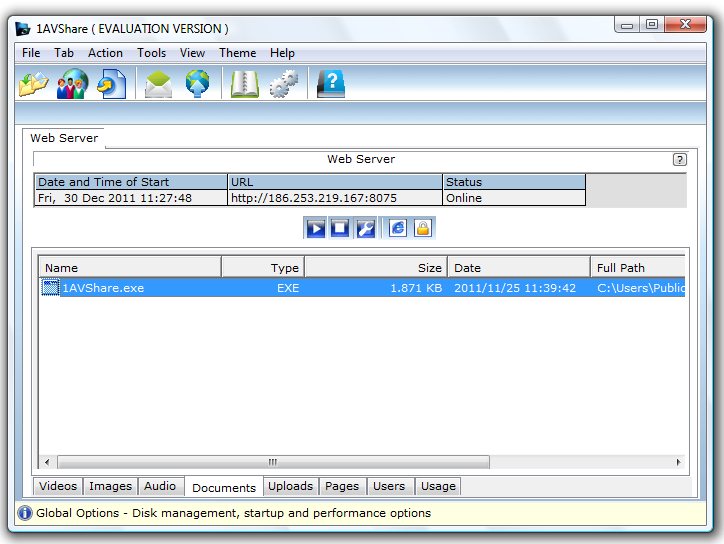
Whether your recipient is on an iPhone, an Android tablet, a Linux workstation, or even a smart TV, they can access your shared files. They don't need to install File Sharing Pro; they just need the URL you provide and their login credentials. The interface is designed to be intuitive, allowing users to browse through folders of images, play videos directly in the browser, listen to music, and view documents. It feels like using a high-end, polished web application, but it’s running entirely from your home or office computer.
The "Easy to use user interface" mentioned in the features isn't just marketing speak. It’s a streamlined experience that makes the complex task of server management feel accessible to the average user. The only technical hurdle is setting up a port forward on your router—a task that takes five minutes and is well-documented. Once that is done, you have a global reach. You can be sitting in a coffee shop in Paris and access your home computer's files in New York through a browser. That kind of freedom and accessibility is exactly why I recommend this giveaway so highly.
5. Granular User Control and Professional-Grade Functionality
Finally, we have to talk about the sheer level of control this software gives you. Many file-sharing apps are "all or nothing"—you either share a folder or you don't. File Sharing Pro offers a much more sophisticated approach. One of its standout extra features is the ability to assign specific pages that a user is allowed to visit. This means you can create a truly customized experience for different people in your life.
You might have one folder for your family containing private photos and home movies, and another folder for your co-workers containing spreadsheets and PDFs. With this software, you can ensure that your co-workers never even see the existence of your family photos. You have the power to curate the experience for every person you grant access to. Furthermore, the support for over 100+ mime types ensures that almost any file you share will be recognized and handled correctly by the browser, whether it's an obscure code file, a specific image format, or a standard document.
The addition of client file uploading is another professional touch. This isn't just a one-way street where you give files away; it's a collaborative hub. You can set up a "drop box" for clients or friends to send you large files directly. No more hunting through emails for attachments or dealing with expired download links. Everything is organized on your own server. And for the power users out there, the ability to share executable files is a rare feature that many cloud services block for "security" reasons. File Sharing Pro trusts you to be the administrator of your own system, giving you the flexibility to share software tools, scripts, and applications without the software interfering with your choices.
Conclusion: In an age of digital uncertainty, File Sharing Pro is a beacon of reliability and privacy. It combines the power of a professional web server with the ease of use of a consumer app. It protects your data using the very best security your computer has to offer and removes the arbitrary limits imposed by big-tech companies. If you are looking for a secure, budget-friendly, and professional way to share your digital life with the world on your own terms, this is the giveaway you cannot afford to miss. Download it, set it up, and take control of your data today.
Summary of Key Features for the User:
- Native Security: Uses your own Windows or Mac login security to keep hackers out.
- High Compatibility: Supports over 100 different file types for seamless viewing.
- Two-Way Sharing: Not only can people download from you, but they can also upload files to you.
- No "Middle-Man": No third-party servers means no privacy concerns and no monthly fees.
- Total Flexibility: Share anything from a simple text file to a massive 4K movie or an executable program.
By downloading this software, you aren't just getting a tool; you're getting a professional-grade server that puts you in the driver's seat. It's time to stop renting space for your files and start owning the platform they live on. File Sharing Pro is the definitive choice for the security-conscious user who demands performance without the hefty price tag.

Reviews for File Sharing Pro
Click Here to Read Reviews for File Sharing Pro >> Click Here to Submit Reviews for File Sharing Pro >>