What Does Howler 2019 Do?
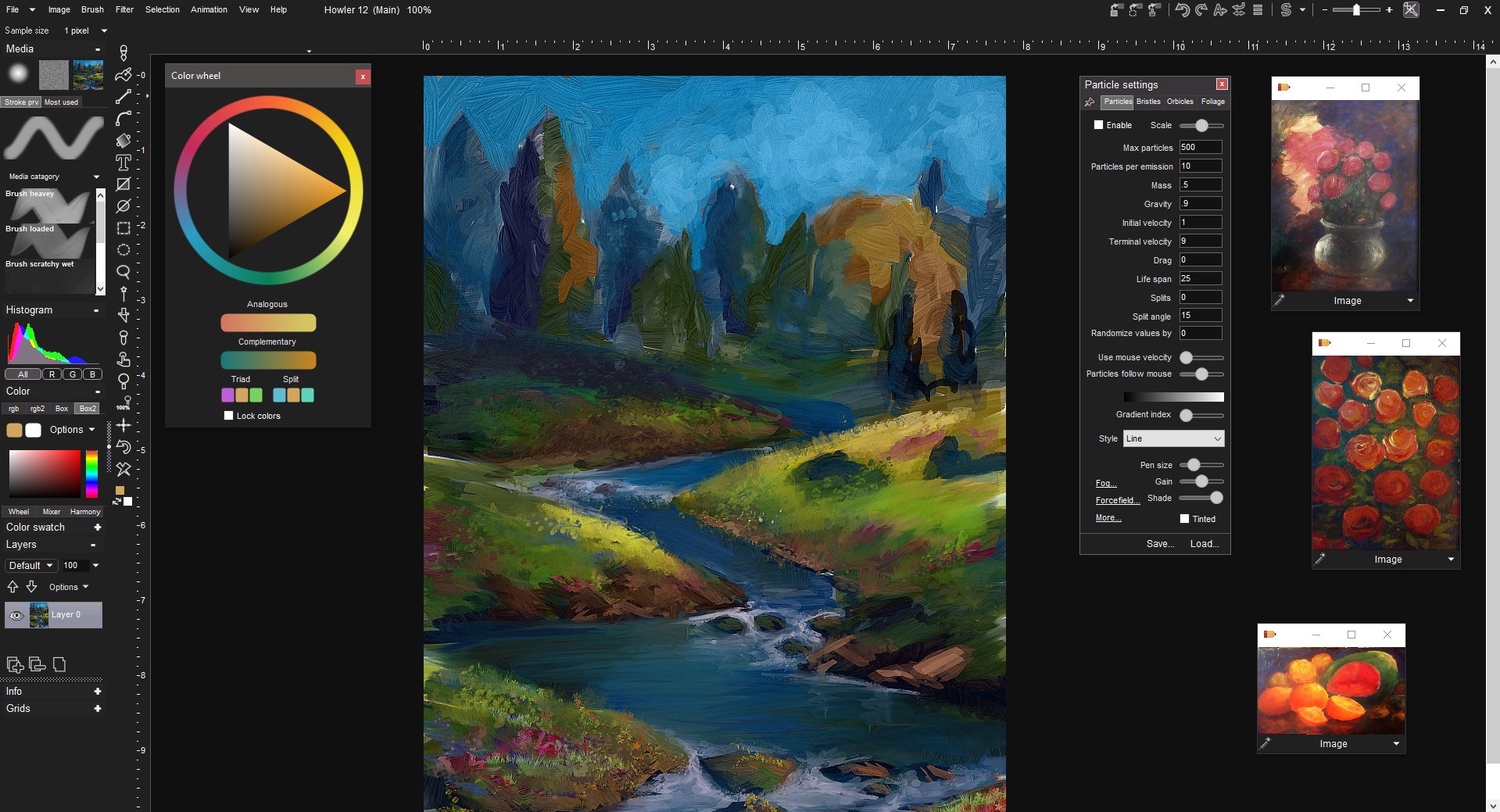
Howler is a digital art suite designed as a paint-first environment for creators focusing on natural media. The software simulates various traditional techniques, including realistic oils and watercolors, alongside naturally simulated bristle brushes. It provides comprehensive support for digitizing tablets, allowing for high-fidelity input within its native interface.
Beyond static illustration, the application functions as an animation and video painting program. Users can apply cinematic visual effects through a workflow optimized for real-time performance. This capability allows for the manipulation of video frames using the same brush tools available for digital painting. The software's engine is built to handle complex visual FX with breakthrough real-time howling performance, providing immediate feedback during the creative process.
The core features of the platform include:
- Comprehensive natural media tools for realistic bristle and paint simulation.
- Full digitizing tablet support for professional drawing workflows.
- Tools for frame-by-frame animation and direct video painting.
- Advanced visual effects processing for cinematic post-production.
By merging traditional painting logic with modern digital processing, the software offers a unified workspace for both fine artists and visual effects professionals. It streamlines the transition from a blank canvas to a finished animated sequence or a video-based project within a single environment.
Top 5 Reasons To Download Howler 2019
- Natural Media Mastery: A paint-first environment that perfectly replicates the feel of realistic oils, watercolors, and physical bristle brushes.
- Cinematic Visual Effects: Create high-end, movie-quality VFX within a familiar painting interface, bridging the gap between fine art and digital production.
- Breakthrough Real-Time Performance: Experience "howling" speed with a high-performance engine that handles complex rendering and brush strokes without lag.
- Integrated Animation and Video Painting: A comprehensive suite that allows you to paint directly onto video frames or create fluid animations from scratch.
- Full Digitizing Tablet Support: Deep integration with hardware that ensures professional-grade pressure sensitivity and ergonomic control for digital artists.
If you have been scouring the internet for a tool that finally bridges the gap between the tactile joy of traditional painting and the high-octane world of digital visual effects, your search ends here. We are looking at a piece of software that has long been a secret weapon for independent filmmakers, digital illustrators, and concept artists. Howler is not just another painting app; it is a powerhouse of creativity that defies the standard categories of the software world. Today, we are diving deep into why this specific giveaway is the absolute must-download of the year for anyone who takes their digital craft seriously.
1. Natural Media Mastery
The first and perhaps most compelling reason to grab this download is the sheer quality of its natural media engine. Many digital art programs claim to offer "natural" brushes, but often they feel like you are just dragging a static bitmap across a screen. Howler is different. It is built from the ground up as a paint-first environment. When you select an oil brush, it does not just look like oil; it behaves like oil. The software simulates the way paint builds up on a canvas, the way colors blend together when wet, and the way a dry brush drags across a textured surface.
The watercolor simulation is particularly breathtaking. If you have ever tried to do digital watercolors in other programs, you know how frustrating it can be when the paint does not "bleed" or "bloom" correctly. In this environment, the watercolor engine respects the laws of physics. You can watch the pigments diffuse into the digital paper, creating those beautiful, soft edges that were once only possible with a physical brush and a glass of water. This level of realism allows for a "happy accident" style of painting that is often lost in the sterile world of digital art.
Furthermore, the bristle brushes are naturally simulated. This means the software calculates the individual movement of hairs on the brush head. When you press harder with your stylus, the bristles splay out, creating a wider, more textured stroke. When you tilt the pen, the stroke changes accordingly. This is the kind of detail that professional illustrators crave. It makes the digital canvas feel alive, turning the act of creation into a dialogue between the artist and the medium rather than a mechanical input process.
2. Cinematic Visual Effects
While the natural media tools are enough to justify the download on their own, Howler takes things a step further by integrating cinematic visual effects (VFX) directly into the painting workflow. This is where the software truly stands apart from its competitors. Usually, if you want to create cinematic effects, you have to jump over to a complex node-based compositor or a dedicated 3D rendering suite. Howler allows you to stay within a familiar painting environment while generating world-class effects.
Imagine being able to paint a landscape and then, with a few clicks, generate a realistic 3D terrain based on your brush strokes. The software includes powerful tools for terrain synthesis, sky generation, and atmospheric lighting. You can create sprawling mountain ranges, misty valleys, and alien planets that look like they belong on the big screen. The "cinematic" aspect is not just a buzzword here; the lighting engines and ray-tracing capabilities built into the software allow for the creation of depth, shadow, and atmospheric haze that mimic professional film production.
Beyond landscapes, the software excels at particle-based effects. Whether you need to add swirling embers to a campfire scene, a magical glow to a character's hands, or realistic rain and snow to a digital matte painting, the tools are right there in your brush palette. You are not just painting static images; you are building worlds. This makes it an indispensable tool for concept artists working in the film and gaming industries who need to produce high-quality "mood boards" or environmental concepts at a rapid pace.
3. Breakthrough Real-Time Performance
In the world of digital art and VFX, the greatest enemy of creativity is the "loading bar." Nothing kills your flow faster than waiting for a stroke to render or for a filter to apply. This is why the breakthrough real-time howling performance of this software is such a game-changer. The developers have optimized the engine to ensure that even the most complex operations happen with near-zero latency.
This "howling" performance means that when you are working with large canvases or high-resolution video frames, the software remains responsive. You can scrub through a timeline, apply a complex physical filter, or use a high-resolution texture brush without the stuttering that plagues other heavy-duty creative suites. This speed is essential for professional workflows where deadlines are tight and the ability to iterate quickly is the difference between a good project and a great one.
The real-time nature of the engine also applies to its 3D rendering capabilities. You can adjust lighting parameters, change the height of a terrain, or alter the density of a cloud layer and see the results instantly. This immediate feedback loop encourages experimentation. You are more likely to try something bold or unusual when you know you don't have to wait five minutes to see if it worked. This software is built for the artist who wants to move at the speed of thought.
4. Integrated Animation and Video Painting
Many people mistake Howler for a simple image editor, but it is actually a robust animation and video painting program. This is the fourth major reason why you need to download this giveaway. The software treats video not as a separate entity, but as a sequence of frames that are all part of your canvas. This opens up a world of possibilities for rotoscoping, frame-by-frame animation, and video enhancement.
If you have a video clip that feels a bit too "digital," you can use the natural media brushes to paint over it, frame by frame, giving it a handcrafted, organic look. This technique, often seen in high-end music videos and experimental films, is made incredibly accessible here. The software provides tools to help you track movement across frames, ensuring that your painted effects stay locked to the action. You can also use the various filters and VFX tools to "re-light" a scene or add elements that weren't there in the original footage.
For those interested in traditional animation, the software offers a comprehensive set of tools for cel-style drawing. You have access to onion-skinning (viewing ghosted versions of previous and next frames), layers, and timing controls. Because you have the full power of the natural media engine at your disposal, your animations can have a level of texture and depth that is difficult to achieve in standard vector-based animation programs. You are essentially painting a masterpiece that moves.
5. Full Digitizing Tablet Support
Finally, we have to talk about the user experience. A professional tool is only as good as its interface with the user, and Howler offers full digitizing tablet support that is second to none. If you are using a Wacom, Huion, or any other professional pressure-sensitive tablet, you will find that the software translates your hand movements with incredible precision. This is where the "natural media" aspect truly shines.
The software recognizes not just the position of your pen, but the pressure you apply and, in many cases, the tilt and rotation of the stylus. This allows for an ergonomic and intuitive drawing experience. You can go from a light, wispy line to a thick, heavy stroke just by adjusting your physical pressure, exactly as you would with a real pencil or brush. This level of control is vital for reducing hand strain during long drawing sessions and for achieving the nuance required in professional illustration.
Beyond just the pen input, the interface itself is designed to stay out of your way. While it is packed with features, it prioritizes the canvas. As a reviewer, I have seen too many programs that clutter the screen with so many buttons and sliders that you lose sight of what you are actually creating. Howler maintains a focus on the act of painting. The menus are logical, the hotkeys are customizable, and the entire environment feels like a well-organized physical studio. When you download this giveaway, you aren't just getting a file; you are gaining access to a professional workspace that respects your hardware and your process.
Conclusion: Why You Need This Now
In the current landscape of creative software, we are often forced to choose between "easy to use" and "powerful." We are told that if we want professional VFX, we have to learn a cryptic interface, and if we want natural painting, we have to give up on advanced animation tools. Howler rejects that compromise. It offers a comprehensive, paint-first experience that scales from simple sketches to complex cinematic productions.
The combination of realistic media simulation, real-time performance, and integrated video capabilities makes it a unique proposition in the market. Whether you are an aspiring concept artist looking to build a portfolio, a filmmaker needing to add a touch of magic to your latest project, or a hobbyist who simply loves the feel of oil on canvas, this software provides the tools you need to succeed. The "howling" performance ensures you stay in the flow, while the tablet support ensures your physical skill translates perfectly to the digital realm.
This giveaway is an incredible opportunity to add a high-end, professional-grade tool to your creative arsenal without the usual overhead. Opportunities to get a "comprehensive environment" of this caliber for free do not come around often. If you want to elevate your art, speed up your workflow, and explore the boundaries of what is possible with digital paint and video, do not hesitate. This is the tool you have been waiting for. Download it, open the canvas, and let your creativity howl.
The software described in this article represents a pinnacle of independent development, focusing on the needs of the artist above all else. Its legacy in the digital art world is well-earned, and its future—with you at the helm—is limitless.

Reviews for Howler 2019
Click Here to Read Reviews for Howler 2019 >> Click Here to Submit Reviews for Howler 2019 >>