Original price was: $9.00.Current price is: $0.00. (100% off)
Sale has ended!
Get More Giveaways And Discounts Discuss This Offer >> Submit A Review >>

Overview

Top 5 Reasons To Download Multiple Search and Replace

Alright, tech enthusiasts, developers, webmasters, and anyone who’s ever stared at a mountain of files needing a crucial, repetitive tweak – gather 'round! Today, we're not just looking at another utility; we're diving deep into a productivity powerhouse, a veritable digital Swiss Army knife for text manipulation across your entire digital domain. Forget the days of tedious manual edits, the fear of missing a critical change, or the sheer frustration of a task that feels like searching for a needle in a haystack made of binary code. We're talking about Multiple Search and Replace, a piece of software that promises to revolutionize the way you interact with your files, and frankly, it delivers on that promise with a spectacular flourish.

In a world where time is our most precious commodity, and efficiency is the ultimate hack, an application that can save you hours, even days, of painstaking work isn't just a convenience – it's an indispensable tool. Imagine updating a copyright year across thousands of website files, changing a contact number in hundreds of Word documents, or refactoring a variable name across an entire codebase in mere moments. This isn't science fiction; it's the everyday reality that Multiple Search and Replace makes possible. And the best part? For those of you lucky enough to be seeing this as a giveaway, you're looking at a zero-cost entry into a world of unparalleled digital mastery. So, why should you absolutely, positively hit that download button right now? Let's break down the top five reasons why this isn't just a useful piece of software, but a fundamental upgrade to your digital toolkit.

  1. Your Universal Text Transformation Toolkit: Conquer Any File Type!
  2. Precision Engineering for Pinpoint Accuracy and Unmatched Power.
  3. Turbocharge Your Workflow: Instant Actions & Seamless Integration.
  4. Unleash Granular Control: Master Your Data with Surgical Precision.
  5. Designed for Everyone: Powerful Yet Painlessly Intuitive.

---

1. Your Universal Text Transformation Toolkit: Conquer Any File Type!

Let's face it: in today's digital landscape, our data isn't confined to neat, uniform text files. We're awash in a sea of formats – from web pages to sprawling spreadsheets, elaborate presentations to intricately formatted PDFs, and the ever-present Word documents. The nightmare scenario for anyone needing to make a consistent change across these disparate file types usually involves opening each one individually, waiting for the application to load, performing the search and replace, saving, and then repeating the excruciating process hundreds or even thousands of times over. This is not just inefficient; it's a soul-crushing exercise in redundancy. Enter Multiple Search and Replace, the hero you didn't know you needed, armed with a file type compatibility list that will make your jaw drop.

This software isn't picky. It doesn't care if your critical information is buried in a plain old Text file (and yes, it handles various encodings, so no more Mojibake nightmares!), a dynamic Webpage (HTML, CSS, JS – bring it on!), a meticulously crafted Word document, a data-rich Excel spreadsheet, an impactful PowerPoint presentation, a formatted Rich Text Format (RTF) document, an open-standard Open Text Format (ODT) file, or even a notoriously difficult-to-edit PDF file. Think about that for a second. This single application can traverse the vast majority of common document and data formats you encounter daily, allowing you to perform consistent, sweeping changes across your entire digital archive. The implications for productivity are nothing short of revolutionary.

Imagine being a webmaster tasked with updating a specific footer link or copyright year across an entire website comprising hundreds of HTML, CSS, and JavaScript files. Historically, this would be a monumental task, riddled with the risk of human error. With Multiple Search and Replace, you define your search and replace terms once, specify your target folders, and watch as it meticulously updates every relevant file in moments. Or consider the developer needing to refactor a deprecated function name across an older project, potentially spanning multiple script types. This tool transforms a week-long grind into an afternoon's work, freeing you up for more creative, impactful tasks.

But its versatility doesn't stop at mere substitution. This incredible utility doubles as an invaluable data extraction and organizational assistant. Ever needed to compile a list of all email addresses mentioned across a sprawling collection of Word documents? Or perhaps update all instances of an old telephone number in various marketing materials spread across different file types and folders? Multiple Search and Replace excels at this. You can define a search term (perhaps using a regular expression for email patterns), let the software scour your specified directories, and then extract all found instances. This capability transforms it from a simple find-and-replace tool into a powerful information mining system, offering unparalleled insight and control over your data. It's like having a dedicated digital archivist at your fingertips, able to pluck out specific pieces of information from the densest digital jungles.

And what about those moments of panic when you remember a key phrase or keyword from a document you desperately need, but have no idea where it’s saved? Forget digging through endless folders and opening files one by one. This software can act as your personal digital detective, finding lost documents based on keywords of their content, regardless of the file type. It’s a lifesaver for anyone dealing with large, unorganized data sets, offering a quick and efficient way to pinpoint crucial information when you need it most. The sheer breadth of file types supported, combined with its ability to not just modify but also extract and locate information, makes Multiple Search and Replace an absolute cornerstone for anyone serious about managing their digital life efficiently. It truly is a universal toolkit, designed to conquer any textual transformation challenge you throw its way, regardless of the format.

2. Precision Engineering for Pinpoint Accuracy and Unmatched Power.

In the realm of text manipulation, "good enough" often isn't. When you're making changes across potentially thousands of files, accuracy is paramount. A single misplaced character or an overly broad search can wreak havoc, turning a productivity gain into a data recovery nightmare. This is where Multiple Search and Replace distinguishes itself, offering a suite of precision tools that elevate your search and replace operations from blunt instruments to surgical scalpels. This isn't just about finding text; it's about finding exactly the right text, in exactly the right context, with an unmatched level of control.

At the heart of its precision capabilities lies robust support for regular expressions and wildcards. For anyone who's ever dealt with dynamic patterns, variable data, or complex textual structures, the power of regular expressions is undeniable. Whether you're trying to match any digit, a specific range of characters, or an entire pattern of text that varies slightly, regex allows you to define your search with incredible granularity. This moves beyond simple string matching into a sophisticated pattern recognition system. Combined with wildcards, you gain immense flexibility to identify and modify text that adheres to a general schema rather than an exact, static string. For developers working with code, or data analysts cleaning up inconsistent data, this feature alone is worth its weight in digital gold, enabling complex transformations that would be utterly impossible with basic search functions.

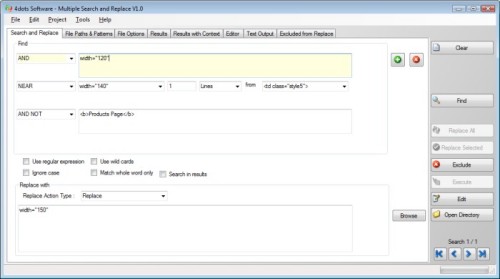
But the precision doesn't stop there. Multiple Search and Replace understands that sometimes, a single search term isn't enough, or the context of that term matters immensely. That's why it allows for multiple search terms, each with different, powerful search operators. Imagine needing to find instances of "client name" only when it appears near "invoice number," or needing to ensure that a document Must Contain a specific keyword, but Must Not Contain another. The available operators – Contains, Must Contain, Must Not Contain, Exclusively Contains, and the incredibly useful Contains near text – provide an almost conversational level of control over your search logic. This allows you to construct highly specific queries, drastically reducing false positives and ensuring that your changes are applied only where truly intended. It's like having a highly intelligent assistant who understands nuance, not just exact matches.

Beyond the content itself, the software empowers you with an astonishing array of sophisticated search criteria based on the location and characteristics of the match within a file. Need to find text only if it appears a certain match count within a file? Or perhaps only on a specific line number, or within a particular character position in file and line? For documents with more structure, you can even specify criteria like page number or worksheet number. This level of detail is simply unheard of in most mass search-and-replace tools. It allows for incredibly targeted operations, such as correcting a recurring header error on a specific page across a batch of PDFs, or adjusting a formula on a particular worksheet in multiple Excel files. This surgical precision ensures that your changes are applied with absolute confidence, eliminating the anxiety typically associated with large-scale file modifications.

Furthermore, the ability to handle multi-line search terms and replace text is a game-changer for anyone dealing with blocks of code, paragraphs of text, or formatted data that spans multiple lines. Most standard tools choke when a search or replace string crosses a line break, forcing users into cumbersome workarounds. Multiple Search and Replace effortlessly handles these complex patterns, making it ideal for refactoring multi-line code snippets, updating contact blocks in documents, or reformatting complex data structures. This meticulous attention to detail and robust feature set truly sets it apart, ensuring that no matter how complex or specific your textual manipulation needs, you have the power and precision to execute them flawlessly. It transforms a daunting task into a manageable, highly accurate operation, giving you complete control over your data transformations.

3. Turbocharge Your Workflow: Instant Actions & Seamless Integration.

A truly great utility doesn't just perform a task; it integrates seamlessly into your workflow, streamlining subsequent steps and enhancing overall productivity. Multiple Search and Replace understands that finding and replacing text is often just the beginning of a larger process. That’s why it’s engineered with a comprehensive suite of post-search actions and reporting capabilities designed to turbocharge your workflow, allowing you to move from identification to resolution with unprecedented speed and efficiency. This isn't just about saving time on the search; it's about optimizing your entire subsequent process.

Once your powerful search criteria have done their job and presented you with a list of found files, the real magic of workflow integration begins. Instead of manually navigating to each file to perform an action, the software empowers you with a range of immediate, actionable options directly from the results pane. Need to consolidate all the affected files into one location for further review? You can effortlessly copy or move them to a specified folder. Found a bunch of outdated or redundant files during your search? You can delete them with a single click, reclaiming valuable disk space. For quick sharing or temporary storage, the option to copy files to the clipboard is incredibly handy. And for those instances where a large number of affected files need to be archived or shared compactly, the ability to compress them to a file directly from the application is an absolute godsend, saving you the hassle of using a separate archiving utility.

Beyond file management, comprehensive result reporting ensures that you have complete visibility and documentation of your operations. The list of found files can be saved, printed, or exported, providing a clear record of your changes or a manifest for further action. This is invaluable for compliance, auditing, or simply for tracking your progress on large projects. Imagine needing to provide a list of all files modified in a specific update, or documenting which documents contained sensitive information. With Multiple Search and Replace, generating these reports is effortless, turning a potential administrative headache into a quick, automated task. The ability to export this data for use in other applications further enhances its integration into broader data management strategies.

One of the most compelling workflow enhancements, however, is the built-in editor. How many times have you performed a search, identified a file, then had to close your search tool, navigate to the file's location, open it in a separate editor, make your final tweaks, save, close, and then return to your search? It's a disjointed, momentum-killing process. Multiple Search and Replace eliminates this friction entirely. When you see a search result and realize a slight manual adjustment or an additional context-specific change is required, you can directly edit the found file within the application itself. This seamless transition from search result to editable document keeps you in the flow, preventing context switching and drastically accelerating your refinement process. You can see the context of each search result with the match highlighted, ensuring you’re always focused on the exact text you need to examine or modify, making the built-in editor an indispensable feature for precision work.

This holistic approach to file management and editing, integrated directly into the search and replace process, transforms Multiple Search and Replace from a simple utility into a core component of an efficient digital workflow. It's not just about doing the job; it's about doing it faster, smarter, and with fewer interruptions, ensuring that your valuable time is spent on productive tasks rather than administrative overhead. By providing instant actions and seamless integration, it truly turbocharges your ability to manage and modify vast quantities of digital information.

4. Unleash Granular Control: Master Your Data with Surgical Precision.

The true mark of a powerful software utility lies in its ability to offer both broad efficiency and minute, granular control. While Multiple Search and Replace excels at sweeping, mass changes, its design philosophy deeply understands that precision often requires narrowing the scope, filtering out irrelevant noise, and targeting specific conditions. This is where its robust suite of advanced filtering and conditional search capabilities comes into play, empowering you to master your data with surgical precision, ensuring that your operations are applied only to the files and contexts that truly matter. This level of refined control ensures accuracy and prevents unintended modifications, giving you peace of mind during complex operations.

One of the standout features in this regard is its ability to search within compressed archives. In today's digital world, it’s common for critical data, legacy projects, or backups to be stored within ZIP, RAR, or other archive formats. Most search tools would simply skip over these, forcing you to manually extract them, search, and then re-archive – a cumbersome and time-consuming process. Multiple Search and Replace eliminates this bottleneck entirely, allowing you to peer into these compressed containers as if they were regular folders. This is incredibly valuable for developers searching through old project archives, system administrators looking for configuration files in backups, or anyone trying to locate information without the overhead of decompression. It's an invisible hand reaching into the hidden corners of your digital storage, ensuring no stone is left unturned.

Beyond file content, the software provides powerful additional search criteria based on file metadata. You can narrow your search by file attributes (e.g., read-only, hidden, system files), ensuring you only target files with specific properties. This is crucial for maintaining data integrity and avoiding changes to system-critical files. Imagine needing to update old documentation, but only in user-modifiable files, not those marked as system archives. This level of control makes it possible. Furthermore, you can filter by file size, allowing you to exclude tiny log files or massive media assets that are unlikely to contain the text you’re looking for. And perhaps most importantly, filtering by file date – creation, modification, or access dates – provides an invaluable temporal filter. Need to update a branding element only in documents modified within the last six months? Or find a specific keyword only in files created before a certain project deadline? This temporal control is a game-changer for project management, compliance, and historical data analysis, allowing you to target your efforts to the most relevant versions of your files.

The flexibility extends to defining your search scope with exceptional clarity. You have the power to specify multiple file paths to be included or excluded in the search. This means you can easily tell the software to search an entire drive, but meticulously skip over system folders, backup directories, or specific project subfolders that are known to be irrelevant. This prevents wasted processing time and, more importantly, prevents accidental modifications to sensitive areas. Complementing this, the ability to specify multiple file masks (e.g., "*.html", "*.css", "*.js", "*.docx") allows you to precisely define the types of files you want to target, or conversely, explicitly ignore. This combination of path inclusion/exclusion and file mask filtering provides an unparalleled level of command over exactly where and what the software analyzes, transforming a broad search into a finely tuned, highly efficient operation. No more sifting through irrelevant files; your search becomes hyper-focused on exactly what you need to address.

This commitment to granular control ensures that whether you're performing a delicate database update or a sweeping code refactor, you have the tools to operate with confidence and precision. It minimizes risk, maximizes efficiency, and ultimately grants you unparalleled mastery over your digital assets. By offering such sophisticated filtering based on file metadata, location, and even compression status, Multiple Search and Replace elevates itself from a mere utility to an essential command center for your data, empowering you to execute even the most complex textual transformations with absolute confidence.

5. Designed for Everyone: Powerful Yet Painlessly Intuitive.

Often, software that boasts immense power and granular control comes with a steep learning curve, a labyrinthine interface, or a developer-centric design that alienates the average user. Not so with Multiple Search and Replace. One of its most impressive achievements is the harmonious balance it strikes between its robust, feature-rich backend and a front-end that is remarkably user-friendly and intuitive. This isn't just a tool for the tech elite; it's designed to be accessible and efficient for everyone, from the casual user to the seasoned professional, making powerful text manipulation a painless experience for all.

At its core, the application features a beautifully designed, user-friendly GUI interface. You won't find yourself lost in endless menus or convoluted settings. The layout is logical, the options are clearly presented, and the workflow is easy to follow. This means that even if you're a beginner, you can quickly grasp the fundamental operations – defining your search, specifying your folders, and executing a replace – without needing to consult a hefty manual. Icons are intuitive, fields are clearly labeled, and the overall experience is one of clarity and control, not confusion. This commitment to ease of use ensures that the powerful capabilities discussed earlier are not locked behind a barrier of complexity, but are readily available to anyone who needs them.

However, for the power users, system administrators, and developers who demand automation and integration into scripts, Multiple Search and Replace doesn't compromise on flexibility. It can also be easily executed from the command-line. This dual functionality is a testament to its thoughtful design. You can leverage the intuitive GUI for interactive, ad-hoc tasks, and then seamlessly transition to command-line execution for batch processing, automated deployments, or integration into larger scripts and workflows. Imagine setting up a nightly cron job to check for and update specific text in log files, or triggering a mass replacement as part of a continuous integration pipeline. The command-line interface provides that level of programmatic control, making it an incredibly versatile tool for diverse environments and user needs.

A crucial aspect of its user-friendliness, particularly for verification and confidence, is the ability to see the context and the line of each search result, with the search result being highlighted. When dealing with hundreds or thousands of potential matches, it’s not enough to just see a filename. You need to instantly understand *where* the match occurred and what surrounds it. This feature provides an immediate visual confirmation, allowing you to quickly scan through results, verify the accuracy of your search, and ensure that any intended changes are appropriate in their specific context. The highlighting makes the target text jump out, drastically speeding up the review process and instilling confidence in your operations, preventing the anxiety of "blind" replacements.

And finally, in our increasingly interconnected global landscape, accessibility is key. Multiple Search and Replace proudly boasts that it is a multilingual application, translated into more than 39 languages. This is a significant detail, as it breaks down language barriers and makes this powerful utility accessible to a truly global audience. Whether you prefer to work in English, Spanish, German, Chinese, or any of the dozens of other supported languages, the interface will adapt to your preference, ensuring that the software feels native and intuitive no matter where you are or what your primary language is. This commitment to internationalization underscores the developer's dedication to creating a tool that truly serves everyone, everywhere.

In essence, Multiple Search and Replace manages to be a sophisticated, feature-packed beast without ever feeling overwhelming. It offers an intuitive front door for novices while providing a robust, extensible back entrance for pros. This blend of power and approachability ensures that you can unlock its full potential quickly and effectively, making it an indispensable tool for anyone who interacts with text files on a regular basis. So, if you're ready to reclaim your time, boost your productivity, and exert absolute control over your digital text, there's simply no reason not to download this giveaway today. It's a fundamental upgrade to your digital arsenal, waiting to transform your workflow.

Official Description

Multiple Search and Replace is a powerful utility that can search and replace text in multiple files at the same time. It supports Text files (various encodings also supported), Webpage, Word, Excel, PowerPoint, Rich Text Format, Open Text Format and Pdf files.

Also it can search in compressed archives.

It is ideal for webmasters, developers and all others who want to make a quick replace in many files at the same time.Also it can be used to extract information, for example to extract all email addresses found in Word Files of a specific directory. Or it can be used , for example, to change the telephone numbers in all Word files of a directory, or to find a lost Word document based on keywords of its content.

Regular expressions and wildcards can be used for the search. The searches can have multiple search terms with different search operators

The found files can be copied or moved to a folder, deleted, copied to the clipboard, or compressed to a file. The list of found files can be saved, printed or exported.

Sophisticated search criteria can be set, such as : match count in file, line number, character position in file and line and page number, worksheet number etc.

Additional search criteria include file attributes, file size and file date.

The search term and the replace text can be multi-line, and the search operators are Contains,Must Contain,Must Not Contain,Exclusively Contains, Contains near text. Multiple file paths can be included or excluded in the search and multiple file masks can be specified.

All search results can be reported on and the output results can easily be sorted.

It is also possible to see the context and the line of each search result and the with the search result being highlighted.

The search result files can be directly edited with the built-in editor.

The application has a user friendly GUI interface but can also be easily executed from the command-line.

The application is multilingual and translated into more than 39 languages.