What Does PaperScan Pro Do?
PaperScan is a universal document acquisition and management tool designed to bridge the gap between disparate hardware and software protocols. Unlike proprietary scanning applications that are typically restricted to specific manufacturer hardware, this utility provides a standardized interface for various devices. Users can import existing PDF or image files to reconfigure document layouts, supporting both single-page and complex multi-page arrangements.
The software features a professional suite of image adjustment and enhancement tools aimed at improving legibility and visual fidelity. Beyond basic capture, PaperScan enables precise document markup through a variety of integrated annotation tools. Users can apply sticky notes, rubber stamps, arrows, and highlighters to their files. These features facilitate collaborative review and internal categorization within a single interface.
Export flexibility is a central focus of the application. Once processing is complete, documents can be saved in several industry-standard formats, including JPEG, TIFF, and PDF. It also supports JBIG2, a specialized compression format for bi-level images. By decoupling document acquisition from specific scanner drivers, PaperScan offers a centralized solution for digitizing, annotating, and archiving paper-based assets in a professional environment.
Top 5 Reasons To Download PaperScan Pro
- Universal Scanner Compatibility: This software works with any scanner model and protocol, liberating you from the limitations of clunky, proprietary manufacturer drivers.
- Professional-Grade Image Enhancement: It features an advanced engine that automatically corrects skewed pages, removes punch-hole marks, and cleans up digital noise for a pristine finish.
- Comprehensive Document Management: You can easily rearrange, merge, or split single and multi-page documents from various sources into one cohesive file.
- Robust Annotation and Markup Tools: The software allows you to add sticky notes, rubber stamps, highlights, and arrows directly onto your documents for seamless collaboration.
- Optimized File Compression and Format Support: It supports a wide range of output formats including PDF, TIFF, and JBIG2, ensuring your files are high-quality yet small enough for easy sharing.
If you have ever spent a frustrating afternoon trying to get a printer-scanner combo to communicate with your PC, you know exactly why the world of digital document acquisition is a minefield of proprietary software and broken drivers. Most of us settle for whatever basic utility came in the box, enduring clunky interfaces and limited features just to get a piece of paper onto our hard drives. But what if I told you there is a professional-grade alternative that not only works with every scanner you own but also turns those scans into polished, high-end digital assets? That is exactly what we are looking at today. This software is a powerhouse designed for anyone who takes document management seriously. Whether you are a home user trying to digitize a mountain of old receipts or a business professional managing a paperless office, this is a tool you need in your digital belt. Let’s dive deep into why this specific giveaway is a total game-changer for your productivity.
Reason 1: True Universal Compatibility
The single biggest headache in the world of scanning is hardware compatibility. We have all been there: you buy a new scanner, or you upgrade your operating system, and suddenly your favorite scanning tool stops working because the manufacturer decided to stop updating the drivers. It is a cycle of planned obsolescence that drives tech enthusiasts crazy. This software solves that problem by being truly universal. Unlike the software that comes bundled with your hardware, which is usually locked to a specific brand or model, this application is designed to communicate across the board.
It supports both TWAIN and WIA protocols, which are the industry standards for image acquisition. This means whether you are using a high-end flatbed, a portable wand scanner, or a massive multi-function office copier, this software will see it, talk to it, and control it. But the "universal" nature of this app goes even further. It doesn’t just work with hardware; it works with your existing digital files too. You can import existing PDFs and images just as easily as you can scan a fresh sheet of paper. This makes it a central hub for all your document acquisition needs, regardless of where those documents originate. You no longer need five different apps for five different tasks; this one tool handles the entire intake process with ease.
Furthermore, because it isn't tied to a specific hardware manufacturer, the interface is consistent. You don’t have to relearn a new menu system every time you switch scanners. This consistency is a massive boost for productivity, especially in environments where multiple devices are in use. It creates a streamlined workflow that is predictable and reliable, which is exactly what a professional-grade tool should provide.
Reason 2: Advanced Image Enhancement and Cleaning
Scanning a document is only half the battle. If you have ever used a cheap scanner or a fast document feeder, you know the results are often less than perfect. You end up with crooked pages, black borders around the edges, or distracting marks from where the paper was hole-punched. In a professional setting, sending out a document that looks like a messy photocopy is not an option. This is where the enhancement engine of this software really shines.
The app includes a sophisticated set of tools designed to automatically "clean" your documents. One of the standout features is the auto-deskew function. If your paper went into the feeder slightly crooked, the software detects the angle and digitally straightens it for you. It also offers punch-hole removal, which intelligently identifies those black circles along the margin of a scanned page and fills them in to match the background. This results in a clean, white digital sheet that looks like it was generated digitally rather than scanned from a physical copy.
Beyond just fixing alignment and holes, the software allows for deep image adjustments. You can manage color detection to save file space, convert documents to grayscale or bitonal (black and white) to improve legibility, and adjust brightness, contrast, and saturation. There are even filters for noise reduction and sharpening. Essentially, it gives you the power of a photo editor within a document scanner. For those dealing with old, faded, or low-quality originals, these tools are indispensable for recovering lost information and making the text pop against the background. It turns mediocre scans into high-fidelity digital archives.
Reason 3: Flexible Page Management and Arrangement
Most basic scanning apps treat every scan as a single event. If you scan ten pages, you get ten separate files, and then you have to find another piece of software to stitch them together. This software takes a much more holistic approach to document management. It treats the scanning process as a workspace where you can manipulate and arrange your pages exactly how you want them before you ever hit "Save."
The ability to arrange pages in any imaginable configuration is a massive win for efficiency. You can drag and drop pages to reorder them, delete unnecessary pages that might have been scanned by accident, or insert new pages into an existing document. This flexibility is perfect for creating complex multi-page PDFs from various sources. For instance, you could scan a three-page contract, import a PDF of a signature page from your email, and add a JPEG of a supporting photo, all into a single, cohesive file.
This "batch" mindset allows you to work with single-page or multi-page configurations effortlessly. You can split a large document into several smaller ones or merge multiple different scans into one massive archive. The software provides a visual thumbnail view of your entire project, making it easy to see the flow of the document and ensure everything is in the right place. It’s like having a digital light table for your documents, allowing for total control over the final output structure. This level of organization is usually reserved for very expensive enterprise software, but you get it right here in this package.
Reason 4: Rich Annotation and Collaboration Tools
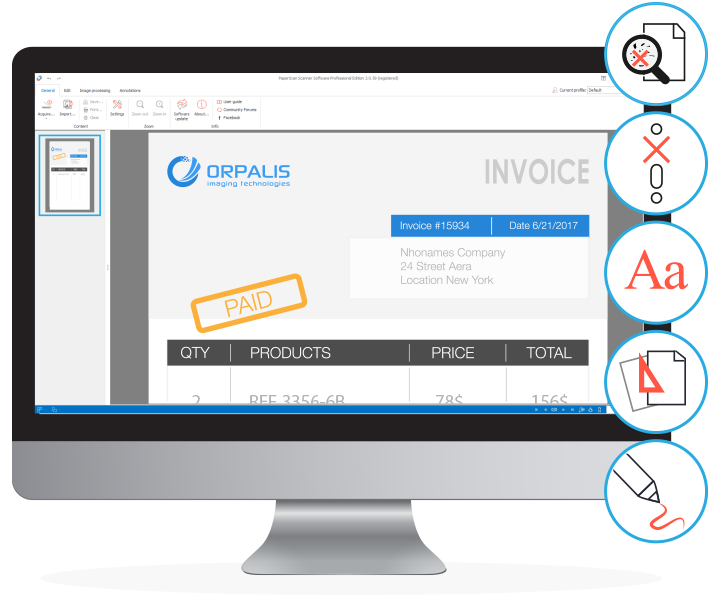
In today's digital world, a document is rarely "finished" once it is scanned. Often, that scan is just the beginning of a collaborative process. Maybe you need to highlight a specific clause in a contract, add a "Paid" stamp to an invoice, or leave a note for a colleague about a specific figure. Usually, this requires exporting the file and opening it in a separate PDF editor. This software eliminates that extra step by building annotation tools directly into the interface.
The annotation suite is surprisingly robust. You can add sticky notes to provide context or instructions. You can use highlighters to draw attention to key text. There are arrows and shapes to point out specific details in diagrams or forms. One of the most useful features for business users is the rubber stamp tool. This allows you to quickly mark documents as "Approved," "Confidential," or "Draft," giving your digital files a professional, official look instantly.
These annotations aren't just superficial; they are integrated into the workflow, allowing you to mark up a document as you are reviewing it for the first time. This is a huge time-saver for anyone involved in legal, financial, or administrative work. Instead of printing a document, marking it up with a pen, and re-scanning it, you can do it all digitally with perfect clarity. This keeps your documents "born digital" and searchable, rather than degrading the quality through multiple rounds of printing and scanning. It’s a modern way to handle paperwork that saves time, ink, and paper.
Reason 5: Optimized Storage and Professional Formats
The final reason you absolutely need to download this software is how it handles the "exit" phase of the process. How you save a document is just as important as how you scan it. If your files are too large, you can't email them. If they are in the wrong format, your clients can't open them. This software provides an array of professional output options that ensure your files are optimized for their intended use.
It supports all the standard formats you would expect, like JPEG and TIFF, but it goes much further. The PDF support is top-notch, allowing you to create compact, searchable documents. However, the real "secret sauce" here is the support for JBIG2. For the uninitiated, JBIG2 is an industry-standard compression format specifically designed for bi-level (black and white) images. It can compress scanned text documents into files that are incredibly small—sometimes 10 times smaller than a standard PDF—without losing any readability. This is a must-have for long-term archiving or for anyone who needs to manage large volumes of documents without filling up their cloud storage.
Having these options at your fingertips means you can tailor the output to the situation. Need a high-quality color scan of a photo? Use TIFF. Need a quick, small copy of a 50-page manual? Use a JBIG2-compressed PDF. The software gives you the power to choose the perfect balance between quality and file size. In an era where we are constantly hitting attachment limits and storage caps, this level of optimization is a gift. It ensures that your digital library is not only high-quality but also manageable and easy to share.
Final Thoughts: Why This Giveaway is a Must-Have
We often overlook the tools we use for basic tasks like scanning, but when you find a piece of software that handles every aspect of the process with such precision, it’s impossible to go back to the basic alternatives. This software represents a significant upgrade over the "good enough" tools that most people use. It bridges the gap between hardware and software, between raw scans and finished professional documents.
By offering universal compatibility, it protects you against future hardware changes. By providing advanced cleaning tools, it ensures your work always looks its best. The page management features give you the flexibility to handle complex projects, while the annotation tools make collaboration a breeze. Finally, the optimized saving options ensure that your hard work is preserved in the most efficient way possible. It is a complete, end-to-end solution for anyone who deals with documents.
In the world of tech, we are always looking for that "one tool" that can replace three or four others. This is that tool for the world of scanning. It is sleek, it is powerful, and most importantly, it is intuitive. You don't need to be a technical expert to get professional results. Everything is laid out in a way that makes sense, allowing you to focus on your work rather than fighting with your software. If you have the chance to add this to your collection through this giveaway, do not hesitate. This is a professional-grade utility that will pay for itself in saved time and reduced frustration within the first week of use. Download it, run your first scan, and see the difference for yourself. Your digital filing cabinet will thank you.
In conclusion, the combination of technical versatility and user-centric features makes this one of the most compelling downloads available right now. It takes the chore of scanning and turns it into a streamlined, high-quality workflow. Whether for personal archives, academic research, or professional business use, this software stands head and shoulders above the competition. Don't miss out on the opportunity to elevate your document game to the next level.

Reviews for PaperScan Pro
Click Here to Read Reviews for PaperScan Pro >> Click Here to Submit Reviews for PaperScan Pro >>