What Does Sanwhole WordHost [3-Year Web Hosting] Do?
Sanwhole WordHost is a web publishing service designed to bypass traditional HTML coding and drag-and-drop site builders. The platform allows users to convert standard Microsoft Word documents into professional websites by uploading files directly to their accounts. This approach eliminates the need for online editing, as all content creation and modifications occur offline within the Word environment.
The service preserves complex formatting that is often difficult to implement in standard web design, including tables, shapes, charts, and SmartArt. Once a document is uploaded, the system generates a live site with a customized domain in a matter of minutes. Because the source files remain on the user's local machine, the Word documents serve as an inherent backup and restoration system; updating the site requires only modifying the local file and re-uploading it.
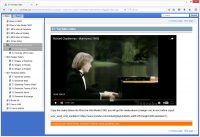
WordHost is capable of managing large-scale projects, such as online help centers containing thousands of pages. Additionally, it supports the integration of external resources, including YouTube and Vimeo embeds, MP4 videos, and third-party tools like Disqus. This giveaway provides a streamlined workflow for users who prefer the familiar interface of word processing over traditional content management systems.
Top 5 Reasons To Download Sanwhole WordHost [3-Year Web Hosting]
- Zero Learning Curve: No Coding and No Drag-and-Drop Required
- Professional Visual Fidelity with Advanced Word Elements
- The Ultimate Offline Editing Experience and Local-First Control
- Seamless Scalability for Massive, Content-Heavy Websites
- Effortless Backup and Disaster Recovery Strategy
I have spent the better part of the last two decades reviewing every piece of software that promises to make web development "easy." I have seen the rise of complex Content Management Systems, the birth of the "drag-and-drop" era, and the endless "no-code" revolutions that often require you to learn a whole new proprietary language anyway. But every so often, a tool comes along that actually understands what the user wants. We do not want more buttons to click or more widgets to configure. We want to take the tools we already know and turn them into something digital, functional, and beautiful. That is exactly why you need to pay attention to Sanwhole WordHost.
Imagine for a second that the document you just finished typing in Microsoft Word—the one with the perfect margins, the professional-looking tables, and the SmartArt diagrams—could be a live, published website in less time than it takes to brew a cup of coffee. No HTML, no CSS, no frustrating alignment issues with an online builder. This is the promise of WordHost, and in this review, I am going to break down why this giveaway is an absolute must-have for anyone from small business owners to technical writers.
1. Zero Learning Curve: No Coding and No Drag-and-Drop Required
The biggest barrier to entry for anyone wanting to start a website is the technical wall. Even with modern "simple" builders, you are forced to learn how their specific ecosystem works. You have to understand containers, columns, padding, and how to navigate a cluttered sidebar of widgets. For many professionals, this is a waste of time. Your expertise is in your content, not in being a web designer. This is where WordHost shines with a brilliance that is honestly refreshing.
When the service says "No HTML coding," they mean it. You don't ever have to look at a single bracket of code. But even more impressive is the "no drag-and-drop" claim. While drag-and-drop was supposed to be the savior of web design, it often turns into a nightmare of elements jumping around the screen or refusing to align on mobile devices. WordHost bypasses this entire frustration by leveraging a tool you have likely used for years: Microsoft Word.
If you can write a letter, you can build a website. You open Word, type your content, format it exactly how you want it to look on the page, and save it. That is it. The process of turning that file into a live website takes seconds—at most, a few minutes for larger files. By eliminating the learning curve entirely, WordHost allows you to focus on the message you want to send to the world rather than the method of how that message is displayed. It is the most democratic way to get on the web today.
2. Professional Visual Fidelity with Advanced Word Elements
If you have ever tried to build a website from scratch, or even used a popular CMS, you know the absolute headache of creating a table. HTML tables are notoriously difficult to style, they break easily, and making them look professional requires a deep dive into CSS. And don't even get me started on charts or histograms. Usually, you have to create them in another program, take a screenshot, and upload them as a static image, which looks terrible on high-resolution screens.
WordHost changes the game by allowing you to use the full power of the Microsoft Office suite. Think about the professional features packed into Word: Shapes, Clip Art, SmartArt, and highly customizable Charts. With WordHost, these aren't just converted into flat images; they are integrated into your website as professional, stunning elements. You can have a complex histogram or a beautiful SmartArt flow chart on your website that looks exactly like it did in your document.
This level of visual fidelity is almost impossible to achieve with standard web builders without hiring a professional developer. By using WordHost, you are essentially using Microsoft’s multi-billion dollar layout engine as your web designer. The result is a website that looks polished, corporate, and authoritative. Whether you are creating a technical manual, a portfolio, or a business landing page, the ability to use native Word elements gives you a massive advantage in professional presentation.
3. The Ultimate Offline Editing Experience and Local-First Control
One of the biggest complaints I hear from web creators is the lag and instability of online editors. We have all been there: you are halfway through an important update, your internet flickers, and the "auto-save" fails. Or, you are working in a coffee shop with slow Wi-Fi, and every time you click a button, you have to wait five seconds for the server to respond. It is a workflow killer.
WordHost offers a "local-first" philosophy that is a dream for productivity. You do all your heavy lifting, editing, and layout work offline in Microsoft Word. It doesn't matter if your internet is down or if you are on a plane; you can refine your website to perfection. Because you are working in a local application, the response time is instantaneous. There is no lag, no loading spinners, and no server timeouts.
Once you are happy with the changes, you simply upload the file to your WordHost account. The transition from your local drive to the live web is seamless. This also means you can maintain multiple versions of your site on your computer. You can work on a "Version 2.0" of your site for weeks in a private Word folder and only publish it when it is 100% ready. This level of control and speed simply cannot be matched by any online drag-and-drop editor, no matter how fast your network connection is.
4. Seamless Scalability for Massive, Content-Heavy Websites
Most "easy" website builders fall apart when you try to move beyond a few pages. They become sluggish, the navigation menus become impossible to manage, and the organization of content becomes a chaotic mess. This is a significant problem for companies that need to host extensive online help documentation, technical manuals, or massive educational resources.
WordHost is specifically designed to handle "heavy loaded" websites. The service can build a site with a thousand pages with the same ease that it builds a single-page portfolio. Because each Word file can represent a structured part of your site, organizing a massive knowledge base becomes as simple as organizing files in a folder on your Windows PC. For technical writers, this is a "holy grail" feature.
Imagine trying to hand-code or drag-and-drop 1,000 pages of help documentation. It would take months. With WordHost, you can take your existing documentation—the manuals your team has already written in Word—and turn them into a searchable, professional online help portal in a fraction of the time. This scalability makes it a powerful tool not just for individuals, but for enterprises that need to get vast amounts of information onto the web quickly and reliably.
5. Effortless Backup and Disaster Recovery Strategy
Website backup and restoration is often the "hidden" nightmare of the tech world. Most users don't think about it until their site gets hacked, a server fails, or a botched plugin update breaks everything. In traditional environments, restoring a site involves database exports, FTP transfers, and a lot of prayer. Even for pros, it is a stressful experience.
With WordHost, the backup strategy is so simple it's almost invisible: your Word files are your website. If you have your Word files saved on your computer (or backed up to a service like OneDrive or Dropbox), you have a 100% complete backup of your entire website. There are no databases to corrupt and no complex configurations to lose.
If you ever need to "restore" your website, you just upload your Word files again. That is it. This provides a level of security and peace of mind that is rare in the web development world. You own your content in a format that is universally recognized and easy to store. You are never locked into a proprietary format that you can't access offline. In an era where digital security and data ownership are more important than ever, WordHost’s approach to backup is both revolutionary and incredibly practical.
But wait, there is more. While the core of the service is built around Word, it doesn't leave you stuck in a static bubble. WordHost allows you to integrate the modern tools that make the web interactive. You can easily embed YouTube and Vimeo videos to bring your pages to life. You can integrate Disqus for comments, allowing you to build a community around your content. You can even add other web tools and custom domains to ensure your site is a fully functional, modern destination.
In conclusion, this giveaway represents a fundamental shift in how we think about the web. It removes the "tech tax" that so many of us pay in the form of wasted hours, frustration, and expensive developer fees. Whether you are an expert coder who is tired of the struggle of styling tables, or a complete novice who just wants to share your thoughts with the world, Sanwhole WordHost is a tool that delivers on its promises. It is fast, it is professional, and most importantly, it uses the skills you already have. Do not miss the chance to download this and change the way you build for the web forever.
The efficiency of being able to go from a blank document to a live, professional website with a customized domain in minutes is something you have to experience to believe. We are talking about a professional-grade output without the professional-grade headache. Grab this giveaway, open Microsoft Word, and start building your future on the web today. You will be amazed at how much you can achieve when the technology finally gets out of your way.


Reviews for Sanwhole WordHost [3-Year Web Hosting]
Click Here to Read Reviews for Sanwhole WordHost [3-Year Web Hosting] >> Click Here to Submit Reviews for Sanwhole WordHost [3-Year Web Hosting] >>