What Does Stress Processor Do?
Stress Processor provides a controlled environment for generating central processing unit (CPU) load to evaluate system performance and software stability. Primarily designed for stress testing, the utility allows users to observe how third-party applications and background services behave when computational resources are constrained. This functionality is essential for identifying memory leaks, thread contention, and potential crashes before software is deployed in production environments.
The tool’s configuration options permit users to toggle load levels from negligible to maximum capacity. By utilizing various load profiles, developers can also simulate the performance of older or underpowered hardware. This assists in verifying that a product remains functional across a broad spectrum of hardware specifications without requiring physical access to legacy systems.
Key technical features of the utility include:
- Customizable load intensity: Users can scale the demand from light processing to full CPU saturation.
- Configurable load profiles: Different patterns of activity can be selected to mimic varied use cases.
- Automated timing: The software supports delayed start times and early test interruptions for hands-off operation.
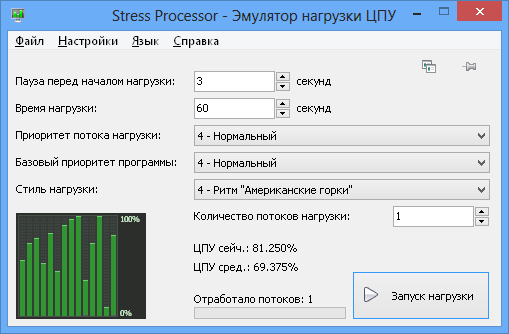
- Real-time feedback: The interface provides continuous monitoring of current load levels and test status, keeping the user informed of the beginning and end of each session.
By simulating high-pressure environments, this software offers a repeatable and factual method for assessing hardware and software resilience under artificial pressure.
Top 5 Reasons To Download Stress Processor
- Precise Control Over CPU Resource Allocation
- Stress-Testing Application Stability and Resilience
- Real-World Simulation of Legacy and Lower-End Hardware
- Advanced Load Profiles and Scheduled Testing
- Lightweight Footprint with Maximum Informative Feedback
In the modern world of computing, we are constantly chasing the fastest speeds, the highest core counts, and the most efficient cooling systems. We want our machines to be effortless, silent, and incredibly powerful. However, there is a hidden side to performance that most casual users—and even many professionals—overlook until it is too late. That side is stability. It is one thing for a computer to run a browser and a word processor; it is quite another for it to maintain its composure when pushed to the absolute brink of its processing capabilities. This is where Stress Processor enters the frame, and let me tell you, as someone who spends their life looking at system benchmarks and software optimization, this is the utility you didn’t know you needed, but won't be able to live without.
When we talk about "stress testing," people often think of hardware enthusiasts trying to break records or overclockers pushing their voltages to the limit. But Stress Processor is far more sophisticated than a simple "heat generator." It is a surgical tool designed to simulate controlled environments. Whether you are a developer trying to see if your new app will crash on a customer’s budget laptop, or a system administrator checking if a server can handle a sudden spike in traffic, this tool is the gold standard for creating artificial pressure. In this article, I am going to break down exactly why you need to grab this giveaway right now and how it will transform the way you interact with your hardware and software.
1. Precise Control Over CPU Resource Allocation
The biggest problem with most free stress-testing tools on the market today is that they are "all or nothing." You hit a button, your CPU fans start screaming, and your computer becomes a paperweight until the test ends. That is not how real-world computing works. Real-world bottlenecks are often subtle—perhaps a background process is taking up 40 percent of your resources, or a system update is eating away at your clock cycles. Stress Processor is revolutionary because it allows for granular, controlled loading of the central processor.
With this tool, you aren't just flipping a switch; you are turning a dial. You can set the CPU load level from a very light "nudge" to a full-blown 100 percent saturation. This level of precision is vital for pinpointing exactly where a system or a specific piece of software begins to fail. For example, your video editing software might work perfectly at 50 percent CPU load but start dropping frames at 75 percent. Without a tool like Stress Processor, you would never be able to find that specific breaking point. By using this tool, you gain the power to simulate specific environments, making it an essential part of any diagnostic toolkit. You are no longer guessing how your system handles pressure; you are dictating it.
Furthermore, this precision allows you to test your cooling solution in a controlled manner. Instead of waiting for a hot summer day or a heavy rendering job to see if your PC overheats, you can incrementally increase the load and watch your thermal sensors. This allows you to set safe margins and ensure that your hardware longevity is protected. It is the difference between crashing your car into a wall to see if the airbags work and testing the brakes in a controlled environment.
2. Stress-Testing Application Stability and Resilience
If you are a software developer, a QA tester, or even just someone who relies on a specific set of tools for your livelihood, you need to know how those tools behave under pressure. We’ve all been there: you’re in the middle of an important project, and suddenly, your computer slows down, the mouse starts lagging, and your primary application "stops responding." Usually, this happens because another process has hogged the CPU, leaving your main app starved for resources. This is known as a race condition or resource exhaustion, and it is the enemy of productivity.
Stress Processor allows you to proactively hunt for these bugs. By simulating a heavy CPU load, you can see how your other applications and services react when they aren't the center of attention. Does your web browser crash? Does your database service time out? Does your music player start stuttering? By intentionally "stressing" the system, you can identify weak links in your workflow. For developers, this is an absolute godsend. It allows you to simulate the "worst-case scenario" for your users. If your app can survive a 90 percent CPU load simulation without losing data or crashing, you can ship that code with confidence.
This "pressure testing" approach is how professional-grade software is built. You don't want to find out that your software has a memory leak or a threading issue when it's in the hands of a client. You want to find it now, on your own terms. Stress Processor provides the environment to break things safely so that you can fix them permanently. It is a proactive shield against the "it worked on my machine" syndrome that plagues the tech industry.
3. Real-World Simulation of Legacy and Lower-End Hardware
We live in a "developer bubble." Most people reading this probably have a relatively modern multi-core processor and plenty of RAM. But that is not the reality for the majority of computer users worldwide. Many people are still using five-year-old laptops, budget-friendly tablets, or older workstations. If you are creating content, websites, or software, you need to know how it feels for them. Stress Processor offers a unique and incredibly clever use case: simulating the performance of older or slower computers.
By applying a constant, baseline load to your high-end CPU, you effectively "throttle" the available power, making your modern machine behave like a much weaker one. This is a game-changer for optimization. If you are a web designer, you can see if your heavy animations make a low-end CPU choke. If you are a gamer, you can see how a background task affects your frame rates on a simulated "minimum specs" machine. This eliminates the need to keep a closet full of old hardware just for testing purposes.
I cannot stress enough how valuable this is for accessibility and user experience. When you can see through the eyes of a user with a slower machine, you become a better creator. You start to notice where your code is inefficient or where your assets are too heavy. Stress Processor isn't just a stress tester; it is a perspective shifter. It allows you to optimize your digital life for everyone, not just the people with the latest hardware. It is an "emulator" for hardware limitations that is incredibly easy to set up and tear down.
4. Advanced Load Profiles and Scheduled Testing
One of the standout features that sets Stress Processor apart from the competition is its sophisticated approach to how that load is applied. It isn't just about a steady stream of data; the tool offers a variety of load profiles. Real-world CPU usage is rarely a flat line. It spikes, it dips, it waves, and it pulses. Stress Processor allows you to mimic these patterns, providing a much more realistic simulation of how a computer actually struggles during heavy multitasking or complex calculations.
The addition of the delayed start and early test interruption features shows that the developers behind this tool truly understand the workflow of a tech professional. Sometimes, you need to start a test but give yourself thirty seconds to switch to another window, start a screen recorder, or open a system monitor. The delayed start allows for this coordination. Conversely, the ability to set an early interruption ensures that you don't accidentally lock up your system for an hour if you realize the settings are too high. You are always in the driver's seat.
These profiles allow for "soak testing," where you leave a system under a specific type of stress for an extended period to check for long-term stability. Is your power supply unit (PSU) failing? A two-hour "sinusoidal" load profile will tell you far more than a quick five-minute burst. The flexibility offered here is typically reserved for expensive, enterprise-level diagnostic software, but you are getting it in a streamlined, user-friendly package. It’s the kind of automation that makes you feel like you have an extra assistant in the room.
5. Lightweight Footprint with Maximum Informative Feedback
There is a cruel irony in many system-testing tools: they are so bloated and heavy themselves that they skew the results of the test. Stress Processor avoids this trap entirely. It is a lightweight, purpose-built utility that doesn't waste system resources on flashy graphics or unnecessary background services. It does exactly what it says on the tin, and it does it with an interface that keeps the user fully aware of the situation at all times.
One of the most important aspects of stress testing is awareness. You need to know exactly when the test starts, exactly how much load is being applied in real-time, and exactly when it ends. Stress Processor keeps you "in the loop" with clear indicators. This prevents the "did it start yet?" anxiety that comes with more primitive tools. It also ensures that if your system does start to struggle, you can immediately identify if it’s due to the tool or another underlying issue. The feedback loop is tight, informative, and essential for accurate diagnostics.
In my years of reviewing tech, I have seen many tools that try to do too much and end up failing at their core mission. Stress Processor is the opposite. It focuses on the central processor—the heart of the machine—and gives you every possible way to interact with it under load. It’s clean, it’s efficient, and it’s reliable. For anyone who takes their computer's health and performance seriously, this is a "must-have" download. Whether you are troubleshooting a mysterious crash, optimizing a new piece of software, or just curious about how your cooling system holds up, this tool provides the answers you need in a clear, concise way.
Final Thoughts: We often take our CPU for granted until it fails us. Don't wait for a blue screen of death or a corrupted file to realize your system is unstable. Take control of your hardware today. Download Stress Processor while it's available in this giveaway and add a professional-grade diagnostic tool to your arsenal. It is the best way to ensure that your machine is ready for whatever the digital world throws at it. Whether you're simulating an old PC or pushing a new one to its limits, this tool is the definitive choice for controlled, intelligent CPU loading. You won't regret having this in your utility folder when the next big project—or the next mysterious system slowdown—hits your desk.

Reviews for Stress Processor
Click Here to Read Reviews for Stress Processor >> Click Here to Submit Reviews for Stress Processor >>