What Does AudioGrail Do?
AudioGrail, formerly known as K-MP3, is a comprehensive utility designed for the management and organization of various digital audio formats. The software supports a wide range of file types, including MP3, OGG, MPC, APE, AAC, FLAC, and WavPack. It functions primarily as a multi-tool for metadata management, allowing users to automatically rename and tag files with information such as artist names, album titles, and track numbers.
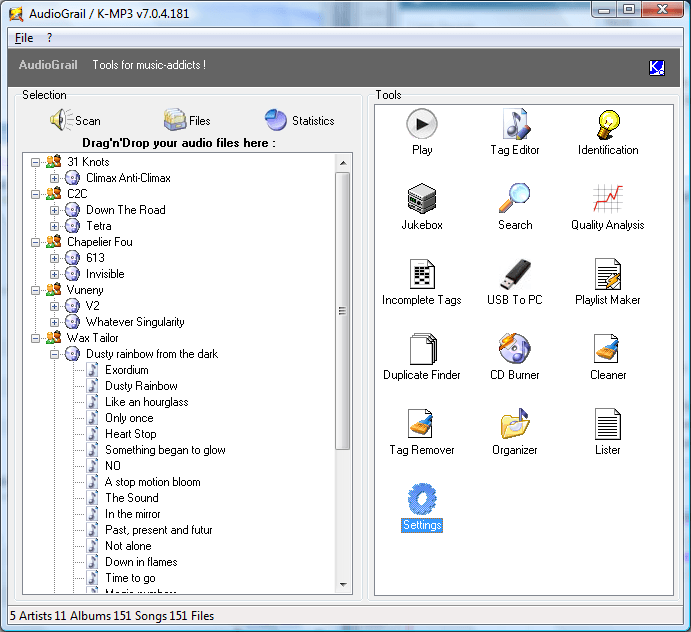
The application automates several labor-intensive library tasks. It can identify songs, download missing album covers, and normalize file names and tags to ensure consistent casing across a collection. For those dealing with large libraries, AudioGrail includes a mass tags remover and an automated file organizer that moves tracks into specific folders based on their internal metadata. It also features a duplicate file finder to help users reclaim storage space.
In addition to organization, the tool provides analytical features. It includes a quality analyzer to evaluate the integrity of audio files and an incomplete tags finder to highlight tracks missing data. Users can generate playlists in m3u, pls, and xpl formats, or export entire file lists as CSV, SQL, or XML documents. The software includes a one-by-one tag editor with a queue system for manual adjustments and provides internationalization support for a global user base.
Top 5 Reasons To Download AudioGrail
- Unrivaled Multi-Format Compatibility and Support: Whether you are an audiophile with a massive FLAC collection or a casual listener with years of MP3s, this tool handles nearly every major audio format with ease.
- Fully Automated Tagging and Album Art Retrieval: Stop wasting hours manually typing in song titles and artists; the software uses intelligent song identification to fetch metadata and high-quality album covers automatically.
- Comprehensive Library Organization and Cleanup: Transform a chaotic folder of "Track01.mp3" files into a perfectly structured hierarchy with mass renaming, folder moving, and standardized casing tools.
- Precision Quality Analysis and Duplicate Detection: Ensure your music collection sounds its best by identifying low-quality files and reclaiming storage space by hunting down and removing pesky duplicate tracks.
- Powerful Batch Processing with Surgical Control: From mass tag removal to creating complex playlists and database exports, you get the power of bulk editing without losing the ability to fine-tune individual files.
Introduction: The Chaos of the Digital Music Age
If you have been collecting digital music for more than a few years, you know exactly what I am talking about. We all have that one folder on our hard drives—the "Music" folder—that has become a digital wasteland. It is filled with files downloaded from different sources, ripped from old CDs, or transferred from ancient devices. Some files have no names, others are written in all caps, and half of them are missing the album art that makes browsing a library such a visual joy. It is a mess, and the thought of fixing it manually is enough to make anyone want to delete the whole thing and start over.
But before you hit that delete key, you need to look at AudioGrail. Formerly known as K-MP3, this software has earned its reputation as the "Swiss Army Knife" of audio management. It is designed for people who take their music seriously but do not want to spend their entire lives editing ID3 tags. As a tech reviewer who has seen dozens of "media managers" come and go, I can tell you that finding a tool that balances power with ease of use is rare. This giveaway is a golden opportunity to take control of your library. Let’s dive deep into the five reasons why you need to download this today.
1. Unrivaled Multi-Format Compatibility and Support
The first thing any serious music collector looks for in a management tool is format support. There is nothing more frustrating than downloading a "complete" audio solution only to find out it does not support OGG files or your high-fidelity FLAC library. AudioGrail stands out because it does not play favorites. It provides comprehensive support for a wide array of formats, including MP3, OGG, MPC, APE, AAC, FLAC, and WavPack.
In the modern era of audio, we are constantly switching between formats. You might keep your archive in FLAC for the best possible sound quality, but your mobile device might require AAC or MP3 for storage efficiency. AudioGrail handles these transitions seamlessly. It doesn't just recognize these files; it understands the specific tagging structures unique to each one. Whether you are dealing with ID3Tag V1 and V2 for your MP3s, Vorbis comments for your Ogg files, or APEv2 tags for your lossless tracks, this software speaks the language of your audio.
Why does this matter? Because a library is only as good as its weakest link. If your software ignores 20% of your collection because they are in a "niche" format like WavPack, you are left with a fragmented system. AudioGrail ensures that your entire collection—regardless of how or when it was encoded—is treated with the same level of professional care. This universal approach is the foundation of what makes it a must-have tool for anyone with a diverse taste in music and technology.
2. Fully Automated Tagging and Album Art Retrieval
Let’s be honest: manual tagging is a nightmare. Typing in "The Beatles," "Abbey Road," and "Come Together" for every single track is a task that belongs in the early 2000s. We live in the age of automation, and AudioGrail is at the forefront of that movement. One of the most compelling reasons to grab this giveaway is its Automatic Song Identification and Album Renaming features.
The software can analyze your files and reach out to massive online databases to find the correct information. It doesn't just look at the filename; it looks at the characteristics of the audio itself to ensure accuracy. Within seconds, a file named "track_05_unknown.mp3" can be transformed into a fully tagged masterpiece with the correct artist, album, track number, and genre. This isn't just a convenience; it is a massive time-saver that turns a weekend-long project into a five-minute task.
Beyond the text data, we have to talk about the visuals. A music library without album art feels sterile and unfinished. AudioGrail includes an Automatic Album Cover Finder that scours the web to find the high-resolution artwork your collection deserves. When you scroll through your music on a smartphone or a high-end media player, those covers are what make the experience feel premium. Having a tool that fetches these automatically, embeds them into the files, and ensures they are correctly sized is a game-changer for the aesthetic value of your digital life.
3. Comprehensive Library Organization and Cleanup
Metadata is only half the battle. The other half is the physical structure of the files on your hard drive. If your music is scattered across thirty different folders with names like "New Folder (2)" or "Downloads," you will never truly find what you are looking for. AudioGrail offers a Files Organizer that is essentially a professional-grade filing clerk for your computer. It can take the tags of your music and use them to rename the files and move them into a logical folder structure.
For example, you can tell the software to move all your music into a "Artist/Album/TrackNumber - Title" format. It will create the folders, move the files, and delete the empty scraps left behind. This level of standardization extends to the text itself. We have all seen those libraries where some artists are "john lennon" and others are "JOHN LENNON." It looks messy and causes sorting issues in most players. AudioGrail’s Case Standardization and Normalizer tools allow you to enforce a single rule across your entire library—whether you want Title Case, UPPERCASE, or lowercase—with a single click.
Finally, let’s talk about the clutter: Duplicate files. Over years of moving music between drives, it is inevitable that you will end up with three copies of the same song taking up space. AudioGrail’s Duplicate Files Finder is sophisticated enough to find these digital ghosts, helping you reclaim gigabytes of storage space. It doesn't just look for identical names; it looks for identical content, ensuring that you are only keeping the best version of your music. This "cleanup" aspect of the software is what transforms a "collection" into a "curated library."
4. Precision Quality Analysis and Technical Tools
As a tech reviewer, I often encounter users who complain that their music sounds "thin" or "distorted" on their high-end headphones. Often, the culprit isn't the hardware; it is a low-quality audio file masquerading as a high-quality one. One of the standout features of AudioGrail is its Quality Analyser. This tool allows you to see the technical health of your files. It can identify files with low bitrates or files that have been "upsampled" (taking a low-quality file and saving it as a high-quality one, which doesn't actually improve the sound).
By using the Quality Analyser, you can identify which parts of your library need to be re-ripped or replaced. It brings a level of transparency to your collection that most media players simply ignore. Furthermore, for those who like to dive into the data, the software includes a Playlist Analyser and Files Lister. If you have ever wanted to export your entire music list into a CSV, SQL, or XML format to share with friends or for your own database, AudioGrail makes it effortless.
Even the Incomplete Tags Finder is a stroke of genius. It scans your library specifically for files that are missing vital info, like a missing year or a missing genre. Instead of hunting through thousands of songs, the software gives you a neat list of exactly what needs to be fixed. It is this attention to the technical "health" of your library that separates AudioGrail from basic tagging apps. It doesn't just want your library to look good; it wants it to be technically perfect.
5. Powerful Batch Processing with Surgical Control
The "Swiss Army Knife" moniker is most apparent when you look at how AudioGrail handles Mass Processing. Most of us have thousands of songs, and editing them one by one is impossible. This software is built for scale. If you want to remove all comments from 5,000 files to save space or clean up the metadata, the Mass Tags Remover does it in seconds. If you want to change the naming convention of an entire genre, the Files Names Normalizer is ready to go.
However, power is nothing without control. What I love about AudioGrail is that it doesn't force you into "bulk-only" mode. It features a One-by-one Tag Editor with a queue system. This means you can line up specific files that need manual attention, go through them with a fine-toothed comb, and the software will keep track of your progress. You get the speed of an automated tool with the precision of a manual editor.
The software also includes Internationalization Support, meaning it can handle characters and tagging standards from around the world. Whether your music is in English, French, Japanese, or any other language, the software maintains the integrity of the characters. When you combine this with its ability to create and analyze m3u, pls, and xpl playlists, you realize that this is a tool designed to be the "hub" of your entire audio experience. It provides the heavy lifting for the big jobs and the surgical tools for the small ones.
Conclusion: Why You Need To Act Now
In the world of software, we often see tools that try to do too much and end up doing nothing well. AudioGrail is the exception. It focuses on the core problems of digital audio management—tagging, organizing, and quality control—and solves them with a suite of tools that are both powerful and accessible. Whether you are trying to fix a messy folder of downloads or you are a professional looking to maintain a pristine archive of lossless audio, this software provides the utility you need.
Top 5 Reasons To Download AudioGrail are clear: format support, automation, organization, quality analysis, and batch power. But beyond the list of features, there is the feeling of satisfaction that comes with a clean library. There is something deeply rewarding about opening your favorite music player and seeing every artist correctly named, every album perfectly categorized, and every song accompanied by beautiful high-resolution artwork. It makes the act of listening to music more immersive and enjoyable.
As a reviewer, I see a lot of "free" software that is actually just a stripped-down version of a better product. This giveaway is different. This is a full-featured, professional-grade tool that has been refined over years (as many long-time users of K-MP3 will attest). It is lightweight, efficient, and does exactly what it says on the tin. In an era where subscription models are taking over every corner of the tech world, getting your hands on a robust utility like this is a win for the consumer.
Don't let your music library remain a cluttered mess for another day. Take the leap, download AudioGrail, and let it do the hard work for you. Once you see your collection transformed, you'll wonder how you ever managed without it. Your music deserves to be organized, and you deserve a tool that makes that process painless. This is the Swiss Army Knife your PC has been waiting for—don't miss out on adding it to your digital toolkit.

Reviews for AudioGrail
Click Here to Read Reviews for AudioGrail >> Click Here to Submit Reviews for AudioGrail >>