What Does FolderViewer Do?
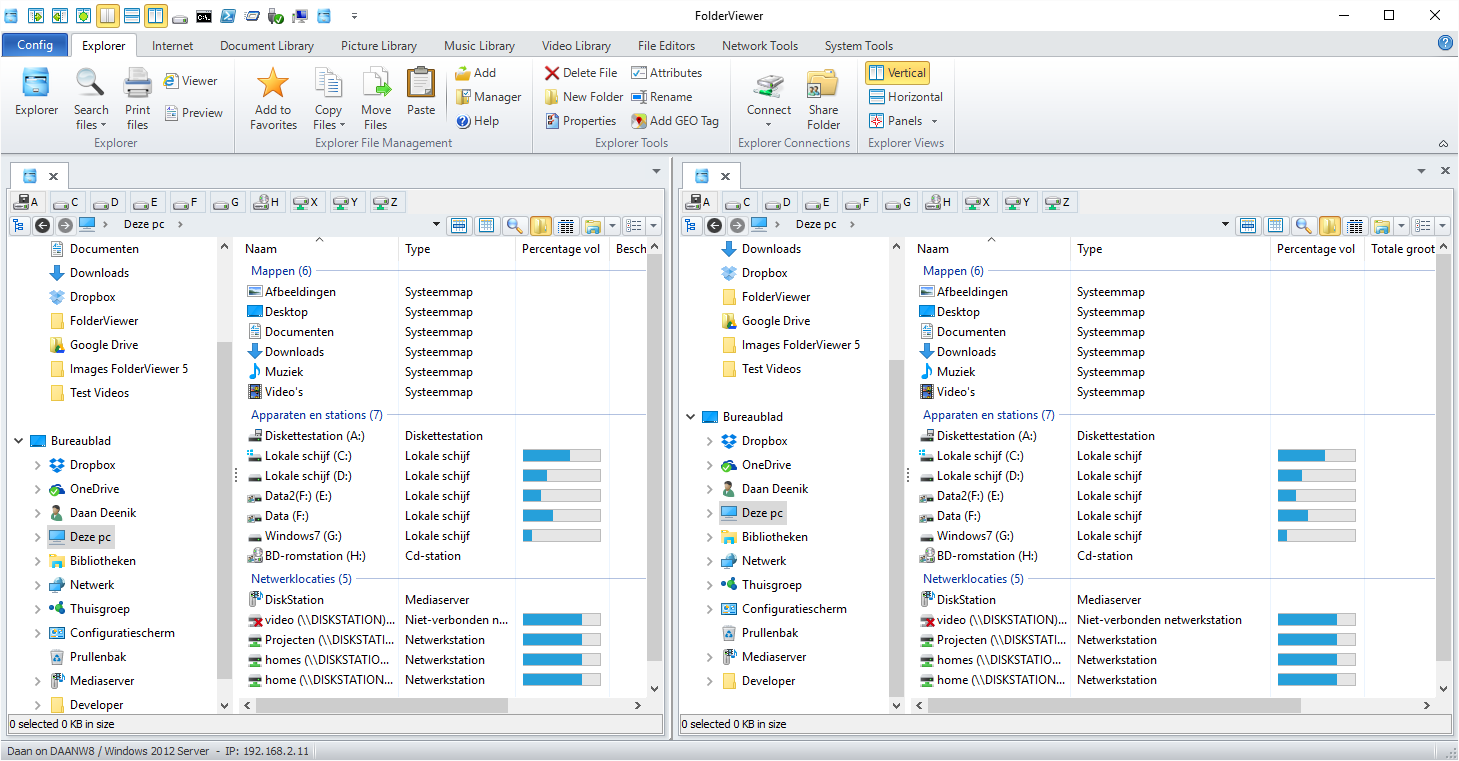
FolderViewer is an advanced dual-panel file management utility designed for comprehensive organization and batch processing. It moves beyond standard explorer functions by integrating specialized tools for metadata-driven file handling and system administration.
The software features an Advanced Copy and Rename toolset. Users can automate folder creation and file naming by extracting metadata properties, such as EXIF data (ISO, F-Stop, location) or media tags (Artist, Album, Title). This allows for granular control when migrating large datasets or organizing extensive photo and music collections. The search functionality is equally robust, offering the ability to export results to Excel, XML, or HTML and perform data analysis using integrated pivot tables.
Beyond local file navigation, FolderViewer includes dedicated databases for documents, pictures, music, and video. It incorporates a dual-panel internet browser with support for 16 search engines and DuckDuckGo Bang! integration. For developers and power users, the application provides hex and syntax editors, network tools, and multiple remote desktop clients.
Media management is handled through embedded Windows Media Players and a music library capable of searching for and printing lyrics. This suite of tools provides a centralized environment for users who require more efficiency than the native operating system's file explorer allows.
Top 5 Reasons To Download FolderViewer
If you are tired of the clunky, limited experience of standard file explorers and you are looking for a way to truly master your digital workspace, then you need to stop what you are doing and pay attention. FolderViewer is not just another file manager; it is a comprehensive productivity suite designed for power users who demand more from their software. Here are the top five reasons why you need to download this giveaway today:
- Unrivaled Dual-Panel Efficiency: A sophisticated dual-pane interface that transforms how you move, manage, and interact with your files, eliminating the frustration of constant window switching.
- Intelligent Metadata-Driven Organization: Revolutionary batch tools that use internal file properties (like EXIF data or ID3 tags) to rename and organize files automatically into a logical folder structure.
- Comprehensive Integrated Multimedia Libraries: Dedicated, database-driven hubs for your documents, pictures, music, and videos that go far beyond simple folder browsing.
- Pro-Level Search and Data Analysis: Advanced search capabilities combined with Pivot Table analysis tools that allow you to visualize and export file data like a professional database administrator.
- The Ultimate "All-in-One" Tech Toolbox: An incredible array of built-in utilities including a dual-panel web browser, Hex and Syntax editors, network tools, and remote desktop clients.
1. Unrivaled Dual-Panel Efficiency
Let’s be honest: the default file explorer provided by most operating systems is designed for the casual user who barely touches their file system. If you are a professional, a collector, or a tech enthusiast, you know that a single-window interface is a recipe for wasted time. FolderViewer solves this by providing a robust dual-panel architecture that is the gold standard for file management productivity.
In the world of power users, "Dual Panel" means power. It allows you to have your source directory on one side and your destination on the other. This setup makes dragging and dropping files a breeze, but FolderViewer takes it much further than basic movement. The interface is designed to be your command center. You can compare directories side-by-side, verify file counts, and synchronize data between two different drives without ever losing your place. This eliminates the "alt-tab fatigue" that comes from trying to manage complex file transfers across multiple overlapping windows.
The beauty of the FolderViewer implementation is its context-aware functionality. Each panel isn't just a list of files; it’s a portal into the deep metadata of your system. You can customize the view to show exactly what you need to see, whether that is file sizes, creation dates, or specific attributes. For anyone who has ever spent hours trying to clean up a messy hard drive or organize a backup of a backup, this dual-pane layout is an absolute game-changer. It turns a chore into a streamlined, professional workflow.
2. Intelligent Metadata-Driven Organization
This is where FolderViewer truly separates itself from the competition. Most file managers can rename a batch of files by adding a number at the end. FolderViewer, however, understands what is inside your files. It features an Advanced Rename Tool and an Advanced Copy Tool that utilize the hidden metadata stored within your documents, photos, and music.
Imagine you have a folder full of 5,000 digital photographs with meaningless names like IMG_9823.jpg. With FolderViewer, you can use the built-in properties like the ISO, F-Stop, Country, City, or even the Street where the photo was taken (provided the GPS data is present) to automatically rename every single file. You could rename them to something like "2023-Paris-EiffelTower-ISO100.jpg" in a matter of seconds. This level of automation is usually reserved for expensive, specialized photography software, but here it is built right into your file manager.
The Advanced Copy Tool takes this a step further. Instead of just moving files, it can actually generate the target folder structure based on file properties. For example, if you have a massive collection of music files, you can tell FolderViewer to copy them to a new drive and organize them into folders based on Artist > Album > Title. The software reads the ID3 tags of the music files and builds the folders on the fly. This turns what would be a multi-day manual project into a task that takes only a few clicks. For anyone managing large media libraries, this feature alone makes the software worth its weight in gold.
3. Comprehensive Integrated Multimedia Libraries
We live in an age of data overload. Most of us have thousands of documents, tens of thousands of photos, and massive libraries of music and video. Trying to navigate these using a standard folder tree is inefficient. FolderViewer addresses this by offering Advanced Document, Picture, Music, and Video Libraries. These are not just shortcuts to folders; they are database-driven environments that help you categorize and find what you need instantly.
The Music Library is particularly impressive. It doesn’t just show you your MP3s; it allows you to search for and even print lyrics directly within the application. It utilizes the embedded Windows Media Players so you can preview and enjoy your content without launching external software. The Picture Library is equally robust, allowing you to manage multiple databases of images, which is perfect for keeping your professional work separate from your personal memories while still using the same powerful tools to manage both.
For the office professional, the Multiple Document Library Databases are a lifesaver. You can organize your PDFs, spreadsheets, and word documents into logical groups that make sense for your projects. Instead of hunting through nested folders, you can use the library’s search and filter functions to surface the exact file you need. This integrated approach means you spend less time "looking" for your files and more time "using" them. It’s about creating a centralized hub for your entire digital life.
4. Pro-Level Search and Data Analysis
Finding a file is one thing; understanding your data is another. FolderViewer includes a Search Tool that is remarkably deep. It even supports Google Desktop Search integration, allowing for near-instantaneous retrieval of information based on file content. Once you have your search results, you aren't just stuck with a list. You have the option to export those results into various formats like Text, Excel, XML, or HTML. This is incredibly useful for creating file manifests, audits, or sharing lists of documents with colleagues.
The real "wow" factor for tech enthusiasts, however, is the Data Analysis feature. FolderViewer allows you to take your search results and run them through Pivot Tables. If you’ve ever worked in data science or high-level accounting, you know how powerful Pivot Tables are for spotting trends and summarizing vast amounts of information. In the context of a file manager, this allows you to see exactly how your storage is being used.
Want to know which file formats are taking up the most space? Want to see a breakdown of your photos by the year they were taken or your documents by author? The Pivot Table functionality lets you slice and dice your file data in ways that are simply impossible in any other file manager. It provides a level of insight into your own hardware that you’ve likely never had before. Being able to save these analyses to disk or export them to Excel means you can track the growth and change of your digital archives over time with professional precision.
5. The Ultimate "All-in-One" Tech Toolbox
The final reason you absolutely must download FolderViewer is that it replaces about a dozen other utilities you probably have cluttering up your desktop. The developers have essentially built a "Swiss Army Knife" for tech users. Inside this one application, you will find a Dual Panel Internet Browser that supports 16 different search engines and an Advanced History Database. It even includes the DuckDuckGo Bang! Database, allowing you to perform specialized internet searches directly from your file manager.
But wait, there’s more. Are you a coder or a power user who needs to look under the hood of a file? FolderViewer includes both a Syntax Editor and a Hex Editor. Need to manage multiple computers? It features multiple Remote Desktop clients and Network Tools to help you maintain your local area network. It even has System Tools built-in to help you keep your OS running smoothly.
By integrating all these features into a single interface, FolderViewer becomes more than just a tool—it becomes an environment. You don't have to keep a browser window, a text editor, a media player, and a remote desktop client open all at once, eating up your RAM and distracting you. You can do almost everything within FolderViewer. It is designed to be the only tool you need to have open to manage your files, your network, and your internet research. This integration leads to a cleaner workspace and a much more focused mind.
The Final Verdict
In a world where software is becoming increasingly simplified and "dumbed down" for the mass market, FolderViewer is a refreshing exception. It is unapologetically powerful, feature-rich, and built for people who actually care about how their data is organized. It respects your intelligence and gives you the tools to manage your digital world with surgical precision.
Think about the hours you have spent manually moving files, the frustration of not being able to find a specific document, and the clutter of having twenty different apps open just to perform basic tasks. FolderViewer is the solution to all of those problems. From the dual-panel efficiency to the incredible metadata-based automation and the professional data analysis tools, this is a piece of software that will pay for itself in saved time within the first week of use.
Don't settle for basic. Don't let your files manage you—take control of them. This giveaway is a rare opportunity to get your hands on a truly advanced piece of software that bridges the gap between a simple file manager and a full-scale digital asset management system. Whether you are a photographer looking to organize a lifetime of memories, a developer needing a robust syntax editor and file browser, or just a power user who wants the best tools available, FolderViewer is the answer. Download it now and experience what it feels like to have total command over your digital domain.
The efficiency gains, the organizational power, and the sheer breadth of tools included in this package are simply too good to pass up. This is the kind of software that makes you wonder how you ever managed without it. It turns the "chore" of file management into a streamlined, even enjoyable, part of your daily routine. Take the leap, upgrade your workflow, and see why FolderViewer is the ultimate choice for those who demand the very best from their tech. You won't regret it.


Reviews for FolderViewer
Click Here to Read Reviews for FolderViewer >> Click Here to Submit Reviews for FolderViewer >>