What Does Mouse and Key Recorder Do?
Mouse and Key Recorder is a desktop automation utility designed to capture and replay user inputs. The software monitors keyboard strokes and mouse movements across any active window, converting these actions into editable macros. Beyond basic recording, the tool integrates more than 135 specialized commands to refine macro behavior. These commands include control flow logic such as loops, conditional statements, and variables, as well as file management operations like renaming or deleting files.
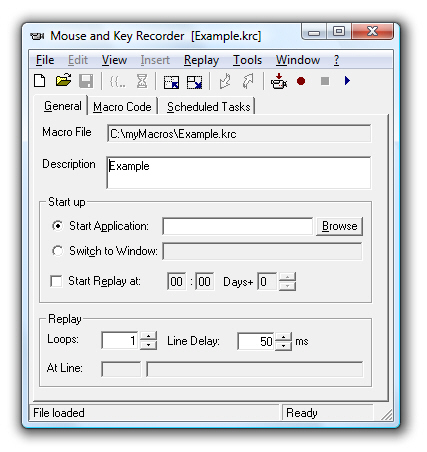
The interface displays recorded activities in a compact format, allowing users to modify existing macros manually. Additional functionality allows for reading and writing files, manipulating cursors, and launching or switching between different applications. Execution options are flexible; macros can be triggered interactively, through a built-in scheduler, or via the command line for integration into broader automated workflows. The software package also includes a complete de-installer for system maintenance.
Users can leverage this tool to streamline repetitive data entry tasks and complex multi-step processes by digitizing routine human-computer interactions. By combining recorded movements with logical commands, the software functions as a bridge between simple screen recording and advanced task scripting. This allows for the automation of virtually any activity that can be performed via standard peripheral devices.
Top 5 Reasons To Download Mouse and Key Recorder
- Seamless Automation of Repetitive Tasks: Effortlessly record and replay every single keyboard stroke and mouse movement to eliminate manual drudgery.
- Extensive Command Library: With over 135 additional commands, you can build complex logic, including loops, variables, and conditional statements.
- Unprecedented Precision and Editing: Macros are stored in a clear, compact format, allowing you to tweak, refine, and perfect your scripts without re-recording.
- Advanced File and System Management: Go beyond simple clicks by automating file renaming, deletions, and program switching directly within your macros.
- Flexible Deployment Options: Run your automated workflows interactively, via a built-in scheduler, or through the command line for maximum efficiency.
If you have ever spent your afternoon performing the same series of clicks, typing the same data into multiple spreadsheets, or manually renaming a hundred files in a folder, you know the soul-crushing boredom of repetitive digital labor. We live in an era where we are promised that technology will work for us, yet we often find ourselves working for our computers. This is where the Mouse and Key Recorder steps in. It is not just another utility; it is a fundamental shift in how you interact with your workstation. As a tech reviewer who has seen countless "automation" tools come and go, I can tell you that this specific software stands out because of its balance between raw power and user-focused simplicity. It is the bridge between a simple screen recorder and a full-blown programming environment, and right now, it is the giveaway you absolutely cannot afford to skip.
1. Seamless Automation of Repetitive Tasks
The core appeal of the Mouse and Key Recorder is its ability to act as a digital ghost of your own actions. At its most basic level, it is a high-fidelity capture tool. When you hit record, the software monitors every nuance of your interaction with the Windows environment. It doesn't just see "a click"; it sees the exact coordinates, the specific window context, and the timing of that click. It captures every keystroke, from simple text entry to complex "Alt-Tab" or "Ctrl-Shift-Esc" combinations. For anyone who has to deal with legacy software that doesn't have a modern API, this is a lifesaver. You are essentially teaching the computer how to use the software just like a human would.
Imagine you are a data analyst who needs to pull reports from an old database that requires twelve different clicks and three password prompts just to reach the export button. Instead of doing this every morning at 9:00 AM, you record the process once. The Mouse and Key Recorder tracks your movements with surgical precision. When you play it back, the software takes over your peripheral inputs, moving the cursor and firing off keystrokes at the exact speed you designated. This "human-like" interaction ensures that the software you are trying to automate behaves exactly as expected, because it cannot distinguish between your hand on the mouse and the recorder's playback engine. It is the ultimate "set it and forget it" tool for the modern professional.
2. Extensive Command Library
What truly separates the Mouse and Key Recorder from the "freebie" macro recorders you might find bundled with a gaming mouse is its massive library of over 135 additional commands. This is the "secret sauce" that transforms a simple recording into a sophisticated script. Most recorders are "dumb"—they play back exactly what you did, and if a window takes an extra second to load, the macro breaks. Not so here. With these 135+ commands, you can build intelligence directly into your macros.
You can implement logic. You can tell the software: "If this window is open, click button A; otherwise, wait five seconds and try again." You can use variables to store information, such as a filename or a user's input, and then use that information later in the sequence. You can create loops that tell the macro to repeat a specific set of actions fifty times, or until a certain condition is met. This level of customization means you aren't just recording a video of your actions; you are writing a program without having to learn a complex coding language like C++ or Python. These commands cover everything from cursor manipulation to reading and writing text files, making it a Swiss Army knife for system administrators and power users alike.
3. Unprecedented Precision and Editing
We have all been there: you are five minutes into recording a complex twenty-minute macro, and you accidentally click the wrong icon. With most recorders, that means you have to scrap the whole thing and start over from scratch. The Mouse and Key Recorder solves this frustration by storing its macros in a "clear and compact" way. When you open a saved macro, you don't see a jumbled mess of binary data. Instead, you see a clean, readable list of actions that is incredibly easy to edit.
This transparency is a game-changer. If you realize that a specific mouse click was two pixels off, or that a "Wait" command needs to be three seconds instead of one, you simply jump into the editor and change the value. You can drag and drop commands to reorder them, or copy and paste segments of one macro into another. This modular approach to macro creation means that over time, you can build a library of "sub-routines"—small, perfected macros that you can combine to handle massive, complex workflows. The editing suite is intuitive enough for a novice but deep enough for a developer, ensuring that your automation evolves alongside your needs.
4. Advanced File and System Management
While many recorders are limited to just moving the mouse, the Mouse and Key Recorder has deep hooks into the Windows file system. This is where the "135 additional commands" really start to flex their muscles. You can create macros that specifically target file management tasks. Need to go into a folder, find every file with a ".tmp" extension, rename them to ".old", and then move them to a backup server? You can script that entire process in minutes.
The software allows you to start or switch between programs with ease. It can manipulate cursors, read data from a file to use as input for a web form, and then write the result back into a log file. This makes it an incredible tool for software testing or bulk data processing. Instead of just simulating a user, the Mouse and Key Recorder acts as a system-level orchestrator. It can bridge the gap between different applications—taking data from an Excel sheet, typing it into a web-based CRM, and then clearing your browser cache. By automating the system-level tasks that usually require manual file handling, you eliminate the risk of human error, such as typos in filenames or accidentally deleting the wrong directory.
5. Flexible Deployment Options
A great automation tool is only useful if it fits into your existing workflow, and the Mouse and Key Recorder is designed with maximum flexibility in mind. You have three distinct ways to trigger your macros, ensuring that the software is available exactly when and how you need it. First, there is interactive replay. This is perfect for tasks where you still want to be at the desk but want the computer to handle a specific, tedious segment of the work. You can trigger a macro with a hotkey, watch it do its thing, and then take back control of the mouse.
Second, the software includes a built-in scheduler. This is where the real magic happens. You can tell the Mouse and Key Recorder to run a specific macro every night at 2:00 AM while you are asleep. It can wake up the computer, perform your data backups, generate your daily reports, and then shut the system down. Finally, for the true power users, it supports command line execution. This allows you to integrate your macros into larger batch scripts or trigger them from other software. Whether you are a casual user looking to save ten minutes a day or a professional developer looking to automate a massive testing suite, the Mouse and Key Recorder scales to meet your ambitions. It even includes a fully working de-installer, showing a level of professional polish and respect for the user's system that is often missing in this category of software.
In conclusion, the Mouse and Key Recorder is more than just a tool; it is an investment in your own time. In a world where our attention is our most valuable resource, wasting it on repetitive digital tasks is a mistake. By downloading this giveaway, you are giving yourself the gift of efficiency. You are gaining a tireless digital assistant that works with pixel-perfect precision, follows your logic to the letter, and never gets bored. Whether you are looking to streamline your office work, automate your gaming experience, or manage your home server, this software provides the power and flexibility to get the job done. Don't let this opportunity pass you by—the transition from manual labor to automated mastery is just a download away.
As a final note from a reviewer's perspective: The sheer volume of commands (the 135+ mentioned) is what really pushes this over the edge. It moves the software from a "toy" to a "tool." When you start exploring the conditional "If/Else" logic and the variable handling, you realize you aren't just recording clicks; you are building your own custom software solutions. This is the kind of utility that stays on your hard drive for years because once you've automated a task, you'll wonder how you ever lived without it. Grab it while you can and start reclaiming your time today.

Reviews for Mouse and Key Recorder
Click Here to Read Reviews for Mouse and Key Recorder >> Click Here to Submit Reviews for Mouse and Key Recorder >>