What Does Website File Collector Do?
Website File Collector is a specialized Windows application designed to automate the retrieval of assets from web domains. The utility allows users to target specific file formats, including PDFs, Word documents, images, and web scripts like CSS and JavaScript files, by scanning through one or multiple URLs simultaneously.
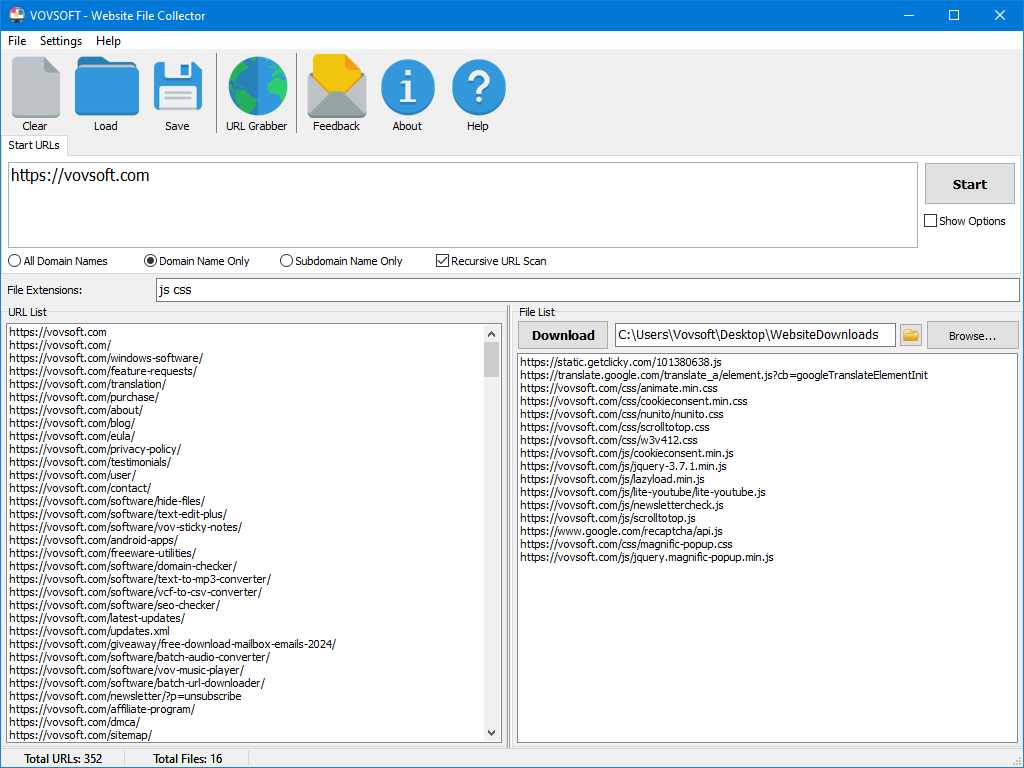
The workflow begins with the user defining search parameters and file extensions. The software then crawls the specified websites to locate every matching resource. Once the scanning process is complete, the application presents a categorized list of all discoverable files. Users can evaluate this data before proceeding, ensuring only relevant content is retrieved.
Key functionalities of the software include:
- Batch Processing: Users can input multiple URLs to scan several sites in a single session.
- Custom Filtering: The tool supports common extensions and user-defined custom file types.
- Data Export: The list of identified URLs can be exported for external use or documentation.
- Bulk Downloading: All discovered files can be saved to a local directory in one automated action.
For developers archiving assets or researchers gathering large volumes of documentation, this tool replaces manual downloads with a streamlined approach to data collection. It provides a structured environment for managing high-volume file acquisitions without requiring complex scripting or command-line expertise.
Top 5 Reasons To Download Website File Collector
- Unmatched Efficiency through Automation: Stop wasting hours on manual "Right-Click, Save As" operations and let the software handle bulk downloads in seconds.
- Granular Control and Custom Filtering: Specify exactly what you need, from standard PDFs and images to niche custom file extensions, ensuring your hard drive isn't cluttered with junk.
- The Ultimate Toolkit for Web Developers: Effortlessly harvest scripts, stylesheets, and assets to analyze site architecture or build comprehensive asset libraries.
- A Research Powerhouse for Students and Professionals: Quickly compile massive amounts of data, white papers, and documents from across multiple URLs to streamline academic or corporate projects.
- Transparent Workflow and Flexible Exporting: Preview every single file before you commit to a download and export URL lists for use in other professional management tools.
If you have ever spent an entire afternoon clicking through a website, opening links in new tabs, and manually saving images or documents one by one, you know the soul-crushing boredom of digital busywork. We live in an age of automation, yet many of us still treat the internet like a physical filing cabinet where we have to pull out every folder by hand. This is exactly where Website File Collector steps in to change the game. As a tech reviewer, I see hundreds of utilities every year, but few address such a specific, painful bottleneck as elegantly as this Windows application. It is a sleek, powerful "digital vacuum" designed to suck up exactly what you want from the web and leave the rest behind.
In this article, I am going to break down why this specific giveaway is the one you need to grab immediately. Whether you are a creative professional, a developer, or someone who just likes to stay organized, the Website File Collector is going to become a permanent fixture in your productivity suite. Let’s dive into the details of why this software is a must-have for anyone who takes their digital workflow seriously.
1. Unmatched Efficiency through Automation
The most precious commodity we have is time. In the world of web management and data collection, time is often wasted on the most mundane tasks imaginable. When you need to download fifty PDF manuals from a manufacturer's site or three hundred high-resolution images for a design project, doing it manually isn't just slow—it is prone to error. You skip files, you lose track of which page you were on, and your focus drifts.
Website File Collector eliminates this entire category of human error. By simply entering a URL, you are handing the "grunt work" over to a machine that doesn't get tired and doesn't miss a single link. The software scans the underlying code of the website, identifies the resources, and prepares them for you in a neat, organized list. What would have taken two hours of mind-numbing clicking now takes two minutes of background processing. This is the definition of "working smarter, not harder." For anyone managing large-scale projects, the efficiency gain alone justifies the download. It transforms a high-friction task into a zero-friction background process.
Furthermore, the ability to handle multiple URLs simultaneously means you can scale your data gathering. You aren't limited to a single page; you can point the tool at an entire domain or a specific list of subdirectories. The software’s engine is optimized for speed, ensuring that even media-heavy sites are indexed quickly. This level of automation isn't just a convenience—it’s a competitive advantage for professionals who need to move fast.
2. Granular Control and Custom Filtering
One of the biggest frustrations with generic "site rippers" or browser extensions is that they often give you everything or nothing. You might just want the high-res JPGs, but the tool forces you to download every thumbnail, icon, and button on the page. You end up spending more time deleting garbage than you saved by downloading it. Website File Collector solves this with its sophisticated filtering system.
The software allows you to be incredibly specific. If you only need .PDF and .DOCX files for a research paper, you simply check those boxes. If you are a designer looking for .SVG icons, you can isolate those. But where this tool really shines is the custom file extension feature. If you are working with niche data formats—perhaps .JSON files, .SQL dumps, or specific CAD files—you can manually enter those extensions into the criteria. The software then acts like a specialized filter, ignoring the noise and capturing only the signals you care about.
This precision means your local storage stays clean. You aren't clogging your "Downloads" folder with thousands of miscellaneous files you didn't ask for. You get a curated collection of exactly what you specified. This level of control is rare in consumer-grade software and speaks to the professional-grade logic behind the application. It empowers the user to define their own parameters, making the tool as broad or as narrow as the project requires.
3. The Ultimate Toolkit for Web Developers
For my fellow web developers and designers out there, this software is a hidden gem. We’ve all been there: you’re looking at a beautifully designed site and you want to understand how they structured their CSS or what specific Javascript libraries they are utilizing. While browser "Inspect Element" tools are great for quick peeks, they aren't efficient for holistic analysis.
Using Website File Collector, a developer can quickly pull all the .CSS and .JS files from a site into a single folder. This allows for local auditing, code review, and learning. You can see how assets are organized and how various scripts interact without having to navigate a complex directory structure in a browser tab. It’s also incredibly useful for "asset harvesting" during the prototyping phase of a project. If you need to migrate assets from an old site to a new one, this tool becomes your primary migration engine.
Think about the time saved during a site audit. Instead of manually checking for broken links to assets, you can run the collector and see exactly what is being served. It provides a bird's-eye view of a site's resource architecture that is difficult to get any other way. By downloading the scripts and stylesheets directly, you can run them through your own local linters and tools, making the development workflow much more robust. It is, quite simply, a "Swiss Army Knife" for anyone who builds or maintains websites.
4. A Research Powerhouse for Students and Professionals
In the academic and corporate research worlds, data is king. However, that data is often scattered across dozens of white papers, case studies, and reports hosted on various parts of a university or corporate website. For a student writing a thesis or a market analyst preparing a report, the sheer volume of reading material can be overwhelming. Collecting that material shouldn't be the hard part; reading it should be.
Website File Collector acts as a research assistant that never sleeps. You can point it at a resource page or an archival site, tell it to look for .PDF or .XLS files, and walk away. When you come back, you have a local library of every relevant document, ready for offline reading or ingestion into a reference manager like Zotero or Mendeley. This capability is a massive boon for "deep work." By removing the distraction of the browser and the "hunt" for files, you can stay in the flow of your research.
Moreover, the software's ability to handle multiple URLs means you can aggregate data from multiple sources in one go. If you are doing a comparative study across five different organizations, you can queue up their resource pages and let the collector build your database. It turns the chaotic, sprawling web into an organized, local repository. For anyone who deals with "big data" on a small scale, this tool is an absolute lifesaver.
5. Transparent Workflow and Flexible Exporting
Finally, let’s talk about the user experience. Many power-user tools are built with "black box" logic—you press a button and hope for the best. Website File Collector takes a different, more transparent approach. Once the scan is complete, it doesn't just start dumping files onto your hard drive. Instead, it presents you with a detailed list of every downloadable URL it found that matches your criteria.
This preview stage is critical. It allows you to verify that the software found what you were looking for before you use up bandwidth or storage space. You can cherry-pick specific files from the list or, if everything looks good, hit the "download all" button. This transparency gives the user a sense of security and control that is often missing from automation tools.
But the "pro move" here is the export functionality. Sometimes, you don't actually want to download the files immediately. Maybe you want to send the list of URLs to a download manager on a different server, or perhaps you need to include the list of resources in a project spreadsheet. Website File Collector allows you to export the list of URLs easily. This makes it an excellent "discovery tool" that fits into a larger ecosystem of software. You can use it to find the files, export the list, and then use that data however you see fit in your professional pipeline. This flexibility ensures that the software isn't a "dead end," but rather a bridge to other parts of your digital life.
Final Thoughts: Why You Need To Act Now
In the tech world, we often talk about "frictionless" experiences. We want our phones to unlock instantly, our apps to load in milliseconds, and our data to be available at our fingertips. Yet, the way we interact with website files has remained remarkably high-friction for decades. We are still using methods from the 1990s to gather data from the web of the 2020s.
Website File Collector is the solution to that legacy problem. It is a modern tool for a modern internet. It understands that we aren't just looking for "a file"—we are looking for collections of assets, libraries of documents, and sets of data. By automating the discovery and retrieval process, it frees up your brain to do the actual creative or analytical work that matters.
Think about your current projects. Is there a folder you've been meaning to populate with references? Is there a site whose assets you've been wanting to study? Is there a set of images you need for a new mood board? Download Website File Collector during this giveaway and stop putting those tasks off. Once you experience the ease of seeing a site’s entire file structure laid out in a clean, filterable list, you will wonder how you ever managed without it.
This isn't just another utility; it's a productivity multiplier. It's the kind of software that stays on your taskbar because you find a new use for it every single week. From the simple interface to the powerful custom extension filtering, every part of this application is designed to make your digital life easier. Don't let this opportunity pass you by. Download the Website File Collector giveaway today and take the first step toward a more organized, efficient, and professional way of interacting with the web. Your future, more productive self will thank you.
In conclusion, whether you are a student trying to ace a thesis, a developer building the next great web app, or a media enthusiast curating a personal collection, this software offers the power and flexibility you need. It is simple enough for a novice to pick up in seconds, yet deep enough for a power user to integrate into a complex professional workflow. It is rare to find a tool that balances simplicity and power so effectively. Grab it now, explore its features, and start collecting the web your way.

Reviews for Website File Collector
Click Here to Read Reviews for Website File Collector >> Click Here to Submit Reviews for Website File Collector >>