What Does Replicaro: Best Cloud Backup App Do?
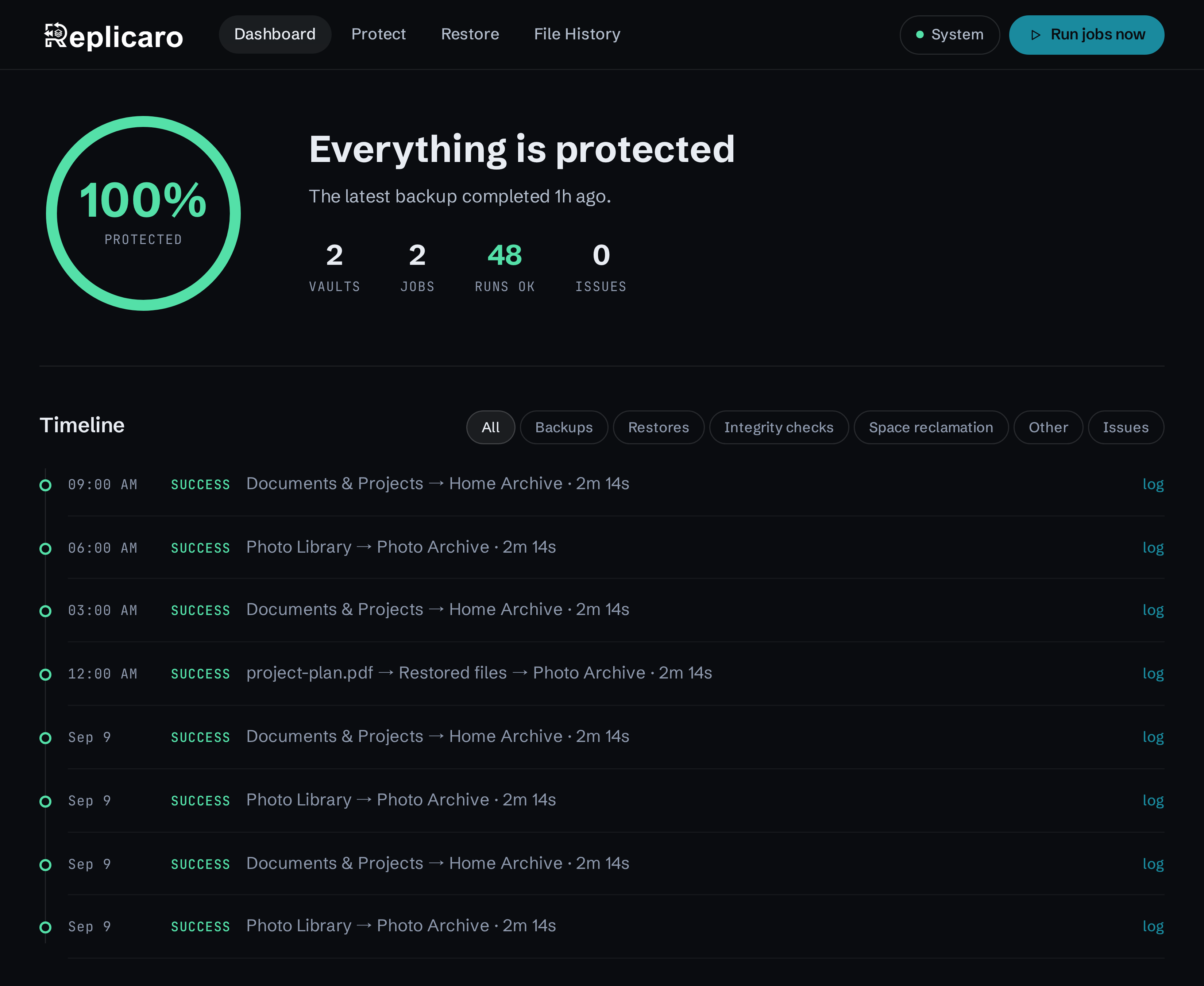
Replicaro is a free, open-source backup application designed for Windows, macOS, Linux, and Docker. Developed by SharewareOnSale, the tool acts as a graphical interface for the Restic and Kopia backup engines, aiming to simplify the process of securing data across various environments. It allows users to manage complex backup tasks through a modern GUI rather than a command-line interface.
The software enables automated, encrypted backups to a wide range of destinations, including local drives, network folders, and cloud services such as Amazon S3, Backblaze B2, Google Drive, and OneDrive. Technical highlights of the service include:
- End-to-End Encryption: All data is encrypted locally before transmission to ensure privacy.
- Data Efficiency: Built-in deduplication and compression minimize the storage space required for multiple versions.
- Granular Recovery: Users can browse backup history, search for specific file versions by name, and restore individual files or entire datasets.
- Ransomware Protection: Support for object-lock protection on compatible cloud storage prevents accidental or malicious deletion.
- Retention Management: Users can define specific policies to keep hourly, daily, or yearly snapshots.
Replicaro supports cross-platform recovery, allowing users to connect multiple computers to the same vault. It operates without file size limits and includes system tray notifications and webhook support to monitor backup success or failure.
Top 5 Reasons To Download Replicaro: Best Cloud Backup App
Every single computer user on the planet falls into one of two categories: those who have experienced a catastrophic data disaster, and those who are about to. Whether it is an unexpected SSD failure, a corrupted operating system update, accidental deletion of critical work documents, or the ever-looming threat of modern ransomware, digital devastation is rarely polite enough to announce itself beforehand. For over a decade, enthusiasts have relied on curated promotions to discover premium software, but today brings something fundamentally different and immensely exciting: an in-house, fully featured, completely unrestricted backup powerhouse known as Replicaro. Built from the ground up to solve the perpetual headaches of personal and professional data protection, this tool demands your immediate attention.
Before breaking down each technological leap, architectural design choice, and everyday convenience this utility provides, here is a quick overview of why this utility is an absolute must-install on every machine you own.
- Battle-Tested Enterprise Engines Meet a Modern GUI: It takes the world-class speed, security, and snapshot technology of command-line giants Restic and Kopia and wraps them inside an intuitive, gorgeous desktop interface anyone can navigate.
- Uncompromising End-to-End Encryption and Ransomware Immunity: Your files are encrypted locally before they ever travel over a wire, paired with S3 object-locking support to prevent malicious wiping or tampering.
- Complete Freedom from Vendor Lock-In: Store your vaults anywhere you want—local external drives, home NAS boxes via SFTP, Google Drive, OneDrive, Dropbox, or enterprise S3 clouds like Backblaze B2, Wasabi, and Amazon Deep Glacier.
- Deduplication, Unlimited File Sizes, and Surgical File Recovery: Advanced block-level deduplication saves gigabytes of space, while a lightning-fast search engine lets you restore an entire drive, a single folder, or an individual revision of an overwritten document.
- Truly Free, Open-Source, and Cross-Platform: Native availability across Windows, macOS, Linux, and Docker with zero subscription fees, zero upsells, zero trial timers, and full code auditability.
Now, let us examine why each of these five capabilities sets this tool miles apart from commercial bloatware and complex legacy backup utilities.
1. Battle-Tested Enterprise Engines Meet a Modern GUI
If you ask seasoned system administrators and Linux power users what tools they rely on for unshakeable data preservation, two names consistently top the list: Restic and Kopia. These open-source engines are globally celebrated for their rock-solid stability, snapshot integrity, and cryptographic rigor. However, they share one monumental drawback that prevents everyday desktop users from embracing them: they operate almost entirely via a terminal command-line interface. For the average user managing family photos, creative projects, or financial records, memorizing obscure syntax flags, creating custom cron jobs, and manually typing out destination strings in PowerShell or Bash is an intimidating barrier to entry.
This is where Replicaro shifts the entire paradigm. Instead of attempting to invent an untested backup algorithm from scratch, the application harnesses the proven resilience of Restic and Kopia under the hood and bridges the gap with a clean, responsive, and thoroughly modern graphical user interface. You get the raw technological perfection of enterprise-tier utilities without having to touch a terminal prompt or write a single line of script.
From the moment you open the application, the setup workflow is frictionless. You are guided through choosing your source folders, pointing to your vault targets, and setting up automated cadences. Everything feels natural, tactile, and instantly understandable. Background processes run smoothly in the system tray, providing informative status indicators and desktop notifications so you always know when your data was last secured. By bridging the chasm between raw terminal power and modern design ergonomics, it democratizes top-tier disaster recovery for regular users and IT professionals alike.
2. Uncompromising End-to-End Encryption and Ransomware Immunity
In an era where massive cloud leaks, intrusive telemetry, and rogue ransomware attacks make daily headlines, how your backups are protected is just as critical as whether they exist at all. Many standard consumer backup services practice what they vaguely call encryption in transit or offer proprietary server-side encryption keys, which means the cloud provider—or anyone who manages to breach their servers—holds the technical ability to decrypt, inspect, or compromise your archives. Other basic backup tools simply copy raw files to an external drive, leaving them entirely vulnerable to malware that sweeps local volumes.
Replicaro eliminates these vulnerabilities through a strict zero-knowledge architecture. Every single byte is compressed and encrypted on your local machine using an impenetrable vault password before it ever leaves your RAM or touches a disk. You hold the master key; neither the developers, your cloud storage vendor, nor your internet service provider can peek inside your archives. Because there is no back door, reset link, or recovery master key, your privacy is mathematically guaranteed against prying eyes.
Even more impressive for security-conscious users is the native support for cloud object-locking. Sophisticated modern ransomware does not simply scramble your active operating system; it systematically searches your connected network drives, unearths your backup vaults, and destroys historical snapshots to ensure you cannot recover. By pairing this application with an S3-compatible cloud provider that supports immutable object-locking, your snapshots are locked into an unalterable state for a duration you specify. Even if an attacker gains control of your local operating system or your cloud login credentials, they cannot delete, overwrite, or encrypt those historical vaults. Combined with built-in automated integrity checks that continually verify your vaults are free from silent bit-rot, your archives remain pristine and ready for deployment when disaster strikes.
3. Complete Freedom from Vendor Lock-In
One of the dirtiest secrets of the modern commercial backup industry is the subscription trap. Proprietary backup vendors lure users in with an introductory rate, force them to store data exclusively inside the vendor's private, closed-ecosystem cloud, and then steadily raise subscription prices year after year. If you ever decide to cancel your subscription, your historical snapshots vanish, and your proprietary archives cannot be read by any alternative program. You are effectively held hostage by the software provider.
Replicaro completely dismantles this parasitic business model by providing unmatched storage independence. The utility does not care where you choose to host your repositories. It puts you in total command of your storage strategy, whether you prefer an offline approach, a self-hosted cloud, or commercial cloud providers. You can direct your encrypted vaults to a humble USB thumb drive, an external high-capacity mechanical hard drive, or a local network-attached storage box via SFTP.
If you prefer offsite cloud storage, you are free to link standard consumer accounts like Google Drive, Microsoft OneDrive, and Dropbox. For users who demand massive capacity at enterprise wholesale rates, the tool seamlessly integrates with Azure Blob Storage, Google Cloud Storage, and virtually any S3-compatible architecture on the market. Whether you use Backblaze B2, Wasabi, Cloudflare R2, self-hosted MinIO servers, or hyper-economical cold archive tiers like Amazon Deep Glacier and Scaleway Glacier, the software connects effortlessly. You pay only for the raw storage you actually consume directly to the host of your choice, completely bypassing middleman markups. If you want to change cloud providers tomorrow, you can do so freely without re-architecting your entire backup process.
4. Deduplication, Unlimited File Sizes, and Surgical File Recovery
Legacy backup systems often struggle under the weight of modern digital workloads. When you edit a massive 50-gigabyte 4K video project, a virtual machine disk image, or an extensive database file, crude backup utilities will attempt to upload the entire 50-gigabyte file over again during the next scheduled cycle. This wastes bandwidth, eats up storage limits, and leads to backup schedules that drag on for hours. Furthermore, many consumer utilities enforce arbitrary file size limitations, outright failing when confronted with substantial raw archives.
Replicaro does away with these limitations completely. With zero file size limits, you can archive virtual machine images, raw media footage, and enormous database dumps without experiencing software crashes or arbitrary roadblocks. More importantly, the system relies on sophisticated content-defined chunking and deduplication. When files are modified, the software intelligently scans the blocks, identifies only the unique segments that have actually changed, compresses them, and adds them to your snapshot history. This means a sprawling daily backup routine that might otherwise consume hundreds of gigabytes often requires mere megabytes of bandwidth and storage, allowing tasks to finish in seconds rather than hours.
Crucially, an efficient backup mechanism is utterly useless if recovering your data turns into an agonizing chore. We have all experienced the frustration of wading through obscure, timestamped zip files just to track down an earlier version of an overwritten presentation. Replicaro turns the restore experience into a fast, precise process. Through a dedicated search interface, you can search across snapshots by file name, preview directory structures from specific dates, and directly compare file revisions side by side. When you find what you are looking for, you can perform surgical recoveries: pull back a single lost spreadsheet, extract a specific folder hierarchy, or trigger a full bare-metal recovery across entirely different computers. Because multiple machines can attach to the same vault, configuring a brand-new replacement workstation takes minimal effort.
5. Truly Free, Open-Source, and Cross-Platform
In the tech software space, the word giveaway often comes with fine print. We frequently encounter applications that offer a free license key valid for only six months, software bundles crippled by aggressive in-app advertisements, or trial editions that restrict essential functionality behind premium paywalls. Even worse are proprietary utilities that harvest your usage telemetry, monitor your file directories, and quietly communicate with remote advertising servers in the background.
This release represents the gold standard of digital integrity because it is genuinely free and open-source software. There are no trial countdowns, no missing features waiting to be unlocked by a credit card transaction, no surprise renewal invoices, and no intrusive promotional popups. The full source code is publicly accessible for community inspection, security auditing, and continuous collaborative enhancement. When you rely on open-source code to preserve your most irreplaceable digital memories and critical business infrastructure, you gain total transparency. You can verify precisely how your data is handled, confirm that no hidden telemetry exists, and rest easy knowing the software will remain functional and accessible indefinitely.
Furthermore, digital workflows are rarely confined to a single operating system. Creative professionals, software developers, and small business owners routinely balance a Windows gaming desktop, a macOS laptop for travel, and Linux-powered homelab servers. Replicaro treats all environments as first-class citizens. With native, perfectly optimized builds ready for Windows, macOS, Linux, and headless Docker containers, you achieve a unified data protection strategy across every screen in your household or office. You no longer need to purchase, master, and configure three separate backup tools to keep your multi-platform hardware ecosystem synchronized and safe.
The Final Verdict
Data loss is an agonizing, gut-wrenching experience that strikes without warning. Waiting until your drive clicks its last breath, your laptop is stolen, or a zero-day exploit encrypts your local documents is the worst time to think about a disaster mitigation strategy. A proper backup system must satisfy four non-negotiable criteria: it must be completely dependable, computationally secure, effortless to run automatically, and fast when restoring files.
By blending the proven durability of Restic and Kopia with a beautiful visual layout, zero-knowledge encryption, universal cloud compatibility, smart deduplication, and a completely open-source architecture, Replicaro delivers an unmatched toolkit for data preservation. Whether you are a digital nomad guarding creative portfolios, an IT professional backing up Docker volumes, or a home user looking to preserve family photos, this application represents the definitive solution to an age-old computing problem.
Life is hard enough without having to fight your backup software. Take advantage of this extraordinary release today, download the software, configure your first encrypted vault, and experience the unrivaled peace of mind that comes with knowing your digital life is completely untouchable.

Reviews for Replicaro: Best Cloud Backup App
Click Here to Read Reviews for Replicaro: Best Cloud Backup App >> Click Here to Submit Reviews for Replicaro: Best Cloud Backup App >>