What Does Ashampoo Privacy Inspector Do?
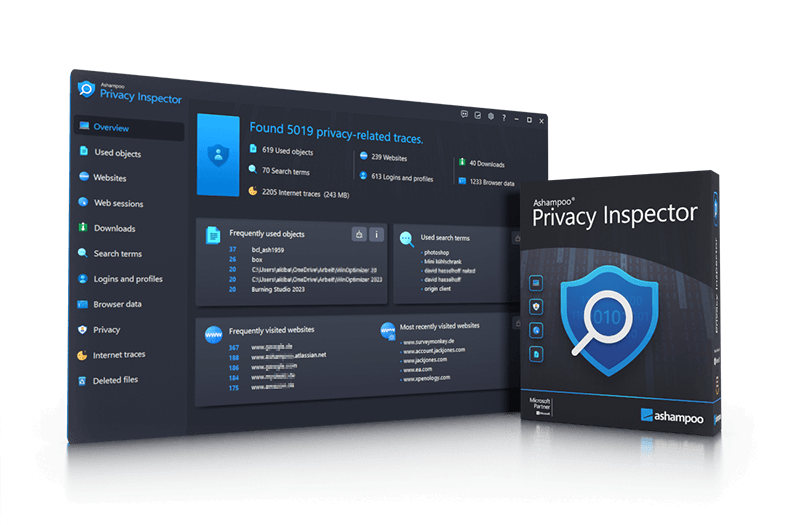
Ashampoo Privacy Inspector provides a granular look into the activity logs maintained by the Windows operating system. The software identifies both offline and online data trails, including frequently used files, recent search terms, and website visits. By analyzing data across all user accounts on a single PC, the application surfaces details such as how a specific page was accessed—whether via a bookmark or a direct link—and visualizes these paths through list and tree views.
The utility extends its oversight to major web browsers like Chrome, Firefox, and Edge, exposing search histories, login records, and form inputs. Beyond simple auditing, users can employ built-in filters to narrow results by time period and delete specific entries to eliminate traces of their activity. To further harden system privacy, the software includes a dedicated module to limit telemetry and prevent unwanted data sharing with third parties.
Key functionality includes:
- Activity Monitoring: Review logins, form inputs, and page visits sorted by frequency and time.
- Detailed Navigation: Retrace internet activity through detailed list and tree views.
- Multi-Browser Support: Analyze browsing behavior across all system user accounts.
- Telemetry Control: Disable background data sharing and telemetry settings.
- Data Recovery: Restore accidentally deleted files using the integrated Undeleter tool.
Ashampoo Privacy Inspector acts as both an auditing tool and a cleanup utility, allowing users to maintain a clear record of system usage while providing the means to purge sensitive information as needed.
Top 5 Reasons To Download Ashampoo Privacy Inspector
- Complete Visibility into Hidden Windows Activity Logs: Uncover the exhaustive "digital paper trail" that Windows creates behind the scenes, including frequently used files and search terms.
- Advanced Web Forensic Analysis: Retrace every step of your online journey with detailed list and tree views that show exactly how you reached specific websites.
- Proactive Telemetry and Data-Sharing Control: Take back control of your OS by disabling the "phone home" features that send your personal usage data to third-party servers.
- Granular Form and Login Management: Gain total transparency over stored form inputs and login data to ensure sensitive credentials aren't lingering where they shouldn't be.
- Universal Multi-User Analysis with Built-in Recovery: Audit privacy traces across all user accounts on a single PC and use the integrated Undeleter to rescue files deleted by mistake.
In the modern computing era, the concept of privacy has become increasingly elusive. We often think that by simply clearing our browser history or using an "incognito" window, we are wiping away our digital footprints. However, the reality of the situation is much more complex and, frankly, a bit unsettling. Your operating system, specifically Windows, is a meticulous record-keeper. It doesn't just watch what you do online; it logs your offline activities, the files you open, the programs you run, and even the search terms you punch into your start menu. If you have ever felt like your computer knows a little too much about you, you are right. This is where Ashampoo Privacy Inspector steps in, and why this giveaway is an absolute essential for anyone who values their digital autonomy.
As a tech reviewer, I have seen countless "cleaner" utilities that promise to speed up your PC by deleting temp files. But Ashampoo Privacy Inspector isn't just another system cleaner. It is a specialized forensic and privacy tool designed to give you a "god-view" of exactly what your PC is recording. It transforms the cryptic logs buried deep within the Windows system into readable, actionable information. Whether you are looking to secure your personal data from prying eyes or you simply want to understand your own digital habits better, this software provides a level of depth that is rarely seen in consumer-grade applications. Let’s dive deep into the five core reasons why you need to grab this giveaway immediately.
1. Complete Visibility into Hidden Windows Activity Logs
Windows is designed to be helpful, but that "helpfulness" comes at the cost of constant logging. Every time you open a document, view a photo, or search for a specific setting, Windows creates a shortcut or a log entry to make accessing that item faster the next time. While this sounds convenient, it creates a massive trail of metadata that can be used to reconstruct your entire daily routine. Ashampoo Privacy Inspector acts as a powerful lens, focusing on these hidden areas to show you exactly what has been recorded.
One of the most impressive aspects of this tool is its ability to reveal frequently used files and recently visited directories that might not show up in the standard "Recent Files" list in File Explorer. It digs into the User Assist logs and other system-level databases to show you which applications you use most often and when you last used them. This isn't just about seeing a list; it's about understanding the "what, when, and how" of your PC usage. For users who share a computer or for those who take their laptop into public spaces, knowing that this data is being stored—and having the power to delete it—is a massive security advantage. The software includes built-in filters that allow you to narrow down these results by time period, meaning you can audit your activity from today, yesterday, or a month ago with just a few clicks.
Moreover, the transparency extends to the top search terms you have used within the Windows environment. We often forget that the Windows search bar is effectively a local tracker. By revealing these search terms, the software allows you to see the "profile" your computer has built of your interests and needs. Ashampoo Privacy Inspector doesn't just show you this data to scare you; it gives you the surgical tools to remove individual sections of this data without affecting your system’s stability. It is about empowering the user to decide what remains on their hard drive.
2. Advanced Web Forensic Analysis
While Windows handles the offline side of things, our browsers handle the online world. Most of us use a mix of Chrome, Firefox, and Edge, and each of these browsers keeps its own set of detailed logs. Ashampoo Privacy Inspector brings all of these browsers under one roof, providing a unified dashboard to analyze your web behavior. This is where the software moves from being a simple utility to a near-forensic tool. It doesn't just show you a list of URLs; it allows you to retrace your steps through the internet using sophisticated list and tree views.
The "Tree View" is particularly fascinating from a tech reviewer’s perspective. It allows you to visualize the "referral" path of your browsing. For example, did you reach a specific page because you clicked a link on a news site, or did you access it through a saved bookmark? This level of detail is vital for understanding how you interact with the web and for identifying potentially malicious sites that might have redirected you without your knowledge. You can see the frequency of visits to specific pages, which helps you identify which sites are eating up most of your time or which background trackers are being triggered most often.
Furthermore, the software provides a deep dive into download histories. We’ve all downloaded files and forgotten where they came from or why we have them. Ashampoo Privacy Inspector provides a crystal-clear picture of every file downloaded through your browsers, including the source URL and the timestamp. This makes it incredibly easy to clean up your digital clutter while ensuring that no "mystery files" are left lingering in your downloads folder. By centralizing the history of Chrome, Firefox, and Edge, Ashampoo saves you the hassle of jumping between different settings menus, providing a one-stop shop for web privacy.
3. Proactive Telemetry and Data-Sharing Control
If you have spent any time in the tech community, you have likely heard the word telemetry. In short, telemetry is the process of your software "phoning home" to the manufacturer with data about how you use the product. Windows is notorious for this, sending back data on everything from your hardware configuration to how long you spend in certain apps. While Microsoft claims this is for improving the user experience, many privacy advocates see it as an unnecessary intrusion. One of the standout features of Ashampoo Privacy Inspector is its dedicated module for limiting and preventing this telemetry.
This isn't just a simple "off" switch. The software analyzes the various data-sharing channels that Windows uses and allows you to disable them selectively. This prevents your personal usage patterns from being bundled into "big data" sets. For a tech reviewer, this is a "power user" feature that has been made accessible to everyone. You don’t need to be a registry expert or a group policy editor to shut down these invasive tracking services. The program simplifies the process, making it a matter of checking boxes to enhance your privacy.
By stopping telemetry, you are not only protecting your privacy but also potentially freeing up system resources. Background processes that are constantly gathering, bundling, and transmitting data consume CPU cycles and network bandwidth. By putting a stop to unwanted data sharing, you are ensuring that your PC’s resources are focused on the tasks you actually want to perform, rather than serving the data-collection needs of a corporation. This proactive approach is the difference between simply cleaning up past traces and preventing future ones from being created and shared.
4. Granular Form and Login Management
In the age of identity theft and data breaches, your login credentials and form inputs are your most sensitive digital assets. Most modern browsers offer to save your passwords and "autofill" your addresses, credit card numbers, and login names. While this is a massive convenience, it is also a massive risk. If someone gains access to your computer, even for a few minutes, they can often extract this information or use it to log into your sensitive accounts. Ashampoo Privacy Inspector makes these inputs completely transparent, allowing you to see exactly what has been cached and stored.
The software goes beyond the surface level, revealing the form inputs that you might have forgotten were even saved. This includes everything from search queries within specific websites to the data you've entered into contact forms. By making this data visible, the program allows you to realize just how much information is being stored locally on your machine. You can then choose to wipe this data, ensuring that your sensitive inputs don't become a liability.
I find this feature particularly useful for users who have used their PC for sensitive tasks like online banking, tax preparation, or healthcare management. Seeing a list of form inputs can be an eye-opening experience, as it highlights the "memory" of your browser. Ashampoo Privacy Inspector gives you the confidence to use these online services, knowing that you have the tools to completely scrub the evidence of those interactions once you are finished. It bridges the gap between convenience and security, ensuring that "autofill" doesn't turn into "autoleak."
5. Universal Multi-User Analysis with Built-in Recovery
One of the biggest limitations of most privacy tools is that they only look at the current logged-in user. If you have a family PC with multiple accounts for your spouse or children, you would normally have to log into each account individually to clean up the data. Ashampoo Privacy Inspector breaks this barrier by offering the ability to analyze the behavior and web browsing traces of all users on a PC. This is an incredible feature for parents who want to ensure their children are browsing safely or for system administrators who need to maintain the privacy standards of a shared workstation.
Being able to see the browsing behavior across all accounts gives you a holistic view of the machine's security posture. You can identify if one account is frequently visiting high-risk sites or if certain confidential data is being stored in a less-secure user profile. This "universal" approach makes the software an essential tool for household digital hygiene. You can clean up the entire PC in one session, ensuring that no user is leaving behind a trail that could compromise the security of the whole system.
Finally, we have to talk about the Undeleter. We have all been there—you’re in the middle of a "privacy purge," deleting files and logs with enthusiasm, only to realize a second too late that you’ve deleted an important document or a cherished photo. Ashampoo has wisely included a built-in Undeleter module to prevent this "privacy-cleaning regret." If you accidentally delete a file while using the program, the Undeleter can help you recover it quickly. This safety net is what makes Ashampoo Privacy Inspector a truly user-friendly tool. It acknowledges that while privacy is paramount, accidents happen. Having a recovery tool integrated directly into the privacy suite provides a level of peace of mind that other software simply doesn't offer. It allows you to be aggressive with your privacy settings without the fear of permanent data loss.
Conclusion: Why You Should Download This Now
The Ashampoo Privacy Inspector is a comprehensive, sophisticated, and surprisingly easy-to-use solution for one of the most pressing issues in modern computing. It treats your privacy with the seriousness it deserves, providing forensic-level insights without requiring a computer science degree to navigate. From the detailed tree views of your browsing history to the one-click disabling of Windows telemetry, every feature is designed to put you, the user, back in the driver's seat.
We often ignore the "digital dust" that accumulates on our hard drives, but that dust is actually a detailed map of our lives. By downloading this giveaway, you are getting a professional-grade tool that clears the air and secures your environment. You get transparency into what Windows is doing behind your back, you get control over your online history across multiple browsers, and you get a safety net with the integrated Undeleter. In a world where your data is constantly being harvested, Ashampoo Privacy Inspector is your personal shield. Don't let your PC keep secrets from you—download this tool and see for yourself what has been happening under the hood. It’s time to take your privacy back, and there is no better way to do it than with this powerful, all-in-one inspector.
Protect your data, audit your history, and secure your future. This giveaway is the perfect opportunity to upgrade your digital security toolkit with a program that delivers real, tangible results. Whether you are a casual user or a tech enthusiast, Ashampoo Privacy Inspector is an essential addition to your software library.

Reviews for Ashampoo Privacy Inspector
Click Here to Read Reviews for Ashampoo Privacy Inspector >> Click Here to Submit Reviews for Ashampoo Privacy Inspector >>