What Does Download Mailbox Emails Do?
Vovsoft Download Mailbox Emails is a dedicated Windows utility designed to facilitate the offline backup of entire email accounts. The software streamlines the process of extracting messages from various providers, including Gmail, Yahoo Mail, and Hotmail, as well as private server accounts using standard protocols. By migrating cloud-based data to local storage, users can ensure their communications remain accessible regardless of server availability or account access issues.
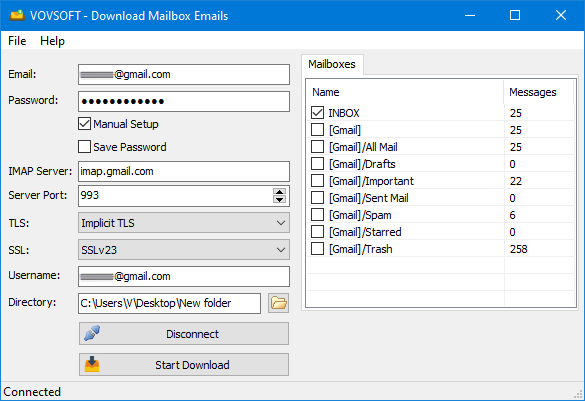
The application operates through a straightforward sequence of steps:
- Input the necessary login credentials and establish a connection to the server.
- Select the specific mailboxes or folders targeted for backup.
- Designate a local directory and initiate the retrieval process.
The tool automates the download process, converting each message into an EML file. These files utilize the MIME format, ensuring that all headers, body content, and attachments are preserved intact. Because the software is non-destructive, it does not delete or modify any data on the original mail server during the extraction process.
Once the download is complete, the resulting files can be opened and managed using standard desktop email clients, such as Microsoft Outlook, Mozilla Thunderbird, or Windows Mail. This provides a reliable method for long-term archiving and offline browsing of sensitive or high-volume correspondence without requiring an active internet connection.
Top 5 Reasons To Download Download Mailbox Emails
- Total Data Sovereignty and Offline Accessibility: Regain control over your digital life by keeping a physical copy of your correspondence on your own hardware, ensuring you are never locked out of your own information.
- The Universal Power of EML Files: By exporting to the industry-standard EML format, your emails remain readable across almost every professional email client, from Microsoft Outlook to Mozilla Thunderbird.
- Streamlined, No-Nonsense Efficiency: Unlike bloated enterprise backup suites, this tool offers a "Connect, Select, Download" workflow that anyone can master in seconds, regardless of their technical expertise.
- A Bulletproof Layer of Cybersecurity: Protect your most sensitive attachments and conversations from cloud-based hacking attempts, server outages, or accidental account deletions by maintaining a local, air-gapped archive.
- Preservation of Data Integrity: The software captures everything—headers, bodies, and attachments—exactly as they appear on the server without modifying or deleting the originals, providing a perfect mirror of your digital history.
In an era where our entire lives are hosted on servers owned by multibillion-dollar corporations, the concept of "ownership" has become increasingly blurry. We treat our Gmail, Yahoo, and Outlook inboxes as permanent archives, assuming that they will always be there, always be accessible, and always be secure. But as any seasoned tech enthusiast will tell you, the "cloud" is simply a fancy word for someone else's computer. If you haven't backed up your email locally, you don't truly own your data. This is where the Download Mailbox Emails software comes in. It is a lightweight, powerhouse of a tool designed for one specific purpose: to give you back your digital sovereignty.
As a reviewer who has seen countless backup utilities come and go, I can say that this particular software stands out because it doesn't try to be a Swiss Army knife. It isn't trying to manage your calendar, suggest AI-written replies, or track your packages. It focuses on the most critical task of the modern professional: securing your correspondence. Let’s dive deep into why this specific giveaway is a mandatory addition to your Windows toolkit.
1. Total Data Sovereignty and Offline Accessibility
The first and most compelling reason to grab this software is the sheer peace of mind that comes with data sovereignty. We live in a "subscription and service" world where access to our own information can be revoked in an instant. Perhaps an algorithm flags your account by mistake, or perhaps a service provider changes their terms of service. If you are locked out of your primary email account today, how much of your life would you lose? Think about the flight receipts, the legal documents, the sentimental messages from years ago, and the critical business threads.
By using this software to download all email messages inside your mailbox, you are creating a localized, physical fortress of your data. This tool allows you to pull every single message from Gmail, Hotmail, or Yahoo and store it directly on your hard drive, an external SSD, or your own private NAS. Once those emails are on your computer, they belong to you. You can access them in the middle of a flight without Wi-Fi, in a remote cabin without cell service, or even if the email provider itself suffers a catastrophic global outage. This is the ultimate "Digital Insurance Policy." It transforms your emails from temporary service-based records into permanent personal assets.
Furthermore, the ability to browse your emails offline is a productivity game-changer. Searching through massive web-based archives can be sluggish, especially with slow internet connections. Having local EML files means you can use Windows search or any local file indexer to find what you need in milliseconds. You aren't just downloading data; you are downloading the freedom to use that data whenever and wherever you want.
2. The Universal Power of EML Files
When it comes to digital archiving, the format you choose is just as important as the backup itself. Many proprietary backup tools save your data in a "black box" format that only their software can read. If that company goes out of business or the software stops working on a future version of Windows, your backup becomes a useless pile of encrypted code. This software avoids that trap entirely by exporting all emails as EML files.
For those who aren't familiar with the technical specifics, the EML format is the gold standard for email storage. It is based on the MIME standard, which means it preserves everything: the sender, the recipient, the timestamp, the rich text formatting of the body, and most importantly, the attachments. Because EML is an open and widely accepted format, it is future-proof. You can open these files today with Windows Mail or Microsoft Outlook, and you will likely be able to open them twenty years from now with whatever technology succeeds them.
This universal compatibility makes the Download Mailbox Emails tool an essential bridge for migration. If you’ve ever tried to move ten years of emails from a Yahoo account to a professional Thunderbird setup, you know it can be a nightmare of IMAP synchronization errors and lost folders. With this software, you simply download the mailbox as EML files and drag-and-drop them into your new client. It eliminates the middleman and the headache, ensuring that your transition between platforms is seamless and data-loss-free.
3. Streamlined, No-Nonsense Efficiency
We have all encountered software that feels like it was designed by a committee of people who hate users. Complex menus, hidden settings, and endless setup wizards can turn a simple task into a weekend project. One of the reasons I am so adamant about this giveaway is the interface. The developers have stripped away the noise and left only the essentials. The workflow is incredibly refreshing: enter your credentials, click Connect, select the folder, and hit Start Download. That’s it.
This simplicity is actually a sophisticated feature in itself. It means that whether you are a power user looking to quickly dump a mailbox for a client, or a casual user who just wants to save their personal memories, the learning curve is zero. The software supports IMAP protocols, which is the industry standard, meaning it works with Gmail, Hotmail, Yahoo, and virtually any private email server used by businesses. You don’t need to be a network administrator to configure the ports or security layers; the app handles the handshake with the server efficiently.
In my testing, the speed of the download is limited only by your internet connection and the responsiveness of the email provider’s server. The software doesn’t "hang" or "bloat" while processing thousands of messages. It works quietly in the background, populating your chosen directory with your EML files. In a world of over-engineered apps, this level of minimalist efficiency is a breath of fresh air.
4. A Bulletproof Layer of Cybersecurity
Security isn't just about passwords; it's about redundancy. We often think of the cloud as "safe," but the reality is that cloud services are high-value targets for hackers. Ransomware attacks, phishing schemes that lead to account takeovers, and simple human error can result in a mailbox being wiped clean. If your only copy of a critical contract is in your "Sent" folder on a cloud server, you are one security breach away from losing it forever.
By downloading your emails locally, you are creating what security experts call an "air-gapped" backup (if you move them to an external drive). This means that even if your live Gmail account is compromised, the hacker cannot touch the emails sitting on your physical hard drive. This software is a proactive defense mechanism. It allows you to maintain a rolling archive of your most sensitive communications without needing to keep them "live" on a server where they are vulnerable to scanning or unauthorized access.
Moreover, there is a privacy aspect to consider. Many free email providers scan your messages to build advertising profiles. While this software doesn't stop them from scanning the emails currently on their servers, it does give you the option to archive your messages and then delete the "live" versions from the server to keep your cloud footprint small. This tool gives you the choice to decide where your data lives and who has the potential to see it. It turns your PC into a private vault for your digital history.
5. Preservation of Data Integrity
The final reason you need to download this tool is the integrity of the data it preserves. A common problem with "copy-pasting" email content or printing to PDF is that you lose the metadata. Metadata includes the routing information, the original headers, and the cryptographic signatures that prove an email is authentic. In legal or professional settings, these headers can be vital. Download Mailbox Emails ensures that every bit of that information is preserved in the EML file.
When you download your mailbox contents, you get the full MIME format. This means the attachments remain embedded within the email file, exactly where they were originally placed. You don't have to worry about a "broken link" to an attachment or a missing image in an HTML email. Everything is packaged together. This is particularly important for business owners who need to keep records for tax or compliance reasons. You aren't just saving the text of the email; you are saving the context.
Crucially, this software operates with a "read-only" mindset regarding your server. It does not delete your emails from the server after downloading them. This allows you to use the tool as a non-destructive backup utility. You can keep your mailbox active and full on your phone and web browser, while the software creates a perfect mirror on your desktop. This dual-layer approach ensures that you have the convenience of the cloud and the security of local storage simultaneously, with zero risk of accidental data loss during the synchronization process.
Conclusion: Why You Should Act Now
In the tech world, we often say there are two types of people: those who back up their data, and those who haven't lost everything yet. Email is arguably the most important data we generate. it is our primary log of transactions, relationships, and professional milestones. Relying on a third-party provider to keep that data safe forever is a gamble with high stakes and low rewards.
The Download Mailbox Emails software is a robust, elegant, and incredibly simple solution to a complex problem. It bridges the gap between the convenience of modern webmail and the security of old-school local storage. Whether you are looking to migrate to a new email client like Mozilla Thunderbird or Microsoft Outlook, or you simply want to make sure your Gmail history is safe from hackers, this tool is the answer. It provides EML exports that are universal, a user interface that is intuitive, and a security level that only local storage can provide.
Don’t wait for a server outage or a forgotten password to realize the value of your email archive. Download this giveaway, connect your accounts, and take the first step toward true digital independence. Your future self—the one who needs to find a three-year-old attachment in the middle of an internet blackout—will thank you. This is more than just a utility; it is the key to owning your digital footprint. In a world that wants to rent you access to your own life, choose the tool that lets you own it instead.

Reviews for Download Mailbox Emails
Click Here to Read Reviews for Download Mailbox Emails >> Click Here to Submit Reviews for Download Mailbox Emails >>