What Does Advanced Recent Access 11 Do?
Advanced Recent Access is a specialized utility designed to provide a more detailed overview of recently accessed system resources than native operating system tools typically offer. It monitors both files and directories, consolidating them into a single, sortable interface for administrative review.
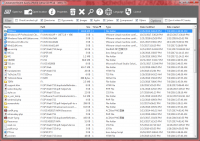
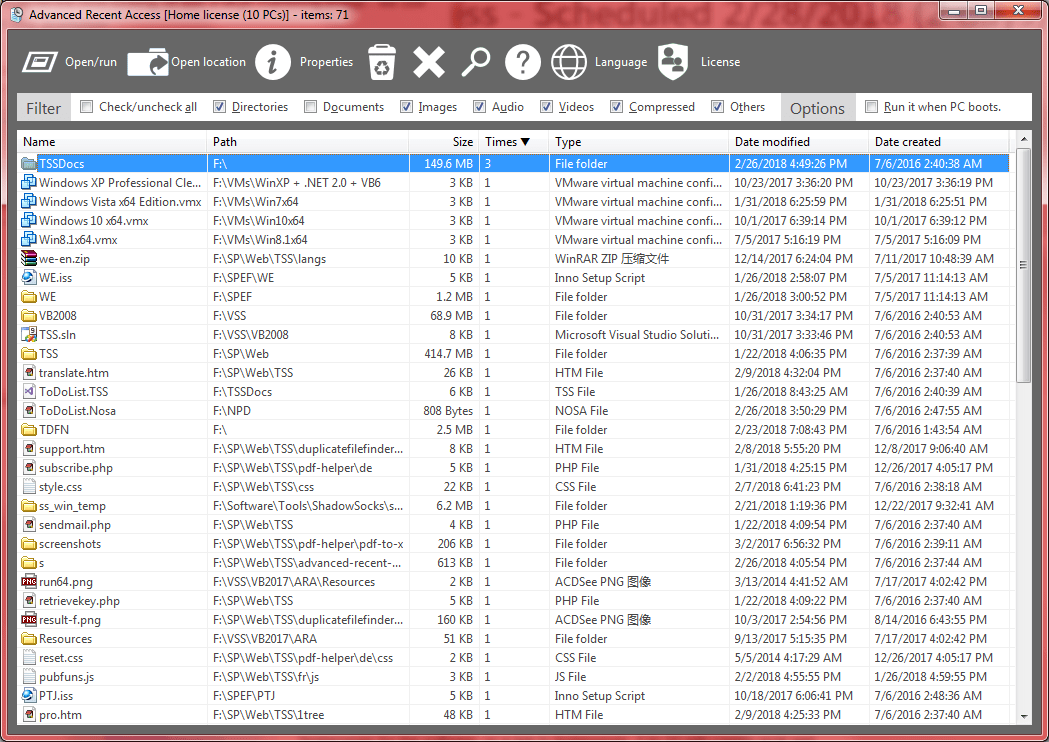
The software surfaces granular metadata for each entry, including the exact file path, size, resource type, and specific timestamps for both creation and modification. Beyond standard file properties, the tool automatically tracks and records the number of times each resource has been opened, providing a quantitative look at user activity and file frequency.
To ensure the displayed list remains relevant, the application includes an automated cleanup feature that removes entries for resources that no longer exist on the local drive. Users can also filter data by specific file categories to narrow their search results. The software emphasizes workflow customization, allowing users to toggle the visibility of specific property columns. It automatically persists UI preferences for column widths, sorting orders, and display sequences between sessions, streamlining the process of auditing and managing recent local file interactions.
Top 5 Reasons To Download Advanced Recent Access 11
If you are a power user, a digital creative, or simply someone who spends eight hours a day navigating the labyrinth of a modern operating system, you know the frustration of the "Recent Files" list. We have all been there: you are looking for that one specific spreadsheet you edited yesterday, or perhaps a folder you accessed an hour ago, but the default system tools give you a cluttered, disorganized, and often broken list of entries. This is where Advanced Recent Access enters the fray, promising to turn that chaotic list into a precision-engineered dashboard for your productivity. Today, we are looking at why this specific tool is a must-have addition to your software arsenal.
Before we dive into the nitty-gritty details of how this software transforms your workflow, let us look at the highlight reel. Here are the top five reasons you need to download this giveaway today:
- Enhanced Metadata Visibility: See the full path, file size, type, and detailed timestamps (Created vs. Modified) at a glance.
- Automated Usage Tracking: It automatically records and logs every time a resource is accessed, giving you a perfect audit trail of your work.
- Intelligent Ghost-File Management: No more broken links; the software automatically purges nonexistent resources from your list.
- Advanced Filtering and Sorting: Easily isolate specific file types or hide irrelevant properties to keep your view clean and focused.
- Persistent Workspace Customization: The app remembers your exact column widths, sorting orders, and layouts, so it is always ready for your specific workflow.
1. Deep Metadata Visibility: Knowing More Than Just the Filename
The standard "Recent Items" menu in most operating systems is, frankly, archaic. It usually gives you a name and perhaps an icon, leaving you to guess which version of "Project_Draft_Final_v2" you are actually looking at. Advanced Recent Access shatters this limitation by providing a comprehensive suite of file properties directly within the interface. When you use this tool, you are not just looking at a list of names; you are looking at a data-rich environment.
Imagine being able to see the Full Path of every file immediately. This is a game-changer for those who work with deeply nested directory structures or mirrored drive setups. You no longer have to right-click and select "Open File Location" just to verify where a file lives. Furthermore, having the Size, Type, and Date Modified/Created columns visible and sortable means you can quickly identify the largest files you’ve recently worked on or find that specific PDF you created on Tuesday morning.
For tech-savvy users, this level of transparency is essential. It allows for a level of "at-a-glance" verification that simply does not exist in native system tools. By exposing these properties, Advanced Recent Access acts as a high-level command center for your recent activity, ensuring that you are always interacting with the correct version of your data.
2. The Power of Automated Access Logs
One of the most impressive features of Advanced Recent Access is its ability to Automatically Record Accessed Times. While most systems might update a "Date Modified" stamp, they often fail to give you a granular history of when you simply viewed a file or directory. This software fills that gap by maintaining a meticulous log of every time you interact with a resource.
Why does this matter? Think about the "Context Switch." In a modern work environment, we are constantly jumping between projects. You might open a reference document at 10:00 AM, move to a coding task at 11:00 AM, and then realize at 3:00 PM that you need to find that reference document again. If you didn't save or modify it, a standard system list might not prioritize it. Advanced Recent Access, however, tracks that 10:00 AM access time perfectly.
This feature essentially creates a "time-machine" for your productivity. It allows you to reconstruct your day based on the resources you touched. For freelancers who need to track time spent on specific client files, or for researchers managing hundreds of PDFs, this automated logging provides an effortless audit trail that requires zero manual input from the user. It is the ultimate "set it and forget it" productivity booster.
3. No More "File Not Found" Frustration
We have all experienced the "Ghost File" phenomenon. You see a file in your recent list, you click it, and you are greeted with a cold, heartless error message: "The file or folder has been moved, renamed, or deleted." This happens because standard recent lists are just static links that don't verify the existence of the target. Advanced Recent Access solves this with its Automatically Deletes Nonexistent Resources feature.
This is a housekeeping feature that you didn't know you needed until you experienced it. The software actively monitors your recent list and cross-references it with your actual file system. If you move a folder to an external drive or delete a temporary download, Advanced Recent Access cleans up the "ghost" entry immediately. This ensures that every single item on your list is a "live" link.
This level of automated maintenance keeps your workspace clutter-free. You won't find yourself wading through dozens of dead links to find the one file that actually exists. It streamlines the interface and ensures that when you click something, it actually opens. In a world where digital clutter is a constant battle, having a tool that automatically cleans up after you is a breath of fresh air.
4. Precision Filtering and Customization
If you are a heavy user, your "recent" list can grow to hundreds of items in a single day. At that scale, a simple list is no longer useful; it becomes a haystack. Advanced Recent Access provides the needle-finding tools you need through its Filter by Types and Hide Unwanted Properties capabilities. This is where the "Advanced" part of the name really shines.
Suppose you are a video editor. Your recent list might be filled with thousands of small cache files, temporary renders, and project logs. If you only want to see the actual .MP4 or .MOV files you’ve touched, you can simply filter the list to show only those types. This instantly removes the noise and lets you focus on the assets that matter. Similarly, if you don't care about the file size but you care deeply about the "Date Created," you can hide the size column to save screen real estate.
This granular control allows you to tailor the software to your specific niche. You aren't forced into a "one size fits all" view. Whether you are a programmer looking for .sh scripts or a photographer looking for .RAW files, the ability to filter by type and customize visible properties makes this tool infinitely more flexible than the built-in alternatives. It turns a generic list into a specialized tool for your specific profession.
5. A Persistent and Pro-Grade User Interface
The final reason this giveaway is a must-download is the software's respect for your time and your personal preferences. Many utility apps reset their view every time you close them, forcing you to re-sort columns or resize windows. Advanced Recent Access Automatically Remembers Order, Width, and Sorting of Columns. This might seem like a small detail, but for a professional, it is a significant productivity win.
Consistency is the key to a fast workflow. If you prefer to have your "Date Modified" column on the far left, sorted from newest to oldest, with a specific pixel width for the "Path" column, you set it once and it stays that way. This allows you to develop "muscle memory" for your data. You know exactly where to look for the information you need the moment the window opens.
In the world of tech reviews, we often talk about "friction." Friction is anything that slows you down, even by a second. By remembering your UI preferences and providing a stable, predictable environment, Advanced Recent Access removes that friction. It feels like a natural extension of your workflow rather than a clunky third-party add-on. When you combine this UI persistence with the deep data and automated cleaning features mentioned above, you get a tool that feels truly "Pro."
Final Thoughts: Why You Should Grab This Now
In conclusion, Advanced Recent Access is not just another file explorer clone. It is a specialized utility designed to solve a very specific problem: the inefficiency of the modern "Recent Items" list. By providing more data, better automation, and deeper customization, it empowers users to take control of their digital history.
The ability to see the path and size of your recent files at a glance, combined with the automatic recording of access times, gives you an unprecedented level of insight into your daily digital habits. The automated cleanup of nonexistent resources ensures your list remains functional and clean, while the advanced filtering and UI persistence allow you to mold the tool to fit your exact needs.
As a tech reviewer, I see hundreds of utilities that claim to "optimize" your workflow, but many of them are just bloatware. Advanced Recent Access is different. It is lightweight, focused, and addresses a pain point that every Windows user has felt. Whether you are trying to manage a complex project or just want to stop looking for that file you *know* you opened ten minutes ago, this software is the answer.
Don't miss out on this giveaway. Download it, set up your preferred filters, and watch as your daily navigation becomes faster, cleaner, and much more intelligent. This is the kind of tool that, once you use it for a week, you will wonder how you ever managed without it. It is time to move beyond the basic "Recent Files" list and embrace a more advanced way of accessing your resources.
By downloading Advanced Recent Access today, you are giving yourself the gift of time and clarity. No more digging through folders, no more clicking on dead links, and no more guessing which file is which. Just a clean, powerful, and data-rich view of everything you’ve been working on. It’s an essential upgrade for any modern computer user.

Reviews for Advanced Recent Access 11
Click Here to Read Reviews for Advanced Recent Access 11 >> Click Here to Submit Reviews for Advanced Recent Access 11 >>