What Does PoKeep Location Changer Do?
PoKeep Location Changer is a desktop-based utility designed to modify GPS coordinates on iOS and Android devices. The software enables users to override their physical location without the need for jailbreaking or rooting the mobile operating system. By connecting a smartphone to the interface, users can teleport to any set of global coordinates or search for specific landmarks to relocate their digital presence instantly.
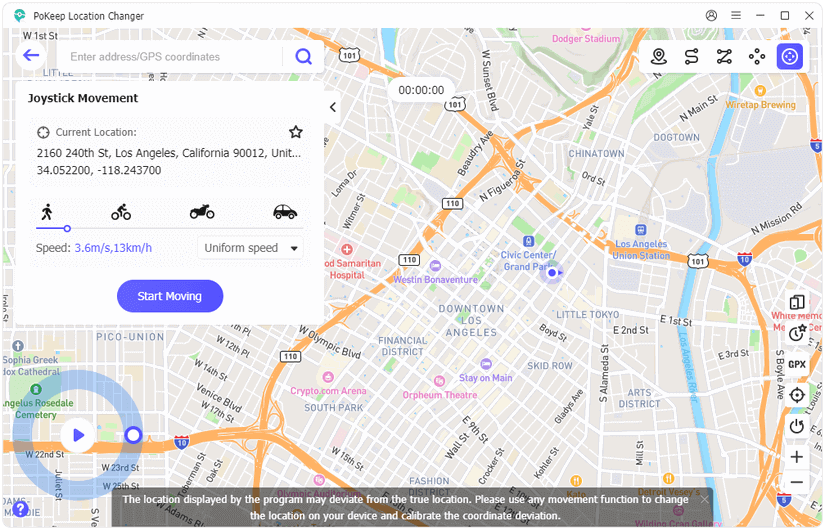
The application features several movement simulation modes tailored for augmented reality gaming and location-based services. A Virtual Joystick allows for 360-degree manual navigation via keyboard or mouse, while the Multi-spot mode enables the creation of custom routes. These routes can be adjusted to simulate specific speeds, such as walking, cycling, or driving. Additionally, the software supports the import of GPX files, allowing users to follow established paths for automated resource farming or navigation.
For privacy management, PoKeep hides real-time movement from tracking applications and social media platforms. The tool includes a Cooldown Assistant, a timer designed to help users monitor travel intervals and adhere to game-specific cooling periods. The software also supports multi-device management, permitting the simultaneous control of GPS data for up to ten separate devices from a single workstation.
Top 5 Reasons To Download PoKeep Location Changer
- Dominating AR Games with Professional-Grade Movement Tools: Utilize a 360-degree virtual joystick and customizable movement speeds to conquer games like Pokémon GO and Monster Hunter Now from the comfort of your couch.
- Absolute Privacy Control and Tracking Protection: Instantly mask your real-world coordinates on intrusive tracking apps like Find My and Life360 to reclaim your digital and physical anonymity.
- Sophisticated Movement Simulation and GPX Integration: Create realistic walking, cycling, or driving routes with multi-spot pathing and import pre-made GPX files for automated resource farming.
- Safety-First "No Jailbreak" Infrastructure: Change your location on the latest iOS and Android versions without compromising your device’s security or voiding your warranty through risky rooting or jailbreaking.
- Unrivaled Efficiency with Multi-Device Support and Cooldown Management: Manage up to 10 devices simultaneously while using a built-in Cooldown Timer to ensure you stay within "fair play" limits and avoid account penalties.
If you have ever felt limited by the physical boundaries of your neighborhood while playing your favorite mobile game, or if you have ever felt a shiver down your spine knowing that a dozen different apps are tracking your every move, then you already know why location manipulation is the "frontier" of mobile utility. As a tech reviewer who has seen hundreds of apps claim to offer GPS "spoofing," I can tell you that most of them are clunky, dangerous for your device, or simply don't work with modern security updates. That is exactly why I am sitting down to write this today. PoKeep Location Changer is not just another utility tool; it is a comprehensive suite for anyone who wants to take back control of their smartphone’s most sensitive data point: its location.
We are living in an era where our phones are tethered to our physical bodies. This has paved the way for incredible experiences, like Augmented Reality (AR) gaming, but it has also created a world where we are constantly monitored. PoKeep offers a bridge between the physical and the digital, allowing you to be anywhere you want to be without moving an inch. This giveaway is your ticket to a world without geofences. Whether you are a hardcore gamer looking for that regional-exclusive legendary creature or a privacy advocate who believes your location is your business alone, here are the detailed reasons why PoKeep is the only tool you need for the job.
1. Dominating AR Games with Professional-Grade Movement Tools
Let’s get real for a moment: AR gaming is exhausting. While the "get out and walk" philosophy of Pokémon GO and Monster Hunter Now is great in theory, the reality often involves bad weather, dangerous traffic, or simply living in a "rural dead zone" where nothing interesting ever spawns. PoKeep changes the entire meta of these games. The standout feature here is the Virtual Joystick. Unlike other apps that require you to constantly type in new coordinates, the joystick allows for 360-degree fluid movement. You can navigate through a virtual Tokyo or New York City using your mouse or keyboard, making the experience feel more like a high-end PC RPG than a mobile game.
But it isn’t just about moving; it’s about moving naturally. PoKeep allows you to toggle between different movement modes, which is essential for "hatching eggs" or triggering "distance-based" rewards. If you move too fast, the game knows you are cheating. PoKeep’s variable speed slider lets you set your pace to a brisk walk, a casual bike ride, or a car’s cruising speed. This level of granularity means you aren't just jumping from point A to point B; you are existing in the game world in a way that the game’s servers perceive as completely legitimate. For the competitive player, this is the ultimate "unfair advantage" that feels perfectly fair.
Furthermore, the precision of the teleportation feature is unmatched. If a rare raid is happening on the other side of the planet, you can be there in seconds. You don't have to worry about the "rubber-banding" effect—where your GPS signal flickers back to your real location—because PoKeep uses high-level system overrides to ensure your virtual location stays pinned exactly where you want it. In the high-stakes world of Monster Hunter Now, where positioning is everything, having this level of control over your hunt is a literal game-changer.
2. Absolute Privacy Control and Tracking Protection
In our modern landscape, privacy is a luxury. We are constantly being nudged to "Share Your Location" with social media platforms, family tracking apps, and even weather apps that have no business knowing exactly which room of our house we are in. Apps like Life360 and Find My were designed for safety, but they have often become tools for over-surveillance. This is where PoKeep steps in as a powerful shield. By using this software, you can set your location to a library, a friend's house, or even another city, and that is exactly what the tracking apps will report.
The beauty of PoKeep’s privacy protection is that it works at the system level. This means you aren't just "faking" a check-in on a social media app; you are telling the entire operating system of your phone that you are somewhere else. Every app on your phone that requests GPS data will receive the spoofed coordinates. This is particularly useful for people who want to browse location-specific content on apps like TikTok or Tinder without actually being in those regions. If you want to see what the dating scene is like in Paris, or what the local trends are in Seoul, PoKeep makes it possible with a single click.
Privacy is a right, not a privilege, and PoKeep treats it as such. The software doesn't require you to provide any personal data to function, and because it runs through your computer to your phone, there is no "paper trail" on the device itself that suggests location modification is happening. For anyone who feels like they are being watched too closely by the "Big Brother" of modern app ecosystems, this giveaway is an essential tool for reclaiming your digital autonomy.
3. Sophisticated Movement Simulation and GPX Integration
One of the most impressive aspects of PoKeep is its Two-Spot and Multi-Spot movement modes. While teleporting is great for instant travel, simulation is what you need for long-term automation. With the multi-spot mode, you can map out a complex route through a city, hitting specific landmarks or "stops" along the way. You can even set the number of times the route should repeat. This is perfect for "farming" resources in games or for developers who need to test how their own location-based apps handle movement over time.
For the power users, the GPX File Support is the crown jewel. GPX files are essentially "scripts" for locations. The internet is full of optimized routes created by the community—routes that pass by the maximum number of PokéStops or cover the most efficient hunting grounds in Monster Hunter. Instead of manually clicking on a map, you can simply import a GPX file into PoKeep, and your character will begin walking that path automatically. It turns your phone into an automated resource-gathering machine.
What makes this even better is the "Realistic Mode." When this is enabled, PoKeep will slightly vary your movement speed to mimic the natural fluctuations of a human walking. A real human doesn't walk at exactly 3.6 kilometers per hour for forty minutes straight; they slow down, they speed up, and they stop for a few seconds. PoKeep’s algorithms simulate these human behaviors, making it virtually impossible for automated detection systems to flag your movement as "bot-like." It is this attention to detail that separates a professional tool from a hobbyist's app.
4. Safety-First "No Jailbreak" Infrastructure
For years, if you wanted to change your GPS location, you had to "jailbreak" your iPhone or "root" your Android. These processes are not only difficult for the average user but also incredibly dangerous. They strip away the security layers of your operating system, leaving you vulnerable to malware, and they often void your manufacturer’s warranty. If you mess up a jailbreak, you could "brick" your phone, turning a $1,000 device into a glass paperweight. PoKeep has solved this problem entirely.
PoKeep works by using the developer communication protocols already built into iOS and Android. By connecting your phone to your computer, PoKeep can "talk" to the device and override the GPS module safely. There is no need to modify the internal system files of your phone. This means that as soon as you unplug your phone and restart it, your location returns to normal, and there is no lasting trace of the software on your device. This makes it 100% safe for use on the latest versions of iOS and Android, including the newest flagship models.
As a reviewer, I always emphasize security. You should never have to trade your device's integrity for a new feature. PoKeep’s "plug-and-play" nature ensures that your data remains encrypted and your OS remains "locked down" while still giving you the freedom to roam the world. This is the most professional way to handle location spoofing, and it is the reason why PoKeep is trusted by thousands of users who value their hardware as much as their gaming experience.
5. Unrivaled Efficiency with Multi-Device Support and Cooldown Management
Finally, we have to talk about the "pro" features that make PoKeep a powerhouse for heavy users. First, there is the Multi-Device Management. PoKeep allows you to control the GPS for up to 10 different devices at the same time. If you are a dedicated AR gamer who runs multiple accounts to maximize raid efficiency, or if you are a head of a household who wants to set privacy parameters for the whole family's devices from one central hub, this feature is indispensable. You can have one phone "walking" in London, another "teleported" to New York, and a third "stationary" in Los Angeles—all managed from a single computer interface.
Then, there is the Cooldown Assistant. This is a feature that many amateur location-changers ignore, often to their own peril. If you teleport from London to New York and immediately perform an action in a game, the game's servers will realize you have traveled faster than a jet plane and will "soft ban" your account. PoKeep’s Cooldown Assistant is a smart timer that calculates exactly how long you need to wait before it is "safe" to interact with the world at your new location. It takes the guesswork out of spoofing and keeps your accounts safe from bans.
This combination of managing multiple devices and having a built-in safety timer makes PoKeep feel like a piece of enterprise software. It is organized, efficient, and designed with the user’s long-term success in mind. It doesn’t just give you the "what" (a new location); it gives you the "how" (a safe, managed way to use that location). For anyone serious about location manipulation, these "quality of life" features are what make the software worth every penny—and certainly worth downloading during this giveaway.
In conclusion, PoKeep Location Changer is the gold standard for GPS manipulation. It perfectly balances high-end technical capabilities with a user-friendly interface that anyone can master in minutes. Whether you are looking to become the ultimate monster hunter, hatch every egg in your inventory, or simply hide your whereabouts from a nosy app, this tool provides the most secure and feature-rich way to do it. Don’t miss out on this giveaway; it is time to take the world into your own hands and go wherever you want, whenever you want, with just a single click. Download it now and start your journey—the world is literally at your fingertips.

Reviews for PoKeep Location Changer
Click Here to Read Reviews for PoKeep Location Changer >> Click Here to Submit Reviews for PoKeep Location Changer >>