What Does Ashampoo Photo Optimizer 11 Do?
Ashampoo Photo Optimizer 11 is a desktop application designed to streamline the photo enhancement process through automated algorithms. It targets users looking for rapid corrections to exposure, contrast, and color balance across individual files or entire folders. The software utilizes a 64-bit optimized engine to improve memory management, ensuring stability and speed during resource-intensive tasks.
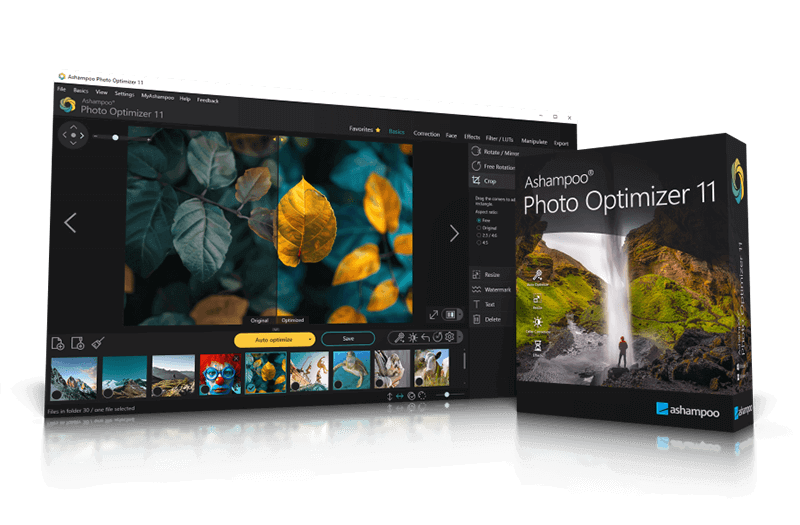
The primary utility of this tool lies in its one-click auto-optimization engine. By analyzing image metadata and pixel data, it identifies lighting flaws and adjusts tonal curves automatically. Users can monitor changes via a real-time split-screen view, allowing for direct comparison between the original capture and the processed output. For those requiring specific artistic directions, the software includes over 45 Lookup Tables (LUTs) and manual sliders for color temperature and gamma adjustments.
Key functional highlights include:
- Perspective Correction: Straightens tilted horizons and corrects architectural lines to create more natural perspectives.
- Portrait Retouching: Features dedicated tools for red-eye removal, blemish correction, and skin spot removal.
- Batch Processing: Facilitates the simultaneous optimization of entire image libraries to save time.
- Workflow Efficiency: A customizable Favorites menu provides immediate access to frequently used features.
Beyond technical corrections, the suite offers creative effects such as aging, overlays, and oil painting filters. It provides a balance between automated efficiency and manual control for various photography needs.
Top 5 Reasons To Download Ashampoo Photo Optimizer 11
If you are anything like me, your hard drive is overflowing with thousands of digital photos that look almost great. Maybe you snapped a breathtaking sunset on your last vacation, only to get home and realize the colors look weirdly washed out. Or perhaps you took a fantastic family portrait where the lighting felt a bit too harsh and the horizon tilted slightly to the left. For years, fixing these everyday photographic hiccups meant choosing between two frustrating extremes: bloated, overwhelmingly complex professional suites that demand weeks of tutorials and hefty monthly subscriptions, or flimsy mobile apps that slap cheap filters over your memories and crush image quality.
That is exactly why I get genuinely excited when a utility like Ashampoo Photo Optimizer 11 lands on the giveaway radar. After putting this software through its paces, I can confidently say it strikes the sweet spot that almost every casual shooter, hobbyist, and busy content creator has been begging for. It combines intelligent automation with surprisingly deep manual tools inside a crisp, modern workspace that stays out of your way. Before this giveaway window closes, here are the top five reasons you need to grab a copy and install it on your PC today.
- Effortless One-Click Auto-Optimization for Single Images and Entire Folders
- More Than 45 Stunning LUTs with Upgraded LUT Management
- Precision Perspective Corrections, Tonal Curves, and Quick Portrait Fixes
- Blazing 64-Bit Performance, Improved Stability, and Super-Fast Favorites
- Rich Creative Effects and Intuitive Editing with Zero Learning Curve
1. Effortless One-Click Auto-Optimization for Single Images and Entire Folders
Let us be honest about "auto-enhance" buttons in most photo editors: usually, they just crank up the saturation, blow out the highlights, and leave your picture looking unnatural. Ashampoo Photo Optimizer 11 takes a remarkably smarter approach with its significantly enhanced image auto-optimization engine. Under the hood, a powerful algorithm carefully analyzes every single photo you load, scanning specifically for incorrect exposure, flat contrast, and flawed color balance. Instead of applying a blind, one-size-fits-all preset, the software evaluates what that specific image lacks and corrects those flaws with surgical precision.
The real magic happens when you see an average, slightly muddy snapshot transform into a crisp, vibrant photograph with a single click. Better yet, Ashampoo never forces you to take its word for it. A built-in split-screen view lets you drag a divider back and forth to compare the original photo against the optimized version in real time. You can inspect shadow details, check skin tones, and confirm the improvements immediately—and if you ever change your mind, you can revert to the original file without breaking a sweat.
What truly elevates this feature from neat trick to indispensable time-saver, however, is batch processing. Suppose you just returned from a weekend trip or a birthday party with three hundred photos sitting in a directory. Rather than opening and tweaking each shot one by one, you can point Ashampoo Photo Optimizer 11 at the entire folder and optimize every single image automatically. Turning an afternoon of tedious editing chores into a few minutes of automated polish is, by itself, reason enough to download this giveaway.
2. More Than 45 Stunning LUTs with Upgraded LUT Management
If you have ever wondered how photographers and filmmakers achieve those cohesive, cinematic moods across their portfolios, the secret often comes down to Lookup Tables, commonly known as LUTs. Unlike basic Instagram-style filters that simply overlay muddled color washes, LUTs mathematically remap color tones across your image to build genuine atmosphere. Ashampoo Photo Optimizer 11 comes packed right out of the box with more than 45 expertly designed LUTs, giving you instant access to moods ranging from sun-drenched warm tones and crisp cool blues to nostalgic retro aesthetics.
In previous generations of photo software, managing dozens of color profiles could quickly turn into a cluttered guessing game. Thankfully, version 11 introduces enhanced LUT management designed for ultimate flexibility. You can easily organize, browse, and apply these color profiles to test different visual directions in seconds. Whether you want a moody, desaturated look for street photography or a punchy, vibrant palette for outdoor landscapes, having 45+ curated LUTs at your fingertips feels like having a professional colorist sitting beside you.
As a tech reviewer, I especially appreciate how seamlessly these LUTs play with the rest of the editing pipeline. You can run the automatic optimizer to balance your exposure first, then drop a subtle LUT on top to establish a signature style across an entire photo album. For anyone running a blog, managing social media pages, or simply putting together a sharp-looking digital photo book for family, this level of instant stylistic control makes a massive visual difference.
3. Precision Perspective Corrections, Tonal Curves, and Quick Portrait Fixes
Automation is wonderful for speed, yet every serious photo enthusiast eventually wants to take the wheel and fine-tune an image manually. One of the biggest surprises in Ashampoo Photo Optimizer 11 is how generous and capable its manual toolset actually is, especially considering how clean the interface remains. Start with architectural and travel shots: we have all taken pictures of tall buildings or scenic coastlines only to notice leaning walls or a tilted horizon. The software delivers brilliant perspective corrections that restore natural lines and straighten horizons cleanly, rescuing shots you might otherwise have deleted.
For users who love dialing in exact lighting and color balance, Ashampoo includes dedicated tonal curve adjustments alongside manual color temperature controls. Tonal curves allow you to shape highlights, midtones, and shadows with far greater nuance than standard contrast sliders, while manual color temperature lets you rescue indoor photos ruined by harsh fluorescent bulbs or overly orange tungsten lamps. Of course, if you prefer straightforward sliders, you still have smooth, intuitive controls for brightness, lighting, gamma, and plenty of other core settings.
On top of color and geometry fixes, the software covers all the practical everyday retouching tasks you expect from a well-rounded photo suite:
- Quick Portrait Polish: Effortlessly tackle common portrait distractions with dedicated red-eye removal, blemish corrections, and spot removal tools.
- Essential Framing Tools: Rotate, flip, and crop images rapidly to tighten compositions or prepare photos for specific aspect ratios.
- Branding and Personalization: Add clean text overlays or custom watermarks in seconds to protect your work or caption favorite memories.
Having perspective tools, tonal curves, portrait cleanup, and watermarking all living harmoniously under one roof means you will rarely need to bounce between multiple programs just to finish one image.
4. Blazing 64-Bit Performance, Improved Stability, and Super-Fast Favorites
Nothing kills creative momentum faster than sluggish software. Modern cameras and smartphones churn out massive high-resolution image files, and older 32-bit photo editors routinely choke, stutter, or crash when you ask them to process large batches or heavy adjustments. Ashampoo Photo Optimizer 11 is fully 64-bit optimized and backed by significantly improved memory management. In real-world testing, that technical foundation translates directly into snappy load times, smooth slider responsiveness, and rock-solid stability even during heavy editing sessions.
Speed is not just about raw CPU and RAM efficiency, though; it is also about workflow design. Ashampoo clearly listened to power users when building the new Favorites system. Instead of forcing you to hunt through nested submenus every time you want your go-to crop tool, tonal curve, or favorite LUT, you can pin your most-used functions directly to Favorites for super-fast feature access. Over time, your workspace effectively adapts to your personal editing habits, shaving valuable seconds off every single photo you touch.
Even without customizing your Favorites, the overall user interface deserves serious praise. It is intentionally simple, logical, and clutter-free. Everything sits right where your eyes naturally expect to find it. You do not need to watch hour-long video courses or read a dense manual before making your first edit. Literally two minutes after completing the installation, you will feel completely at home navigating tools, comparing before-and-after previews, and exporting crisp finished images.
5. Rich Creative Effects and Intuitive Editing with Zero Learning Curve
Once your exposure is balanced, your horizon is straight, and your colors pop, sometimes you just want to have fun and push an image in an artistic direction. Ashampoo Photo Optimizer 11 encourages that playful experimentation with a collection of creative effects designed to transform ordinary photos into eye-catching visual pieces. You can apply realistic aging effects for a weathered vintage charm, layer stylish overlays for extra texture, or convert a favorite landscape into an expressive oil painting with just a couple of clicks.
What makes these creative touches genuinely appealing is how approachable they feel. In heavyweight professional programs, achieving an oil painting look or building vintage texture overlays requires juggling multiple adjustment layers, blending modes, and opacity masks. Here, those artistic ideas are distilled into clean, accessible options that anyone can experiment with immediately. If you want to design custom greeting cards, spice up desktop wallpapers, or give a gift print a unique painterly finish, the creative toolkit delivers instant gratification without any technical headaches.
Finally, consider the sheer value proposition sitting right in front of you. Good photo software rarely comes cheap anymore, and the industry trend toward endless recurring subscriptions has left many users feeling nickel-and-dimed just to edit their own family photos. Getting a fast, 64-bit, feature-packed editor like Ashampoo Photo Optimizer 11 through a giveaway means you gain a permanent upgrade to your digital toolkit without sacrificing hard drive space to bloatware or fighting a steep learning curve.
Final Verdict: Do Not Miss This Giveaway
Whether you are a smartphone photographer who wants vacation shots to sparkle, a hobbyist tired of clunky freeware, or a busy user who simply needs reliable batch optimization and quick manual fixes, Ashampoo Photo Optimizer 11 hits all the right notes. Between its intelligent one-click optimization algorithm, more than 45 versatile LUTs, sharp perspective and tonal curve tools, snappy 64-bit performance, and approachable creative filters, it punches well above its weight class.
Giveaways for genuinely polished, practical desktop software do not stick around forever. If you want faster workflows, better-looking photos, and an editing experience that feels effortless from the very first launch, download Ashampoo Photo Optimizer 11 while you still have the chance. Your photo library will thank you.

Reviews for Ashampoo Photo Optimizer 11
Click Here to Read Reviews for Ashampoo Photo Optimizer 11 >> Click Here to Submit Reviews for Ashampoo Photo Optimizer 11 >>