What Does Hide Files Do?
Data privacy remains a critical concern for users who share hardware or store sensitive information on portable media. Hide Files is a utility designed to restrict access to specific directories and individual documents through a centralized locking mechanism. The software functions by making selected data invisible to the standard operating system interface, requiring a master password for any subsequent visibility or access.
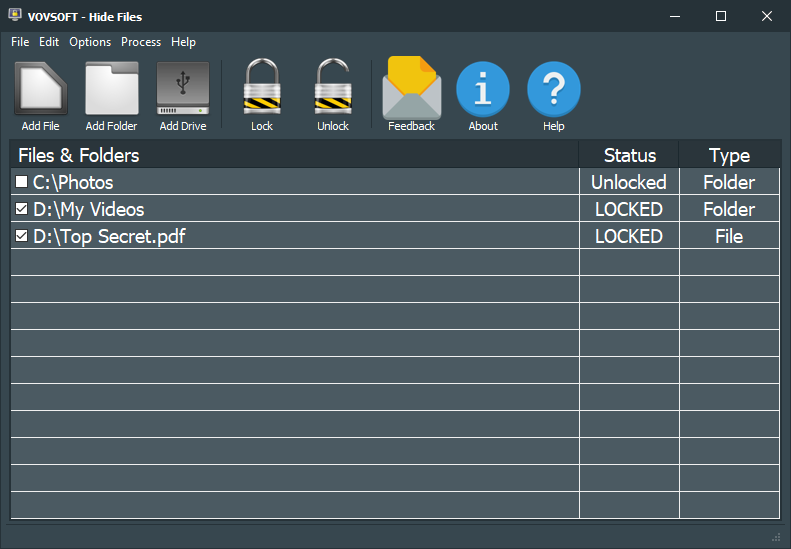
The security process begins during the initial configuration, where users are required to establish a master password. This credential serves as the exclusive key for the application’s dashboard. Within the interface, users can target files, folders, or entire external USB drives for protection. Once the lock command is executed, the selected items are encrypted and hidden from file explorers, preventing unauthorized viewing or modification.
The application is versatile in its handling of various data formats. Users can leverage the tool to secure the following:
- Confidential financial documents and spreadsheets.
- Private multimedia, including high-resolution photos and video archives.
- Sensitive work projects stored on removable storage devices.
By implementing a password-controlled encryption layer, Hide Files ensures that personal or professional data remains inaccessible to third parties. The utility provides a streamlined workflow for toggling visibility, allowing users to quickly secure their digital environment without navigating complex system permissions or manual file attribute adjustments.
Top 5 Reasons To Download Hide Files
- Unbreakable Master Password Security: The application establishes a singular, robust gatekeeper for all your data, ensuring that even if someone gains access to your computer, they cannot bypass the software’s defenses.
- Universal Media Protection: Beyond just standard files, this tool allows you to secure entire folders and external USB drives, providing a comprehensive shield for all your storage mediums.
- Absolute Invisibility: Unlike standard operating system settings that merely "hide" a file, this software makes your sensitive data completely inaccessible and invisible to the file system until unlocked.
- High-Level Encryption Standards: Your most confidential documents, including tax records, private photos, and business strategies, are encrypted to prevent unauthorized viewing by hackers or nosy locals.
- Zero Learning Curve Design: The software is built with a minimalist, streamlined interface that allows you to secure your entire digital life in just a few clicks without needing a degree in cybersecurity.
In an era where our entire lives are digitized, privacy has become more than just a luxury—it is a necessity. Whether you are sharing a family computer, working in an open-plan office, or carrying sensitive documents on a thumb drive, your data is constantly at risk of being seen by the wrong eyes. This is why the Hide Files software giveaway is such a critical opportunity for anyone who values their digital autonomy. As someone who has tested dozens of security utilities, I can tell you that most are either too bloated with useless features or too complicated for the average user to navigate. This tool hits the sweet spot. Let’s dive deep into the five reasons why you need to download this immediately.
1. Unbreakable Master Password Security
The first thing you encounter when you launch this software is the requirement to set a master password. This is not just a secondary feature; it is the cornerstone of the entire application’s security model. Most "file hiding" tricks involve changing a few attributes in the Windows registry or shifting files to a hidden directory that any tech-savvy teenager could find in five minutes. This software operates on a different level.
By requiring a master password from the very first launch, the software ensures that the utility itself is a vault. You don’t have to worry about individual passwords for every single file—which, let’s be honest, would result in you forgetting half of them and losing your data forever. Instead, you have one ironclad entry point. This master password becomes the key to your digital kingdom. If you aren’t there to provide it, the files simply do not exist to the rest of the world. For anyone who shares a laptop with a spouse, children, or roommates, this provides a level of peace of mind that standard user accounts simply cannot match.
Furthermore, the software is designed to be persistent. It doesn’t "forget" its status if the computer restarts or if someone tries to force-close the task. Without that password, the gate remains closed. In my testing, this is the single most important feature because it removes the "human error" element of security. You set it once, you remember your one strong password, and your data is safe.
2. Universal Media Protection
One of the biggest frustrations with basic security software is the limitation on what you can protect. Some apps only work for text files, or they struggle with large video files. This software eliminates those barriers by offering Universal Media Protection. It doesn't matter if you are trying to hide a single Word document, a massive Photoshop project, or a 4K video of your last vacation—the software handles it with the same level of efficiency.
Perhaps the most impressive aspect is its ability to lock entire USB drives. We’ve all been there: you have a thumb drive with important work documents or personal photos, and you’re terrified of losing it at a coffee shop or leaving it plugged into a public computer. By using this software to secure the drive, you turn a simple piece of plastic into a secure hardware vault. If that drive falls into the wrong hands, the person who finds it will see nothing. They won’t be able to browse your folders or harvest your data. In a world where physical theft is just as common as digital hacking, this feature is a game-changer.
The ability to secure entire folders is also a massive time-saver. Rather than picking through hundreds of individual photos or files, you can simply dump everything into a dedicated "Private" folder and lock the entire thing in one go. The software maintains the internal structure of the folder, so when you finally unlock it, everything is exactly where you left it. It is organized, efficient, and incredibly powerful.
3. Absolute Invisibility
Most people think that right-clicking a folder and selecting "Hidden" in the properties menu is enough to keep their data safe. It’s not. Any basic search or a simple "Show Hidden Files" toggle in the file explorer will reveal your "secret" documents instantly. This software goes far beyond that amateur level of protection. It provides absolute invisibility.
When you use this tool to hide a file, it isn't just "grayed out" or moved to a different folder. It is effectively removed from the operating system's visibility. It will not show up in recent documents, it won't appear in the search bar results, and it won't be indexed by the system. It is as if the file has been wiped from the drive, yet it remains safely stored in an encrypted state, waiting for you to enter your password.
This "ghost-like" existence is the ultimate defense against prying eyes. If a nosy coworker or a curious family member is poking around your computer, they won't even know there is something to look for. They won't see a suspicious "Locked_Vault.exe" file or a password-protected ZIP archive that screams "I have something to hide!" Instead, they will just see a normal computer with normal files. This level of stealth is what separates professional-grade privacy tools from basic utilities. You aren't just protecting your data; you are protecting the fact that you have data worth protecting.
4. High-Level Encryption Standards
Hiding a file is great, but what happens if someone pulls the hard drive out of your computer and plugs it into another machine? If the files are only "hidden" via software settings, they might be accessible through a different operating system or a data recovery tool. This is where encryption comes into play, and it is a core reason why you need to download this giveaway.
This software doesn't just hide the file path; it secures the data itself. By encrypting and decrypting your sensitive documents on the fly, it ensures that the raw data is unreadable without the correct cryptographic key (your password). Whether it's sensitive documents, photo albums, or confidential videos, the bits and bytes are scrambled into a digital mess that makes no sense to anyone but you.
This is particularly vital for anyone who handles "high-stakes" data. Think about your tax returns, scans of your passport, or business contracts. If these were compromised, the result wouldn't just be embarrassing; it could be financially devastating. By using this tool, you are applying a layer of protection that is used by professionals to keep their data out of the hands of malicious actors. You can rest easy knowing that even if your hardware is compromised, your confidential information remains locked behind a wall of encryption that would take a supercomputer years to crack.
5. Foolproof, Minimalist User Interface
As a tech reviewer, I often see software that is incredibly powerful but so difficult to use that people give up on it within ten minutes. Security software is notorious for this. You often have to deal with complex command lines, confusing "encryption algorithms" menus, and archaic settings. This software breaks that trend by offering a minimalist, foolproof interface.
The design philosophy here is "Set and Forget." The dashboard is clean, intuitive, and gets right to the point. There are no distracting ads, no unnecessary "system boosters," and no confusing jargon. You select your files, you set your password, and you click lock. That’s it. Because the interface is so streamlined, the software is also incredibly lightweight. It won't bog down your system resources, it won't slow down your boot times, and it won't conflict with your antivirus software.
This ease of use is actually a security feature in itself. Why? Because if security software is hard to use, people won't use it. They will get lazy and leave their files out in the open. By making the process of locking and unlocking files as easy as clicking a button, this software ensures that you will actually use it consistently. It fits into your workflow rather than interrupting it. Whether you are a "tech-illiterate" beginner or a seasoned power user, you will appreciate the elegance and simplicity of the design. It does one thing, and it does it exceptionally well: it keeps your business your business.
The Moral Necessity of Digital Privacy
Beyond the technical specs, we need to talk about why you personally want this software. We live in a world where "oversharing" is the default. We are tracked by websites, our data is harvested by big tech, and our physical devices are more vulnerable than ever. Downloading a tool like this is a way to take back control. It’s about creating a private space that is yours and yours alone.
Think about the embarrassing files we all have—not necessarily anything "wrong," but things that are personal. Maybe it's a journal you're writing, or photos of a lifestyle your family wouldn't understand, or even just your private financial planning. You have a right to keep those things to yourself. Using a locker utility isn't an admission of guilt; it's an assertion of privacy. It allows you to use your computer with a sense of freedom, knowing that even if you leave your screen unlocked for a moment to grab a coffee, your "inner sanctum" is still protected.
The peace of mind that comes with this software is arguably its best feature. When you know your tax documents are encrypted, when you know your private videos are invisible, and when you know your USB drive is a literal vault, you stop worrying. You stop looking over your shoulder. You start using your digital tools the way they were meant to be used—to enhance your life, not to create new anxieties.
Final Verdict: Why You Can't Miss This Giveaway
This software is a rare find. It takes a complex problem—digital data security—and solves it with a solution that is both incredibly powerful and refreshingly simple. Most people wait until after they’ve had a privacy breach to look for a tool like this. They wait until a roommate sees a private photo, or a laptop is stolen, or a confidential document is accidentally emailed to the wrong person. By then, the damage is done.
By downloading this giveaway now, you are being proactive. You are setting up your defenses before the attack happens. You are getting a professional-grade folder-locker utility that can encrypt, decrypt, and hide your data with ease. It is the digital equivalent of a high-end safe in your home, but one that is invisible to everyone but you.
Don't wait for a "privacy disaster" to strike. Take advantage of this opportunity to secure your files, folders, and external drives with a master password that only you know. Whether you're looking to hide secret documents, protect sensitive information, or just keep your photo albums private, this is the tool for the job. It is easy, it is effective, and most importantly, it puts you back in the driver's seat of your digital life. Download it, set your master password, and breathe a sigh of relief. Your data is finally safe.


Reviews for Hide Files
Click Here to Read Reviews for Hide Files >> Click Here to Submit Reviews for Hide Files >>