What Does LookupPal Do?
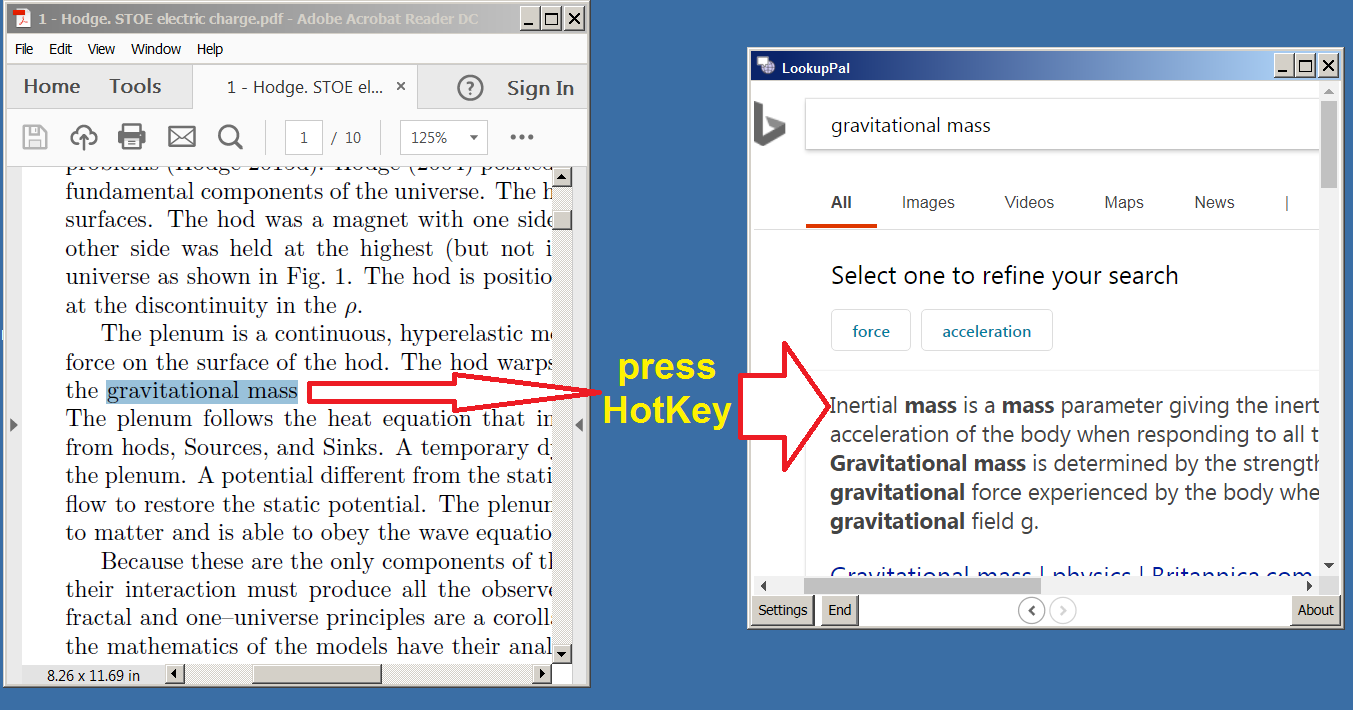
LookupPal for Windows is a productivity utility designed to integrate translation, information retrieval, and calculations directly into the active desktop environment. By highlighting text within a document and pressing a customizable hotkey, users can instantly translate phrases, define words, or perform web searches without manually opening a browser or switching applications.
The software maintains broad compatibility across the Windows ecosystem, functioning within Microsoft Word, Excel, PDF readers, email clients, and web browsers. It also extends its reach to system tools like File Explorer and specialized software such as Adobe Photoshop. This workflow eliminates the need for repetitive copying and pasting, allowing for the direct translation of social media comments or technical documentation from within their native interfaces.
Beyond its core lookup functions, LookupPal includes several advanced features to assist with document management:
- A built-in ads suppressor to streamline search results.
- The ability to export text fragments or web descriptions to PDF, RTF, HTML, and plain text without requiring third-party PDF writers or word processors.
- Background operation that can be configured to launch at system startup for immediate access.
LookupPal is tailored for students, editors, and researchers who frequently interact with multilingual documents or require rapid data verification. It serves as a background assistant that minimizes the steps required to process information across different file formats and platforms.
Top 5 Reasons To Download LookupPal
Before we dive into the nitty-gritty details of why this software is a complete game-changer for your Windows desktop experience, let’s look at the highlights. If you are tired of the constant "copy-paste-switch tab" routine, here are the top five reasons you need to download LookupPal right now:
- Seamless Workflow Integration: Translate and look up information directly from any open document without ever leaving your active window.
- Universal Compatibility: It works across almost every Windows application imaginable, from Word and PDF readers to Photoshop and File Explorer.
- Built-in Information Cleanup: An integrated Ads suppressor ensures that your searches and lookups remain clean, focused, and free from distractions.
- Powerful Export Capabilities: Save your findings instantly to PDF, MS Word, RTF, or HTML without needing any additional document creation software.
- Instant Utility with Custom Hotkeys: Perform calculations, internet searches, and word definitions with a single, user-defined keystroke that stays ready in the background.
As a tech reviewer, I see hundreds of productivity tools every year. Most of them promise the world but end up adding more clutter to your desktop than they actually solve. However, every once in a while, a tool comes along that addresses the "friction" of modern computing. Friction is that moment when you are in the "flow state"—writing an email, analyzing a spreadsheet, or reading a complex PDF—and you hit a word or a concept you don't understand. Usually, you have to stop, highlight, copy, open a browser, navigate to a search engine or a translator, paste, and then try to find your way back to your original thought. LookupPal is designed to kill that friction once and for all.
1. Seamless Workflow Integration: Maintaining the "Flow State"
The number one reason to download LookupPal is its ability to keep you focused. In the world of high-level productivity, "context switching" is the enemy. Every time you move from one application to another, your brain takes a few seconds—sometimes even minutes—to fully re-engage with the original task. LookupPal eliminates this cognitive load by allowing you to work directly from your open documents.
Imagine you are reading a technical whitepaper in a PDF viewer. You come across a term that is unfamiliar or a sentence in a foreign language. With LookupPal, you don't have to minimize your viewer. You simply highlight the text and hit your pre-selected hotkey. Boom. The information appears right there. This isn't just a "nice-to-have" feature; it is a fundamental shift in how you interact with information on your PC. It turns your entire operating system into an interactive encyclopedia and translation hub.
For students and researchers, this is a literal lifesaver. When you are juggling twenty different sources for a thesis or a report, the last thing you want to do is manage twenty more browser tabs for translations. LookupPal sits quietly in the background, starting up with Windows, and is always ready to assist without ever getting in the way. It’s like having a digital assistant that only speaks when spoken to, and when it does, it has exactly what you need.
2. Universal Compatibility: It Goes Where You Go
One of the most frustrating things about "productivity" apps is when they only work in specific environments. You find a great tool, but it only works in Chrome. Or it only works with Microsoft Office. LookupPal shatters these boundaries. It is designed for the Windows environment as a whole, not just a handful of apps.
This software works with the staples like MS Word and Excel, but it also goes into the "nooks and crannies" of your system. Are you a designer working in Photoshop who needs to quickly look up a term in a layer name or a help document? LookupPal is there. Are you an IT professional navigating through File Explorer or looking at system Help files? LookupPal works there too. It even handles the modern web in a way that feels native, allowing you to translate YouTube comments or Facebook posts without having to right-click and search for a translation option that might not even be there.
This "Universal Compatibility" means that your learning curve is zero. Once you learn the hotkey, you know how to use the software in every single application on your computer. Whether you are an analyst looking at data in a text file or an editor working in a proprietary CMS, the functionality remains identical. This consistency is what separates professional-grade tools from amateur scripts.
3. Built-in Information Cleanup: The Ads Suppressor
We live in an age of information, but we also live in an age of noise. If you use a standard browser to look up a word or translate a phrase, you are immediately bombarded with advertisements, tracking cookies, and "recommended content" that tries to pull you away from your work. LookupPal includes a built-in Ads suppressor specifically for this reason.
When you use LookupPal to fetch descriptions or fragments of web pages, it filters out the garbage. It focuses on the core data you requested. This is an essential feature for anyone who values their time and their privacy. By suppressing ads, the software not only makes the information easier to read but also helps the results load faster, saving you precious seconds throughout the day. In a 1,500-word article about productivity, I cannot stress enough how much those "seconds" add up over the course of a work week.
The Ads suppressor also makes the software safer to use. We all know that some translation and "lookup" sites can be heavy with intrusive scripts. By using LookupPal as your interface, you create a buffer between your system and the clutter of the open web. You get the knowledge you need without the baggage that usually comes with it.
4. Powerful Export Capabilities: No Extra Software Required
This is perhaps the "hidden gem" of the LookupPal package. Often, when we find a piece of information or a translated text, we need to save it for later. Traditionally, this means opening another document, pasting the text, and saving it as a PDF or Word file. LookupPal cuts out the middleman.
The software allows users to export found descriptions, definitions, or fragments directly to .pdf, MS Word, .rtf, text, and HTML formats. Here is the kicker: you don't even need a PDF writer or MS Word installed on your machine to do this. This makes LookupPal an incredibly lightweight document creation tool in its own right.
If you are a student collecting definitions for a glossary, or a scientist gathering snippets of research from various sources, you can compile these into a professional format instantly. The "experimental" feature of exporting to MS Word is particularly exciting for power users who want to integrate their findings into larger reports later. This feature alone makes the giveaway worth it, as it replaces the need for several different converter utilities that usually take up space and system resources.
5. Instant Utility: Calculations and Search Customization
While translation and word lookups are the headline features, the "Pal" in LookupPal really comes out in its ability to handle figures and general internet searches. How many times have you been looking at an invoice or a data sheet and needed to do a quick calculation? Instead of fumbling for your phone or opening the Windows Calculator app, LookupPal can handle figures directly from the text.
The custom hotkey system is the "brain" of the operation. During setup, you choose the key combination that feels most natural to you. This level of customization ensures that the software fits into your existing muscle memory rather than forcing you to learn a new way of working. It is your tool, configured your way.
Because it starts at Windows logon and sits in the background, it uses negligible system resources. It is "always ready, never in the way." For the power user, this is the holy grail. You want tools that are powerful enough to handle complex tasks but light enough that they don't slow down your gaming or your heavy-duty rendering. LookupPal hits that "Goldilocks" zone of software design: it is robust in its features but incredibly lean in its execution.
Who is this for? The developer lists students, editors, analysts, and scientists, but I would argue it’s for anyone who spends more than two hours a day on a Windows machine. If you read emails, if you browse the web, or if you write anything at all, you are constantly encountering information that requires a second look. Why make that second look a difficult process?
In conclusion, LookupPal is one of those rare utilities that you didn’t know you needed until you used it for a day. Once you get used to the convenience of highlighting a word in a PDF and seeing its translation or definition appear instantly, going back to the old way of "copy and paste" feels like going back to dial-up internet. It is slow, it is clunky, and it is unnecessary.
This giveaway is an incredible opportunity to snag a tool that streamlines your digital life. It’s about more than just translation; it’s about reclaiming your time and maintaining your focus in an increasingly distracted world. Download it, set your hotkey, and watch how much faster you move through your daily tasks. Your brain—and your "Flow State"—will thank you.
In a world where we are constantly told to "work harder," LookupPal is one of the few tools that actually helps you work smarter. By bridging the gap between your documents and the vast resources of the internet, it turns your computer into a more cohesive, intelligent workstation. Don't miss out on this—your productivity deserves the upgrade.
Final thoughts for the tech-savvy: the inclusion of RTF and HTML export options shows that the developers understand the needs of web editors and old-school power users alike. The ability to grab a fragment of a web page and turn it into a clean HTML file or a Rich Text document without all the "junk" coding that usually comes with a web copy-paste is worth its weight in gold. Whether you're translating a YouTube comment to understand a global conversation or exporting scientific descriptions for a research paper, LookupPal is the utility that makes it all feel like one seamless experience. Grab this giveaway while you can and transform your Windows workflow today.
Make sure to check the settings after installation to choose your preferred hotkey and explore the export options. You'll find that the "Ads suppressor" is particularly effective when you're looking up terms on sites that are otherwise cluttered with marketing banners. This is productivity, refined.

Reviews for LookupPal
Click Here to Read Reviews for LookupPal >> Click Here to Submit Reviews for LookupPal >>