What Does PDF Combine Do?
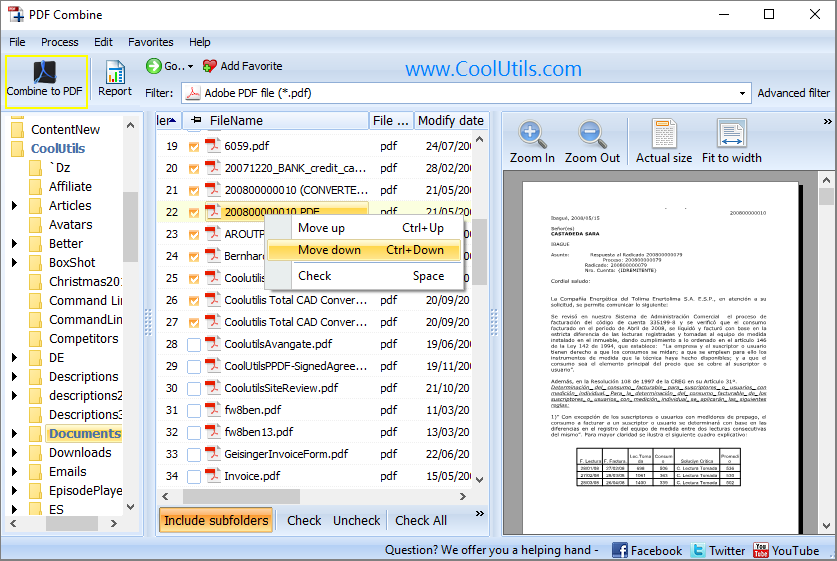
PDF Combine by Coolutils is a desktop utility designed to merge multiple PDF documents into a single, organized file. The software supports various PDF versions and types, ensuring data integrity for specialized documents such as invoices, bank statements, and legal contracts. Users can operate the tool through a standard graphical user interface or via command-line arguments for automated processing.
The application includes several features to enhance the organization of the merged output:
- Automated Bookmarks: Creates navigation points based on the original filenames.
- Table of Contents: Generates a structured index for the combined document.
- Cover Pages: Allows for the addition of a custom lead page to the final file.
- Folder Hierarchy: Maintains the existing folder structure when processing subdirectories.
The program is optimized for performance, utilizing a processing engine capable of handling large batches of files at high speeds. It caters to both novice users looking for a simple drag-and-drop solution and advanced professionals who require command-line integration for complex workflows. PDF Combine maintains formatting across all source files, providing a consistent layout in the resulting unified PDF document. By consolidating multiple records into a single file with an automated index, the tool simplifies the management of high-volume digital paperwork.
Top 5 Reasons To Download PDF Combine
- Automatic Organization with Bookmarks and Tables of Contents: Transform a chaotic pile of files into a single, navigable document with an automated Table of Contents and bookmarks based on filenames.
- Professional Presentation via Custom Cover Pages: Instantly add a professional polish to your merged documents by including a cover page, making your reports and e-books ready for distribution.
- Preservation of Complex Folder Structures: Maintain your logical filing system even after merging, as the software can mirror your subfolder hierarchy within the final PDF.
- High-Performance Speed and Universal Compatibility: Experience lightning-fast merging speeds with an engine that handles PDFs from any source without compromising data accuracy.
- Dual-Mode Versatility for All Skill Levels: Whether you prefer a clean, intuitive Graphical User Interface (GUI) or the automation power of a Command Line interface, this tool caters to every workflow.
Why You Need This PDF Powerhouse in Your Digital Toolkit
Let’s be honest for a second: we are all drowning in PDF files. Whether you are a student trying to manage dozens of research papers, a legal professional handling a mountain of contracts, or an office administrator trying to compile monthly invoices, the "PDF sprawl" is a real and frustrating problem. We have all been there, clicking through twenty different windows just to find one specific piece of information. This is exactly why a tool like PDF Combine from Coolutils isn't just a "nice-to-have" utility—it is a fundamental necessity for anyone who values their time and sanity.
I have tested countless PDF utilities over the years. Some are too bloated, others are too simplified, and many of the free online tools are frankly a privacy nightmare. When I first got my hands on PDF Combine, I was looking for something that didn't just smash files together, but actually organized them. This software delivers on that promise with a level of precision that is rare in the industry. It treats your documents with the respect they deserve, ensuring that the final output is just as crisp and accurate as the originals, but far more useful. Here is a deep dive into why this specific giveaway is the one you absolutely cannot afford to skip.
1. Automatic Organization with Bookmarks and Tables of Contents
The biggest problem with merging twenty different PDF files into one giant document is that you end up with a massive, unnavigable wall of text. Usually, you lose track of where one document ends and the next begins. This is where PDF Combine completely changes the game. It doesn't just stick the pages together; it builds a map for you. By using the original filenames as bookmarks, the software automatically creates a navigational sidebar in your PDF viewer. This means you can jump from "Invoice_January" to "Report_Final" with a single click.
But it goes even further than that. One of my favorite features is the automatic Table of Contents generation. If you are creating an e-book or a large corporate manual, you would normally have to spend hours manually typing out page numbers and linking them to headers. PDF Combine does this heavy lifting for you. It scans the files you are merging and creates a neat, professional Table of Contents page at the beginning of the document. Each entry is a live link, so your readers (or you) can navigate the massive file with ease. This isn't just about saving time; it’s about creating a document that people actually want to read. Navigation is the key to utility, and this tool masters it effortlessly.
2. Professional Presentation via Custom Cover Pages
First impressions matter, especially in a professional setting. If you are sending a collection of documents to a client, a bank, or a superior, you don't want them to just open a file and see the middle of a random spreadsheet. You want a front door. PDF Combine includes a powerful option to add a Cover Page to your merged files. This might seem like a small detail, but it makes a world of difference in how your work is perceived.
Imagine you are compiling a year-end financial summary. By using the cover page feature, you can provide context, titles, and branding before the reader even gets to the data. It transforms a "file" into a "presentation." In a sea of disorganized attachments, your single, professionally-bound PDF with a clear cover page will stand out. It signals that you are organized, thorough, and professional. The fact that you can do this within the same workflow as the merging process—rather than having to use a separate image editor or word processor—is a massive boost to efficiency. It's about working smarter, not harder.
3. Preservation of Complex Folder Structures
This is a feature that power users are going to absolutely love. Most PDF mergers are "flat." You throw files in, and it spits one file out. But what happens if you have a complex project with multiple subfolders? For example, a "Project X" folder might contain subfolders for "Contracts," "Designs," and "Correspondence." Normally, if you tried to merge these, you would lose the context of which file belonged in which category.
PDF Combine is smarter than that. It has the unique ability to keep the folder structure intact. When you merge subfolders within a main folder, the software uses that hierarchy to organize the final PDF. It’s like taking your entire physical filing cabinet and turning it into one perfectly organized digital book without losing the dividers. This is a huge win for legal discovery, academic research, and long-term archiving. You don't have to rename every file to keep them in order; the software understands the logic of your existing filing system and respects it. This level of structural integrity is something I rarely see in competing products.
4. High-Performance Speed and Accuracy
We have all used "free" tools that take five minutes to process three pages, or worse, tools that "break" the PDF during the merge. You know the ones—where the fonts look weird, the images are blurry, or the digital signatures vanish. When you are dealing with bank statements, legal contracts, or high-res e-books, you cannot afford "inaccurate" output. PDF Combine uses a high-performance engine specifically designed to handle the complexities of the PDF format.
During my testing, the speed was what struck me first. It handles hundreds of files in the time it takes most web-based tools to upload just one. Because it is a local application, you aren't limited by your internet bandwidth, and your sensitive documents never leave your computer. More importantly, the output is identical to the source. It doesn't matter if one PDF was created in Word, another in Photoshop, and another in an old version of Acrobat. PDF Combine harmonizes them into one neat file without losing a single pixel of quality. This reliability is why professionals trust Coolutils. When the stakes are high and the documents are important, you need an engine that won't fail you.
5. Dual-Mode Versatility for All Skill Levels
One of the hallmarks of great software is that it is accessible to beginners but powerful enough for experts. PDF Combine strikes this balance perfectly. For the average user who just wants to get the job done, the Graphical User Interface (GUI) is a breath of fresh air. It is clean, intuitive, and doesn't require a manual to understand. You drag your files in, check a few boxes for your preferences (like bookmarks or a cover page), and hit start. It’s a no-friction experience.
However, for the tech-savvy crowd, the IT professionals, or the developers among us, the inclusion of a Command Line interface is a total game-changer. This allows you to automate the merging process. You can write a simple script to automatically merge all PDFs in a specific folder at the end of every work day, or integrate the PDF Combine engine into other workflows. This dual-mode approach ensures that the software grows with you. Even if you start as a casual user, the power of the command line is there whenever you are ready to take your productivity to the next level. It’s rare to find a tool that is this user-friendly while still offering "pro-grade" automation features.
Final Thoughts: Why This Giveaway Is a Must-Have
In the world of utility software, there is a lot of "junk" out there. Many apps promise the world but deliver a buggy, ad-filled experience that leaves your files a mess. PDF Combine from Coolutils is the exact opposite. It is a refined, purpose-built tool that solves a very specific set of problems with incredible elegance. It’s the kind of software that you don’t realize how much you need until you actually start using it—and then you wonder how you ever lived without it.
Think about the time you spend every week managing documents. If you can save just ten minutes a day by having a more organized, searchable, and professional way to handle your PDFs, that adds up to nearly an entire work week saved over the course of a year. That is the true value of this giveaway. It’s not just about a piece of software; it’s about buying back your time and reducing the daily friction of digital paperwork.
Whether you are merging invoices for tax season, creating a massive digital archive of your personal records, or preparing a high-stakes presentation for a client, PDF Combine gives you the tools to do it better. It’s fast, it’s accurate, it’s incredibly powerful, and it respects the organization you’ve already put into your files. In my opinion, as someone who looks at tech for a living, this is a "no-brainer." Download it, install it, and watch your PDF headaches disappear. Trust me, your future self will thank you for being this organized.
Don't wait until you have a 500-page document emergency to look for a solution. Grab this tool now while it's available and be prepared for whatever digital paperwork comes your way. It is a solid, reliable, and professional-grade utility that belongs on every desktop.


Reviews for PDF Combine
Click Here to Read Reviews for PDF Combine >> Click Here to Submit Reviews for PDF Combine >>