
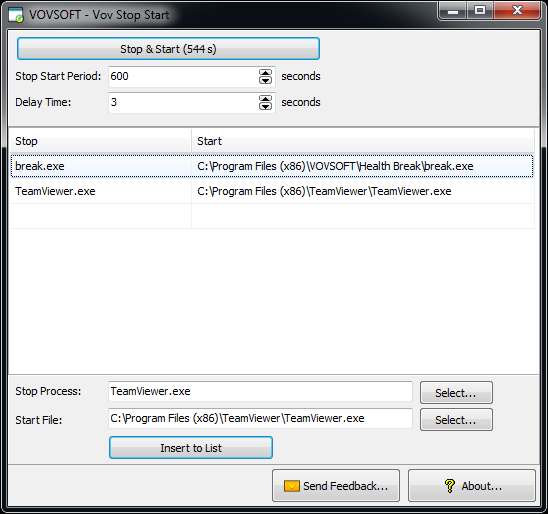
Some background applications are prone to crash. Vov Stop Start is an easy to use application to automatically stop-start this kind of applications. You can minimize application stoppages by using Vov Stop Start. All you have to do is to set stop-start period in seconds and select the applications you wish to stop-start. The utility is built for system administrators and power users. It runs on Windows XP, Vista, 7, 8, 8.1, 10 and Windows Server editions.
Official Product Description
Overview
What Does Vov Start Stop Do?
Vov Stop Start is a lightweight system utility designed to automate the management of unstable background processes. In environments where specific applications are prone to crashing or require periodic refreshing to maintain performance, this tool provides a hands-off solution for ensuring continuous operation. By automating the restart cycle, users can mitigate the impact of application failures without the need for manual intervention.
The interface allows for configuration through a straightforward selection process. Users identify the applications they wish to monitor and define a specific "stop-start" interval, measured in seconds. Once these parameters are established, the utility terminates the targeted process and restarts it according to the designated schedule. This functionality is specifically engineered for system administrators and power users who manage persistent background tasks that may suffer from memory leaks or intermittent hangs.
The software supports a broad range of Windows operating systems, including:
- Windows XP, Vista, 7, 8, and 8.1
- Windows 10
- Windows Server editions
By providing a centralized method to refresh problematic software, Vov Stop Start helps maintain system uptime and reduces the administrative overhead associated with manual process management.
Top 5 Reasons To Download Vov Start Stop
1. Unmatched Reliability Through Automated Self-Healing: By proactively restarting applications, you eliminate the downtime associated with software that is prone to hanging or crashing during critical background tasks.
2. Granular Refresh Control: The ability to set specific stop-start intervals down to the second ensures that your system resources are always fresh and that memory leaks never have the chance to bog down your performance.
3. Legacy and Modern OS Versatility: Whether you are managing an old industrial machine running Windows XP or a modern data center on Windows Server, Vov Stop Start provides a consistent solution across almost three decades of operating systems.
4. Minimalist Footprint and Zero Bloat: Designed for power users who hate cluttered interfaces, this utility offers a lightweight, "no-nonsense" approach that does exactly what it says without draining system resources itself.
5. Professional-Grade System Administration: It acts as a digital watchdog for your most important processes, allowing administrators to focus on high-level tasks while the software handles the tedious chore of process monitoring and maintenance.
The Problem We All Face: The Unstable Background App
We have all been there. You are working on a high-stakes project, or perhaps you have a server running a vital piece of automation software in the background. Everything seems to be going smoothly until, suddenly, the service drops. You check your task manager and realize that a crucial background application has simply stopped responding. Maybe it is a memory leak that slowly choked the life out of the process, or perhaps it is just a poorly coded legacy tool that was never meant to run for weeks at a time without a reboot. Regardless of the cause, the result is the same: manual intervention, lost time, and a massive headache.
This is where Vov Stop Start enters the conversation as a mandatory tool for any serious Windows user. As a tech reviewer, I see hundreds of utilities that claim to "optimize" your PC, but most of them are just fluff. Vov Stop Start is different because it addresses a very specific, very painful reality of computing: applications are often unstable. By automating the process of stopping and starting these problematic apps, this utility essentially gives your software "self-healing" properties. Let us dive deep into the top five reasons why you need to grab this giveaway immediately.
1. Unmatched Reliability Through Automated Self-Healing
In the world of system administration and power use, "uptime" is the gold standard. However, achieving 100% uptime is nearly impossible when you are forced to rely on applications that have a tendency to "ghost" or freeze. When an application crashes silently in the background, it does not always give you a helpful error message. Sometimes it just sits there, consuming CPU cycles while doing absolutely nothing productive. This is particularly common with data-scraping tools, sync utilities, or older proprietary software that hasn't seen an update since the mid-2000s.
The primary reason to download Vov Stop Start is that it provides a safety net. By setting a stop-start cycle, you are essentially performing a "micro-reboot" of that specific software. This clears the cache, resets the process ID, and ensures that the application starts with a clean slate. Imagine you have a security camera feed or a weather-monitoring script that tends to lock up every six hours. Instead of checking it manually, you can set Vov Stop Start to refresh the app every five hours. You have effectively eliminated the crash before it ever had the chance to occur. This proactive approach to system stability is what separates a cluttered, buggy workstation from a high-performance environment.
2. Granular Refresh Control
One of the most impressive aspects of Vov Stop Start is its simplicity in configuration. Many enterprise-level tools require complex scripting or deep knowledge of Windows PowerShell to automate process restarts. Vov Stop Start does away with all of that complexity. The interface allows you to set the stop-start period in seconds. This level of granularity is vital because every application behaves differently. Some might need a refresh once a day (86,400 seconds), while a highly unstable beta tool might need a kick-start every 60 seconds.
This control is particularly useful for combatting memory leaks. A memory leak occurs when a program fails to release the RAM it has used, leading to a slow but inevitable system slowdown. By using Vov Stop Start to cycle these "leaky" programs every few hours, you ensure that your total system memory remains available for other tasks. It is an elegant solution to a technical problem that has plagued Windows users for years. You do not need to be a coder to set this up; you just need to know how many seconds you want to wait between refreshes. It is automation made accessible for the everyday power user.
3. Legacy and Modern OS Versatility
We live in a world that is constantly pushing us toward the "newest and greatest," but the reality of the tech industry is that many vital systems still run on older versions of Windows. Whether it is a CNC machine in a factory running Windows XP or a small business server running Windows 7, these systems often host critical software that cannot be easily updated. One of the standout features of Vov Stop Start is its incredible range of compatibility. It supports Windows XP, Vista, 7, 8, 8.1, 10, and even Windows Server editions.
For those of us who have to maintain "legacy" hardware, finding modern, lightweight tools that actually run on older NT kernels is like finding a needle in a haystack. This software is built with that versatility in mind. If you are a system administrator tasked with keeping an aging fleet of machines running, Vov Stop Start is a godsend. It brings modern automation techniques to operating systems that were otherwise left behind by the software industry. It ensures that no matter what version of Windows you are using, you have the tools necessary to keep your applications running smoothly without constant manual oversight.
4. Minimalist Footprint and Zero Bloat
As a tech reviewer, nothing irritates me more than a simple utility that comes packaged with 200MB of unnecessary graphics, telemetry, and "bonus" features that nobody asked for. A utility meant to monitor other apps should not be a resource hog itself. Vov Stop Start is a breath of fresh air because it is incredibly lightweight. It sits quietly in the background, performing its duty without demanding a significant portion of your CPU or RAM. This is crucial because the whole point of using a stop-start utility is to save resources, not consume more of them.
The user interface is clean, functional, and efficient. There are no distracting ads, no complicated sub-menus, and no "cloud" requirements. You select your application, you set your interval, and you let it run. In an era where even basic calculators and text editors are becoming "Software as a Service" (SaaS) with monthly subscriptions, having a standalone, lightweight tool that you can just download and use is a massive advantage. It respects the user's system and their time, which is something every power user can appreciate.
5. Professional-Grade System Administration
While the app is easy enough for a novice to use, its true power lies in how it serves the needs of system administrators. If you manage a network of computers, your biggest enemy is the "support ticket." Many of those tickets are for simple things: "The app is frozen," or "The sync hasn't happened today." By deploying Vov Stop Start on critical machines, you can significantly reduce the volume of these minor issues. It acts as a digital watchdog, ensuring that even if you are not physically at the machine, the essential services are being maintained.
This utility is the "Swiss Army knife" for anyone who manages servers. In a Windows Server environment, background processes are the lifeblood of the organization. If a print spooler or a database bridge hangs, it can halt productivity for dozens of employees. Using this tool to periodically refresh these services ensures that small errors never escalate into major system outages. It allows the admin to be proactive rather than reactive. Instead of spending your morning fixing crashed background apps, you can spend your time on high-level infrastructure improvements, knowing that Vov Stop Start is handling the mundane task of process management in the background.
Who Is This Actually For?
You might be wondering, "Do I really need this if my computer seems fine?" The answer is almost certainly yes, especially if you fall into any of the following categories. Digital Signage Operators: If you run a computer that powers a display in a store or office, you know that those display apps crash constantly. Vov Stop Start ensures the screen never goes black. Crypto Miners or Distributed Computing Fans: If you run software like Folding@Home or mining rigs, you need those apps running 24/7. This utility ensures they stay active. Home Lab Enthusiasts: If you have a dedicated "always-on" PC for file sharing or media hosting, this tool is the perfect way to keep your server-side apps fresh.
The beauty of a giveaway like this is that it allows you to add a professional-level utility to your toolkit at no cost. Even if you don't have a crashing app today, you will tomorrow. Software is getting more complex, and with that complexity comes a higher chance of instability. Having Vov Stop Start ready to go in your "Utilities" folder is just smart computing. It is one of those tools that you don't realize you need until the moment it saves you three hours of work, at which point it becomes completely indispensable.
The Final Verdict
In conclusion, Vov Stop Start is a masterclass in functional software design. It takes a single, frustrating problem—unstable background applications—and provides a robust, easy-to-implement solution. By offering a "set-and-forget" workflow, it empowers both casual users and professional system administrators to take control of their Windows environment. Its broad compatibility ensures it is a long-term investment for any machine in your arsenal, and its lightweight nature means it won't interfere with your other work.
This is not just another "nice-to-have" app; it is a "must-have" for anyone who values their time and system stability. Don't wait until your next critical application crash to look for a solution. Download this giveaway, set up your most important apps, and experience the peace of mind that comes with a truly self-healing system. Your PC—and your sanity—will thank you.
Make sure to take advantage of this giveaway while it lasts. In the fast-paced world of technology, tools that offer this kind of utility and reliability are rare. Whether you are running Windows 10 or an old Windows Server edition, Vov Stop Start is the watchdog your system deserves.
Reviews for Vov Start Stop
Click Here to Read Reviews for Vov Start Stop >> Click Here to Submit Reviews for Vov Start Stop >>