What Does Bitwar OCR Text Scanner Do?
Bitwar Text Scanner is an optical character recognition (OCR) application designed to automate the digitization of printed and onscreen text. The software functions as a productivity tool that extracts content from images, PDF documents, and E-books, converting them into editable formats. A key technical feature of this utility is that all recognition is performed locally on the user's device, ensuring that data is processed without the need for cloud-based uploads.
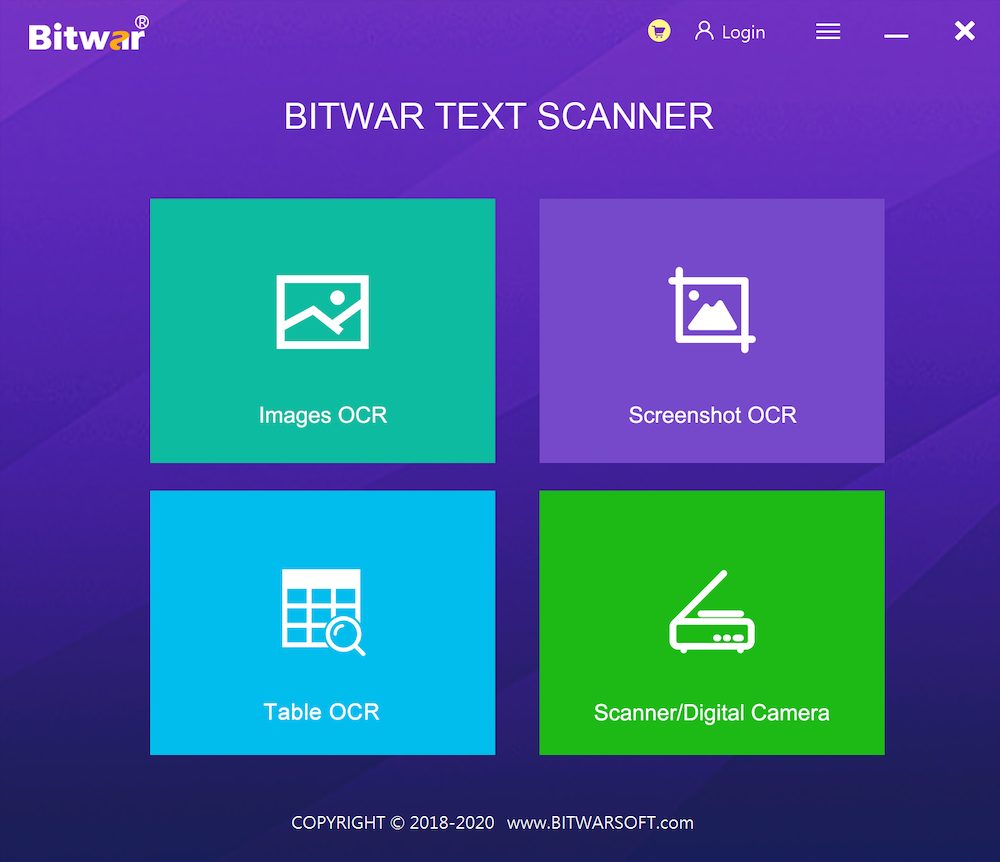
The application provides several distinct functions for various document management needs:
- Images OCR: This feature supports batch processing, allowing users to add multiple image files at once to extract editable text efficiently.
- Screenshot OCR: Users can capture a specific portion of their screen and instantly convert the visual information into a text format.
- Table OCR: The software identifies tabular structures within images and can batch-process these files to output them directly as Excel spreadsheet files.
- Scanner and Digital Camera Integration: The tool can connect directly to external hardware, such as scanners and digital cameras, to initiate the OCR process from physical documents.
By utilizing these features, Bitwar Text Scanner eliminates the need for manual data entry. It serves as a comprehensive solution for turning static visual data from screenshots, scanned papers, and digital images into manageable, editable files.
Top 5 Reasons To Download Bitwar OCR Text Scanner
Before we dive into the nitty-gritty details of why this software is a total game-changer for your productivity, let’s look at the highlights. If you are tired of the manual grind, these are the five pillars that make this tool a must-have for your digital arsenal:
- Lightning-Fast Batch Image OCR: Process hundreds of images at once and turn them into editable text in seconds.
- Seamless Screenshot-to-Text Utility: Capture anything on your screen and instantly extract the words without saving a file.
- Automated Table-to-Excel Conversion: Stop rebuilding spreadsheets from scratch by converting image-based tables directly into Excel.
- Robust Offline Security and Local Processing: Keep your sensitive data safe because all recognition happens right on your machine, not in the cloud.
- Versatile Hardware Connectivity: Direct integration with scanners and digital cameras to bridge the gap between physical paper and digital editing.
We have all been there. You are working on a massive project, and someone sends you a "document" that is actually just a collection of poorly lit JPEGs. Or perhaps you are doing research and find the perfect quote inside a locked PDF or an E-book that won’t let you highlight text. Usually, this means one thing: hours of tedious, soul-crushing manual typing. You sit there, Alt-Tabbing back and forth, squinting at your screen, and praying you don’t make a typo. It is the ultimate productivity killer.
But what if I told you that those days are officially over? Enter Bitwar Text Scanner. This isn't just another utility tool; it is a specialized powerhouse designed to liberate your hands and save your sanity. As a tech reviewer, I see hundreds of apps that claim to "optimize your workflow," but few actually deliver on that promise as directly as this one. This software is built on high-precision Optical Character Recognition (OCR) technology, and right now, it is available as a giveaway that you simply cannot afford to miss. Let’s break down exactly why this needs to be on your desktop right now.
1. Lightning-Fast Batch Image OCR
The first and perhaps most obvious reason to grab Bitwar Text Scanner is its sheer speed and efficiency when handling bulk images. Most free OCR tools you find online allow you to upload one image at a time. That is fine if you have one receipt to scan, but what if you have a 50-page scanned manuscript? Or a folder full of lecture notes captured on a smartphone? Doing those one by one is barely better than typing them manually.
Bitwar changes the game with its Batch Image OCR feature. You can simply drag and drop an entire folder of images into the interface. The software then goes to work, identifying text patterns across multiple files simultaneously. It doesn't matter if the source is a JPG, PNG, or a complex PDF document; the engine is optimized to recognize characters with incredible accuracy.
What makes this truly special is the quality of the extraction. Many OCR tools struggle with fonts that aren't perfectly standard or images that have a bit of noise. Bitwar’s algorithms are tuned to filter out that background noise, focusing on the text characters to ensure that the output is "clean." This means less time spent proofreading and correcting errors after the scan is complete. In the professional world, time is the only currency that truly matters, and the batch processing feature is like getting a few extra hours back in your week.
2. Seamless Screenshot-to-Text Utility
This is the feature that I personally use the most. We spend so much of our time in web browsers, video meetings, and proprietary software where text selection is often disabled. Maybe you are watching a coding tutorial and want to grab a snippet of code, or you are in a Zoom meeting and the presenter is showing a slide full of vital statistics. Normally, you’d have to take a screenshot, save it, upload it to a website, and then copy the text.
With Bitwar Text Scanner, that friction is eliminated. The Screenshot OCR function allows you to use a hotkey to select any area of your screen—exactly like the Snipping Tool you are already used to. However, instead of just saving a picture, Bitwar instantly analyzes that area and provides you with the editable text in a floating window. It is instantaneous.
Imagine the possibilities for students and researchers. You can "snip" quotes from E-books that are protected by DRM, or grab data points from a YouTube video infographic. It turns your entire screen into a selectable text field. It is one of those features that, once you start using it, you wonder how you ever lived without it. It turns a multi-step process into a two-second action, and for a tech reviewer who is always grabbing specs from uncopyable websites, it is an absolute lifesaver.
3. Automated Table-to-Excel Conversion
If you work in finance, logistics, or any data-heavy field, you know that tables are the final boss of data entry. Extracting text from a paragraph is one thing, but extracting a 10-column financial statement while maintaining the structural integrity of the rows and columns is a nightmare. Usually, when you run OCR on a table, the software spits out a jumbled mess of numbers and words with no formatting, leaving you to spend an hour re-aligning everything in Excel.
Bitwar Text Scanner includes a dedicated Table OCR mode that is specifically tuned for this purpose. It doesn't just look for characters; it looks for the grid lines and the spatial relationship between data points. When you feed it an image of a spreadsheet or a scanned paper report, it understands the layout.
The result? You can export that data directly into an editable Excel spreadsheet. The columns stay columns, and the rows stay rows. This is an enterprise-level feature that is often locked behind expensive monthly subscriptions in other software suites. Having this as part of a giveaway is a massive value proposition. Whether you are digitizing old paper invoices or extracting data from a PDF report, this feature alone justifies the installation. It moves you from "data entry clerk" to "data analyst" by removing the manual labor from the equation.
4. Robust Offline Security and Local Processing
In an era where every app wants to upload your data to "the cloud," privacy has become a major concern. Many free online OCR services require you to upload your documents to their servers. If you are handling sensitive legal documents, private medical records, or proprietary business contracts, that is a massive security risk. You have no idea where those files are being stored, who has access to them, or how they are being used to "train" AI models.
One of the strongest selling points for Bitwar Text Scanner is that all recognition is performed locally. When you process an image or a screenshot, that data never leaves your computer. The OCR engine lives on your hard drive, utilizing your local CPU/GPU to do the heavy lifting. This means you can use the software while completely offline, which is perfect for working while traveling or in high-security environments.
For the privacy-conscious user, this is a non-negotiable benefit. You get the power of modern OCR without the "privacy tax" of the cloud. It ensures that your company's trade secrets and your personal information remain exactly where they belong: under your control. In my reviews, I always prioritize software that respects user sovereignty, and Bitwar's local-first approach is a shining example of how productivity software should work.
5. Versatile Hardware Connectivity for Scanners and Cameras
Finally, Bitwar Text Scanner serves as the perfect bridge between the physical and digital worlds. While many of us work with digital files, there is still an enormous amount of "paper" in the world. From physical books and signed contracts to handwritten notes and business cards, we often need to get physical text into our computers.
Bitwar makes this incredibly easy by offering direct Scanner and Digital Camera connectivity. You don't need to use a separate, clunky scanning utility that came with your printer from 2015. You can trigger the scan directly through Bitwar. If you have a high-resolution digital camera or a specialized document scanner connected to your PC, Bitwar can interface with it to start the OCR process the moment the image is captured.
This creates a streamlined "analog-to-digital" pipeline. You put a document on the scanner bed, hit a button in Bitwar, and seconds later, you are editing that text in Word. It supports the digitization of E-books, the archiving of old paper files, and the quick conversion of business cards into digital contacts. It is a comprehensive solution that handles the entire lifecycle of a document, from the moment it is scanned to the moment it is converted into a functional, editable file.
Conclusion: Why You Should Download This Right Now
As a tech reviewer, I see a lot of "bloatware"—apps that take up space and offer very little in return. Bitwar Text Scanner is the exact opposite. It is a lean, mean, productivity machine. It tackles one of the most universal problems in computing: the "dead text" problem. By turning images, screenshots, and physical papers into living, editable, and searchable data, it frees up your most valuable resource—your time.
Think about the hours you have spent re-typing information. Think about the frustration of trying to get data out of a locked PDF. Think about the security risks of uploading your private documents to random websites for conversion. Bitwar solves all of these problems in a single, easy-to-use package.
No more hand typing. That is the promise, and based on the feature set, it is a promise that Bitwar keeps. Whether you are a student trying to organize your notes, a professional managing a mountain of invoices, or just someone who wants to make their digital life a little bit easier, this giveaway is a golden opportunity.
The software is fast, reliable, and most importantly, it respects your privacy. It handles the complex stuff like tables and batch processing with ease, and it integrates seamlessly into your daily workflow through its screenshot utility. This is the kind of tool that you don't realize you need until you have it—and once you have it, you will wonder how you ever managed without it. Don’t wait for the manual typing to pile up. Download Bitwar Text Scanner today and give your hands the break they deserve!

Reviews for Bitwar OCR Text Scanner
Click Here to Read Reviews for Bitwar OCR Text Scanner >> Click Here to Submit Reviews for Bitwar OCR Text Scanner >>