What Does Genie Timeline Professional 2013 Do?
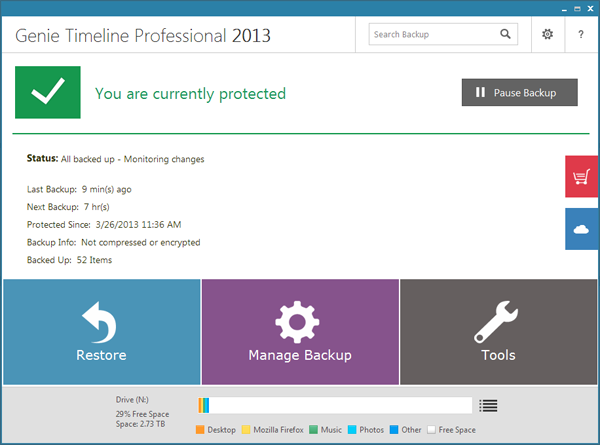
Genie Timeline Professional 2013 is a specialized backup utility designed for automated file protection across local, external, and network drives. The software streamlines the setup process through a three-step configuration wizard, after which it operates autonomously in the background. It utilizes IntelliCDP technology to monitor for modified data and updates backups in real time.
A primary feature of the application is the Timeline interface, which allows users to navigate and restore files from specific historical points. For data security, the software employs 256-AES military-grade encryption. Users can also perform granular recovery of deleted items or previous file versions directly through the right-click context menu.
The program offers several advanced management options:
- Disaster Recovery: Provides full system restoration capabilities to mitigate hardware failures or malware attacks.
- Native File Access: Supports uncompressed backups, allowing files to be viewed on any computer without the software installed.
- Remote Monitoring: Includes a mobile application for live status updates and automated email notifications.
- System Control: Features advanced scheduling and the ability to automatically power down the computer following a backup task.
Genie Timeline Professional 2013 balances simplicity with technical controls, providing both casual users and power users a way to maintain consistent data integrity without manual intervention.
Top 5 Reasons To Download Genie Timeline Professional 2013
- Seamless "Set It and Forget It" Automation: Configure your entire backup strategy in just three simple steps and let the IntelliCDP technology handle the rest in the background.
- Revolutionary Time-Travel Recovery: Use the intuitive Timeline interface to browse through different versions of your files and restore your system to a specific point in time.
- Military-Grade Data Security: Protect your sensitive personal information with 256-AES encryption, ensuring that your data remains private even if your backup drive is stolen.
- Transparent File Portability: Access your backed-up data in its native form on any computer without needing the Genie Timeline software installed, thanks to the non-compressed backup option.
- Complete Disaster Recovery and System Protection: Go beyond simple file backups with a full system recovery solution that protects you against hardware failure, virus attacks, and total OS crashes.
The Ultimate Safety Net for Your Digital Life
We have all been there. You are working on a massive project, perhaps a presentation for work or a collection of irreplaceable family photos, and suddenly, the unthinkable happens. Your hard drive makes a clicking sound, your screen turns blue, or you accidentally hit the delete key on a folder you desperately needed. In the tech world, we often say there are two types of people: those who have lost data and those who are about to. If you find yourself in the latter category, or if you have already felt the sting of a digital catastrophe, then Genie Timeline Professional 2013 is the software you have been waiting for. This is not just another utility; it is a comprehensive insurance policy for your digital existence.
As a tech reviewer, I see hundreds of backup utilities every year. Most of them are either too simple to be useful or so complex that you need a degree in computer science just to navigate the settings menu. Genie Timeline Professional 2013 hits that elusive "Goldilocks zone." it is incredibly powerful under the hood, yet the user interface is so streamlined that anyone can use it. This giveaway is an absolute must-download for anyone who values their time and their data. Below, I am going to break down exactly why this software needs to be on your machine right now.
1. Seamless "Set It and Forget It" Automation
The biggest reason people fail to back up their data is that it is usually a chore. Most programs require you to manually select files every week, or they nag you with pop-ups that interrupt your workflow. Genie Timeline Professional 2013 eliminates this friction entirely. The developers have mastered the art of simplicity. When you first install the program, you are guided through a three-step configuration process. You choose where you want to save your data, what types of files you want to protect, and how you want to handle the security. After those three steps, you are done. Truly done.
What makes this possible is a technology called IntelliCDP (Continuous Data Protection). Instead of waiting for a scheduled time, like 2:00 AM on a Sunday, Genie Timeline monitors your files in real-time. The moment you save a change to a document or add a new photo to your library, the software detects the change and silently updates your backup. It does this with such low resource overhead that you will never even notice it is running. This background operation is the hallmark of professional-grade software. You do not have to remember to back up because the software remembers for you. It is the ultimate "set it and forget it" solution, ensuring that your most recent work is always protected without you lifting a finger.
Furthermore, the automation extends to how the software manages storage. It intelligently manages your backup drive space, cleaning up older versions when space gets tight, but always prioritizing the safety of your most recent data. This level of automation means you can focus on being productive or enjoying your media, rather than playing the role of a manual system administrator for your own PC.
2. Revolutionary Time-Travel Recovery
While most backup programs are great at saving your current files, they often struggle when you need to find something from the past. Genie Timeline Professional 2013 introduces a feature that feels almost like magic: the Timeline. Imagine having a visual slider that lets you scroll back through days, weeks, or months of your computer's history. If you realize that the version of a document you wrote last Tuesday was actually better than the one you have today, you can simply "travel" back to Tuesday and pull that specific version out.
This is a lifesaver for creative professionals, students, and anyone who iterates on their work. But it is not just for finding old versions of existing files. This feature is the ultimate weapon against accidental deletion. We have all accidentally emptied the Recycle Bin only to realize seconds later that we needed one of those files. With Genie Timeline, those files are not gone. You can right-click any folder and see exactly what was in it at any point in the past. The integration into the Windows Explorer interface is seamless; you don't even have to open the main Genie Timeline app to recover a file. A simple right-click allows you to view versions or recover deleted items instantly.
This "time-travel" capability transforms backup from a boring safety measure into a powerful productivity tool. It gives you the freedom to experiment with your files, knowing that you can always revert to an earlier state if things go wrong. It provides a level of granular control that traditional "image-based" backups simply cannot match.
3. Military-Grade Data Security
In today's world, data privacy is more important than ever. If you are backing up your tax returns, medical records, or private business documents to an external hard drive or a network location, you need to ensure that those files are for your eyes only. If that external drive were ever lost or stolen, an unencrypted backup would be a goldmine for identity thieves. Genie Timeline Professional 2013 addresses this head-on with 256-AES encryption.
For those who aren't familiar with cryptographic standards, 256-AES is the same level of encryption used by banks and military organizations to protect classified information. It is essentially uncrackable by modern standards. When you enable this feature in Genie Timeline, your data is scrambled before it ever leaves your primary hard drive. This means that even if someone were to gain physical possession of your backup drive, they would see nothing but meaningless gibberish without your password.
But the security features don't stop at encryption. Genie Timeline Professional 2013 also includes a robust "Disaster Recovery" component. While file backup is great for recovering a lost Word document, Disaster Recovery is for when your entire Windows operating system fails to boot. The software allows you to create a recovery disk that can restore your entire system—apps, settings, and all—to a new hard drive. This holistic approach to security means you are protected against both digital snooping and physical hardware failure.
4. Transparent File Portability
One of the most frustrating things about modern backup software is "proprietary lock-in." Many programs take your files and bundle them into a giant, compressed, encrypted blob that can only be opened by that specific software. If you take your backup drive to a friend's house or a work computer that doesn't have the software installed, you are effectively locked out of your own data. Genie Timeline Professional 2013 offers a refreshing alternative: the ability to back up files in their native form without compression.
When you choose this option, the software mirrors your file structure exactly on the destination drive. If you go into your backup folder, you will see your "Photos" folder exactly as it appears on your C: drive, with all the JPEGs and PNGs visible and clickable. You can plug your backup drive into any computer—Mac, Linux, or another Windows PC—and view your files immediately using standard file explorers. You don't need to install Genie Timeline to get your data back in an emergency.
This transparency is a huge advantage for users who value flexibility. It means your backup drive can also function as a portable media library. You can back up your music and movie collection, and then plug that drive into a smart TV or a media player, and it will work perfectly because the files are in their "native form." This feature removes the "middleman" between you and your data, ensuring that you always have access to your information regardless of the software environment.
5. Comprehensive Monitoring and Power User Customization
While Genie Timeline is designed to be simple for the average user, it doesn't skimp on the features that power users crave. A backup system is only useful if you know it is working, and Genie provides multiple ways to keep tabs on your data's safety. One of the coolest features is the mobile app integration. You can get live feedback on your backup status directly on your smartphone. Whether you are at the office or on vacation, a quick glance at your phone can confirm that your home PC is backed up and secure.
For those who prefer more traditional notifications, the software can send detailed email reports directly to your inbox. This is perfect for small business owners or family "tech experts" who want to monitor the backup status of multiple machines without having to physically sit down at each one. You will know exactly when a backup was completed, if any errors occurred, and how much space is left on your destination drive.
Furthermore, the "Professional" version of this software gives you deep control over how the program behaves. You can set specific power management rules, such as telling the computer to shut down automatically once a major backup task is finished. You can exclude specific file types or folders to save space, and you can tweak the IntelliCDP settings to prioritize system performance or data frequency. This level of customization ensures that the software adapts to your lifestyle, rather than forcing you to change your habits to accommodate the software. It is a sophisticated tool that manages to stay out of your way while providing all the data you need to feel secure.
Why This Giveaway is a Game-Changer
In the tech world, we often see "lite" or "free" versions of backup software that are stripped of their most essential features. They might limit the amount of data you can save, or they might disable the encryption and disaster recovery options. That is not the case here. Getting your hands on Genie Timeline Professional 2013 through this giveaway means you are getting the full, unrestricted professional suite. You are getting the military-grade encryption, the mobile monitoring, and the full system disaster recovery that usually carries a significant price tag.
The value proposition here is undeniable. Think about the cost of a professional data recovery service. If your hard drive fails and you haven't backed up your data, you could be looking at spending thousands of dollars for a specialist to try and retrieve your files from the physical platters of the drive—and even then, there is no guarantee of success. By downloading this software today, you are essentially eliminating that risk for free. You are spending five minutes of your time to prevent hundreds of hours of potential heartbreak and thousands of dollars in potential costs.
Final Thoughts: Don't Wait Until It Is Too Late
As a reviewer, I have seen far too many people lose their digital lives because they thought "it won't happen to me." They thought their new laptop was invincible, or they thought they didn't have anything "important enough" to back up. But it is only after the files are gone that they realize how much those photos, those scanned documents, and those saved projects actually meant to them. Data loss is not a matter of "if," it is a matter of "when." Hardware eventually wears out, malware is constantly evolving, and human error is unavoidable.
Genie Timeline Professional 2013 is the perfect solution because it removes all the excuses. It is easy to set up. It is automatic in its operation. It is secure enough for the most sensitive data. And it is flexible enough to allow you to access your files anywhere. Whether you are a casual user who just wants to protect family memories or a power user who needs a robust system-wide backup and recovery plan, this software delivers on every front.
The clock is ticking on your hard drive's lifespan. Every day you run your computer without a professional backup solution is a day you are gambling with your data. Take advantage of this giveaway, follow the three simple setup steps, and then rest easy knowing that your digital world is protected by one of the best in the business. Download Genie Timeline Professional 2013 now—your future self will thank you.
In conclusion, Genie Timeline Professional 2013 stands out as a premier choice for file protection. Its blend of high-end features like 256-AES encryption and IntelliCDP with a user-friendly, three-step setup makes it accessible to everyone. The ability to recover deleted files with a simple right-click and the peace of mind offered by full disaster recovery tools make it a complete package. Do not miss the opportunity to secure your digital life with this professional-grade tool. It is efficient, it is powerful, and most importantly, it is reliable. Secure your files, protect your system, and enjoy the confidence that comes with knowing your data is safe.

Reviews for Genie Timeline Professional 2013
Click Here to Read Reviews for Genie Timeline Professional 2013 >> Click Here to Submit Reviews for Genie Timeline Professional 2013 >>