What Does FlexClip: Easy-to-Use Video Editor Do?
FlexClip is a cloud-based video editing platform designed to simplify the content creation process. The service focuses on providing a streamlined workflow for users who need to produce high-quality video content without the steep learning curve associated with professional-grade desktop software.
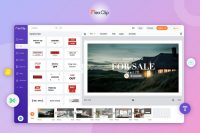
The platform features a library of over 1,000 professionally designed templates categorized for business, marketing, social media, and personal events. Users can further customize these projects using a suite of creative tools, including:
- Animated text and dynamic overlays for visual impact.
- Interactive widgets and specialized intro/outro sequences.
- Access to over 1,000,000 stock assets, including royalty-free music, photos, and video clips.
In terms of technical capabilities, FlexClip includes essential editing functions such as cutting, trimming, merging, and speed adjustment. The interface allows for frame-accurate control over clips while maintaining drag-and-drop simplicity. This utility is designed to handle the heavy lifting of video processing within a web browser environment.
Once the editing phase is complete, the software enables one-click exporting in various file formats and direct sharing to major online platforms. By consolidating stock assets and editing tools into a single interface, FlexClip functions as an end-to-end solution for efficient video production.
Top 5 Reasons To Download FlexClip: Easy-to-Use Video Editor
1. A Massive Library of Over 1,000 Professionally Designed Templates: Jumpstart your creativity without starting from scratch using high-quality layouts for every occasion.
2. Access to Over 1,000,000 Royalty-Free Stock Assets: Say goodbye to copyright strikes and expensive subscriptions with a built-in treasure trove of videos, photos, and music.
3. An Intuitive, Beginner-Friendly Editing Interface: Edit with professional precision using simple drag-and-drop tools that eliminate the steep learning curve of traditional software.
4. Advanced Creative Elements and Motion Graphics: Elevate your production value instantly with animated texts, funky widgets, dynamic overlays, and professional intros/outros.
5. Unmatched Speed and Efficiency from Concept to Export: Save hours of labor with a streamlined workflow that allows for one-click downloading and easy online sharing.
The Video Revolution is Here, and You Need the Right Tools
Let’s be honest for a second: we are living in the age of the video. Whether you are trying to grow a brand on social media, create a memorable presentation for work, or simply capture the magic of a family event, video is the currency of the modern world. But there is a massive problem that most of us face. Professional video editing has historically been a nightmare. In the past, if you wanted a video that didn't look like it was made in 1995, you had to spend hundreds of dollars on complex software and then hundreds of hours watching tutorials just to figure out how to cut a single clip.
That is exactly why I am so excited to talk to you about this specific giveaway. We are looking at a platform that takes the "work" out of video work. This online video editor is a game-changer because it prioritizes your time and your creativity over technical hurdles. It allows you to navigate and edit videos to your own gusto without the headache. If you have been looking for a sign to finally start that YouTube channel, upgrade your business marketing, or just make your social media feed look ten times better, this is it. Let’s dive deep into the five reasons why you absolutely need to get your hands on this tool.
1. A Massive Library of Over 1,000 Professionally Designed Templates
We have all stared at a blank screen, the cursor blinking mockingly, while we wonder how to start a project. The "blank canvas syndrome" is the biggest killer of productivity. This software solves that instantly by providing over 1,000 exquisitely-designed templates. These aren't just generic layouts; they are tailored specifically for business, marketing, festivals, special events, and social media platforms.
Imagine you need to create a promotional video for a flash sale. Instead of worrying about font pairings, transitions, or color palettes, you simply select a marketing template that fits your vibe. The heavy lifting is already done by professional designers. All you have to do is swap out the text and perhaps change a few images, and you have a professional-grade video in minutes. The efficiency here is staggering. Whether you are celebrating a holiday, launching a product, or creating a "Happy Birthday" montage for a friend, the templates ensure that you always start with a high-quality foundation. It is tremendously practical for anyone who needs to produce content consistently without burning out.
2. Access to Over 1,000,000 Royalty-Free Stock Assets
One of the most frustrating parts of video creation is finding the right "b-roll" or background music. Usually, this involves scouring the internet for hours, worrying about copyright infringement, and often paying exorbitant fees for a single stock clip. This giveaway changes the game by giving you direct access to over 1,000,000 royalty-free stock assets.
Within the editor, you can search for high-definition video clips, stunning photos, and high-quality music tracks. Need a shot of a sunset in Hawaii? It’s there. Need a high-energy lo-fi beat for your tech review? It’s there. Having these assets integrated directly into the editor means you never have to leave your workflow. You can search, preview, and drop assets into your timeline instantly. This isn't just a convenience; it is a massive cost-saving feature. Typically, a subscription to a stock footage site can cost hundreds of dollars a year. By using this tool, you are essentially getting a premium library of assets for free. It allows you to make your videos look like they had a massive production budget, even if you’re just working from your laptop at a coffee shop.
3. An Intuitive, Beginner-Friendly Editing Interface
Most professional video editors look like the cockpit of a fighter jet. There are buttons everywhere, multiple timelines, and confusing terminology like "keyframing" and "color grading" that can scare off even the most enthusiastic creators. This software takes a completely different approach. It is built on the philosophy that anyone should be able to edit a video.
The interface is remarkably easy to navigate. You can effortlessly cut, trim, and combine clips with just a few clicks. If you want to speed up a clip for a time-lapse effect or slow it down for a dramatic moment, the tools are right there, clearly labeled and responsive. There is no digging through nested menus or looking up keyboard shortcuts. It’s all about ease of use. But don't let the simplicity fool you. While it is easy to use, it is powerful enough to handle complex tasks like converting file formats or merging multiple media types into a seamless story. It’s the perfect balance of simplicity and functionality, making it the ideal choice for both the casual hobbyist and the busy professional who needs to get things done fast.
4. Advanced Creative Elements and Motion Graphics
A video without effects is just a series of clips; a video with effects is a story. To truly engage an audience, you need those little "extras" that make a video pop. This is where this editor really shines. It provides a suite of animated texts, funky widgets, and dynamic overlays that can be applied with a single click.
Think about the last time you watched a high-quality video on social media. It likely had sleek text animations that appeared on the screen, or perhaps a professional intro and outro that gave the brand a sense of identity. With this tool, those elements are at your fingertips. You can add "like and subscribe" buttons, social media handles, and transition effects that keep the viewer's eyes glued to the screen. These elements are designed to be engaging. They add a layer of polish and "funkiness" that is usually reserved for professional motion graphic designers. By downloading this giveaway, you are essentially gaining a digital design assistant that helps you add flair to every second of your footage. It’s about taking your video from "average" to "outstanding" with minimal effort.
5. Unmatched Speed and Efficiency from Concept to Export
In the digital world, speed is everything. If it takes you three days to edit a video about a trending topic, you’ve already missed the trend. This software is built for the "one, two, three" workflow. The entire process—from selecting a template to final export—is optimized for speed. Because it is an online editor, you don't have to worry about your computer’s hardware being slow or the software crashing during a heavy render.
Once you have finished your masterpiece, the export process is a breeze. With just one click, you can download your video in various file formats and resolutions to suit your needs. Whether you need a high-res file for a big screen or a compressed version for a quick social media upload, the software handles it. Furthermore, the ability to share directly online with the world means you can go from "just an idea" to "published content" in record time. It fills every objective of a modern creator: it's fast, it's practical, and it's incredibly effective at producing high-end results. You aren't just downloading an app; you are downloading a faster way to communicate your ideas to the world.
Why You Shouldn't Wait
I’ve seen a lot of editing tools in my time as a reviewer, but few manage to strike the balance that this one does. It understands that most people don't want to be "video editors"—they want to be "creators." They want to share their business, their life, and their passions without the software getting in the way. This tool is like a shortcut to professional results. It takes the most time-consuming parts of the process—the searching for assets, the designing of graphics, the complex cutting—and turns them into simple, enjoyable tasks.
Video is the biggest thing these days, and if you aren't utilizing it, you are being left behind. But you shouldn't have to sacrifice your entire weekend to get a 60-second clip ready for the web. This giveaway is your chance to reclaim your time while actually increasing the quality of your output. It’s an investment in your digital presence, your brand, and your creative expression. Whether you're a seasoned pro looking for a faster way to handle smaller projects or a complete novice who has never touched a timeline before, this software is for you.
The "one, two, three" simplicity mentioned in the description isn't just marketing fluff; it’s a reality of how this platform functions. It fills each one of the objectives for modern video elaboration. You get the templates, you get the stock assets, you get the ease of use, and you get the professional elements all in one package. It is tremendously practical and, frankly, an essential tool in any modern digital toolkit.
So, what are you waiting for? In a world where content is king, don't let a lack of technical skill hold you back. Grab this giveaway, explore the thousands of templates, and start creating videos that reflect your true "gusto." You have the stories to tell—now you finally have the perfect tool to tell them effortlessly. Download it today and start creating!
Summary of Benefits
- Time-Saving: Complete projects in minutes rather than hours or days.
- Cost-Effective: Eliminate the need for expensive stock footage subscriptions.
- Professional Quality: Use the same templates and assets used by top-tier marketers.
- Versatile: Perfect for YouTube, Instagram, TikTok, corporate presentations, and personal memories.
- Accessible: No high-end computer hardware required; edit anywhere with an internet connection.
The bottom line is simple: this software makes video creation fun again. By removing the barriers of complexity and cost, it empowers you to be as creative as you want to be. Don't miss out on the opportunity to streamline your workflow and elevate your content to the next level. This is the giveaway your creative projects have been waiting for.


Reviews for FlexClip: Easy-to-Use Video Editor
Click Here to Read Reviews for FlexClip: Easy-to-Use Video Editor >> Click Here to Submit Reviews for FlexClip: Easy-to-Use Video Editor >>