What Does iPixSoft Flash Slideshow Creator Do?
PixSoft Flash Slideshow Creator is a utility designed to convert digital still images and video segments into animated Flash presentations. The software targets users looking to enhance websites, blogs, or online storefronts without requiring manual coding or specialized Flash development skills. It facilitates the construction of galleries, thumbnail displays, and professional-grade albums through an automated workflow.
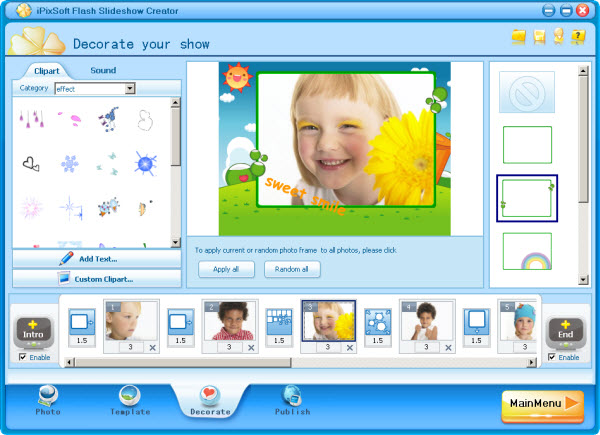
The creation process involves importing media files, selecting from over 70 pre-designed templates, and applying a variety of transition effects, including swift and push movements. Functional customization options include adding background music, inserting text captions, and utilizing more than 150 high-quality animated clipart assets. Advanced settings allow for the inclusion of Intro and Credit movies, as well as the ability to embed hyperlinks directly into individual slides for navigation purposes.
Flexibility extends to the output phase, where the software supports multiple formats. Users can export their finished projects as standard SWF movies or HTML files for web integration, standalone executable files, or system screensavers. The application also provides options for direct server uploads to facilitate online sharing. This tool simplifies the production of interactive rich media content by prioritizing an intuitive, step-by-step interface for users of all technical levels.
Top 5 Reasons To Download iPixSoft Flash Slideshow Creator
- Unrivaled Ease of Use: The "1-2-3" workflow ensures that anyone, regardless of technical skill, can create professional-grade slideshows without touching a single line of code.
- Massive Creative Library: With over 70+ templates, 70+ transition effects, and 150+ animated clipart elements, your creative possibilities are virtually endless.
- Dynamic Multimedia Integration: Unlike basic tools, this software allows you to seamlessly blend high-definition photos, video clips, and background music into a single cohesive presentation.
- Professional Interactive Features: The ability to add hyperlinks, custom Intro/Credit movies, and text captions transforms a simple photo reel into an interactive marketing tool or a cinematic story.
- Versatile Output and Sharing Options: Whether you need an executable file for a presentation, a screensaver for your PC, or an SWF file for your website, the software supports every format you need for modern sharing.
In the digital age, we are all photographers. Our smartphones and hard drives are overflowing with thousands of captured moments, from family vacations and weddings to professional product shots and corporate events. However, the tragedy of the modern era is that these photos often stay buried in folders, never to be seen again because the barrier to creating something beautiful with them is simply too high. Most professional editing suites require a degree in graphic design to navigate, and the "quick" mobile apps often lack the depth needed for a truly polished result. This is exactly where PixSoft Flash Slideshow Creator steps in to bridge the gap, and why this giveaway is an absolute must-download for anyone who values their digital memories or needs to boost their online presence.
As someone who spends most of my day testing software, I have seen my fair share of "slideshow makers." Most of them fall into two categories: overly simplistic toys that produce grainy results, or behemoth programs that take four hours to install and another forty to learn. PixSoft has managed to find the "Goldilocks zone." It provides the power of a professional studio with an interface so intuitive that my grandmother could use it to organize her knitting club photos. Let’s dive deep into the five core reasons why you need to grab this software while it’s available in this giveaway.
1. Unrivaled Ease of Use and the "1-2-3" Workflow
The first thing you will notice when you fire up PixSoft Flash Slideshow Creator is how clean and purposeful the interface feels. The developers lean heavily on a "1-2-3" philosophy. This isn't just marketing jargon; it is the actual architecture of the user experience. You begin by importing your media, move into the design and decoration phase, and finish by choosing your output format. It is a linear, logical progression that removes the "choice paralysis" often found in creative software.
For those who have avoided creating web content because they don't know HTML or Flash, this software is your "get out of jail free" card. It handles all the heavy lifting in the background. You don't need to know how to script a transition or how to optimize a file for web playback. You simply drag, drop, and click. This accessibility is a game-changer for small business owners, eBay sellers, and bloggers who need to create engaging content quickly without hiring a freelance developer. Time is money, and this software saves you massive amounts of both by streamlining the creative process into a few simple minutes of work.
2. A Massive Library of Creative Assets
Software is only as good as the results it produces. You could have the easiest interface in the world, but if the final product looks like a 1995 PowerPoint presentation, no one will care. This is where PixSoft truly shines. The sheer volume of pre-loaded creative assets is staggering. With over 70 professionally designed templates, you are never starting from a blank canvas. These templates range from elegant wedding themes to high-energy business layouts, ensuring that the "vibe" of your slideshow matches the content of your photos.
Beyond the templates, you have access to over 150 high-quality animated clipart elements. These aren't just static stickers; they bring a level of dynamism and personality to your slides that static images simply cannot match. When you combine these with the 70+ transition effects—including the "swift" and "push" effects that are favorites among professional video editors—you get a final product that looks like it was created by a high-end marketing agency. The transitions are smooth, the animations are fluid, and the overall aesthetic is one of high production value.
3. Dynamic Multimedia Integration
We no longer live in a world of just "photos." Our digital lives are a mix of still images and short video clips. Most slideshow creators force you to choose one or the other, or they struggle to handle the transition between a JPG and an MP4. PixSoft Flash Slideshow Creator treats both with equal importance. You can import your high-resolution photos and your video clips into the same timeline, creating a rich, multi-sensory experience.
But visual media is only half the story. To truly capture an audience's attention, you need audio. The software allows you to add your own background music, which is crucial for setting the mood. Whether it’s a sentimental track for a family memorial or an upbeat, driving rhythm for a product showcase, the ability to sync your visuals to audio is what transforms a "slideshow" into a "presentation." The software gives you the tools to ensure your music starts and stops exactly when you want it to, providing a cinematic feel that will impress anyone who views your work.
4. Professional Interactive Features
This is the point where PixSoft separates itself from the "toys" available on the app store. It isn't just about making things look pretty; it's about making them functional. The inclusion of interactive features like hyperlinks is a massive advantage. If you are using this software for an eBay listing or a business blog, you can turn any slide into a clickable gateway to your store or your contact page. This turns your slideshow into a conversion engine, driving traffic and sales directly from the visual content.
Furthermore, the ability to enable and customize Intro and Credit Movies adds a layer of professionalism that is often overlooked. Every great film has an opening and a closing; your presentations should be no different. You can use these sections to provide context, give credit to photographers, or display your brand's logo and contact information. When you add custom text captions to each slide, you are no longer just showing pictures—you are telling a story with a beginning, middle, and end. This narrative structure is what keeps viewers engaged from the first second to the last.
5. Versatile Output and Sharing Options
The final reason to download this giveaway is the incredible flexibility in how you share your creations. A beautiful slideshow is useless if you can't get it in front of people. PixSoft offers an array of output formats that cover every possible use case. If you want to embed your gallery on a website or a blog, you can output it as an SWF movie or an HTML file. The code is clean and ready to be dropped into your site’s backend.
If you want to send a presentation to a client or a family member who might not be tech-savvy, you can create an executable (EXE) file. This is a standalone file that plays on any Windows computer without requiring any additional software or plugins. It is the ultimate "it just works" solution. For those who want to enjoy their memories daily, you can even turn your slideshow into a custom screensaver. And if you’re looking for the quickest way to share, the software allows you to upload directly to their server for instant online sharing. This level of versatility ensures that no matter where your audience is—whether they are on a mobile phone, a desktop computer, or browsing an eBay listing—they will be able to see your work exactly as you intended.
Final Thoughts: Why You Should Act Now
In the world of tech, we often hear the phrase "content is king." But the reality is that presentation is the crown that content wears. You could have the most beautiful photos in the world, but if they are presented in a clunky, boring way, their impact is lost. PixSoft Flash Slideshow Creator gives you the power to present your world in the best possible light. It takes the technical barriers down and opens up a world of creative expression that was previously reserved for professionals.
This giveaway is a rare opportunity to add a high-quality, versatile tool to your digital arsenal without any financial risk. Whether you are a hobbyist looking to preserve family history, a student wanting to ace a presentation, or a professional looking to spice up your marketing materials, this software is designed for you. It is intuitive, it is powerful, and most importantly, it produces results that you will be proud to share. Don’t let your photos sit idle on your hard drive for another day. Download this giveaway, spend five minutes experimenting with the templates, and I guarantee you will be amazed at what you can create. This is one tool that truly lives up to the hype, and once you start using it, you’ll wonder how you ever managed your digital media without it.
In conclusion, if you want a tool that combines ease of use with professional-grade features, multiple output formats, and a library of assets that would take years to build on your own, PixSoft Flash Slideshow Creator is the answer. It is the perfect blend of simplicity and power, wrapped in a user-friendly package that respects your time and enhances your creativity. Grab this giveaway while you can and start turning your static images into living, breathing stories today.

Reviews for iPixSoft Flash Slideshow Creator
Click Here to Read Reviews for iPixSoft Flash Slideshow Creator >> Click Here to Submit Reviews for iPixSoft Flash Slideshow Creator >>