What Does Video to Photos Do?
Video to Photos is a specialized utility designed to extract still images from video files with minimal manual effort. The software streamlines the process of capturing specific moments, allowing users to load individual files or perform batch operations to process multiple videos simultaneously. It supports a broad range of standard containers, including MP4, AVI, MKV, MOV, MPEG, WEBM, and WMV.
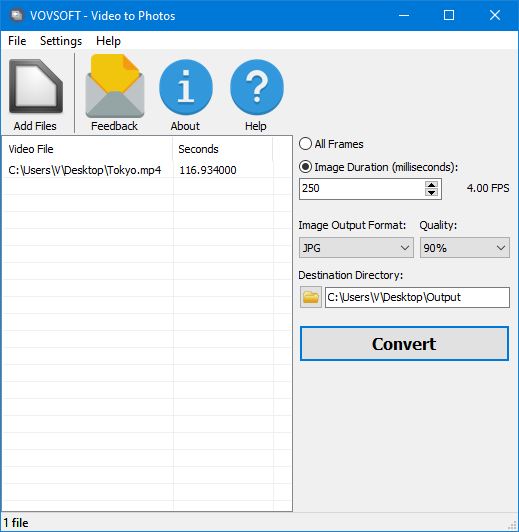
The application provides two primary methods for frame extraction. Users can choose to export every single frame from a video or define a specific image sequence based on millisecond intervals. Once the input files are loaded, the conversion process is initiated via a single interface button, removing the need for complex configuration.
Regarding output, the tool offers two format options to suit different storage requirements. BMP files can be generated for those requiring maximum image fidelity, though these result in significantly larger file sizes. Alternatively, users can select JPEG to conserve disk space, with the added ability to manually adjust the quality ratio to balance compression and visual detail.
Core functional capabilities include:
- Batch processing for high-volume video conversion.
- Support for major video formats including AVI, MKV, and MP4.
- Customizable frame capture intervals measured in milliseconds.
- Variable JPEG quality settings for optimized storage.
- High-fidelity BMP output for lossless frame extraction.
Top 5 Reasons To Download Video to Photos
- Unmatched Frame-Perfect Precision: Never miss a fleeting moment again by extracting high-quality stills from any video sequence with millisecond accuracy.
- Universal Format Compatibility: Whether you are working with MP4, MKV, MOV, or even WEBM, this tool handles all major video containers without the need for external codecs.
- Batch Processing for Maximum Efficiency: Save hours of manual labor by converting entire folders of videos into image sequences simultaneously.
- Granular Quality Control: Choose between lossless BMP files for professional-grade clarity or optimized JPEG files with adjustable compression to save storage space.
- Minimalist, Zero-Learning-Curve Interface: Skip the bloat of heavy video editing suites and get straight to the results with a streamlined "load and convert" workflow.
How many times have you been recording a video of a once-in-a-lifetime moment—perhaps your child’s first steps, a breathtaking sunset, or a high-speed sports play—only to realize later that you forgot to snap a still photo? We have all been there. You try to take a screenshot on your phone or computer, but the playback bar gets in the way, the resolution drops, or you just cannot seem to pause at the exact millisecond where the image is sharp. This is exactly where Video to Photos comes into play, and it is a total game-changer for anyone who values their digital memories and creative workflow.
As a tech reviewer, I see a lot of software that tries to do a hundred things at once and fails at most of them. Video to Photos is the refreshing opposite. It is a specialized, surgical tool designed for one specific purpose: turning high-quality video into high-quality images. It does this with an efficiency that puts massive, expensive video editing suites to shame. If you have been looking for a way to bridge the gap between your videography and your photography, this giveaway is something you absolutely need to grab right now. Let’s dive deep into the five core reasons why this utility deserves a permanent spot on your hard drive.
1. Unmatched Frame-Perfect Precision
The biggest struggle with extracting photos from video is the "timing" issue. Standard media players are built for viewing, not for extraction. When you hit the pause button, you are often catching a frame that is slightly blurred or just a fraction of a second off from the "hero shot" you actually wanted. Video to Photos changes the math entirely. By allowing you to extract every single frame or specify a sequence based on milliseconds, it gives you a level of control that manual pausing simply cannot match.
Think about the implications for high-action scenarios. If you are filming a skateboarder performing a trick or a bird taking flight, the "perfect" shot exists for only about 1/60th of a second. This software allows you to lay out every single frame of that movement side-by-side. You can then scan through them at your leisure and pick the one where the lighting is perfect and the motion is crisp. It turns your video camera into a high-speed burst camera that never misses. For creators, this is like having a superpower. You no longer have to choose between filming a scene and photographing it; you can do both simultaneously, knowing that you can extract the stills later with surgical precision.
2. Universal Format Compatibility
We live in a fragmented digital world. Your phone might record in MOV, your action camera in MP4, your high-end mirrorless camera in MKV, and your web-based projects might use WEBM. Usually, trying to move files between these formats for editing requires a secondary conversion step, which often results in a loss of image quality. One of the most impressive things about Video to Photos is its "Swiss Army Knife" approach to file compatibility.
It natively supports AVI, MKV, MOV, MP4, MPEG, WEBM, and WMV. This means you don't have to worry about whether your footage will be "readable" by the software. You simply drag and drop your file, and the program handles the rest. This is particularly useful for those of us who deal with archived footage or files sent from different devices. The ability to pull a crisp JPEG from an old MPEG file or a high-res BMP from a modern 4K MP4 without jumping through hoops is a massive time-saver. It eliminates the frustration of "File Format Not Supported" errors that plague so many other "simple" converters.
3. Batch Processing for Maximum Efficiency
Time is the one resource we can’t get more of, and this is where many video-to-image tools fail. Most online converters or basic apps require you to upload one file at a time, wait for it to process, and then download the results. If you have a folder full of twenty different video clips from a weekend trip, that process could take hours. Video to Photos solves this by offering robust batch processing. You can load multiple files—or even entire directories—into the interface at once.
Imagine you are a social media manager or a content creator. You have ten different "behind the scenes" clips, and you need five still images from each to use as thumbnails or teaser posts. With the batch feature, you can set your parameters, click "Convert," and walk away to grab a coffee. When you return, you’ll have a neatly organized collection of images ready for use. This "set it and forget it" workflow is what separates amateur tools from professional utilities. It respects your time and maximizes your productivity, making it an essential download for anyone who deals with large volumes of media.
4. Granular Quality Control
In the world of digital imagery, quality and file size are always in a tug-of-war. Sometimes you need the absolute highest quality possible—perhaps for a print or a high-resolution digital composite. Other times, you need small, lightweight files that you can quickly upload to a website or send via email. Video to Photos provides the flexibility to handle both ends of the spectrum. You can choose to output your frames as BMP files or JPEG files.
For the purists, the BMP (Bitmap) option is fantastic. It is a lossless format, meaning every single pixel from the original video frame is preserved with 100% accuracy. There is no compression artifacts and no "smudging" of colors. It is the raw data as it existed in the video. On the other hand, if you are worried about your hard drive filling up, the JPEG option is incredibly smart. Not only does it offer the standard space-saving benefits of the format, but it also allows you to manually change the JPEG quality ratio. This means you can decide exactly where the balance between "beautiful" and "small" lies. Having this level of control over your output ensures that you are never stuck with a file that doesn't meet your specific needs.
5. Minimalist, Zero-Learning-Curve Interface
We have all downloaded "professional" software only to be met with a screen that looks like the cockpit of a fighter jet. You shouldn't need a PhD in video engineering just to pull a photo from a clip. The developers of Video to Photos clearly understood this. The interface is refreshingly clean and focused. There are no hidden menus, no confusing jargon, and no distracting advertisements. You load your video, you choose your settings, and you hit "Convert." That’s it.
This simplicity is a feature in itself. It means the software is incredibly lightweight and won't hog your system resources. It opens instantly and performs its task without lag. For users who might not be "tech-savvy," it is a dream come true. You don't have to worry about keyframes, bitrates, or aspect ratio corrections; the software handles the technical heavy lifting in the background. But even for power users, the speed of a dedicated, minimalist tool is often preferable to opening a massive program like Adobe Premiere just to perform a thirty-second task. It is the ultimate "utility" app—it stays out of your way and does exactly what it says on the tin.
Why you should download this giveaway right now:
The digital landscape is shifting more and more toward video, but the "still image" remains the most powerful way to capture a moment in time. Whether it’s for a YouTube thumbnail, a family photo album, or a technical report, the ability to extract high-quality stills from video is a necessity. Video to Photos provides a professional, efficient, and incredibly easy way to do just that. By downloading this giveaway, you are adding a versatile tool to your arsenal that will save you time, preserve your memories in the highest possible quality, and simplify your creative process. Don't let those perfect moments stay trapped inside a video file—set them free with this essential software.
In conclusion, this is not just another "junk" app. It is a focused, high-performance utility that solves a real problem that almost every computer user faces. From its wide format support to its batch-processing power, it offers everything you need and nothing you don't. It is the definition of "software done right." Take advantage of this giveaway and see for yourself how much easier it is to capture the perfect moment when you have the right tool for the job. You’ll wonder how you ever managed without it.
Summary of the Core Benefits:
- Capture the Impossible: Get the shots your camera shutter was too slow to catch.
- Save Your Storage: Use the JPEG quality slider to keep your library manageable.
- Pro-Level Quality: Use BMP for those shots that deserve to be printed and framed.
- Work Faster: Let the batch converter do the tedious work for you.
- Stay Organized: Easily create image sequences for animation or analysis.
There is no reason to hesitate. This is a polished, reliable piece of software that delivers on its promises. Whether you are a professional photographer, a social media influencer, or just someone who wants to save their family videos as photos, Video to Photos is the perfect solution. Download it today and start turning your video library into a stunning gallery of still moments.

Reviews for Video to Photos
Click Here to Read Reviews for Video to Photos >> Click Here to Submit Reviews for Video to Photos >>