What Does AnyCase App Pro Do?
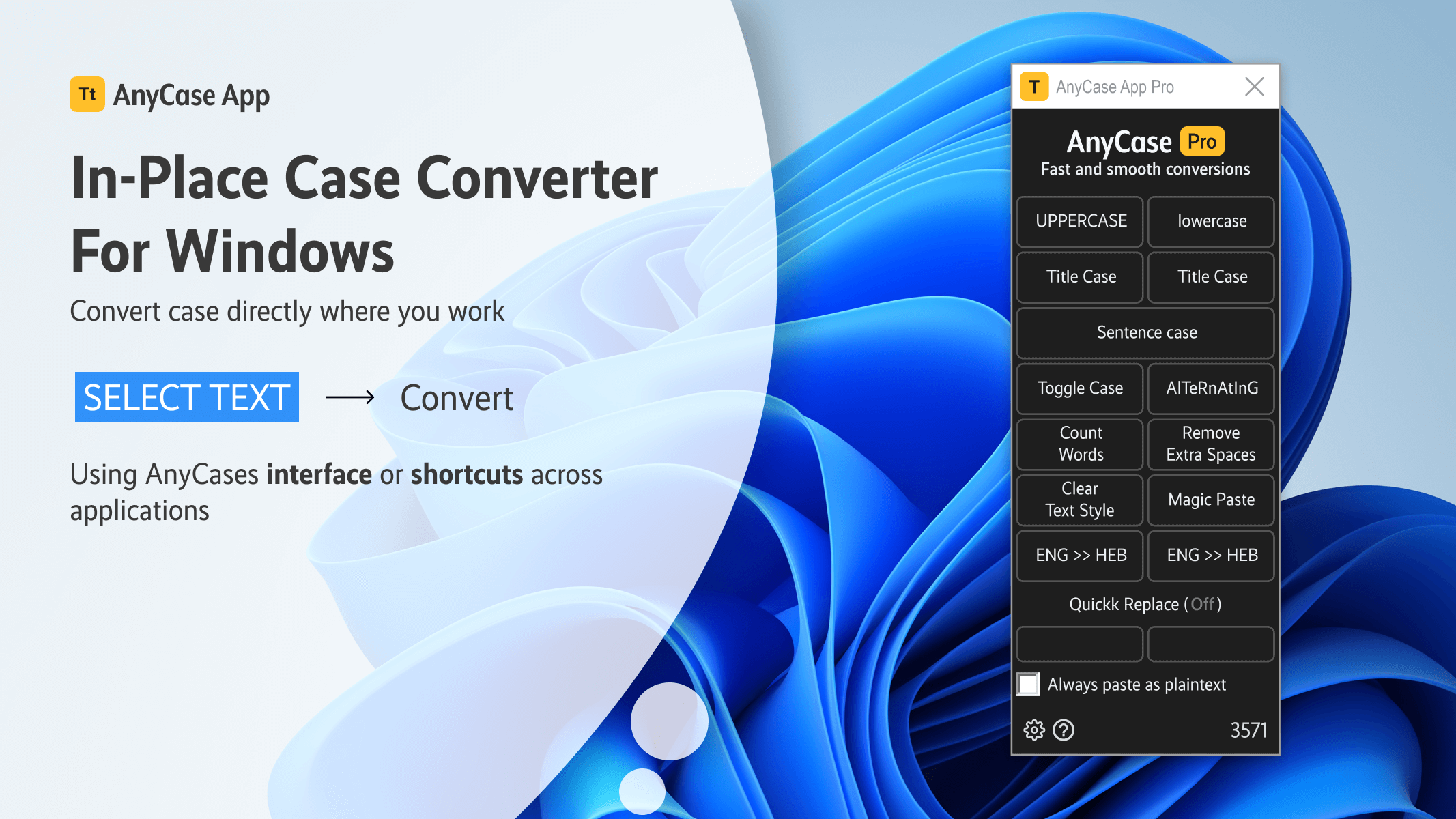
AnyCase App is a dedicated text-processing utility for the Windows operating system designed to facilitate in-place case conversions. The software integrates directly into active applications, allowing users to transform text without retyping or using external clipboards. It supports a variety of formats, including UPPERCASE, lowercase, Title Case, and Sentence case.
The application functions globally across document editors, web browsers, and coding environments. Key features include:
- Global Shortcuts: Users can trigger case changes instantly using customizable keyboard commands.
- Custom Word Capitalization: The tool allows for the definition of specific rules for brand names or technical terms to maintain consistency.
- Magic Paste: This functionality enables users to paste text into restricted fields that normally block standard paste commands.
- Language Switching: This feature corrects text that was accidentally typed using the incorrect keyboard language layout.
Designed for professionals and content creators, AnyCase App minimizes workflow interruptions by providing direct text manipulation. It addresses common formatting errors and typing mistakes within the user's primary workspace, supporting a wide range of third-party software without requiring complex configurations.
Top 5 Reasons To Download AnyCase App Pro
- Seamless In-Place Case Conversion: Change text case instantly within any application without the need for copying, pasting, or rewriting.
- Universal Compatibility Across Windows: It works everywhere you type, from professional IDEs and document editors to web browsers and email clients.
- Intuitive Global Keyboard Shortcuts: Boost your workflow with easy-to-remember shortcuts that make text manipulation feel like a native part of your operating system.
- The "Magic Paste" Power: Bypass frustrating website restrictions that block pasting, ensuring your data entry remains uninterrupted.
- Intelligent Customization and Language Correction: Maintain brand consistency with custom capitalization rules and instantly fix text typed in the wrong keyboard language.
If you have ever spent a significant portion of your afternoon retyping a paragraph because you accidentally left the Caps Lock key on, then you know that some of the smallest digital hurdles can cause the biggest frustrations. As someone who spends nearly ten hours a day in front of a computer screen, I have seen my fair share of "productivity hacks." Most of them are bloated, complex, or require you to change the way you work entirely. However, every once in a while, a tool comes along that is so elegant and so fundamentally useful that you wonder how Windows hasn't integrated it as a core feature yet. That tool is the AnyCase App.
This isn't just another utility to clutter your system tray. This is a surgical strike against one of the most persistent annoyances in digital life: text formatting errors. Whether you are a developer, a content creator, or a data entry specialist, the AnyCase App is designed to keep you in "the flow." This giveaway represents a massive opportunity to upgrade your Windows experience. Let’s dive deep into the five reasons why this is a mandatory download for anyone who takes their efficiency seriously.
1. Seamless In-Place Case Conversion
The core philosophy of the AnyCase App is the elimination of the "middleman." In the traditional workflow, if you have a block of text in an application like Notepad or a specific web-based form that needs to be converted from all-caps to sentence case, you usually have to follow a tedious multi-step process. You copy the text, open a word processor like Microsoft Word or an online converter, paste it, use their tool to change the case, copy it again, and finally paste it back into your original window. This is a productivity killer.
With AnyCase, that entire cycle is eradicated. The "In-Place" conversion means exactly what it says. You highlight the text right where it sits—whether that is in a Slack message, a Windows Explorer file name, or a Google Chrome search bar—and apply the change. Instantly, the text transforms. It supports UPPERCASE, lowercase, Title Case, Sentence case, Toggle cAsE, and more. By removing the need to jump between programs, you save seconds that, over the course of a year, add up to dozens of hours of saved labor. It makes text editing feel fluid and effortless, turning a chore into a split-second afterthought.
This feature is particularly a godsend for professionals who deal with legacy data. If you are importing thousands of lines of data from an old database where everything was shouted in uppercase, AnyCase allows you to clean that data up as you review it, without ever leaving your primary workspace. It is the definition of working smarter, not harder.
2. Universal Compatibility Across Windows
One of the biggest frustrations with software utilities is when they only work in specific "sandboxed" environments. You might find a browser extension that changes text case, but it won’t help you when you are renaming folders in File Explorer. You might have a feature in Microsoft Word that handles capitalization, but it’s useless when you are coding in Visual Studio Code or Sublime Text.
AnyCase App breaks down these walls. It is built to be a global Windows utility. This means it has universal compatibility. I have tested this across a staggering array of software. It works in email clients like Outlook and Thunderbird, it works in creative suites like Adobe Photoshop (perfect for fixing layer names or text layers on the fly), and it works in specialized professional tools. For software enthusiasts, this is the "holy grail" of utility behavior: it’s there when you need it, and it works everywhere you go.
Imagine you are a social media manager. You are jumping between Excel spreadsheets, Facebook’s Meta Suite, and Canva. Each of these platforms has different text handling capabilities. AnyCase provides a consistent, reliable interface across all of them. You no longer have to remember which app has "Change Case" in the menu and which doesn't. AnyCase becomes your single source of truth for text formatting across your entire digital ecosystem.
3. Intuitive Global Keyboard Shortcuts
As a tech reviewer, I am obsessed with "muscle memory." The best tools are the ones that become an extension of your hands. AnyCase App excels here by providing Global Windows Shortcuts that are both easy to learn and incredibly responsive. Instead of digging through right-click menus or looking for a tiny icon in the taskbar, you use simple key combinations to trigger the magic.
The beauty of these shortcuts is that they don't conflict with your existing system commands. They sit quietly in the background, waiting for their moment to shine. For a professional writer or coder, being able to keep your hands on the home row while fixing a formatting error is the difference between staying focused and losing your train of thought. We often talk about "micro-stutter" in gaming, but "micro-stutter" in productivity is just as real—those small moments where you have to stop typing to grab the mouse and navigate a menu. AnyCase eliminates that friction.
Furthermore, these shortcuts are highly customizable. If you have a specific workflow that requires a different key binding, the app is flexible enough to accommodate you. This level of user-centric design is what separates a "good" app from a "great" one. It respects the user’s preferences and existing habits while providing a massive boost in capability.
4. The "Magic Paste" Power
We have all encountered them: those frustrating websites or secure forms that, for some inexplicable reason, have disabled the right-click "Paste" function or the Ctrl+V command. Perhaps it’s a banking site, a government portal, or a corporate login page. While these restrictions are often put in place for "security," they are frequently a major hindrance to users who rely on password managers or who need to transfer long strings of alphanumeric data accurately.
Enter Magic Paste. This is the "secret weapon" of the AnyCase App. This feature allows you to bypass these arbitrary paste restrictions. It works by simulating the actual keystrokes of the text you are trying to paste, effectively "typing" the information into the field at superhuman speeds. To the website, it looks like you are typing the characters manually, but in reality, you are just using AnyCase to bridge the gap.
This feature alone is worth the download. It solves a specific, high-stress problem that almost every Windows user has faced at some point. No more manually retyping 24-character serial numbers or complex passwords while squinting at a different window. Magic Paste ensures your workflow remains continuous and error-free, regardless of how a particular website is coded. It’s a small bit of digital rebellion that makes the internet feel much more user-friendly.
5. Intelligent Customization and Language Correction
The final reason to grab this giveaway is the sheer intelligence built into the app’s customization options. AnyCase isn't just a "dumb" converter; it can be trained to recognize the nuances of your specific work. For example, the Custom Word Capitalization feature allows you to create a "white list" of words that should always be capitalized in a specific way. If you work for a company with a brand name like iPhone or eBay, you know how annoying it is when standard "Sentence Case" tools incorrectly capitalize the first letter. You can tell AnyCase to always respect your brand’s specific casing, ensuring consistency across all your documents and communications.
But the intelligence doesn't stop there. One of the most unique features is the Language Switching capability. For multilingual users who frequently switch between keyboard layouts, there is nothing more frustrating than typing three sentences only to realize you were in the wrong language setting, resulting in a string of gibberish. Normally, you’d have to delete it all, switch languages, and retype. With AnyCase, you can highlight that "gibberish" and flip it into the correct language with a single command. It recognizes the key positions and translates the input into the intended characters of the other language.
This feature is a massive time-saver for international professionals, translators, and students. It’s an "emergency button" for your typing errors that you didn’t know you needed until you used it. When you combine this with the custom capitalization, you have a tool that doesn’t just change the case of your text—it actually understands the context of how you want your text to appear.
Conclusion: Why You Need This Giveaway Today
In the world of Windows software, we are often told that we need massive, expensive suites to be productive. But the truth is that our productivity is often most impacted by the small, repetitive tasks we perform thousands of times a week. Text manipulation is at the heart of almost everything we do on a computer. By optimizing how we handle that text, we reclaim our time and our mental energy.
AnyCase App is a rare gem. It is lightweight, unobtrusive, and incredibly powerful. It doesn't try to reinvent the wheel; it just makes the wheel spin significantly smoother. From the In-Place Conversion that keeps you in your favorite apps, to the Magic Paste that breaks through digital barriers, this app is a masterclass in utility design. It’s the kind of tool that, after three days of use, you will forget what it was like to work without it.
As a tech reviewer, I see hundreds of apps, but I only keep a handful on my primary machine. AnyCase has earned its spot. It addresses real-world frustrations with elegant, technical solutions. Whether you are fixing a "Caps Lock" accident, ensuring your brand names are perfectly capitalized, or bypassing a stubborn form's paste restriction, this app handles it all with grace.
Do not miss out on this giveaway. This is your chance to add a professional-grade tool to your arsenal that will pay for itself in saved time within the first week. It is a game-changer for Windows users of all skill levels. Download it, set up your shortcuts, and experience the satisfaction of a workflow that finally feels as fast as you are. AnyCase App is the upgrade your Windows experience deserves.
Final Verdict: This is a must-have utility for anyone who types on Windows. It is efficient, versatile, and solves problems you didn't even realize were slowing you down. Grab the giveaway, install it, and watch your productivity floor rise instantly. You won't regret making this a permanent part of your digital toolkit.

Reviews for AnyCase App Pro
Click Here to Read Reviews for AnyCase App Pro >> Click Here to Submit Reviews for AnyCase App Pro >>