What Does Ashampoo Music Studio 2027 Do?
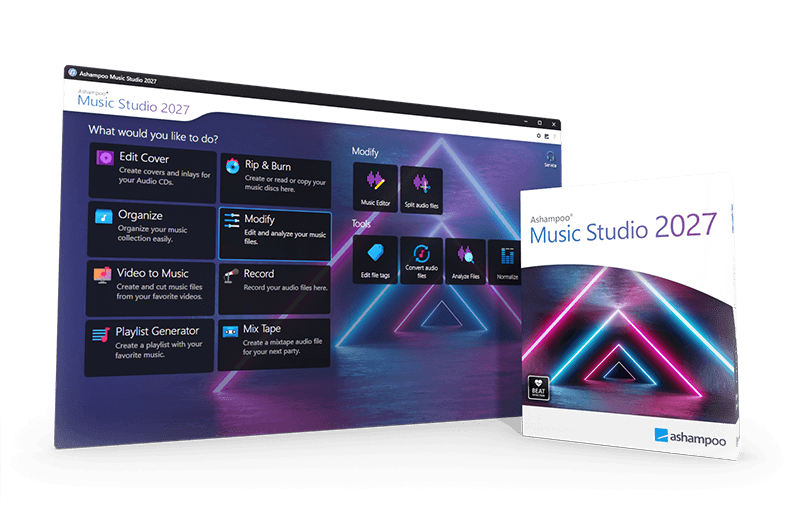
Ashampoo Music Studio is a comprehensive utility designed for managing, editing, and burning audio collections. The software includes tools for ripping CDs, where it automatically pulls track information from online databases to populate metadata. It supports secure burning and format conversion across various audio types, ensuring compatibility across different playback devices.
The editing suite allows users to modify files by cutting segments or splitting tracks into multiple parts. Its interface facilitates the moving and combining of audio clips, while a dedicated track mixer enables crossfading for seamless transitions. For organization, the application provides metadata editing, volume normalization, and batch renaming functions to standardize disorganized libraries.
Additionally, the software can extract audio tracks from video files, which is useful for creating custom soundtracks or ringtones. For physical media, it includes a cover editor with templates and online search capabilities to design and print custom CD cases. Ashampoo Music Studio balances a broad feature set with a functional design to handle a wide range of digital and physical audio tasks efficiently without unnecessary complexity.
Top 5 Reasons To Download Ashampoo Music Studio 2027
- A True All-in-One Digital Audio Swiss Army Knife: Consolidates recording, editing, converting, organizing, ripping, and burning into a single lightweight workstation, eliminating the need to juggle half a dozen separate utilities.
- Precision Audio Editing and Creative Track Mixing: Enables smooth trimming, splitting, moving, and crossfading of audio tracks with zero steep learning curve, making custom mixtapes and audio cleanup accessible to anyone.
- Intelligent Metadata Tagging, Batch Renaming, and Volume Normalization: Automatically retrieves track data from online databases, standardizes messy file structures, and levels out erratic audio volumes across your entire music collection.
- High-Speed CD Ripping, Secure Disc Burning, and Video Sound Extraction: Converts physical audio CDs into digital files with automated metadata matching, extracts clean soundtracks from video files, and produces error-free physical discs.
- Integrated Graphic Design Suite for Custom Cover Art: Solves the blank-album-art problem by offering built-in template design, spine layouts, and automated web artwork searches directly within your audio workspace.
Every digital music enthusiast, amateur creator, and digital archivist eventually hits the exact same wall: digital audio fragmentation. You have a handful of MP3 files that sound far too quiet compared to the rest of your playlist. You have an old physical compact disc collection sitting on a shelf gathering dust because your modern laptop does not have an easy, automated way to extract the tracks. You have live concert recordings where track transitions are jarring, or video clips from which you desperately want to extract a clean soundtrack or ringtone. Typically, solving these everyday audio problems requires installing four or five different freeware applications, enduring clunky open-source user interfaces, or subscribing to bloated, overpriced production software suites that demand a degree in sound engineering just to trim a song.
That is precisely why this giveaway of Ashampoo Music Studio demands your immediate attention. Developed by a software house renowned for striking the perfect balance between robust utility and effortless usability, this package delivers a comprehensive, highly refined audio workshop directly to your desktop. Whether you want to polish your personal MP3 library, craft seamless playlists for an upcoming event, or burn custom physical CDs complete with retail-quality artwork, this program covers all the bases. Below, we break down the top five reasons why you need to claim and download this giveaway today before it expires.
1. A True All-in-One Digital Audio Swiss Army Knife
The primary reason you should grab this software instantly is the immense convenience of its unified design. In the current software ecosystem, utility developers love to split features across separate micro-apps. You often end up with one tool for ripping CDs, a separate utility for converting WAV to MP3, a third tool for editing metadata tags, and an overly complex digital audio workstation just to chop off a ten-second intro from a recording. This fractured workflow is an absolute productivity killer. You spend half your time converting files just to make them readable by your next tool, polluting your hard drive with duplicate files and interim formats.
Ashampoo Music Studio obliterates this problem entirely by bringing every fundamental audio task under one clean, coherent roof. From the moment you launch the application, you are greeted with a clear, task-oriented menu that categorizes your options logically: edit, produce, organize, and burn. There is virtually no setup time required, and the workflow is uninterrupted. You can rip an entire album, normalize the volume levels across all tracks, trim silence from the beginning and end of each song, convert the formats, and send the final product straight to a playlist or blank disc without ever closing the application.
For modern PC users who value a clutter-free operating system, having this single, versatile powerhouse installed is a massive upgrade over maintaining an unruly collection of outdated utilities. It provides the heavy-duty power needed for intricate audio projects while retaining the simplicity required for quick, two-minute touch-ups. When a single piece of software can replace your ripper, tagger, converter, basic sound editor, and disc-burning tool, claiming it as a free giveaway is an absolute no-brainer.
2. Precision Audio Editing and Creative Track Mixing
Audio editing often intimidates casual users because the industry has conditioned us to believe that cutting an audio file requires mastering multi-track timelines, parametric equalizers, and complicated envelope graphs. Ashampoo Music Studio rejects that complexity, giving you direct, intuitive control over your sound files. The built-in editor allows you to open MP3s and a wide variety of other audio formats to slice, dice, and refine them with surgical accuracy.
Have you ever downloaded a live recording ruined by two minutes of crowd chatter before the music actually starts? Or perhaps you have a favorite podcast episode where you simply want to cut out an irrelevant discussion or annoying static burst? With this software, you can isolate unwanted audio segments and delete them cleanly. The multi-element timeline lets you split long songs into distinct individual tracks, which is a lifesaver when dealing with digitized vinyl records or continuous DJ sets that were recorded as a single massive audio block. You can drag and reposition clips with magnetic snapping, making arrangement as effortless as moving blocks around your screen.
Beyond standard trimming, the track mixer feature is an exceptional highlight for anyone who loves sharing music. Rather than playing songs with awkward, abrupt pauses between tracks, the software allows you to assemble smooth, professional-grade playlists with dynamic crossfading. You can overlap the tail end of one song with the introduction of another, creating a fluid audio stream perfect for parties, workouts, or personal listening. Creating a cohesive mixtape used to require hours of meticulous adjustment in complex software, but here, the intuitive interface enables you to produce seamless transitions in just a few clicks.
3. Intelligent Metadata Tagging, Batch Renaming, and Volume Normalization
Anyone who has amassed a music collection over the past two decades knows the agony of inconsistent digital libraries. You sync your music folder to your smartphone or car stereo, only to find albums categorized under Unknown Artist, track titles formatted as Track_01_final.mp3, and wildly erratic loudness levels that force you to constantly adjust your volume knob. An unorganized audio collection is deeply frustrating to navigate, yet manually fixing hundreds of tags is one of the most tedious computing tasks imaginable.
This software turns that weekend-long chore into an automated, painless process. Ashampoo Music Studio features an intelligent metadata editor that identifies missing information and fills in the blanks. Thanks to integrated online database lookups, the program can analyze your audio tracks and automatically retrieve correct track titles, artist names, album titles, release years, and musical genres. Even if your file names are completely scrambled, the software helps you pull down the right tags, transforming an unrecognizable collection into a pristine, searchable digital catalog.
Once your metadata is corrected, the program's batch renaming engine lets you impose uniform order on your file storage. You can establish naming rules, such as Artist - Album - Track Number - Song Title, and apply them across thousands of files simultaneously. Furthermore, the built-in volume normalization engine addresses the classic problem of uneven track volumes. By analyzing the dynamic range of each track and leveling them to an international standard, the software ensures that older, quieter recordings play at the exact same perceived loudness as modern, heavily compressed tracks. You will never have your ears blasted again when your playlist transitions from a vintage acoustic recording to a modern pop anthem.
4. High-Speed CD Ripping, Secure Disc Burning, and Video Sound Extraction
While the modern world revolves heavily around digital streaming, countless music lovers still possess expansive physical CD collections containing rare masterings, non-streamed tracks, and cherished personal albums. One of the strongest arguments for downloading this giveaway is its elite disc-handling capabilities. Ripping audio CDs can often be a painful experience fraught with read errors and missing track titles. Ashampoo Music Studio makes physical-to-digital preservation swift and effortless. It rapidly rips your discs at maximum drive speeds while simultaneously communicating with online databases to download the correct metadata instantly. Your physical CDs are transformed into high-fidelity digital files with zero manual typing required.
On the flip side, if you still enjoy playing physical media in your car, on a legacy home hi-fi system, or via a portable player, the integrated burning engine provides rock-solid reliability. Unlike basic operating system disc burning features that frequently produce skips, playback errors, or incompatible discs, this software includes secure burning algorithms designed specifically for audio formats. You can burn standard Audio CDs that play on any legacy player, or create data discs packed with hundreds of compressed MP3 or WMA files for extended road trips, all with guaranteed file integrity.
Equally valuable is the integrated video-to-audio extraction module. We consume vast amounts of live performances, tutorials, speeches, and video clips across various multimedia formats. Often, you do not need the video itself; you only want the pristine audio track to listen to on the go. Ashampoo Music Studio allows you to drop in video files and effortlessly extract the audio stream as a standalone music file. Whether you want to turn an epic movie speech into an inspiring audio clip, capture a rare live musical performance from a video file, or craft a custom smartphone ringtone from a viral clip, this feature alone justifies keeping the program permanently pinned to your taskbar.
5. Integrated Graphic Design Suite for Custom Cover Art
Most audio tools consider their job done the moment the sound file is written to your drive, completely ignoring the visual component of music curation. But a music collection without cover artwork feels barren and incomplete. When you stream an album or browse your local player, missing cover art leaves an unsightly, generic placeholder icon. If you burn a physical disc to gift to a friend or place on your shelf, writing on the disc with a permanent marker looks amateurish and unappealing.
Ashampoo Music Studio solves this packaging dilemma through its robust, built-in cover editor. This is not merely a barebones label printer; it is a full-fledged graphic design tool tailored specifically to audio formats. The software features an integrated online cover search, allowing you to quickly locate original high-resolution album artwork for practically any release. If the official art is not available or if you are creating a custom compilation, the program provides a wealth of polished, pre-made design templates, fonts, and layout options.
You can create professional-grade front booklets, back inlays with track listings automatically populated from your playlist, slimline case inserts, and even circular labels designed to be printed directly onto printable compact discs. The editor handles all the precise dimensional mathematics for you, ensuring that your printed artwork folds, fits, and lines up perfectly inside standard jewel cases or slimline sleeves. This attention to visual detail elevates your custom music projects from informal file dumps to gorgeous, boutique physical presentations that look like they came straight out of a professional manufacturing facility.
Taken as a whole, this software delivers an unmatched combination of versatility, audio fidelity, and user-centric design. You get surgical cutting tools, a creative crossfading mixer, deep library organization, lightning-fast ripping and burning, and complete visual packaging design without paying a single cent thanks to this giveaway offer. It is efficient, lightweight on system resources, and built to eliminate everyday multimedia headaches.
Opportunities to secure a polished, fully licensed multimedia utility from an established industry developer do not come around every day. If you listen to music, manage an audio archive, edit sound clips, or create custom discs, this giveaway is an essential addition to your software arsenal. Do not wait until the promotion ends: download your copy today and take complete control of your digital audio world.

Reviews for Ashampoo Music Studio 2027
Click Here to Read Reviews for Ashampoo Music Studio 2027 >> Click Here to Submit Reviews for Ashampoo Music Studio 2027 >>