What Does Text to MP3 Converter 4 Do?
Vovsoft Text to MP3 Converter is a desktop utility designed to transform written documents into high-quality audio files. The software supports various input formats, allowing users to import TXT files, PDFs, and Microsoft Word (DOC and DOCX) documents. It is capable of processing up to 500,000 characters at once, roughly equivalent to eight hours of audio, making it suitable for long-form content like e-learning modules or video scripts.
The program provides three distinct pathways for voice generation. It natively utilizes the preinstalled Microsoft SAPI Text-to-Speech engine for standard outputs. For users requiring higher fidelity, the software integrates with the OpenAI API to utilize natural-sounding voices such as Alloy, Echo, and Onyx. It also supports the Replicate API for voice cloning and sample voice usage. Users can export their files as MP3 for compactness or WAV for higher quality.
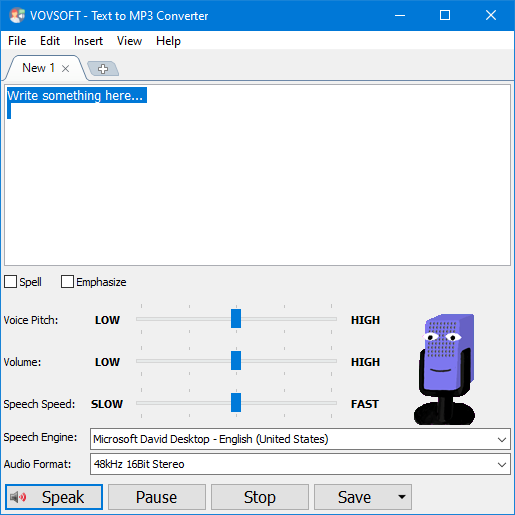
Key technical features include a "Batch Conversion" mode for processing multiple documents simultaneously and a "Speech Speed" slider that ranges from 10x slow to 10x fast. By streamlining the text-to-audio workflow, the application offers a functional solution for increasing content accessibility and generating voiceovers without the need for manual recording or complex configuration.
Top 5 Reasons To Download Text to MP3 Converter 4
1. Massive Character Support and Audio Length: Convert up to 500,000 characters into nearly 8 hours of high-quality audio in a single session.
2. Cutting-Edge AI Voice Integration: Access natural-sounding voices like Alloy, Echo, and Fable via OpenAI and Replicate APIs for professional-grade narration.
3. Comprehensive Document Compatibility: Effortlessly transform PDF, DOC, and DOCX files directly into audio without the need for manual copy-pasting.
4. Efficient Batch Processing: Save hours of manual labor by converting multiple files simultaneously using the built-in batch conversion engine.
5. High-Fidelity Export Options: Choose between the universal portability of MP3 or the uncompressed, lossless quality of WAV files to suit any project needs.
The Deep Dive: Why This Is a Must-Have for Your Digital Toolkit
In the modern digital landscape, we are constantly bombarded with information. From endless white papers and academic journals to long-form blog posts and technical documentation, the sheer volume of text we are expected to consume is staggering. As someone who spends the better part of my day looking at screens, I can tell you that eye strain is real, and cognitive fatigue is even realer. This is why I am so excited to talk about this specific giveaway. We are looking at a tool that doesn't just "read text," but serves as a bridge between the static written word and the dynamic world of audio content. If you have ever wanted to turn your reading list into a personalized podcast, or if you are a content creator looking to streamline your workflow, this software is the ultimate "Swiss Army Knife" for text-to-speech conversion.
Let’s get into the nitty-gritty. This isn't your average, run-of-the-mill browser extension that stutters through a paragraph before crashing. This is a robust, desktop-class application designed for heavy lifting. Whether you are a student, a professional educator, or a YouTube creator, the ability to convert text to high-quality MP3 or WAV files instantly is a game-changer. Let's break down exactly why you need to hit that download button right now.
1. Unprecedented Scale: 500,000 Characters of Pure Audio
One of the most significant frustrations with free online text-to-speech tools is the character limit. Most web-based services cap you at 500 or 1,000 characters, forcing you to copy and paste small chunks of text, convert them, download them, and then manually stitch them together in an audio editor. It is a tedious, soul-crushing process. This software completely obliterates that barrier. With a capacity of 500,000 characters, you are looking at the ability to convert an entire novel in one go.
To put that into perspective, 500,000 characters translates to approximately 80,000 to 100,000 words. That is roughly 8 hours of continuous audio. Imagine taking a massive technical manual or a dense academic dissertation and turning it into an audio file that you can listen to during your commute, at the gym, or while doing chores. This feature alone justifies the download. It transforms the way you consume long-form content. Instead of being chained to your desk, you are suddenly mobile. The "Speech Speed" option further enhances this, allowing you to ramp up the speed to 2x or even 10x if you are a speed-listener, or slow it down if you are trying to learn a new language or transcribe difficult technical jargon.
2. The AI Revolution: Natural Voices That Actually Sound Human
We have all heard the "robotic" voices of the past—the ones that sound like a computer from a 1980s sci-fi movie. While this software supports the standard Microsoft SAPI engines preinstalled on your Windows machine, it goes several steps further by integrating with the latest in artificial intelligence. By supporting the OpenAI API, you gain access to a suite of voices that are indistinguishable from human narrators. Names like Alloy, Echo, Fable, Onyx, Nova, and Shimmer represent the pinnacle of neural text-to-speech technology.
These voices understand cadence, emphasis, and tone. They don't just read words; they deliver content. If you are a YouTube creator, this is your secret weapon. You can generate high-quality voiceovers for your videos without having to buy an expensive microphone or spend hours recording and re-recording your own voice. Furthermore, the integration with the Replicate API opens the door to voice cloning and even more specialized samples. This means your audio won't just be "functional"—it will be professional. This is the difference between an e-learning module that puts students to sleep and one that keeps them engaged through clear, natural narration.
3. Beyond TXT: Direct Support for PDF and Word Documents
Most basic converters require you to have your text in a plain .txt file. But let's be honest: in the real world, our information lives in PDFs and Word documents. This software understands that reality. The ability to load DOC and DOCX files directly into the interface is a massive time-saver. Think about the workflow of a typical professional: you receive a 40-page report in Word format. Instead of spending two hours reading it, you simply load the document into the software, hit convert, and within minutes, you have an MP3 ready for your phone.
The PDF support is equally impressive. PDFs are notoriously difficult to extract text from without losing formatting or ending up with garbled characters. This software handles the heavy lifting, allowing you to bypass the "Select All, Copy, Paste" dance. It’s a seamless transition from a desktop document to a portable audio file. For students who have to digest hundreds of pages of PDF-based readings every week, this feature is nothing short of a lifesaver. It turns your laptop into a personal narrator that can handle any file type you throw at it.
4. Power User Efficiency: Batch Conversion
If you have ever had to manage a large-scale project, you know that "one at a time" is the enemy of productivity. Perhaps you are creating a series of short instructional audios for a corporate training program, or maybe you have twenty different chapters of a book that you want to keep as separate files. Doing this manually for each file would take all afternoon. This is where the Batch Conversion feature shines.
The batch engine allows you to queue up multiple files and let the software work its magic in the background. You can point the program at a folder full of documents, set your preferred output format (MP3 for space-saving or WAV for maximum fidelity), and walk away. When you come back, your entire library has been digitized into audio. This level of automation is usually reserved for expensive enterprise software, but here it is, wrapped in a simple, user-friendly interface. It’s about working smarter, not harder, and this tool is the epitome of that philosophy.
5. High-Fidelity Audio for Every Scenario
Finally, let's talk about the output. A lot of text-to-speech tools output low-bitrate audio that sounds tinny and compressed. This software gives you the choice. If you are looking to save space on your smartphone or cloud storage, the MP3 export is perfect. It’s compact, universally compatible, and retains enough quality for clear speech. But what if you are working on a high-end production? What if you need that audio to be edited, processed, or broadcast?
That is where the WAV export comes in. By offering uncompressed WAV files, the software ensures that you are getting the highest possible fidelity from the TTS engine. This is crucial for creators who might want to add background music or sound effects later in a digital audio workstation (DAW). The audio remains "clean," without the artifacts often found in heavily compressed formats. Combined with the "Speech Speed" controls, which range from 10x slow to 10x fast, you have total control over the final product. Whether you need a slow, methodical reading for a meditation app or a lightning-fast playback for a data review, the quality remains consistent and professional.
Conclusion: Why You Should Act Now
In conclusion, this isn't just a "nice-to-have" utility; it is a productivity powerhouse. We live in an era where time is our most precious commodity. Any tool that can give you back hours of your day by allowing you to "read" while you're on the move is worth its weight in gold. This software takes the complexity out of text-to-audio conversion. It removes the hurdles of character limits, file type restrictions, and robotic voices.
As a tech reviewer, I see a lot of software, but it’s rare to find a tool that balances simplicity with such high-end features like OpenAI API integration and batch processing. It is perfect for the educator looking to increase accessibility for their students, the content creator looking for a professional voiceover solution, and the busy professional looking to optimize their information intake.
Don’t let this giveaway pass you by. Having the ability to turn 500,000 characters of text into 8 hours of high-quality MP3 audio is something you will find yourself using more often than you think. Once you experience the convenience of listening to your documents instead of squinting at them on a screen, there is no going back. Download it, experiment with the natural AI voices, and start converting your digital world into a personal audio library today. You’ll wonder how you ever managed your workflow without it.
Final Verdict: This is a robust, no-nonsense application that delivers on its promises. Its strength lies in its simplicity and its deep integration with modern AI technologies. If you value your time and your eyesight, this download is a total no-brainer. Get it now and start transforming your text into high-quality audio instantly!

Reviews for Text to MP3 Converter 4
Click Here to Read Reviews for Text to MP3 Converter 4 >> Click Here to Submit Reviews for Text to MP3 Converter 4 >>