What Does Ashampoo WinOptimizer 25 Do?
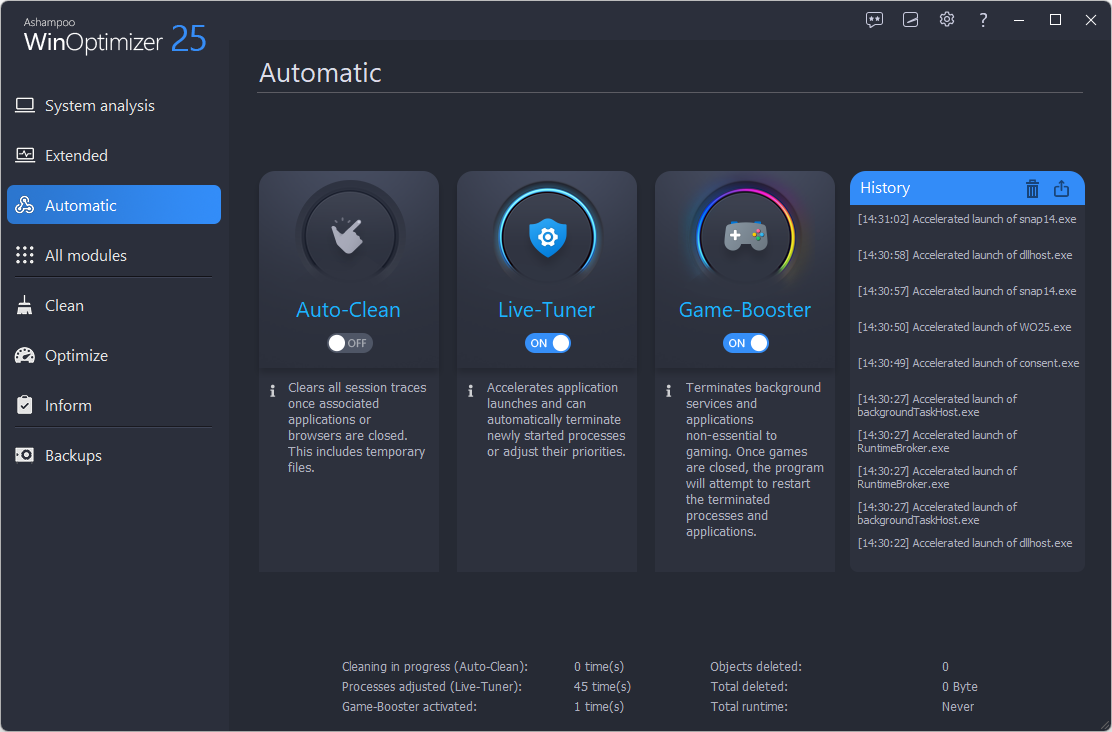
Ashampoo WinOptimizer 25 is a system maintenance and optimization suite designed to improve the performance, stability, and privacy of Windows-based PCs. This version features a technological overhaul that increases cleaning speeds by up to 75% compared to previous iterations. The software targets system-critical areas to remove junk files, installation leftovers, and web browsing traces across all major browsers.
Users can utilize the following core functions:
- System Cleaning: Deep-cleans system caches, old Windows versions, and update backups to reclaim significant disk space.
- Performance Tuning: Accelerates system responsiveness through a multi-core supported Registry Cleaner and an updated Process Manager.
- Privacy Protection: Manages telemetry settings and includes a universal Cookie Manager that allows users to preserve login sessions while eliminating tracking cookies.
- Windows 11 Customization: Offers specific tweaks for the Windows 11 taskbar and File Explorer, ensuring full compatibility with the latest operating system’s design and functionality.
The interface provides a comprehensive start page featuring a real-time CPU speedometer and detailed hardware specifications. Additional utilities include a File Wiper for secure data deletion, an UnInstall Manager, and a Link Checker to identify and fix broken shortcuts. The software supports Windows Aero Snap for window scaling and is fully compatible with Windows 7, 10, and 11.
Top 5 Reasons To Download Ashampoo WinOptimizer 25
- Unprecedented Speed and Performance Optimization: With a massive technological overhaul, the cleaners are up to 75% faster, utilizing multi-core processors for near-instant results.
- Comprehensive Deep System Cleaning: Reclaim massive amounts of disk space by targeting hidden junk like DirectX shader caches, preview caches, and old Windows version leftovers.
- Total Windows 11 Integration and Customization: Fully tailored for the latest OS, allowing you to bypass annoying restrictions and customize the taskbar, Explorer, and privacy settings.
- Advanced Privacy Protection and Cookie Management: A best-in-class cookie manager allows you to protect your privacy without losing the convenience of staying logged into your favorite sites.
- Professional-Grade System Tools and UI: From a real-time CPU speedometer to a redesigned UnInstall Manager, the interface is sleek, modern, and incredibly easy to navigate.
Listen, we have all been there. You unbox a brand-new PC, and for the first few months, it feels like a dream. Applications snap open instantly, the boot time is mere seconds, and everything feels fluid. But fast-forward a year, and the story changes. Windows starts to feel "heavy." You notice micro-stutters when opening folders. Your hard drive space seems to be disappearing into a black hole, and you are constantly pestered by telemetry and privacy-invading background processes. Most users think this is just the "natural aging" of a computer, but as a tech reviewer, I am here to tell you that it is actually just digital clutter. Your operating system is essentially a house that hasn't been dusted in a decade.
This is exactly why Ashampoo WinOptimizer 25 is a mandatory download for anyone serious about their PC’s health. This isn't just another "system cleaner" that deletes a few temporary files and calls it a day. It is a comprehensive suite designed to overhaul how your computer handles data, privacy, and system resources. Whether you are running a high-end gaming rig or an older laptop that’s struggling to keep up with modern web browsing, this software provides a "double boost" that breathes new life into your hardware. Let’s dive deep into the five primary reasons why you need to grab this giveaway immediately.
1. Unprecedented Speed and Performance Optimization
In the world of system utilities, speed is everything. Nobody wants to wait ten minutes for an optimization tool to finish scanning. Ashampoo has performed what I can only describe as a technological miracle with version 25. They have completely re-engineered the cleaning engines from the ground up. The result? These cleaners are now up to 75% faster than previous versions. When you click that "Analyze" button, the results appear almost instantaneously. It is buttery smooth, and the animations feel incredibly modern.
But the speed isn't just about the software’s interface; it’s about how it handles your hardware. WinOptimizer 25 is the first version to fully utilize multi-core processors for its cleaning modules. Most traditional system tools are single-threaded, meaning they only use a fraction of your CPU's power. By leveraging all available cores, WinOptimizer 25 can scan your Registry and file system in a fraction of the time. This is especially beneficial for users with modern processors who want to see their hardware actually being utilized effectively. It reduces the memory footprint significantly, ensuring that the software itself doesn't become the "bloatware" it’s trying to remove.
The "1-click optimization" feature has also been overhauled. It is based on these new, hyper-fast cleaner modules, meaning you can perform a total system sweep in the time it takes to sip your coffee. For someone who manages multiple machines or simply doesn't have the patience to dig through menus, this speed boost is a game-changer. It makes regular maintenance a task that takes seconds rather than minutes, ensuring your PC stays in peak condition without interrupting your workflow.
2. Comprehensive Deep System Cleaning
Standard cleaning tools usually stop at your "Recycle Bin" and "Temporary Internet Files." WinOptimizer 25 goes significantly deeper, venturing into the system-critical areas that most users (and most softwares) are afraid to touch. One of the most impressive features of this version is the extended in-depth cleaning. This tool hunts down the "invisible" junk that accumulates over years of Windows updates and software installations.
Have you ever noticed that after a major Windows update, your hard drive feels smaller? That is because Windows keeps backups of old versions and update files "just in case." WinOptimizer 25 allows you to find and delete these old Windows versions and system caches safely. Furthermore, it targets the DirectX shader cache. For the gamers out there, this is huge. A cluttered shader cache can lead to display issues and stuttering in games. By clearing this out, you allow the system to rebuild fresh caches, often resulting in smoother frame rates and faster loading times.
The software also targets the Windows Explorer preview cache. If you have ever opened a folder full of photos and had to wait for the thumbnails to load, you know how annoying a corrupted or bloated preview cache can be. By clearing this, you reset the responsiveness of your file navigation. There are eight powerful new options in the cleaning department that focus on everything from usage statistics to installation leftovers. This isn't just about making your PC faster; it is about reclaiming gigabytes of space that you didn't even know were being occupied by digital ghosts.
3. Total Windows 11 Integration and Customization
Windows 11 brought a fresh look, but it also brought a lot of frustration. From the controversial centered taskbar to the often-intrusive widgets and the redesigned context menus, many users felt like they lost control over their own OS. Ashampoo WinOptimizer 25 is essentially the missing manual and control panel for Windows 11. It has been fully updated to be 100% compatible, featuring a design language—buttons, icons, and dialogs—that feels like a native part of the Windows 11 experience.
The "tweaking" module is where this software really shines for power users. It offers hundreds of tweaks specifically for Windows 11. Want to move the taskbar? Want to change how the Explorer looks or behaves? Want to disable the "telemetry" that sends your usage data back to the mothership? WinOptimizer 25 makes this as easy as toggling a switch. It gives you the power to personalize your machine according to your rules, not Microsoft’s.
This level of control extends to the Aero Snap support. The software windows now scale and dock perfectly with the Windows docking system, making it a joy to use on high-resolution or multi-monitor setups. It doesn't matter if you are on Windows 11, 10, or even 7; the software adapts to your specific OS version to provide the most relevant optimizations. It's like having a specialized mechanic for every specific model of car you might own.
4. Advanced Privacy Protection and Cookie Management
Privacy is the biggest concern in the modern digital age. Every website you visit and every app you open wants a piece of your data. Windows itself is notorious for "telemetry," which is a fancy word for tracking your every move. WinOptimizer 25 puts a firm stop to this. It includes dedicated privacy modules that shut down Windows' tracking features, ensuring that your machine remains your machine.
The standout feature here is the new Cookie Manager. Cookies are a double-edged sword; they keep you logged into your email and remember your shopping cart, but they also track your browsing habits across the web. Most cleaners just delete all cookies, which is annoying because you have to log back into every single website. Ashampoo’s new manager is "best-in-class" because it allows you to separate the "safe" cookies from the "invasive" ones.
You can use wildcard characters to mark entire domains as safe, or manually whitelist the sites you trust. This "wheat from the chaff" approach means you can keep your login sessions active while nuking the tracking cookies that invade your privacy. Even better, these settings apply across all your installed browsers, and you can export your "safe" list to use on other devices. It is a sophisticated, common-sense approach to privacy that I haven't seen executed this well in any other suite. It’s about convenience without compromise.
5. Professional-Grade System Tools and UI
Beyond the cleaning and tweaking, WinOptimizer 25 is packed with utilities that help you understand what is happening under the hood of your PC. The updated start page now features a CPU speedometer and up-to-date hardware details. This gives you an immediate health check the moment you open the app. If your CPU is spiking or your temperatures are high, you’ll know instantly.
There are also several "quality of life" tools that make this giveaway a "must-download." The Link Checker and Context Menu Manager have been redesigned for better overview and easier handling. If you have ever installed a program and noticed it added five annoying options to your right-click menu, you can now remove them with two clicks. The UnInstall Manager and Process Manager have also received new designs, making it easier to see which programs are eating up your RAM and which ones are safe to remove.
For those who have lost their Windows product keys, WinOptimizer even gives you direct access to your Windows license key—a lifesaver if you ever need to reinstall your OS. The File Wiper now includes a confirmation dialog and multiple deletion methods, ensuring that when you want a file gone, it is gone for good, beyond the reach of data recovery tools. Every single feature in this 25th-anniversary edition feels polished and intentional. It’s not just a collection of tools; it’s a cohesive ecosystem for PC maintenance.
In conclusion, if you care about the longevity and performance of your computer, there is no reason to pass up on this. Ashampoo WinOptimizer 25 is the pinnacle of system optimization. It combines extreme speed, deep-cleaning capabilities, and unmatched Windows 11 customization into one user-friendly package. It respects your privacy, gives you back your disk space, and ensures that your Windows experience is as fast and stable as the day you first turned on your computer. Don't let your PC settle for "good enough" when it can be optimized. Download this giveaway today and see the difference for yourself!
Whether you’re a power user looking to squeeze every drop of performance out of your multi-core CPU, or a casual user who just wants their computer to stop lagging, this software delivers on every front. It is thorough, it is fast, and most importantly, it is effective. Get ready to experience your PC as it was meant to be: fast, lean, and secure.

Reviews for Ashampoo WinOptimizer 25
Click Here to Read Reviews for Ashampoo WinOptimizer 25 >> Click Here to Submit Reviews for Ashampoo WinOptimizer 25 >>