What Does RegEx Extractor Do?
RegEx Extractor is a utility designed for automated data mining within text-based documents and logs. The software allows users to isolate specific information using regular expressions or predefined rules, such as "starts with," "ends with," or "contains." This functionality is effective for identifying and gathering recurring data types, including email addresses, phone numbers, URLs, postal codes, and dates.
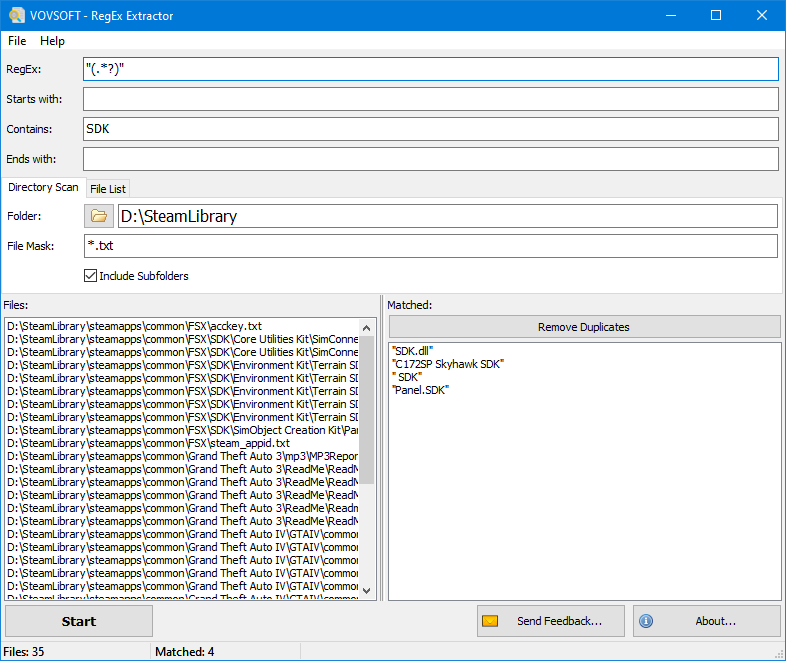
The application supports batch processing, which enables the simultaneous scanning of multiple files or entire directories. Users can initiate the extraction process by dragging and dropping files into the interface or by selecting a specific folder. The inclusion of file masks allows for granular control over which document types the software parses during a scan, ensuring that only relevant files are analyzed.
Once the search parameters are defined and the scanning process is complete, the tool organizes the identified strings into a list. This collected data can then be exported into a file for future use or further analysis. RegEx Extractor provides a streamlined solution for users who need to process large volumes of log files or unstructured text without the need to manually search through individual documents.
Top 5 Reasons To Download RegEx Extractor
- Lightning-Fast Batch Processing for Massive Datasets
- Accessible Logic for Both Novices and Power Users
- Infinite Customization Through Regular Expression Support
- Streamlined Workflow via Drag-and-Drop and File Masking
- Seamless Data Export for Professional Reporting
In the modern digital landscape, data is the new gold. However, unlike actual gold, digital data is often buried under mountains of useless noise, scattered across thousands of log files, or hidden deep within messy text documents. If you have ever found yourself manually opening dozens of text files, pressing Ctrl+F, and copying and pasting individual email addresses or phone numbers into a spreadsheet, you know exactly how soul-crushing that process can be. It is tedious, it is prone to human error, and frankly, your time is worth much more than that. This is where RegEx Extractor comes into play, and why this giveaway is an absolute must-have for your digital toolkit.
As a tech reviewer, I see hundreds of utilities that claim to "simplify your life," but many are just bloated wrappers for features your operating system already has. RegEx Extractor is different. It is a surgical tool designed for a specific, high-value purpose: finding exactly what you need in an ocean of text and pulling it out with precision. Whether you are a system administrator looking through server logs, a digital marketer harvesting contact info, or a developer cleaning up a database, this software is the shortcut you have been looking for. Let’s dive deep into the five primary reasons why you should grab this tool while it is available.
1. Lightning-Fast Batch Processing for Massive Datasets
The single greatest hurdle in data mining is scale. Searching through one file is easy. Searching through five hundred files is a nightmare. Most standard text editors or even some advanced IDEs struggle when you ask them to perform complex searches across an entire directory of disparate files. They lag, they crash, or they simply do not offer a way to aggregate the results into a single usable format. RegEx Extractor solves this problem by placing batch processing at the very core of its functionality.
When you use this tool, you aren't limited to a file-by-file workflow. You can select an entire folder, and the software will systematically crawl through every supported file it finds. This is a game-changer for professionals who deal with automated logs. Imagine you have a week's worth of server logs, and you need to find every unique IP address that accessed a specific port. Doing this manually would take hours. With RegEx Extractor, you point the software at the folder, hit start, and watch as it parses through thousands of lines of code in seconds. It treats your entire directory as one giant, searchable database.
Furthermore, the efficiency of the software's engine means it doesn't hog your system resources. I’ve seen it chew through megabytes of raw text without the cooling fans on my laptop even spinning up. It is built for speed, focusing on the raw text data rather than trying to render a complex user interface for every file it touches. This "set it and forget it" mentality is exactly what a high-productivity environment requires.
2. Accessible Logic for Both Novices and Power Users
One of the biggest intimidating factors for people entering the world of data extraction is the term "RegEx" itself. Regular Expressions are notoriously difficult to master; they look like a cat walked across a keyboard to the uninitiated. Symbols like carets, dollar signs, and backslashes can be enough to make a casual user close the program immediately. However, the brilliance of RegEx Extractor lies in its dual-layered approach to search logic.
If you don't know the first thing about Regular Expressions, you are not left out in the cold. The software includes simple, rule-based extraction methods that anyone can understand. You can tell the software to find lines that "contain" a specific word, "start with" a certain character, or "end with" a particular string. This basic logic covers a surprisingly large percentage of daily tasks. If you just need to find every line in a document that mentions "Invoice," you don't need a PhD in computer science—you just select the "contains" rule and type the word.
This accessibility makes it an incredible "bridge" tool. It allows a beginner to get immediate value from the software while providing an environment where they can slowly start to experiment with more complex patterns. It’s rare to find a tool that respects the power user without alienating the person who just wants to get their work done quickly. By lowering the barrier to entry, this giveaway becomes useful for everyone from high-school students organizing research notes to career data analysts.
3. Infinite Customization Through Regular Expression Support
While the simple rules are great, the "RegEx" in the name is where the real power lies. For those who do understand Regular Expressions, or for those willing to spend two minutes Googling a pattern, the possibilities are literally infinite. Regular Expressions allow you to search for patterns rather than specific text. This is the difference between searching for "John Doe" and searching for "any string of text that looks like a valid email address."
With RegEx Extractor, you can input patterns to find URLs, postal codes, phone numbers, dates, credit card numbers, or specific hexadecimal codes. Think about the utility of that for a moment. If you have a 10,000-page document and you need to extract every date mentioned regardless of the format, a standard search is useless. But a well-crafted RegEx string can identify "MM/DD/YYYY," "DD-MM-YY," and "Month Day, Year" all in one pass. This tool gives you a dedicated playground to apply those patterns across your files.
The software acts as a clean, focused interface for these expressions. You don't have to write a custom Python script or a complicated command-line string to get the results. You just paste your RegEx, select your files, and let it rip. It’s an essential utility for anyone doing technical SEO, forensic data analysis, or even just heavy-duty academic research. Once you have the power of RegEx at your fingertips in a streamlined UI, you’ll wonder how you ever lived without it.
4. Streamlined Workflow via Drag-and-Drop and File Masking
In the world of utility software, "user experience" is often an afterthought. Many data mining tools look like they were designed in 1995 and require you to navigate through complex nested menus just to select a file. RegEx Extractor avoids this trap by focusing on a "path of least resistance" workflow. The inclusion of drag-and-drop functionality is a perfect example of this. You don't have to hunt through your C: drive via a tiny dialog box; you just grab your files or folders from your desktop and drop them into the interface.
Another "pro" feature that I have to highlight is the support for file masks. When you are scanning a large folder, you often don't want to scan everything. You might only be interested in .log files or .txt files, while ignoring the .exe or .dll files in the same directory. The file mask feature allows you to tell the software exactly which extensions to look at. This prevents the software from wasting time on binary files that don't contain readable text and ensures your results aren't cluttered with garbage data.
The interface is refreshingly honest. There are no distracting ads, no unnecessary "dashboard" metrics, and no "pro version" pop-ups. It is a workspace designed for one thing: getting the data out. This minimalist approach to design is something I always look for in a utility. It means the developer spent their time on the functionality of the extraction engine rather than on flashy graphics that don't help you get your work done. For a tech reviewer, that is a massive green flag.
5. Seamless Data Export for Professional Reporting
Extraction is only half the battle. Once you have found all those phone numbers, URLs, or error codes, what do you do with them? If the software just showed them to you in a window and didn't let you save them, it would be half-useless. RegEx Extractor understands that the data you find is likely just one step in a larger process. That is why it offers a robust and simple export system.
Once the processing is finished, the results are presented clearly, and you can export them directly to a file. This allows you to take your findings and immediately import them into Excel, a SQL database, or a CRM system. For instance, if you’ve extracted a list of potential leads from a series of public records, you can save that list as a text file and have it ready for your outreach team in minutes. This turns the software from a simple "search tool" into a "data pipeline tool."
Furthermore, the ability to save these results for future use means you can build up a library of extracted data over time. You can run one search today, export it, and then run a different search on the same files tomorrow without any conflict. The software helps you organize the chaos of raw data into something structured, legible, and—most importantly—actionable. In a professional setting, being able to provide a clean list of extracted data instead of a messy pile of files is what makes you look like a hero.
Final Thoughts from the Reviewer:
We live in an age where we are constantly overwhelmed by information. The ability to filter that information and find the specific "nuggets" that matter is a superpower. RegEx Extractor is a tool that gives you that superpower without requiring you to be a master coder. It is lightweight, it is incredibly fast, and it handles the heavy lifting of batch processing so you don't have to.
If you have ever felt the frustration of manual data entry or the headache of searching through hundreds of logs, this giveaway is the answer to your problems. It’s one of those "Swiss Army Knife" utilities that you might not use every single day, but on the days you do need it, it will save you hours of work. It is rare to find a software utility that is this focused and effective. Do not let this giveaway pass you by—download it, keep it in your toolkit, and the next time you're faced with a mountain of text, you'll be glad you have it. It is the definition of "working smarter, not harder."
Whether you are a seasoned IT veteran who knows every RegEx shortcut by heart or a business owner who just needs to find some specific information in a folder full of documents, this tool is designed for you. Its simplicity is its strength, and its batch processing is its greatest asset. In the world of tech utilities, Vovsoft has built a reputation for creating "no-nonsense" tools that do exactly what they say on the tin, and RegEx Extractor is a prime example of that philosophy in action. Take advantage of this offer, streamline your data mining, and start reclaiming your time today.

Reviews for RegEx Extractor
Click Here to Read Reviews for RegEx Extractor >> Click Here to Submit Reviews for RegEx Extractor >>