What Does MonsterWriter Pro Do?
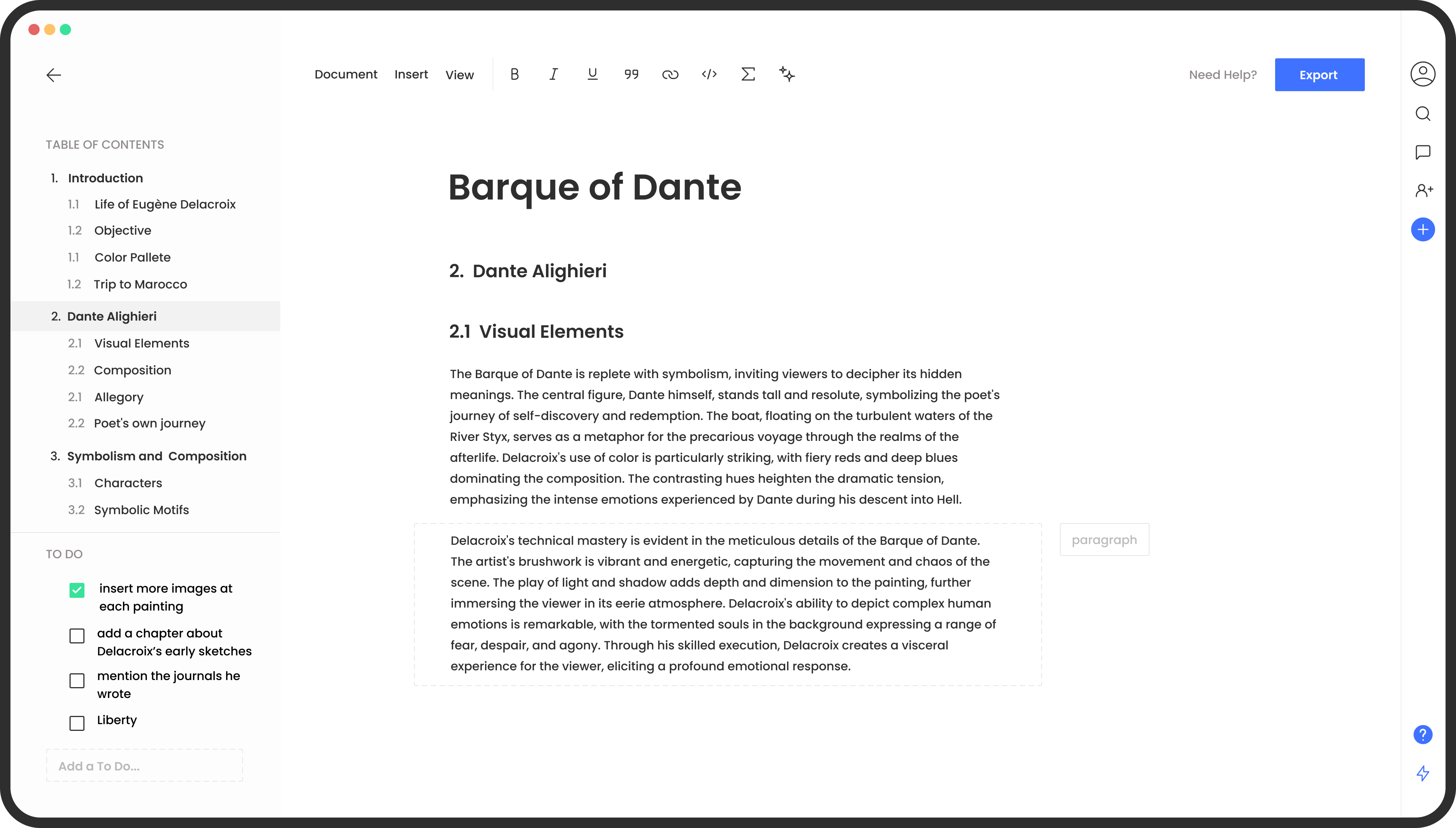
MonsterWriter is a specialized writing application designed to streamline the creation of complex academic documents, such as theses and research papers. The software focuses on structural efficiency, allowing users to manage rich text alongside technical elements like LaTeX equations, automated footnotes, and dynamically updated tables of contents. It also provides native support for figure captions and bibliography management.
The application includes several features intended to assist with the academic workflow:
- Academic Integration: Users can connect directly to Zotero or import BibLaTeX files to manage citations and references.
- Document Management: The platform allows for the creation of unlimited articles and the categorization of documents. Built-in ToDo lists help writers track their progress through various chapters.
- Export Versatility: Completed work can be exported into multiple formats, including DOCX, HTML, and LaTeX. The software also provides unlimited PDF exports.
- Templates: Access to professional templates ensures that documents adhere to standard formatting requirements without manual adjustment.
By automating the technical layout and citation aspects of long-form writing, MonsterWriter functions as a dedicated environment for scholarly production. It serves as an alternative to general-purpose word processors, prioritizing the specific needs of researchers and students who require precise control over academic formatting.
Top 5 Reasons To Download MonsterWriter Pro
- Seamless Academic Formatting Made Simple: Experience the power of LaTeX-style precision without the steep learning curve, thanks to built-in support for equations, footnotes, and automated tables of contents.
- Ultimate Bibliography and Research Integration: Effortlessly manage your citations through direct Zotero integration and BibLaTeX imports, ensuring your references are always accurate and perfectly styled.
- Professional-Grade Export Versatility: Whether your department requires a PDF, a DOCX file, or raw LaTeX code, you can export your work in multiple formats with a single click.
- Integrated Productivity and Task Management: Stay on track with your writing goals using built-in ToDo lists and document categorization, keeping your research organized and your deadlines manageable.
- Unlimited Creative Freedom: Break free from the constraints of basic text editors with the ability to write unlimited articles and export unlimited PDFs using professional templates designed for success.
If you have ever spent a sleepless night wrestling with a word processor that refuses to place a caption correctly, or if you have found yourself staring at a broken bibliography ten minutes before a submission deadline, then you know that the tools you use can make or break your academic career. Writing a thesis, a dissertation, or even a complex research paper is not just about the words you put on the page; it is about managing an enormous amount of data, citations, and structural requirements. This is where MonsterWriter enters the fray, and quite frankly, it is a game-changer that every student and researcher needs to download immediately. In the world of academic software, it is rare to find a tool that balances power with simplicity so effectively.
1. Seamless Academic Formatting Made Simple
The first and perhaps most compelling reason to grab this giveaway is the way it handles complex content. Traditional word processors are great for writing a letter to your grandmother, but they often crumble under the weight of a hundred-page thesis. MonsterWriter was built from the ground up to handle the "heavy lifting" of academic writing. When we talk about rich text and content, we aren't just talking about bolding or italics. We are talking about the structural integrity of your document.
For many researchers, the biggest hurdle is formatting equations. Whether you are in mathematics, physics, economics, or any social science that requires statistical modeling, getting those equations to look professional is a nightmare in standard apps. This software allows you to express yourself with complex equations that remain crisp and legible, regardless of how you export them. But it does stop there. It manages footnotes, bibliographies, tables of contents, and captions with a level of automation that feels almost like magic. You no longer have to manually update your list of figures or worry if your footnote numbering has skipped a digit after you moved a paragraph. The software tracks everything in the background, allowing you to focus entirely on your arguments and your data.
By removing the "formatting friction," this tool transforms the writing process from a technical chore into a streamlined creative flow. You are essentially getting the power of a professional typesetting system wrapped in an intuitive, user-friendly interface. For anyone who has ever feared the complexity of raw LaTeX code, this is your solution. You get the professional output without having to learn a programming language just to write your paper.
2. Ultimate Bibliography and Research Integration
Let’s be honest: citation management is the bane of every academic's existence. Keeping track of hundreds of sources, ensuring they are formatted according to specific style guides, and making sure the in-text citations match the final reference list is a monumental task. This giveaway provides a robust solution to this headache by offering seamless integration with Zotero and the ability to import BibLaTeX files.
Zotero is the gold standard for many researchers when it comes to collecting sources, and the fact that MonsterWriter connects directly to it is a massive win. You can pull your researched references directly into your writing environment without having to copy and paste or manually type out titles and authors. This drastically reduces the risk of human error. If you’ve ever been docked points because of a misplaced comma in a citation, you know how valuable this feature is.
Furthermore, the support for BibLaTeX means that if you are moving from a different system or working with a shared library, your transition will be seamless. The software handles the organization of these citations with grace. You don't have to worry about the "bibliography section" until you are ready to export; the app keeps your database organized and ready to be deployed at a moment's notice. This level of integration ensures that your focus remains on the synthesis of information rather than the clerical work of reference management. It is about working smarter, not harder, and this software is the smartest tool in the shed.
3. Professional-Grade Export Versatility
In the academic and professional world, the format of your final document is often out of your hands. One journal might demand a LaTeX file, while your professor might insist on a DOCX for track-changes feedback, and your university archives might require a specific PDF standard. Usually, this means maintaining three different versions of the same document and praying they stay in sync.
One of the top reasons to download this tool is its incredible export engine. With MonsterWriter, you write your content once and export it to whatever format the situation demands. The PDF export is particularly noteworthy; it produces clean, professional, and properly typeset documents that look like they were produced by a high-end publishing house. If you need to send a draft to a collaborator who only uses Word, the DOCX export ensures that your structure remains intact. If you are submitting to a conference that requires raw LaTeX, you can generate that file instantly without ever having to write a line of code yourself.
The addition of HTML export also opens up possibilities for digital publishing and sharing your research online in a responsive format. This versatility is a lifesaver for anyone working in a multi-platform environment. It gives you the freedom to use the best writing tool for your needs without worrying about compatibility issues down the line. You are essentially future-proofing your work, ensuring that no matter where it needs to go, it will arrive in the perfect format.
4. Integrated Productivity and Task Management
Writing a thesis is not a single event; it is a marathon consisting of thousands of tiny tasks. Most writers have their manuscript in one app, their ToDo list in another, and their research notes scattered across a third. This fragmentation is a recipe for distraction and missed deadlines. This software solves this by integrating productivity tools directly into the writing interface.
The ability to create ToDo lists within the app means you can break your massive writing project into manageable chunks. You can set tasks for specific sections, remind yourself to check a source, or note down a thought for a future chapter without ever leaving your document. This keeps you in the "zone" for longer periods. When you don't have to switch tabs to check your progress, your brain stays focused on the complex task of writing.
Additionally, the categorization of documents allows you to manage multiple projects or different sections of a large thesis with ease. You can organize your work logically, making it simple to navigate between your introduction, your methodology, and your conclusion. It creates a centralized hub for your intellectual output. By combining writing and management into a single workspace, this tool acts as a digital assistant that keeps you organized, motivated, and moving toward the finish line. It is not just a writing app; it is a project management suite for your brain.
5. Unlimited Creative Freedom
Finally, we have to talk about the sheer scale of what this giveaway offers. In an era where everything is moving toward restrictive subscription models with "pay-per-feature" limitations, this software gives you unlimited power. You can write unlimited articles, meaning this isn't just a tool for your current thesis—it's a tool for your entire academic and professional career. Whether you are writing a 500-word blog post or a 100,000-word dissertation, the software scales with you.
The access to professional templates is another massive perk. Starting with a blank page is the hardest part of writing. These templates provide the structural scaffolding you need to get moving quickly, ensuring that you are following standard academic layouts from the very first word. Combined with unlimited PDF exports, you have a powerhouse of a publishing house right on your desktop.
This is the kind of tool that changes your relationship with writing. Instead of dreading the "struggle" of thesis writing, you start to view it as an organized, achievable process. You gain the confidence that comes with knowing your formatting is perfect, your citations are secure, and your productivity is optimized. This isn't just a download; it's an investment in your success and your sanity. If you want to say goodbye to the friction of academic writing and hello to unmatched productivity, this is the giveaway you have been waiting for. Do not let this opportunity pass you by—your future self, the one holding a perfectly formatted, finished thesis, will thank you.
In conclusion, the combination of rich text features, deep citation integration, flexible export options, and built-in task management makes MonsterWriter an essential addition to any student's or researcher's toolkit. It addresses the real-world problems that writers face every day and provides elegant, powerful solutions. The ability to manage complex content with such ease is rare, and when you factor in the unlimited nature of the articles and exports, the value proposition is undeniable. This is a premium experience designed for people who take their writing seriously. It is time to elevate your workflow and give your research the professional presentation it deserves. Download it now and experience the difference that a dedicated, high-performance writing environment can make in your academic journey.
The features described in this article reflect the comprehensive nature of the software, designed to support the user through every stage of the document creation process, from the first brainstorm to the final, professional export.

Reviews for MonsterWriter Pro
Click Here to Read Reviews for MonsterWriter Pro >> Click Here to Submit Reviews for MonsterWriter Pro >>