What Does SnapText Pro Do?
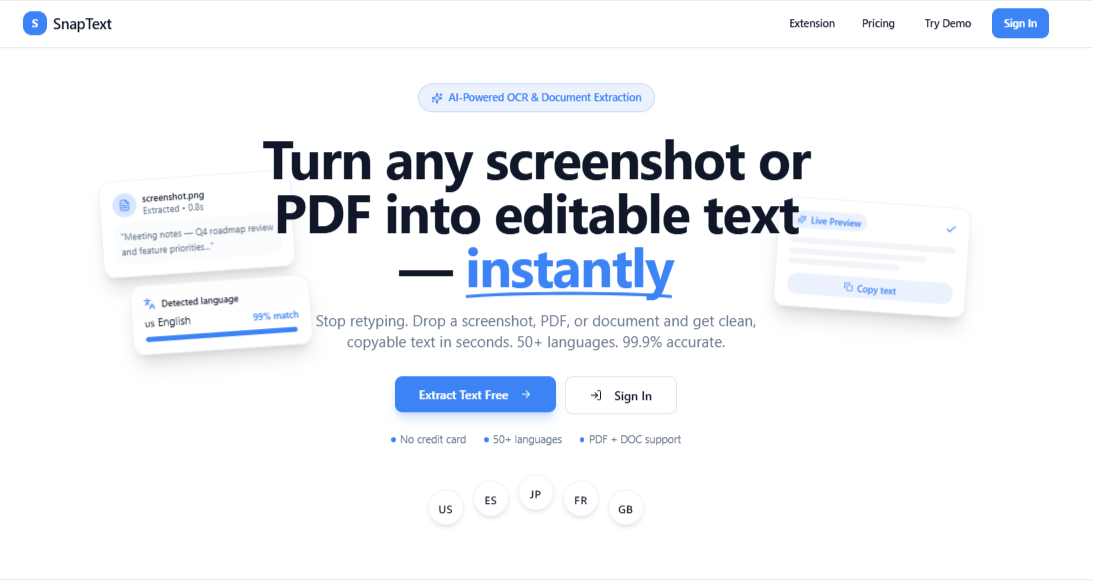
SnapText is an AI-powered productivity platform designed to automate the extraction of text from various digital and physical sources. Utilizing advanced Optical Character Recognition (OCR) technology, the software allows users to instantly capture content from images, screenshots, PDFs, and scanned documents. Its capabilities extend to dynamic media, enabling text retrieval from videos and live on-screen activity.
The platform includes a specialized suite of tools to refine the extraction process:
- Chrome Extension: Facilitates immediate text capture directly within a web browser without switching applications.
- Smart Layout: Preserves the original formatting of documents, ensuring that tables and structured data remain intact after extraction.
- DLFast: A dedicated feature designed to accelerate the workflow when capturing content from supported media types.
For professionals, researchers, and content creators, SnapText functions as a centralized hub for digitizing and organizing information. This giveaway edition provides access to the platform's premium feature set, which is intended to eliminate manual transcription through high-speed automation. The package also includes complimentary credits, allowing users to process a volume of documents and media through the AI engine to experience the full utility of the platform’s advanced OCR capabilities.
Top 5 Reasons To Download SnapText Pro
We have all been there: you are staring at a locked PDF document, an uncopyable web page, a screenshot of a crucial email, or even a frame from an online video tutorial, and you desperately need to copy that text. In the past, your options were frustratingly limited and time-consuming. You either had to painstakingly retype every single word manually—hoping you did not introduce typos along the way—or rely on clunky, outdated Optical Character Recognition (OCR) tools that produced jumbled, unreadable garbage. The time wasted on these mundane administrative tasks adds up faster than most of us care to admit.
Enter SnapText, a modern, AI-powered productivity platform designed to render manual retyping completely obsolete. Whether you are a student pulling quotes from scanned research papers, a business professional handling financial reports locked in image files, or a content creator snagging inspiration on the fly, SnapText promises to streamline your digital workflow like never before. And right now, thanks to an exclusive giveaway edition, you can get full access to this game-changing software without spending a single dime.
In this article, we are going to dive deep into why this software deserves an immediate spot on your desktop and browser. But before we get into the detailed breakdown, here is a quick snapshot of why you need to snag this download right now.
The Top 5 Reasons To Download SnapText Today:
- Seamless Multi-Source Text Capture: Instantly extract text from images, screenshots, PDFs, scanned documents, video frames, and live screen regions with unmatched accuracy.
- Intelligent Smart Layout Technology: Preserve complex document formatting, multi-column structures, and spreadsheet tables perfectly without breaking your data into a jumbled mess.
- Browser Integration & Workflow Acceleration: Streamline your online research with the native Chrome extension and supercharge extraction speeds using the built-in DLFast technology.
- Next-Generation AI Precision: Say goodbye to broken characters and mistranslations; SnapText leverages advanced machine learning to handle complex fonts, low-resolution scans, and multiple languages effortlessly.
- 100% Free Access to Premium Features: This SharewareOnSale Giveaway Edition unlocks the full power of SnapText, complete with complimentary credits so you can experience high-tier performance at zero cost.
1. Seamless Multi-Source Text Capture
Most legacy text recognition tools on the market suffer from severe platform limitations. Maybe you have a decent desktop tool for converting PDFs, or a browser plugin for web images, or a mobile utility for taking photos of paper documents. Having to switch between three or four different programs depending on where your source text lives is inefficient, annoying, and completely ruins your mental focus. SnapText solves this fragmentation issue completely by acting as an all-in-one universal text capture hub.
What makes SnapText truly remarkable is its ability to grab text from literally anywhere on your screen in real time. Did a presenter during a live Zoom meeting or webinar show a slide packed with valuable code, charts, or bullet points? Instead of scrambling to grab a pen or taking a screenshot that sits uselessly in your picture folder, you can use SnapText to capture the live screen region and extract every single character in a fraction of a second.
The software handles an astonishing variety of digital inputs with total ease. It effortlessly processes standard screenshots, flattened graphic files like PNGs and JPEGs, scanned physical paperwork, multi-page PDF documents, locked web scripts, and even video files. If text appears on your monitor, SnapText can read it and turn it into editable digital content instantly. For students sifting through dense academic archives, lawyers reviewing scanned legal filings, or remote workers dealing with digital presentations, this level of versatility completely transforms how fast you can consume and organize information.
2. Intelligent Smart Layout Technology Keeps Your Data Intact
If you have ever used traditional optical character recognition utilities in the past, you are likely familiar with the dreaded layout breakdown. You attempt to copy a neatly formatted financial spreadsheet, a multi-column newsletter, or a detailed product pricing table from a scanned document, and the software outputs a single, giant block of garbled, continuous text. You then end up spending thirty minutes fixing line breaks, realigning rows, and manually re-creating table borders in Word or Excel, completely defeating the purpose of using automated software in the first place.
This pain point is precisely where SnapText’s proprietary Smart Layout technology sets a new standard. Smart Layout does not merely recognize individual letter shapes; it actively interprets spatial context, layout hierarchy, and document architecture. Driven by intelligent visual processing models, SnapText analyzes how paragraphs, subheadings, bulleted lists, separate columns, and grid lines relate to one another spatially on the page.
When you extract a complex table or multi-column layout using SnapText, it respects the structural grid of the original source. You can paste the resulting output directly into Microsoft Excel, Google Sheets, or your preferred word processor, and the columns, rows, and margins remain beautifully aligned and fully editable. This intelligent preservation of visual hierarchy makes SnapText an indispensable utility for accountants, data analysts, researchers, and administrators who handle structured information every day. The sheer amount of tedious reformatting time this single feature saves is more than enough reason to download the application immediately.
3. Frictionless Browsing & DLFast Workflow Acceleration
In modern software design, incredible power is useless if the user interface is sluggish or cumbersome to access. SnapText eliminates user friction by meeting you exactly where you spend most of your computing hours: your web browser. Included with this platform is a dedicated, lightweight Chrome extension that integrates natively into your everyday browsing routine.
Imagine researching a topic online and encountering an infographic with crucial statistics, an online eBook protected against text copying, or an embedded image containing important quotes. With the SnapText Chrome Extension, you do not need to save the image file to your desktop, launch a separate desktop software client, upload the file, click convert, and download a text file. You simply activate the extension directly from your Chrome toolbar, drag a selection box over the text on your screen, and the text is immediately copied to your system clipboard ready to be pasted. It turns what used to be a tedious multi-step chore into a two-second gesture.
To ensure this process happens without lag, SnapText incorporates its custom DLFast engine acceleration. DLFast optimizes processing protocols to deliver near-instantaneous optical recognition rendering. Whether you are batch-extracting text across dozens of browser tabs or processing heavy, high-resolution document scans, DLFast eliminates annoying loading bars and processing delays. The software feels incredibly lightweight, snappy, and entirely unobtrusive, allowing you to maintain your creative flow state without waiting on slow software engines.
4. Next-Generation AI Precision Unlocks Unmatched Accuracy
The single biggest flaw of historical OCR technology has always been accuracy. Legacy software relied on rigid, rule-based pattern matching. If an image was slightly blurry, featured an unusual graphic font, suffered from poor lighting, or contained slanted handwriting, the output would be riddled with nonsense symbols, mistranslated numbers, and missing words that required tedious manual proofreading.
SnapText completely modernizes text extraction by replacing old algorithmic pattern matching with advanced Artificial Intelligence and deep neural networks. The AI does not just scan pixels; it understands context, syntax, and natural language structure. This contextual awareness allows SnapText to accurately predict and decipher words and symbols that conventional tools completely misinterpret.
Whether you are working with faded historical document scans, low-resolution camera screenshots, stylized graphic design assets, or multi-lingual text blocks, SnapText delivers astounding accuracy. It correctly distinguishes between easily confused characters like the number one, the capital letter 'I', and the lowercase letter 'l'—a common headache that trips up standard tools. Furthermore, its extensive multi-language recognition capability makes it a powerful asset for international business professionals, language learners, and global market researchers. You spend far less time double-checking output for embarrassing typos and far more time putting your extracted text to productive use.
5. Exclusive SharewareOnSale Giveaway Access (Full Premium Power)
High-end AI processing typically comes with a steep price tag. Professional-grade document conversion software and modern AI productivity platforms usually lock their best capabilities behind expensive monthly subscription models or restrict users with low pay-per-use paywalls. For students, freelancers, and small business owners operating on tight budgets, these recurring software fees can quickly become overwhelming.
That is precisely why this specific giveaway offer is an absolute must-grab opportunity. Through this limited-time SharewareOnSale promotion, you are receiving full access to the official SnapText Giveaway Edition. This is not a stripped-down trial version that restricts you to tiny image files, limits your feature selection, or slaps ugly watermarks over your extracted text. You get complete, unfettered access to all premium platform features, including full use of the Chrome extension, Smart Layout table retention, and the DLFast processing engine.
Even better, this exclusive giveaway package includes complimentary processing credits right out of the box. These credits allow you to immediately leverage SnapText’s premium cloud-assisted AI models without ever pulling out a credit card. You get the rare opportunity to test the platform on your heaviest workloads, convert your toughest document archives, and experience true AI-driven productivity completely risk-free. It is a premium software solution delivered to you at zero financial cost.
Final Verdict: Don't Pass Up This Productivity Powerhouse
In today's fast-paced digital work environment, your time and mental focus are your most valuable assets. Spending precious minutes retyping information from screenshots, reformatting scrambled tables from scanned PDF files, or manually copying notes from video lectures is simply an inefficient use of your time. You deserve modern tools that handle administrative heavy lifting instantly, accurately, and intelligently.
SnapText sets a impressive new benchmark for what text extraction software should be. By seamlessly combining multi-format screen capture, intelligent structural layout preservation, effortless Chrome browser integration, lightning-fast DLFast acceleration, and cutting-edge AI accuracy, it delivers an unbeatable productivity upgrade for professionals, students, and casual computer users alike.
Opportunities like this do not stay around forever. This SharewareOnSale Giveaway Edition gives you the ultimate risk-free chance to upgrade your software toolkit with full premium features and complimentary credits included. Whether you need it for intense work projects, academic research, or daily web browsing, downloading SnapText today is guaranteed to save you countless hours of tedious work. Claim your free download right now before this limited-time giveaway deal vanishes!

Reviews for SnapText Pro
Click Here to Read Reviews for SnapText Pro >> Click Here to Submit Reviews for SnapText Pro >>