What Does SmartOCR Pro Do?
SmartOCR Pro is an optical character recognition utility designed to transform static image files and PDF documents into editable digital formats. The software addresses the manual labor involved in retyping scanned documents by automating the conversion process into Word, RTF, PDF, and HTML files. Because the application includes native OCR support, it can process both standard digital PDFs and those generated from physical scans.
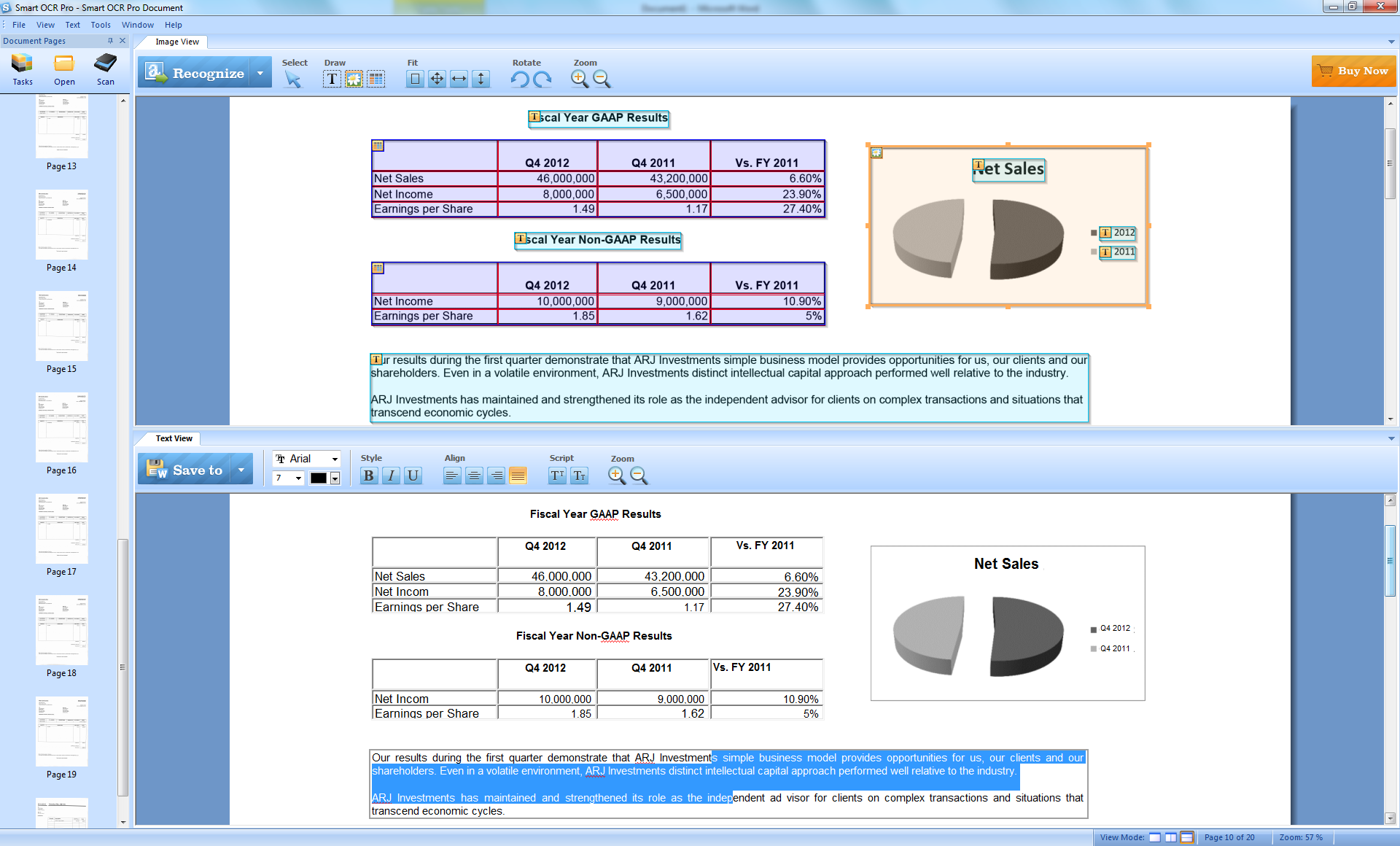
A central feature of the software is its ability to maintain the original layout and formatting of the source document during conversion. This ensures that tables, columns, and graphics remain in their intended positions within the newly created editable file. For immediate corrections, the application features a built-in text editor, allowing users to review and modify the recognized text directly within the interface before finalizing the export.
For users working with physical archives, SmartOCR Pro facilitates a direct connection to hardware scanners, streamlining the path from physical paper to digital storage. With extensive PDF support, the software handles a variety of document structures and provides a bridge between physical media and modern word processors. This utility serves as a functional solution for digitizing legacy documents and managing complex paper-to-digital workflows without losing structural integrity.
Top 5 Reasons To Download SmartOCR Pro
If you have ever spent hours manually retyping a scanned document or felt the intense frustration of trying to copy text from a locked PDF, then you know exactly why high-quality Optical Character Recognition (OCR) software is an absolute necessity. Today, we are looking at a powerhouse in the document management space: SmartOCR Pro. This is not just another utility; it is a professional-grade solution designed to bridge the gap between physical paper and digital editability. Before we dive into the deep technical analysis, here are the top five reasons why you need to grab this giveaway immediately:
- Industry-Leading OCR Accuracy for Scanned Documents: Transform non-editable "flat" images and scanned PDFs into fully editable text with incredible precision.
- Flawless Layout and Formatting Retention: Save hours of reconstruction by keeping your columns, tables, and images exactly where they belong.
- Integrated Text Editor for Immediate Refinement: Edit and proofread your converted documents directly within the application before you ever export them.
- Direct Scanner Integration and Batch Processing: Streamline your entire workflow by pulling documents directly from your hardware into the digital world.
- Extensive Multi-Format Support: Export your finished products to Word, RTF, HTML, or searchable PDF, ensuring compatibility with any platform or device.
1. Industry-Leading OCR Accuracy for Scanned Documents
Let’s be honest: the digital age was supposed to make paper obsolete, but we are still drowning in it. Whether it is a contract signed by hand, a vintage book chapter, or a receipt, we often find ourselves with a "dead" image of text rather than the text itself. This is where the Optical Character Recognition engine of SmartOCR Pro shines. Most free or budget OCR tools struggle with anything less than a perfect high-resolution scan. They trip over slightly skewed lines, unusual fonts, or low-contrast backgrounds.
When you download SmartOCR Pro, you are getting an engine that has been refined to recognize characters with surgical precision. It doesn’t just look at shapes; it understands the structure of language. This means less time fixing "rn" that was read as "m" or "1" that was read as "l." For professionals like lawyers, researchers, or students, this accuracy is not just a convenience—it is a requirement. If you are digitizing a 50-page document, even a 1% error rate means hundreds of corrections. SmartOCR Pro aims to push that error rate as close to zero as possible, giving you a clean slate to work from.
The beauty of this giveaway is that it provides you with a professional-tier engine that handles "regular" PDFs and "scanned" PDFs with equal ease. A regular PDF often has text data embedded, but a scanned PDF is essentially just a photograph. SmartOCR Pro treats these images with advanced algorithms that "read" the pixels and translate them into machine-encoded text. This effectively unlocks the data trapped inside your images, making it selectable, copyable, and most importantly, editable.
2. Flawless Layout and Formatting Retention
The biggest nightmare in the world of document conversion is not just the text itself, but the formatting. We have all been there: you use a basic converter to turn a PDF into a Word document, and the result is a chaotic mess. The images are overlapping the text, the columns have disappeared, and the tables have been converted into a series of disconnected tabs and spaces. You end up spending more time re-formatting the document than it would have taken to just retype the whole thing.
SmartOCR Pro solves this by focusing heavily on layout retention. When the software analyzes a page, it doesn't just look for letters; it maps out the "geography" of the page. It identifies where headers begin, where sidebars are located, and how images interact with the text flow. This is particularly vital for complex documents like newsletters, technical manuals, or financial reports containing intricate tables.
By maintaining the original layout, SmartOCR Pro ensures that your converted Word or RTF file looks exactly like the original source. If the original document had a three-column layout with an image in the center, the exported version will reflect that structure. This level of sophistication is what separates a professional tool from a hobbyist one. For a business environment where documents must remain professional and readable after conversion, this feature alone makes the software worth its weight in gold. The goal of SmartOCR Pro is to make the transition from paper to digital invisible.
3. Integrated Text Editor for Immediate Refinement
One of the standout features that I, as a reviewer, find most impressive is the built-in text editor. Most OCR applications act as a "black box"—you put a file in, and a converted file comes out. If there are errors, you don't see them until you open the file in another program like Microsoft Word. This back-and-forth workflow is inefficient and breaks your concentration.
SmartOCR Pro changes the game by including a fully functional text editor directly inside the interface. Once the OCR process is complete, the recognized text is displayed in a window where you can interact with it immediately. You can check the spelling, adjust the font styles, or rewrite entire sections before you ever save the file. This is an incredible time-saver for proofreading.
Imagine you are scanning a document with some handwritten notes in the margins. The OCR might try to interpret those notes, resulting in some garbled text. With the built-in editor, you can quickly delete those sections or type them out properly while the original image is still fresh in your mind. This side-by-side comparison capability allows you to verify the accuracy of the conversion in real-time. It transforms the software from a simple conversion utility into a complete document preparation suite. You can finalize your document within SmartOCR Pro and export a "perfect" version, ready for distribution or publication.
4. Direct Scanner Integration and Batch Processing
Efficiency is the heart of productivity, and SmartOCR Pro is built for speed. Many users think they have to use their scanner's clunky, basic software to create an image file first, then save that file, then open it in an OCR program. SmartOCR Pro cuts out the middleman. It features direct scanner connection support. You can place your stack of papers in your Automatic Document Feeder (ADF), click a button in SmartOCR Pro, and the software will pull the images directly into the conversion engine.
This "one-click" workflow is a massive benefit for anyone dealing with high volumes of paperwork. Whether you are an office manager digitizing years of archives or a student scanning library resources, the ability to scan and convert in a single step is a lifesaver. Furthermore, the software supports batch processing. You don't have to wait for one page to finish before starting the next. You can load dozens of files or scan a multi-page document and let the software work its magic in the background while you grab a coffee.
The integration goes beyond just hardware. The software is designed to handle the "extensive PDF support" mentioned in its benefits. This means it can handle password-protected files (provided you have the permissions), multi-page documents, and various PDF versions. It is a robust, "set-it-and-forget-it" system that respects your time and reduces the number of clicks required to get the job done.
5. Extensive Multi-Format Support
Finally, we have to talk about versatility. A tool is only useful if it fits into your existing ecosystem. SmartOCR Pro does not lock you into a proprietary format. Instead, it offers a wide array of export options that cover almost every use case in the modern office.
If you need to edit the content extensively, you can export to Microsoft Word (.doc) or Rich Text Format (.rtf). These files will retain the formatting we discussed earlier, allowing you to pick up right where the scan left off. If you are a web developer or need to post the content online, the HTML export is a hidden gem. It converts the document into clean code, saving you the hassle of manual web formatting.
Perhaps most importantly for archival purposes is the ability to export to searchable PDF. This is a specific type of PDF that looks exactly like the original scan, but contains an invisible layer of text underneath. This allows you to use the "Find" (Ctrl+F) function to search for keywords within a scanned image. For businesses that need to maintain digital archives of signed contracts or historical records, searchable PDFs are the industry standard. SmartOCR Pro makes creating these files incredibly simple. By providing these various "output paths," the software ensures that no matter what your end goal is—be it editing, archiving, or web publishing—you have the right tool for the job.
Conclusion: Why You Should Not Miss This Giveaway
In the world of software, we often see "bloatware" that promises everything and delivers nothing. SmartOCR Pro is the opposite. It is a focused, powerful, and professional utility that solves a very specific set of problems with elegance and efficiency. It takes the "dead" data of the physical world and the "locked" data of static PDFs and gives them new life in a format you can actually use.
Think about the value of your time. How much is an hour of your workday worth? If this software saves you even just one hour of retyping or re-formatting a document, it has already paid for itself. Over the course of a month or a year, the time savings are exponential. You are not just downloading a converter; you are downloading a productivity multiplier.
The combination of high-accuracy OCR, layout preservation, an integrated editor, direct hardware support, and flexible export options makes this an essential tool for any digital toolkit. Whether you are a casual user who needs to convert the occasional document or a power user managing a massive digital library, SmartOCR Pro has the features and the reliability to handle the task.
This giveaway is a rare opportunity to acquire a professional-grade document management solution at no cost. Usually, software with this level of OCR sophistication comes with a hefty price tag or a recurring subscription model. By grabbing this version now, you are future-proofing your workflow against the frustrations of non-editable documents. Don't wait until you have a 100-page document staring you in the face with a deadline looming. Download SmartOCR Pro today, get it set up, and experience the satisfaction of knowing that no PDF or scanned image will ever stand in your way again. This is, quite simply, a "must-have" for anyone who values their time and their sanity in our increasingly digital world.
Embrace the power of truly editable documents. SmartOCR Pro is the key to unlocking your data, and there has never been a better time to add it to your arsenal than during this exclusive giveaway. Your future self—the one who doesn't have to retype that 20-page contract—will thank you.

Reviews for SmartOCR Pro
Click Here to Read Reviews for SmartOCR Pro >> Click Here to Submit Reviews for SmartOCR Pro >>