What Does PC WorkBreak Do?
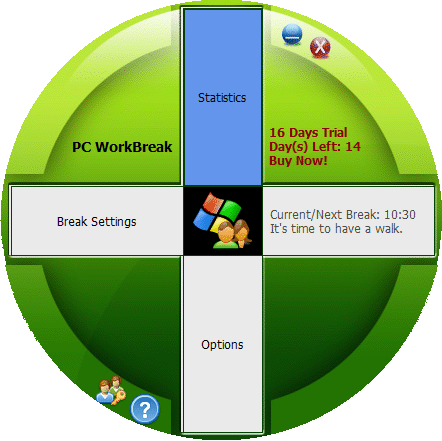
PC WorkBreak is a health-focused utility designed to mitigate the risks of Repetitive Strain Injury (RSI) for individuals with high computer usage. The software monitors keyboard and mouse activity to trigger automated reminders for various physical interventions. These alerts include micro-breaks, stretching routines, eye exercises, and walking intervals.
Users can manage their health goals through the following core features:
- Configurable Break Settings: Users can adjust the frequency and duration of reminders based on specific PC usage models and individual needs.
- Professional Demos: The software provides visual demonstrations for stretches and exercises. These demos can be customized using personal pictures or animated GIFs to suit user preferences.
- Compliance Tracking: A built-in statistics module tracks how often a user follows the suggested breaks, providing a data-driven overview of health habit adherence.
- International Support: The interface includes Unicode support and is compatible with multiple languages, ensuring functionality across different regional systems.
By implementing these structured interruptions, PC WorkBreak aims to alleviate body pain and physical strain associated with prolonged sitting and repetitive manual tasks. The tool focuses on providing a flexible environment where users can tailor health reminders to their specific workflow requirements without manual tracking.
Top 5 Reasons To Download PC WorkBreak
- Comprehensive Multi-Type Break System: PC WorkBreak doesn’t just tell you to stop; it provides a structured regime of micro-breaks, stretches, eye exercises, and walks to prevent RSI from every angle.
- Intelligent Usage-Based Monitoring: Unlike static timers, this software tracks your actual keyboard and mouse activity to provide reminders that align with your real-world PC usage patterns.
- Fully Configurable Visual Customization: Users can personalize their experience by using their own photos or animated GIFs for break demos, making the health reminders both engaging and less intrusive.
- Detailed Compliance Statistics and Tracking: The software provides actionable data on how well you are following your health goals, allowing you to visualize your progress and commitment to a pain-free lifestyle.
- Professional-Grade Ergonomic Guidance: With built-in professional stretch demonstrations and multi-language support, it serves as a personal ergonomic coach that is accessible to a global audience.
In the modern digital landscape, we are more tethered to our desks than ever before. Whether you are a software developer, a creative professional, or a dedicated gamer, the hours can slip by in a blur of blue light and repetitive keystrokes. We often forget that our bodies aren't designed to remain static for eight to ten hours a day. The result? A slow, creeping onset of stiffness, fatigue, and the dreaded Repetitive Strain Injury (RSI). I have seen dozens of productivity apps, but few address the foundation of all productivity: your physical health. That is why I am excited to talk about PC WorkBreak. This isn't just another notification tool; it is a comprehensive health management suite for your workstation. If you have been looking for a reason to prioritize your well-being, this giveaway is your golden ticket. Let’s dive deep into why this software is a mandatory download for anyone who takes their desk health seriously.
1. Comprehensive Multi-Type Break System
Most break reminder software is incredibly simplistic. They function like an egg timer—every thirty minutes, a window pops up telling you to "take a break." While the intent is good, the execution is often lacking because not all breaks are created equal. PC WorkBreak understands that your body has different needs at different intervals. The software categorizes breaks into four distinct types: micro-breaks, stretches, eye exercises, and walks.
The micro-break is designed to be short and frequent. It is that thirty-second pause that allows your wrists to neutralize and your breathing to steady. Then, you have the stretch reminders. These are crucial for counteracting the "hunch" that many of us develop after staring at a monitor. By following the professional stretch demos, you can target specific muscle groups in the neck, shoulders, and lower back before they tighten into painful knots. The eye exercises are a game-changer for those suffering from "Computer Vision Syndrome." By prompting you to shift your focus and blink intentionally, PC WorkBreak helps reduce the strain on your ocular muscles. Finally, the walk reminders encourage you to stand up and move your entire body, which is vital for healthy blood circulation. This multi-layered approach ensures that you aren't just taking a break; you are performing a maintenance routine on your body.
By downloading this software through this giveaway, you are essentially hiring a health consultant that monitors your physical state throughout the day. The variety of breaks ensures that you don't get bored or frustrated with the interruptions, as each one serves a unique and valuable purpose in keeping you pain-free and focused.
2. Intelligent Usage-Based Monitoring
One of the biggest complaints users have with health apps is that they are "dumb." If you leave your desk for fifteen minutes to grab a coffee, a standard timer will still pop up with a break reminder two minutes after you sit back down because it doesn't know you were away. This leads to "notification fatigue," where users eventually just disable the app because it becomes a nuisance. PC WorkBreak solves this problem through its intelligent PC usage model.
The software doesn't just watch the clock; it watches your activity. It monitors your keyboard and mouse usage to determine how much work you are actually doing. If you have been typing vigorously for an hour, it knows you need a break more urgently than if you have been idling or watching a video. Conversely, if the software detects that you have been away from your computer, it can intelligently reset or adjust the timers. This level of sophistication makes the software feel like a partner rather than a nag. It respects your workflow and only intervenes when the data suggests that your physical health is at risk.
As a tech reviewer, I value efficiency above all else. A tool that understands context is infinitely more valuable than a tool that operates in a vacuum. By using the PC usage model, PC WorkBreak provides a bespoke experience that fits into your specific work habits. Whether you are a light browser or a heavy coder, the software adapts to the "load" you are putting on your joints and muscles, making it an essential piece of kit for the modern professional.
3. Fully Configurable Visual Customization
Let’s talk about the user experience. Many health apps use jarring, clinical-looking pop-ups that ruin the aesthetic of your workspace. PC WorkBreak takes a different approach by offering a high degree of configuration. The developers understood that users are more likely to engage with a tool if it feels personal and non-intrusive. This is where the customizable reminder demos come into play.
Within the settings, you can choose to use your favorite pictures or even animated GIFs as the reminder demos. This might sound like a small feature, but it has a massive impact on the psychology of taking a break. Instead of a boring gray box, you could have a GIF of a calming forest, a funny meme, or a photo of your family appearing to remind you to stretch. This creates a positive reinforcement loop. You stop viewing the break as an interruption of your work and start viewing it as a moment of personal enjoyment. It reduces the stress associated with "stopping" and makes the transition to a stretch or an eye exercise much smoother.
Furthermore, all break settings are fully configurable. You can set the frequency, the duration, and the specific type of alerts you want to receive. If you find that you don't need walk reminders but desperately need eye exercises, you can toggle them accordingly. This level of control ensures that the software serves you, rather than the other way around. In a world of "one-size-fits-all" software, the flexibility offered by PC WorkBreak is a breath of fresh air.
4. Detailed Compliance Statistics and Tracking
You cannot improve what you do not measure. This is a mantra in the tech world, and it applies perfectly to health. One of the standout features of PC WorkBreak is its ability to provide compliance rates and statistics. It keeps a record of how often you actually took the breaks that were suggested. Do you skip the stretch reminders every morning? Do you always follow through on the micro-breaks? The statistics will tell the story.
This data-driven approach is incredibly effective for habit formation. When you see a visual representation of your compliance—perhaps a percentage or a graph—it triggers a "gamification" response. You want to see that number go up. You want to achieve 100% compliance for the week. This accountability is what separates a simple app from a lifestyle-changing tool. It allows you to identify patterns in your behavior. For example, you might notice that your compliance drops significantly during the "afternoon slump" around 3:00 PM. Armed with this knowledge, you can make a conscious effort to stay disciplined during those hours.
For those of us who love tracking our steps or our sleep, having a "compliance score" for our desk health is incredibly satisfying. It provides a sense of accomplishment that goes beyond just finishing a task at work. It proves that you are taking care of the most important piece of equipment in your office: you. This giveaway provides you with a professional tracking system that would normally be a paid luxury, helping you build healthy habits that will last a lifetime.
5. Professional-Grade Ergonomic Guidance
The final reason you need to download this software is the quality of the content itself. PC WorkBreak isn't just telling you when to stretch; it is showing you how to stretch. The software includes professional stretch demonstrations that are designed to be easy to follow and highly effective. This is crucial because performing a stretch incorrectly can sometimes do more harm than good. By providing clear, visual demos, the software ensures that you are getting the maximum benefit from every break.
Additionally, the software is designed for a global audience. With Unicode support and multi-language support, it is accessible to users regardless of their location or their computer's regional settings. This level of polish is what you expect from professional-grade software. It isn't a hobbyist project; it is a well-engineered tool designed to address a global health crisis: the sedentary lifestyle. The inclusion of professional demos means you don't have to go searching on video platforms for "desk stretches" and get distracted by other content. Everything you need to maintain your health is contained within the app, ready to go when you are.
When you combine these professional demos with the flexible settings and the intelligent monitoring, you get a tool that is greater than the sum of its parts. It is a complete ecosystem for ergonomic health. Heavy PC users—from writers to day traders—will find that the "body pain induced by long sitting" begins to dissipate once they adhere to the routines suggested by this software. It is a proactive approach to health rather than a reactive one.
Conclusion: Why You Must Download This Today
We often spend thousands of dollars on the latest CPUs, ergonomic chairs, and mechanical keyboards, yet we neglect the software that manages our most vital asset—our health. PC WorkBreak is the missing link in your workstation setup. It bridges the gap between high-performance work and physical longevity. By downloading this giveaway, you are making a commitment to yourself. You are saying that your wrists, your eyes, and your back are worth twenty seconds of your time every half hour.
In this review, we’ve looked at the five pillars that make this software a standout choice. From the multi-type break system that addresses different physical needs to the intelligent usage tracking that respects your workflow, it is clear that a lot of thought has gone into the user experience. The customization options allow you to make the app your own, while the compliance statistics keep you honest and motivated. Finally, the professional guidance ensures that you are moving your body in the safest, most effective way possible.
RSI is a silent, cumulative condition. It doesn't happen overnight; it happens over years of small, repeated strains. The best time to start preventing it was years ago; the second best time is today. Don't wait until you feel that first sharp pain in your wrist or the chronic ache in your shoulders. Take advantage of this giveaway and install PC WorkBreak. It is a lightweight, powerful, and essential addition to any PC. Your future self—the one without chronic back pain or carpal tunnel syndrome—will thank you. This is more than just a software download; it is an investment in your ability to keep doing what you love for years to come. Grab it now and start your journey toward a healthier, more productive, and pain-free digital life.


Reviews for PC WorkBreak
Click Here to Read Reviews for PC WorkBreak >> Click Here to Submit Reviews for PC WorkBreak >>