What Does RaidLabs File Uneraser Do?
RaidLabs File Uneraser is a data recovery utility designed to restore deleted files from various storage media. The software supports internal hard drives as well as removable devices, including USB flash drives, memory sticks, and digital cameras. It addresses a wide range of file formats, such as documents, digital images, audio, video, and compressed archives. The utility is compatible with FAT, FAT32, NTFS, and NTFS5 file systems, and it can retrieve encrypted or compressed files on NTFS volumes.
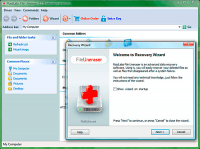
The application offers two primary modes of operation. A guided recovery wizard directs users through the selection and restoration process, while a full auto mode automates disk scanning to determine the optimal recovery strategy. For complex cases, a PowerSearch feature conducts a comprehensive volume scan to locate files no longer indexed by the file system. Users can manage results through an interface similar to Windows Explorer.
A central technical highlight is LivePreview, which enables the viewing of more than 250 file types—including documents and media—prior to restoration. Key capabilities include:
- Recovery of files from emptied Recycle Bins and formatted partitions.
- Restoration of entire folder structures and directory trees.
- Specialized recovery technology for FAT32 volumes.
- Compatibility with both legacy and modern Windows environments.
Top 5 Reasons To Download RaidLabs File Uneraser
We have all been there. That heart-stopping moment when you realize you have just hit Shift + Delete on a folder containing months of hard work, or that sickening feeling when your USB flash drive suddenly asks to be formatted, threatening to swallow your irreplaceable vacation photos forever. In the digital age, data is our most valuable currency, yet it is incredibly fragile. That is exactly why you need a professional-grade recovery tool in your arsenal before disaster strikes. Today, we are looking at a powerhouse utility that every PC user should have installed: RaidLabs File Uneraser. This is not just another utility; it is a digital safety net that can pull your data back from the brink of oblivion. If you are looking for a reason to grab this giveaway, here are the top five reasons why this software is a mandatory download for your system.
- Universal File and File System Compatibility: Whether it is a modern NTFS partition or an old FAT32 flash drive, this tool handles everything including encrypted and compressed files.
- The "PowerSearch" Deep Scanning Engine: When the file system is corrupted and other tools give up, PowerSearch goes below the surface to find files based on raw data signatures.
- Unrivaled LivePreview Technology: You can view over 250 different file types—including documents, photos, and videos—before you even commit to the recovery process.
- Zero-Learning-Curve Interface: With a fully guided recovery wizard and a "Full Auto Mode," you do not need to be an IT professional to recover your data like one.
- Comprehensive Hardware Support: From your internal SSD to digital cameras, memory sticks, and external USB drives, if your computer sees it as a drive letter, this software can save it.
1. Universal File and File System Compatibility
One of the most frustrating aspects of data recovery is finding a tool that only works on specific types of drives. Most free utilities might handle a standard Windows 10 hard drive, but the moment you plug in an older camera card or an encrypted business drive, they fall apart. RaidLabs File Uneraser stands out because it is built to be a universal solution. It supports the entire spectrum of Windows file systems, including FAT, FAT32, NTFS, and NTFS5. This is crucial because different devices use different "languages" to store data. Your high-capacity hard drive likely uses NTFS, while your 32GB thumb drive or your digital camera’s SD card likely uses FAT32. This software speaks all those languages fluently.
But the compatibility goes deeper than just the file system. In a professional environment, many files are compressed to save space or encrypted for security. Most entry-level recovery tools see these files as scrambled junk and cannot restore them to a usable state. This software features specialized algorithms designed to handle NTFS-encrypted and compressed files, ensuring that your sensitive business documents or archived projects are recovered exactly as they were. Whether you are dealing with a simple accidental deletion from the Recycle Bin or a more complex loss involving a virus attack that scrambled your partition table, the broad compatibility ensures you are never left staring at a "Format Disk" error message with no way out.
Furthermore, the tool is designed to work across various versions of Windows. Whether you are running the latest build or an older legacy system, the software maintains its efficiency. This versatility is exactly why tech reviewers recommend it; you never know what kind of device a friend or family member might bring to you for help. Having a tool that can "unerase" data from virtually any disk format gives you a level of technical flexibility that is hard to find in the crowded market of recovery apps.
2. The "PowerSearch" Deep Scanning Engine
When you delete a file, Windows does not actually erase the data immediately. Instead, it marks the space as "available" and removes the file's entry from the master index. Standard recovery tools simply look at that index to see what was recently removed. But what happens if the index itself is damaged? This is where PowerSearch, the crown jewel of RaidLabs File Uneraser, comes into play. If a standard scan comes up empty, PowerSearch performs a comprehensive disk scan that ignores the file system entirely and looks at the raw clusters of data on the disk.
Imagine your hard drive is a library where the card catalog has been burned. A normal person would look at the empty catalog and say there are no books. PowerSearch is the librarian who walks through every single aisle, picking up every scrap of paper and identifying it by its content. It recognizes the unique "signatures" of files—the specific headers and footers that tell the computer "this is a JPEG image" or "this is a PDF document." This allows the software to locate and reconstruct files that are not listed in the file system at all.
This feature is a literal lifesaver in scenarios involving malicious software attacks. Many modern viruses specifically target the file allocation table to make your data invisible, even if the data is still physically there. By using the PowerSearch technology, you bypass the damage done by the virus. It is the difference between a quick surface-level check and a forensic-level investigation of your storage media. For anyone who has ever lost data due to a drive crash or a partition error, this deep-scanning capability is the primary reason why this giveaway is an essential addition to your digital toolkit.
3. Unrivaled LivePreview Technology
There is nothing more frustrating than spending three hours recovering 50GB of data only to find out that the specific file you needed is corrupted or was the wrong version. RaidLabs solves this problem with its LivePreview feature. This isn't just a simple thumbnail viewer; it is a sophisticated engine that allows you to preview more than 250 types of files in a live mode. You can actually read deleted documents, view high-resolution pictures, play back music files, and even watch snippets of recovered video files before you click the "Recover" button.
From a user experience perspective, this is a massive time-saver. When you are looking for a specific photo among thousands of deleted items, being able to scroll through them with a single click in an Explorer-like window is invaluable. The software even allows you to enter deleted archives (like ZIP or RAR files) as if they were regular folders, letting you see what is inside them before you commit to the restoration. This level of transparency is rare, especially since many other tools require you to pay for the full version before you can even see if the file is recoverable.
The LivePreview function acts as a "proof of concept." It gives you the confidence that the software is actually doing its job. If you can see the photo in the preview window, you know for a fact that the data is intact and can be saved. This eliminates the guesswork and the anxiety that usually accompanies data loss. For the tech-savvy user who values efficiency, or the casual user who just wants their wedding photos back, the ability to verify the integrity of files on the fly is a game-changing feature that puts this software in a league of its own.
4. Zero-Learning-Curve Interface
Most powerful tech tools come with a manual the size of a phone book and a user interface that looks like a cockpit of a fighter jet. RaidLabs File Uneraser takes the opposite approach. It is designed with the philosophy that if you are stressed out because you just lost your data, the last thing you want to do is struggle with a complex piece of software. The Fully Guided Recovery Wizard is the star of the show here. From the moment you launch the application, it walks you through a step-by-step process: select the drive, choose the scan type, and pick the files you want back.
For those who want to put in even less effort, there is the Full Auto Mode. In this mode, the software takes the wheel. It analyzes the target drive, determines the most likely cause of data loss, and automatically selects the optimal recovery strategy to get the maximum amount of data back. This is "set it and forget it" data recovery at its finest. You don't need to know the difference between a cluster and a sector; you just need to know which drive you lost your stuff on.
The interface uses a familiar Explorer-like window. This means that once the scan is finished, your deleted files are presented in a layout that looks exactly like the folders you use every day. You can use a search function to filter by file type or name, and you can add files to your recovery list with a simple double-click. By removing the technical barriers to entry, RaidLabs has made professional-level data recovery accessible to everyone. Whether you are a grandmother trying to save photos or a college student trying to recover a lost thesis, the intuitive design ensures you won't make a mistake that could further jeopardize your data.
5. Comprehensive Hardware Support
We live in a world of fragmented storage. We have data on internal hard drives, external backups, tiny microSD cards in our phones, and USB sticks on our keychains. A recovery tool is only as good as the devices it supports. RaidLabs File Uneraser excels here by offering support for virtually any storage media that can be connected to your PC and assigned a drive letter. This includes memory sticks, digital cameras, flash drives, and even older MP3 players.
Think about the variety of ways we lose data today. Maybe you pulled a USB drive out of the port too quickly and the file system became RAW. Maybe your digital camera's internal software glitched and "erased" the memory card. Or perhaps a virus on your PC jumped over to your external backup drive and started deleting archives. In every one of these scenarios, this software is capable of mounting the drive and digging for the lost data. It doesn't care if the device is a high-end SSD or a cheap thumb drive you found in a drawer; the recovery algorithms remain just as potent.
This hardware-agnostic approach is vital because data loss rarely happens where it's most convenient. By downloading this giveaway now, you are essentially preparing yourself for any future hardware failure. It is like having a universal key that can unlock any digital door. The fact that it can recover files from emptied Recycle Bins—the most common place for data to "disappear"—is just the tip of the iceberg. Its ability to communicate with removable media makes it an indispensable tool for photographers, videographers, and anyone who relies on portable storage for their daily tasks.
Final Thoughts: Why You Need To Download This Now
In the world of software, there are "wants" and there are "needs." You might want a new photo editor, but you need a data recovery tool. Data loss isn't a matter of "if," it is a matter of "when." Hard drives eventually fail, human error is inevitable, and software glitches are a fact of life. When that moment comes, the difference between a minor inconvenience and a total catastrophe is whether or not you have the right tool installed and ready to go.
RaidLabs File Uneraser offers a rare combination of high-end forensic power and entry-level simplicity. With its PowerSearch technology, it can find files that other programs don't even know exist. With its LivePreview, it saves you hours of frustration by letting you see what you are getting before you do the work. And with its Guided Wizard, it ensures that even the least tech-savvy user can navigate the recovery process with confidence. This isn't just about "undeleting" a file; it's about reclaiming your digital life after an accident.
As a tech reviewer, I see hundreds of utilities, but few are as genuinely useful as a reliable uneraser. This giveaway is a golden opportunity to add a premium piece of software to your arsenal without the premium price tag. It is lightweight, powerful, and remarkably effective. Don't wait until you are staring at an empty folder and a feeling of dread. Download this tool, keep it ready, and give yourself the peace of mind that comes with knowing your files are never truly gone as long as you have the right software to bring them back. This is one download you will definitely thank yourself for later.
Make sure to take advantage of this giveaway while it lasts. In the high-stakes game of data management, being prepared is the only way to win. Recover your documents, save your photos, and protect your memories with a tool that actually delivers on its promises.


Reviews for RaidLabs File Uneraser
Click Here to Read Reviews for RaidLabs File Uneraser >> Click Here to Submit Reviews for RaidLabs File Uneraser >>