What Does Aimersoft Video Editor Do?
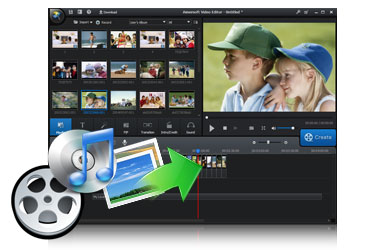
Aimersoft Video Editor is a streamlined utility designed for creators seeking to assemble high-quality multimedia content from raw video, audio, and image files. The application emphasizes accessibility while providing a functional multi-track timeline, allowing users to manage video, audio, and background music on independent layers for greater precision during the assembly process.
The software offers a comprehensive suite of features for both basic and advanced editing tasks:
- Precise Multi-track Editing: Separate tracks for video and audio ensure granular control over timing and synchronization.
- Essential Manipulation Tools: Users can trim, crop, and rotate footage to fix orientation or remove unwanted segments.
- Visual Enhancements: A library of filters, special effects, and transitions is available to touch up videos and provide a professional finish.
- Broad Compatibility: The tool supports the creation of movies from a wide variety of file formats, including diverse audio and image assets.
- Export and Sharing: Finalized projects can be exported for playback on various devices or broadcast across digital platforms.
By combining standard file manipulation with creative post-production effects, Aimersoft Video Editor serves as a functional toolkit for generating polished home movies. The software balances ease of use with enough depth to personalize media files effectively before broadcasting them to a wider audience.
Top 5 Reasons To Download Aimersoft Video Editor
- Pro-Level Precision with a Multi-Track Timeline
- An Infinite Library of Creative Effects and Transitions
- Universal Format Support for Seamless Media Integration
- Unrivaled Ease of Use for Beginners and Pros Alike
- Optimized Exporting for Any Device or Platform
If you have ever tried to edit a video only to find yourself buried under a mountain of complex menus, confusing jargon, and software that crashes every time you try to add a simple transition, you are not alone. The world of video editing is often divided into two frustrating camps: the ultra-basic tools that do almost nothing, and the high-end professional suites that cost a fortune and require a college degree to master. This is exactly why the Aimersoft Video Editor giveaway is such a game-changer. It occupies that perfect "Goldilocks zone" of software—powerful enough to produce stunning, high-quality films, but intuitive enough that you can start your first project and finish it before your coffee gets cold.
In today's digital landscape, video is the undisputed king of content. Whether you are a parent trying to stitch together a montage of your child’s first steps, a budding YouTuber looking to polish your first vlog, or a small business owner trying to create eye-catching social media ads, having a reliable editor is no longer optional. It is a necessity. Aimersoft Video Editor provides the tools to turn raw, unpolished footage into a cinematic experience. Let’s dive deep into the top five reasons why you need to stop what you are doing and download this giveaway immediately.
1. Pro-Level Precision with a Multi-Track Timeline
The biggest hurdle in basic video editing software is the lack of control. Most free or entry-level apps force you to edit on a single "storyboard" where everything is clumped together. If you want to move a clip, the audio gets out of sync; if you want to add background music, it overrides the original sound. Aimersoft Video Editor solves this by providing a fully functional multi-track timeline. This is the hallmark of professional-grade software, and having it in an easy-to-use package is a massive advantage.
With separate tracks for video, audio, and background music, you have total precision over your project. You can layer sounds, overlap images for picture-in-picture effects, and fine-tune the timing of every single cut. Imagine you are creating a travel montage. You can have your primary video footage on one track, a secondary track for "B-roll" overlays, a third track for your voiceover narration, and a fourth track for a sweeping musical score. You can adjust the volume of the music to dip whenever you are speaking, ensuring that your message is never lost in the noise. This level of granular control is what separates a "home movie" from a "fabulous movie."
Furthermore, the timeline allows for frame-by-frame editing. If you have a split second of footage where someone walked into the frame or the camera shook, you can zoom into the timeline and cut it out with surgical accuracy. This ensures that the final product is clean, professional, and exactly how you envisioned it. For anyone serious about the quality of their output, the multi-track timeline is the single most important feature a piece of software can offer.
2. An Infinite Library of Creative Effects and Transitions
Raw footage is rarely perfect. Even the best cameras can produce colors that look a bit flat, or the energy of a scene might feel a bit stagnant. This is where the creative suite within Aimersoft Video Editor shines. One of the most compelling reasons to grab this giveaway is the sheer volume of built-in filters, special effects, and transitions that are ready to go right out of the box. You don't need to be a graphic designer to make your videos look like they were shot on a Hollywood set.
Transitions are often the "make or break" element of a video. Amateur videos often feature jarring cuts that distract the viewer. Aimersoft provides a wide array of professional transitions—from classic fades and dissolves to more dynamic wipes and zooms—that help tell your story smoothly. These transitions bridge the gap between scenes, guiding the viewer’s eye and maintaining the flow of the narrative. Whether you are aiming for a high-energy action vibe or a soft, nostalgic feeling, there is a transition effect to match the mood.
Beyond transitions, the software includes a massive selection of filters and special effects. You can instantly change the color grading of your video to give it a vintage 1970s film look, a high-contrast cinematic feel, or a bright and airy aesthetic for social media. There are also fun overlays and motion elements that you can drop onto your clips to add personality. These features allow you to "touch up" your video just like you would a photo on Instagram, but with the added depth and complexity of motion. It turns the editing process into a creative playground where the only limit is your imagination.
3. Universal Format Support for Seamless Media Integration
We live in a world of fragmented technology. You might take a video on your iPhone (MOV), receive a clip from a friend on an Android (MP4), download some music (MP3), and want to include some high-resolution photos from your DSLR (JPEG). In many editing programs, trying to get all these different file types to work together is a nightmare of "File Not Supported" errors and the need for third-party converters. One of the most practical reasons to download Aimersoft Video Editor is its robust compatibility.
This software acts as a universal hub for all your media. It handles virtually any video, audio, or image format you throw at it. This "plug and play" nature saves you hours of frustration. You can drag and drop your files directly into the media library and start editing immediately. The software handles the background processing, so you don't have to worry about bitrates, codecs, or file extensions. It’s all about removing the technical barriers so you can focus on the creative side of filmmaking.
This compatibility extends to the quality of the media as well. Whether you are working with standard definition footage from an old camcorder or high-definition 1080p clips from a modern smartphone, the software maintains the integrity of your files. It allows you to mix and match different resolutions and aspect ratios, providing tools to crop or scale them so they fit perfectly within your project frame. In a world where we capture memories on dozens of different devices, this kind of flexibility is an absolute lifesaver.
4. Unrivaled Ease of Use for Beginners and Pros Alike
Tech reviewers often talk about the "learning curve" of a program. With many video editors, that curve is a vertical wall. You open the program and are greeted by hundreds of icons that look like hieroglyphics. Aimersoft Video Editor takes a different approach. It is designed with a human-centric interface that prioritizes the most common tasks while keeping advanced features just a click away. This makes it the ideal choice for someone who wants professional results without spending weeks watching tutorials.
The "Basic Features" are clearly labeled and incredibly easy to use. Trimming a long clip into a short highlight takes seconds. Rotating a video that was accidentally shot vertically is a one-click fix. Adjusting the brightness, contrast, and saturation is as simple as moving a slider. These are the tasks that most users need to do 90% of the time, and Aimersoft makes them effortless. The drag-and-drop workflow means that if you want to add a title, you just drag it to the timeline. If you want to add a filter, you just drop it onto the clip. It is intuitive in the truest sense of the word.
However, "easy to use" does not mean "basic." As you become more comfortable with the software, you will find deeper layers of functionality. You can adjust audio pitch, use "face-off" features to blur out faces or add fun masks, and utilize split-screen effects to show multiple perspectives at once. The software grows with you. It doesn't overwhelm the beginner, but it doesn't limit the intermediate user. For a giveaway, finding software that balances this "easy-to-use yet powerful" dynamic is rare, making it a must-have for your digital toolkit.
5. Optimized Exporting for Any Device or Platform
The final, and perhaps most important, step of video editing is sharing your creation with the world. There is nothing worse than finishing a masterpiece only to realize it’s in a format that your TV won’t play, or it’s too large to upload to social media. Aimersoft Video Editor takes the guesswork out of the final phase with its intelligent export options. This is the fifth and final reason why this giveaway is an essential download.
When you are ready to produce your movie, the software gives you a variety of "optimized" presets. You don't need to know what a "H.264 codec" is; you just need to know where you want to watch your video. Do you want to watch it on your iPhone? There is a preset for that. Uploading to YouTube or Facebook? There are dedicated settings that automatically adjust the resolution and compression to ensure the best possible quality on those platforms. You can even burn your project directly to a DVD to give as a gift to family members—a feature that is becoming increasingly rare in modern software.
This "export anywhere" philosophy ensures that your hard work actually gets seen. It handles the heavy lifting of file conversion and optimization in the background, giving you a file that is the perfect balance of high quality and manageable file size. Whether you are broadcasting to a global audience online or just sharing a private link with friends, Aimersoft ensures that your video looks exactly the way you intended it to, regardless of the screen it is being viewed on. In the end, a video is meant to be shared, and this software makes that final step the easiest one of all.
Conclusion: Why You Should Act Now
The Aimersoft Video Editor is more than just a simple utility; it is a gateway to better storytelling. In a world that is increasingly visual, the ability to craft a compelling video is a superpower. This software gives you that power by stripping away the complexity of traditional editing and replacing it with a streamlined, creative, and powerful workflow. From the precision of the multi-track timeline to the ease of the final export, every feature is designed to help you succeed.
Remember, this is a giveaway. Opportunities to legally acquire full-featured, powerful software like this at no cost are few and far between. Whether you are a student, a hobbyist, or a professional looking for a lighter alternative to your heavy-duty tools, there is no reason not to add this to your collection. You are getting a tool that can turn your cluttered folder of "phone clips" into a curated library of memories and professional content. Don't let your footage sit on your hard drive gathering digital dust. Download Aimersoft Video Editor today, and start creating the fabulous home movies you’ve always wanted to make. Your audience—whether it's the whole world or just your family—will thank you.
Final Pro-Tip: When you first open the software, take five minutes to explore the transition library. Simply seeing the possibilities will spark ideas for your next project that you never thought possible. Happy editing!


Reviews for Aimersoft Video Editor
Click Here to Read Reviews for Aimersoft Video Editor >> Click Here to Submit Reviews for Aimersoft Video Editor >>