What Does Sothink Flash Menu Do?
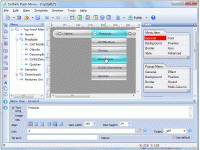
Sothink Flash Menu is a specialized design tool that allows web developers to create interactive, cross-browser navigation systems without requiring knowledge of ActionScript or Flash coding. The software utilizes a WYSIWYG (What You See Is What You Get) interface, enabling users to build and preview menus in a visual environment before publishing them to a live site.
The program provides a suite of pre-configured resources, including:
- 46 built-in templates and 35 preset styles.
- 50 distinct special effects for menu interaction.
- An image library spanning four specific categories.
Functionally, the tool supports the creation of scrollable and highlighted menus. It includes features for importing existing DHTML or tree menus to convert them into Flash format, alongside XML support for data retrieval. Design elements such as font, alignment, transparency, sound, and cursor behavior are fully customizable. To ensure site compatibility, the software manages sub-menu layering so that navigation remains visible above other web elements. It also supports floating menus that maintain fixed positions independently of standard HTML containers, with an auto-adjust feature that scales item sizes based on content changes.
Top 5 Reasons To Download Sothink Flash Menu
If you have ever spent hours staring at a screen, wrestling with lines of code just to get a website menu to look halfway decent, then you know the struggle is real. Website navigation is the backbone of user experience, but creating something that is both functional and visually "wowing" usually requires a PhD in ActionScript or a bank account deep enough to hire a full-time Flash developer. That is exactly why I am so excited to talk about the current giveaway for Sothink Flash Menu. This isn't just another widget; it is a powerhouse of a tool that turns the complex world of Flash animation into a playground for creators of all skill levels. Whether you are a veteran webmaster or a hobbyist looking to spice up a personal project, this software is a game-changer.
Before we dive into the nitty-gritty of why this tool deserves a permanent spot in your digital toolkit, let’s look at the highlights. Here are the top five reasons you need to stop what you are doing and download this giveaway right now.
- Pro-Level Flash Menus Without the Coding Headaches: You can create high-end, interactive menus without knowing a single line of Flash or ActionScript.
- A Massive Library of Ready-to-Use Assets: With 46 templates, 50 special effects, and 35 preset styles, you have thousands of combinations at your fingertips.
- Seamless Integration and Cross-Browser Compatibility: The tool ensures your menus work across different browsers and allows you to import existing DHTML or tree menus effortlessly.
- Total Creative Freedom and Customization: From scrollable menus to custom sounds and transparency settings, every single pixel of your navigation can be tailored to your brand.
- Effortless WYSIWYG Workflow: The "What You See Is What You Get" interface eliminates guesswork, allowing you to see your changes in real-time as you build.
Now, let’s break these down. As someone who has reviewed hundreds of web design tools, I can tell you that it is rare to find a piece of software that balances power and ease of use this effectively. Here is why Sothink Flash Menu is the upgrade your website has been waiting for.
1. Pro-Level Flash Menus Without the Coding Headaches
The biggest barrier to entry for high-quality web animation has always been the technical wall. For years, if you wanted a "stunning" Flash drop-down menu, you had to learn the complexities of Adobe Flash and the intricacies of ActionScript. We are talking about months of learning or hundreds of dollars in outsourced labor. Sothink Flash Menu completely demolishes that wall. It is designed specifically for people who want the visual impact of Flash without the technical debt of learning it.
When you use this software, you are essentially using a visual compiler. You make the choices—colors, movements, logic—and the software handles the heavy lifting in the background. This means you can focus on what actually matters: the user experience and the aesthetic of your site. In the world of tech, we often talk about "democratizing technology," and that is exactly what is happening here. You get to play with the big kids of web design without having to spend years in the library. This giveaway gives you the keys to a kingdom that was previously locked behind a very expensive and difficult gate.
Imagine being able to tell a client or a collaborator that you built a custom, interactive navigation bar in twenty minutes that looks like it took a week. That is the kind of efficiency we are talking about. It’s not just about saving time; it’s about reducing the frustration that comes with traditional web development. No more debugging broken scripts or wondering why a hover effect isn't triggering. It just works.
2. A Massive Library of Ready-to-Use Assets
One of the hardest parts of design is staring at a blank canvas. Even the best designers get "creative block." This software solves that by providing an absolute mountain of resources. We are talking about 46 built-in templates that cover almost every industry and style imaginable. Whether you need something sleek and professional for a corporate site or something vibrant and edgy for a portfolio, there is a template that serves as the perfect starting point.
But it doesn't stop at templates. The software includes 50 amazing special menu effects. These aren't just your standard "fade in" transitions. We are talking about sophisticated, fascinating visual menu effects that catch the eye and improve user interaction. When a visitor hovers over your menu and sees a smooth, polished transition, it subconsciously builds trust. It says, "This site is professional. This site is high-quality."
Add to that 35 preset styles and four categories of image libraries, and you have a virtually infinite palette. You can mix and match these resources to ensure that your menu doesn't look like a "cookie-cutter" design. You can take a base template, apply a unique special effect, swap in images from the library, and end up with something that is entirely your own. This giveaway is basically handing you a complete design studio's worth of assets for the price of... well, zero. That is an incredible value proposition for any web creator.
3. Seamless Integration and Cross-Browser Compatibility
In the tech world, there is nothing more frustrating than building something beautiful that only works in one specific browser. We have all been there—the site looks great in Chrome but falls apart in Safari or Firefox. Sothink Flash Menu is built with cross-browser compatibility as a core feature. It ensures that the stunning navigation bar you create looks and functions exactly as intended, regardless of how your visitor is accessing your site.
The software also offers incredible flexibility in how it handles data. It supports XML to generate the Flash menu, which is a huge win for developers who want to keep their content dynamic and easy to update. Furthermore, if you already have a website with a DHTML or tree menu and you want to modernize it, you don't have to start from scratch. You can import those existing menus into the program and transform them into brand-new Flash menus. This "bridge" between old and new technologies makes it an essential tool for anyone maintaining or reviving older websites.
Another technical masterstroke is how it handles web elements. One common issue with Flash menus is that they can sometimes get "hidden" behind other elements like videos or complex divs. This software allows the Flash menu to show its sub-menus completely above other web elements. Plus, the "float menu" feature allows you to locate the navigation in a fixed position without having to mess around with complicated table or div structures. It’s smart, it’s clean, and it saves you from a million CSS headaches.
4. Total Creative Freedom and Customization
While the templates are great for speed, the true power of Sothink Flash Menu lies in its customization engine. This isn't a "one-size-fits-all" tool. You have granular control over every aspect of the menu's behavior and appearance. Do you need a scroll menu for a site with dozens of categories? You can do that. Do you want a highlight menu that tracks the user's progress through the site? That's just a few clicks away.
The customization list is exhaustive. You can adjust:
- Fonts and Alignment: Match your site's typography perfectly.
- Colors and Transparency: Create glass-morphism effects or bold, opaque blocks of color.
- Sound: Add auditory feedback to your menu items for a truly immersive experience.
- Cursors: Change the mouse cursor on hover to guide the user's eye.
- Position and Size: Use the auto-adjust feature to ensure items resize perfectly based on your modifications.
This level of control means that the menu isn't just an "add-on" to your site; it becomes an integral part of your design language. You can fine-tune the transparency to let a beautiful hero image peek through the navigation, or you can use the sound effects to give your site a "premium app" feel. The ability to customize the interaction—how it feels when a user clicks or hovers—is what separates a "good" website from a "great" one. With this tool, you have everything you need to reach that "great" status.
5. Effortless WYSIWYG Workflow
Finally, we have to talk about the interface. In the software world, WYSIWYG stands for "What You See Is What You Get." This is the holy grail for designers. Instead of writing code, saving the file, uploading it to a server, and hitting refresh in a browser to see if your change worked, you see the changes immediately in the software interface.
The Sothink Flash Menu builder is designed with this intuitive workflow at its heart. When you change a color, you see it. When you apply a "fascinating visual effect," you see it animate right there on your screen. This creates a much faster "feedback loop," which is essential for creative work. It allows you to experiment. You can try five different effects in five minutes to see which one feels right. If you were coding this by hand, that same experiment would take an afternoon.
The interface also includes "smart" features like auto-adjusting item sizes. If you change the text in a menu item from "Home" to "Our International Corporate Headquarters," the software will automatically adjust the menu's dimensions to accommodate the new text. It’s these small, thoughtful touches that make the software a joy to use. It feels like the tool is working with you rather than against you. For any tech enthusiast or professional, a streamlined workflow is the ultimate luxury, and this software delivers it in spades.
In conclusion, the Sothink Flash Menu is a robust, professional-grade solution for anyone looking to elevate their web presence. It takes the power of Flash—its interactivity, its beauty, and its engagement—and makes it accessible to everyone. By downloading this giveaway, you are getting a massive library of assets, a powerful customization engine, and a technical framework that ensures your site works perfectly for every visitor. Do not miss out on this. High-quality navigation is the first thing your users see and the primary way they interact with your content. Give them an experience they won't forget. Download this tool, explore the templates, and start building something stunning today!
Final Reviewer Note: In an era where web design can often feel a bit flat and predictable, adding a touch of Flash-inspired interaction can really make your project stand out from the crowd. This tool provides a safe, easy, and incredibly powerful way to do just that. It is rare to see this much functionality packed into a single package. Whether you use it for the scroll menus, the transparency effects, or just to save time on a client project, you will find that Sothink Flash Menu quickly becomes one of your favorite utilities.


Reviews for Sothink Flash Menu
Click Here to Read Reviews for Sothink Flash Menu >> Click Here to Submit Reviews for Sothink Flash Menu >>