What Does Ocster 1-Click Backup 2 Do?
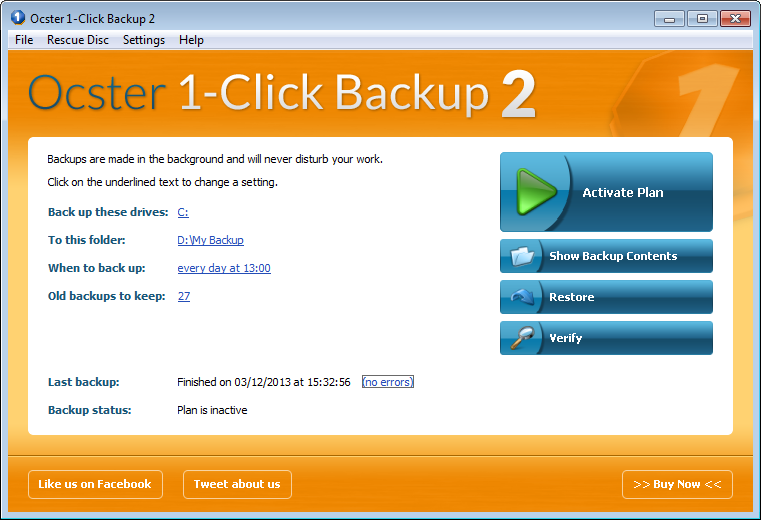
Ocster 1-Click Backup 2 is a streamlined imaging solution designed for automated data protection. The software focuses on a "set and forget" approach, allowing users to initiate full computer or individual drive backups with a single mouse click. Once configured, the application runs in the background and automatically pauses its operations if the system requires full processing power for other tasks.
The core technology behind this utility is the Infinite Reverse Incremental Backup system. This method reduces the total storage footprint of backup data by approximately 50% compared to conventional imaging tools. The software utilizes the VMDK file format, ensuring that backups remain compatible with various third-party virtualization tools, and provides native support for hard disks exceeding 2 TB in capacity.
For data recovery, the application provides several tiers of restoration. Users can mount backups as virtual drives within Windows Explorer to extract individual files and folders. For more critical hardware failures, the software supports bare metal restoration to blank hard drives and includes a bootable rescue system via CD or USB stick. Technical features include high-speed data compression, advanced scheduling options, and an integrated integrity verification tool to ensure all stored data remains uncorrupted.
Top 5 Reasons To Download Ocster 1-Click Backup 2
- The Ultimate "Set It and Forget It" Simplicity – Ocster 1-Click Backup 2 lives up to its name by offering a streamlined setup that requires zero technical knowledge and automates the entire protection process in the background.
- Revolutionary Space-Saving Technology – Thanks to the proprietary Infinite Reverse Incremental Backup system, your backups are roughly 50% smaller than those created by competing software, saving you massive amounts of disk space.
- Comprehensive Recovery and Bare Metal Restore – Whether you need a single lost file or a full system restoration on a brand-new, empty hard drive, the software provides versatile tools including a bootable rescue system.
- Industrial-Grade Technology with Universal Compatibility – Using the VMDK file format and high-speed compression, the software ensures your data is not only safe but also accessible by other virtualization tools if necessary.
- Future-Proof Features for Modern Hardware – With support for massive hard drives over 2 TB, advanced scheduling, and automatic integrity verification, this software is built to handle the demands of modern computing environments.
If you are anything like me, you have probably spent years telling yourself that you really need to start backing up your data. We all know the drill: we buy an external hard drive, we promise ourselves we will copy our photos and documents over every weekend, and then life happens. We forget. Or, worse yet, we try to use a backup utility that is so bloated and complicated that we give up halfway through the configuration process. This is exactly why Ocster 1-Click Backup 2 is a total game-changer for the average user and the tech enthusiast alike. As a reviewer who has seen dozens of backup solutions come and go, I can confidently say that this specific giveaway is something you cannot afford to pass up. It takes the "chore" out of data protection and replaces it with a seamless, invisible safety net.
1. The Ultimate "Set It and Forget It" Simplicity
The biggest hurdle to data security isn't the cost of hardware; it is the complexity of software. Most backup programs ask you a million questions: Do you want a differential or incremental backup? What block size should we use? Should we use AES-128 or 256? For the average person who just wants to make sure their family photos aren't lost if their laptop takes a tumble, these questions are a nightmare. Ocster 1-Click Backup 2 is designed for everyone who does not want to think about backups. The philosophy here is "Simplicity First."
When they say "1-Click," they aren't exaggerating. The initial setup is designed to get you protected in seconds. You can choose to back up your entire computer or specific individual drives with a single mouse click. Once that is done, the software effectively disappears. It runs automatically in the background, keeping your files safe without you ever having to lift a finger again. But what really impressed me during my testing was the intelligent resource management. One of the main reasons people disable backup software is that it slows down their computer while they are trying to work or play games. Ocster solves this by monitoring your system's activity. If you need the full power of your CPU for a resource-heavy task, the backup process automatically pauses. It waits for your system to be idle again before resuming its work. This means you get the best of both worlds: total data protection and zero performance lag.
This level of automation is what makes it a must-download. You don't have to remember to plug things in or click "Start." It is a silent guardian that respects your workflow. In an era where our digital lives are more cluttered than ever, having one less thing to worry about is a massive relief. Simplicity is not just a feature here; it is the core identity of the product.
2. Revolutionary Space-Saving Technology
Storage space is always at a premium. Even as hard drives get larger, our files—4K videos, high-resolution RAW photos, and massive game installs—get even larger. Traditional backup methods can be incredibly wasteful, often saving redundant data or using inefficient compression algorithms that result in "backup bloat." Ocster 1-Click Backup 2 tackles this problem head-on with a unique technology called Infinite Reverse Incremental Backup.
This is where the "tech" in tech reviewer really gets excited. Most software uses standard incremental backups where you have one big "full" backup followed by many small "changes." This can become a mess to manage over time. Ocster’s Infinite Reverse Incremental system is different. It creates image backups that are significantly more efficient. In fact, the software is capable of reducing the total size of your backup data by approximately 50% compared to other leading solutions. Imagine having two terabytes of data and being able to store its backup in only one terabyte of space without losing a single bit of information. That is the power of this technology.
Why does this matter to you? First, it saves you money. You can buy a smaller external drive or fit more versions of your history on your current drive. Second, it makes the backup process faster because there is less data to write to the disk. By combining this "Infinite" storage system with very fast data compression, Ocster ensures that your backups are lean, mean, and incredibly efficient. It is a smarter way to handle data, moving away from the "brute force" methods of the past.
3. Comprehensive Recovery and Bare Metal Restore
A backup is only as good as its ability to be restored. We have all heard the horror stories of people who meticulously backed up their data for years, only to find that when their hard drive actually died, they couldn't get their files back. Ocster 1-Click Backup 2 provides a level of "Easy Restore" functionality that is genuinely impressive. It handles everything from the "oops, I deleted a file" scenario to the "my house was struck by lightning and my computer won't turn on" scenario.
For everyday mistakes, the software allows you to open your backups as virtual drives directly in Windows Explorer. This is incredibly intuitive. You don't have to run a complex "Restore Wizard" just to get one Word document back. You simply browse the backup as if it were a normal folder, find the file, and copy it back to your desktop. It is seamless and requires no learning curve. However, the software also shines when things go spectacularly wrong. It supports Bare Metal Restore, which means you can restore your entire system to a completely blank, new hard drive. If your old drive dies, you just pop in a new one, use the bootable rescue system (which you can create on a CD or a USB stick), and the software will rebuild your entire environment, including the boot sector.
This "Rescue System" is your ultimate insurance policy. Even if Windows won't start, even if the "Blue Screen of Death" is all you see, you can boot from your Ocster USB stick and bring your computer back to life exactly as it was. This includes your operating system, your installed programs, your browser bookmarks, and all your personal files. It turns a potential week-long headache of reinstalling software into a simple, automated process.
4. Industrial-Grade Technology with Universal Compatibility
When you use backup software, you are essentially trusting that company with your digital life. One of the risks with many backup programs is that they save your data in a proprietary "closed" format. If that company goes out of business or you stop using their software, your backups might become useless. Ocster 1-Click Backup 2 avoids this trap by using the VMDK (Virtual Machine Disk) file format.
For those who aren't familiar, VMDK is an industry-standard format used by major virtualization software like VMware. This is a huge win for the user. It means that your backups are stored in a format that is widely recognized and can be opened by various other third-party tools. It provides an extra layer of freedom and security, ensuring that you are never "locked in" to a single ecosystem. This is a professional-grade feature that you rarely see in software designed for "simplicity," and it shows that the developers at Ocster really care about data integrity and user rights.
Additionally, the underlying engine of the software creates Image Backups. Unlike "file-based" backups that just copy folders, an image backup takes a snapshot of the entire drive. This includes hidden system files, partition tables, and the registry. This is the only way to ensure that a restored system will actually work. When you combine this image-based approach with their high-speed compression and the aforementioned space-saving tech, you get a backup engine that is both powerful and reliable. It is "great technology" hidden behind a very user-friendly interface.
5. Future-Proof Features for Modern Hardware
The tech world moves fast, and many backup utilities struggle to keep up. Old software often chokes on new hardware or massive file sizes. Ocster 1-Click Backup 2 has been updated with several "What's New" features that make it ready for the hardware of today and tomorrow. One of the most important updates is the support for hard disks bigger than 2 TB. While 2 TB used to be a massive amount of space, it is now the standard for even budget-friendly external drives. Many older backup programs use an outdated partitioning scheme that simply cannot see or use space beyond the 2 TB limit. Ocster has no such limitations, allowing you to utilize the full capacity of the latest high-density drives.
Beyond hardware support, the software has introduced Advanced Scheduling Options. While the "1-Click" setup is great for most, power users might want more control. You can now fine-tune exactly when and how your backups occur, ensuring they happen at the most convenient times for your specific routine. Even more importantly, the software now includes Backup Integrity Verification. This is a critical feature that many people overlook. It periodically checks your backup files to ensure they haven't been corrupted by "bit rot" or hardware errors on your backup drive. It gives you that extra peace of mind, knowing that when you eventually need that backup, it will actually work.
These features—large disk support, scheduling, and integrity checks—transform the software from a simple utility into a robust, professional-grade tool. It is rare to find a giveaway that offers this much "under the hood" power while remaining so accessible to someone who has never performed a backup in their life.
In conclusion, Ocster 1-Click Backup 2 is a rare breed of software. It manages to be incredibly simple for the novice while offering the advanced technology, space-saving efficiency, and robust recovery options that a pro-user demands. The 50% reduction in backup size alone is a reason to download it, but when you add in the bootable rescue system and the universal VMDK format, it becomes an essential tool for any PC owner. Don't wait for your hard drive to start making that clicking sound of death. Take advantage of this giveaway, set up your 1-click protection, and sleep better knowing your digital world is safe. Download it now and give yourself the gift of total peace of mind.

Reviews for Ocster 1-Click Backup 2
Click Here to Read Reviews for Ocster 1-Click Backup 2 >> Click Here to Submit Reviews for Ocster 1-Click Backup 2 >>