What Does 1-abc.net Password Organizer Do?
Managing multiple digital identities often leads to security vulnerabilities or lost access. 1-abc.net Password Organizer addresses this by consolidating login credentials, PINs, and security codes into a single encrypted database. Users only need to recall one master password to access their entire vault. To enhance security, the utility features an integrated random password generator, creating complex strings that avoid common patterns like birthdays or familiar names.
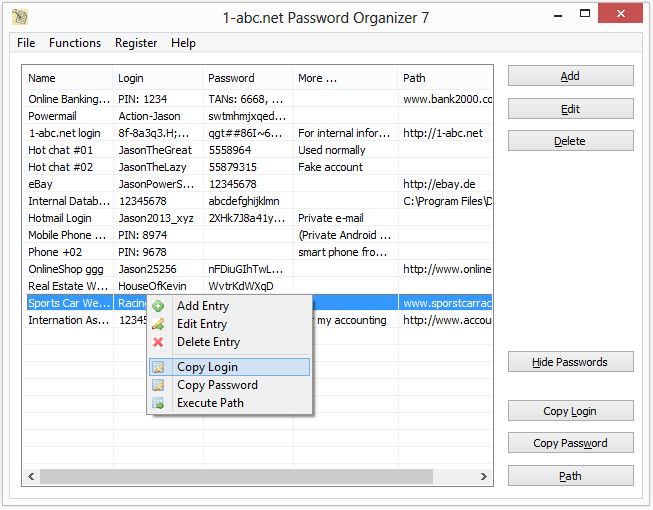
The application is designed for workflow efficiency. It supports global hotkeys for rapid data entry and allows users to link specific entries to executable files or web URLs. This enables a one-click transition from the organizer to a specific login page or local program. All sensitive data is protected using Advanced Encryption Standard (AES), ensuring that stored information remains inaccessible without the master key.
For administrative flexibility, the software offers two interface modes—classic and list view—and is portable, meaning it can be installed on USB sticks or other re-writable media. Additional management features include an automatic inactivity timer, password change reminders, and export capabilities to .txt, .csv, and .sqlite formats. Users can sort entries by name, date, or login to maintain an organized database that scales to the limit of the system's disk space.
Top 5 Reasons To Download 1-abc.net Password Organizer
1. Unbreakable AES Encryption Security: Protects your most sensitive data using the Advanced Encryption Standard, ensuring that your login credentials remain invisible to hackers and unauthorized users.
2. Integrated Random Password Generation: Eliminates the habit of using weak, predictable passwords by creating complex, randomized strings that are virtually impossible to guess or brute-force.
3. Advanced Workflow Automation with Global Hotkeys: Boosts your productivity by allowing you to enter login data instantly into any application or website without the tedious process of manual typing or repeated copy-pasting.
4. Extreme Portability and Media Flexibility: Offers the ability to install and run the software from USB sticks, camera cards, and other rewritable media, giving you access to your secure vault on any machine without leaving a digital footprint.
5. Comprehensive Data Organization and Exporting: Features a massive capacity for thousands of entries, customizable sorting, and the ability to export data to multiple formats like TXT, CSV, and SQLite for personal backups.
In the modern digital landscape, we are constantly bombarded with a never-ending stream of accounts, subscriptions, and services. From the basic necessities like e-mail and social media to the high-stakes world of online banking and investment portfolios, our digital identities are fragmented across dozens, if not hundreds, of different platforms. For the average user, managing this chaotic sprawl of login credentials has become a second job—and a stressful one at that. We have all felt that sinking feeling in our stomachs when we reach a login screen and realize we have forgotten the password. We have all experienced the frustration of the "password reset" loop. But more importantly, many of us are guilty of the cardinal sin of cybersecurity: using the same simple password for everything because it is the only way we can remember how to get into our accounts.
This is where a professional-grade tool like 1-abc.net Password Organizer steps in to save the day. As a tech reviewer who has seen countless security breaches and identity theft horror stories, I cannot stress enough how vital it is to have a centralized, encrypted, and efficient way to manage your data. This giveaway isn't just another piece of "freeware" to clutter your hard drive; it is a fundamental upgrade to your personal digital security posture. Let’s dive deep into the five primary reasons why you need to download this software right now and make it the cornerstone of your daily routine.
Reason 1: Unbreakable AES Encryption Security
When it comes to your passwords, "good enough" security simply doesn't exist. You either have a vault that is locked tight, or you are leaving your digital life open to whoever has the tools to pick the lock. The 1-abc.net Password Organizer utilizes AES (Advanced Encryption Standard), which is the gold standard in the industry. This is the same encryption level used by banks, government agencies, and military organizations across the globe to protect classified information. When you save a password in this application, it isn't just hidden; it is transformed into a complex mathematical cipher that is impossible to decipher without your unique master password.
The beauty of this system lies in the "Single Master Password" philosophy. Instead of trying to juggle fifty different combinations of your childhood pet's name and your grandmother's birthday, you only need to memorize one high-quality, complex phrase. Once you enter that master password, the 1-abc.net Password Organizer unlocks your entire database. This Master Password concept is the ultimate bridge between high-level security and user-friendly convenience. Without that specific key, even if someone managed to steal your database file, they would be looking at a wall of gibberish. In a world where data breaches are happening every single day, having this level of local encryption on your own machine is the best defense you can have. You are no longer relying on a third-party cloud provider to keep your data safe; you are taking control of your own security destiny.
Reason 2: Integrated Random Password Generation
Most people are remarkably bad at creating passwords. We tend to favor patterns: a capital letter at the beginning, a few numbers at the end, and perhaps a special character like an exclamation point. While this might pass the "basic" requirements of a website, it is trivial for modern "brute-force" software to crack these patterns in seconds. We use names of politicians, sports teams, or significant dates because they are easy to remember, but they are also the first things a hacker will try. This is why the Integrated Random Password Generator inside 1-abc.net Password Organizer is such a game-changer.
With this feature, you no longer have to strain your brain trying to think of a "strong" password. The software does the heavy lifting for you, generating random strings of characters that have no linguistic pattern or logical sequence. These are the kinds of passwords that make hackers give up. Whether you need an 8-character pin or a 32-character monster for your primary e-mail, the generator handles it with ease. By using this tool for every new account you create, you ensure that even if one service you use is compromised, the password stolen from that site is completely unique and useless for accessing your other accounts. This isolation of credentials is one of the most effective ways to prevent a single hack from turning into total identity theft.
Reason 3: Advanced Workflow Automation with Global Hotkeys
Efficiency is the hallmark of great software, and 1-abc.net Password Organizer is built with the "power user" in mind. We have all been through the "alt-tab dance": you open your browser, go to a site, realize you don't know the password, open your notes, find the password, copy it, go back to the browser, paste it, and then repeat the whole process for the username. It is a slow, clunky process that interrupts your flow. This organizer eliminates that friction entirely through the use of Global Hotkeys and direct execution paths.
Imagine being able to simply hit a key combination on your keyboard and having your login data instantly populated into the fields. It feels like magic, but it’s just smart engineering. Furthermore, the software allows you to define "paths" for your entries. If you have an entry for a specific website like eBay or a specific program on your computer, you can launch that site or application directly from the organizer with a single click. It turns your password manager into a productivity hub. You don't just store your passwords; you use the organizer as the starting point for your entire digital session. Whether you are a professional managing dozens of client servers or a casual user who just wants to get onto social media faster, these workflow features will save you hours of cumulative time over the course of a year.
Reason 4: Extreme Portability and Media Flexibility
One of the biggest complaints users have about security software is that it often feels "tethered" to a single computer. What happens when you go to the office? What happens when you are using a laptop while traveling? 1-abc.net Password Organizer solves this by offering incredible portability. This isn't just a program that sits on your C: drive; it is an application that can be installed on almost any rewritable medium. You can put it on a USB thumb drive, a camera SD card, or even an external hard drive.
This "mobile vault" capability means that your security goes wherever you go. You can plug your USB stick into any Windows machine, run the program, enter your master password, and have full access to your digital life without ever having to install software on that guest machine. This is particularly useful for people who move between a home office and a corporate environment. Moreover, it adds an extra layer of physical security. If you keep your password database on a small USB drive that stays in your pocket or a safe, it is physically impossible for a remote hacker to access that file when the drive is unplugged. You get the best of both worlds: the convenience of digital storage and the air-gapped security of a physical key.
Reason 5: Comprehensive Data Organization and Exporting
A password manager is only as good as its ability to help you find what you need. If you have five hundred passwords, but they are all in one giant, unsorted list, you haven't really solved your problem. 1-abc.net Password Organizer provides a robust set of organizational tools that allow you to sort your entries by date, name, login, or the password itself. You can toggle between a Classic Mode and a List View depending on your visual preference, and use the full-screen mode when you need a bird's-eye view of your entire digital estate. The inclusion of a Safe Mode to prevent accidental changes is a thoughtful touch that shows the developers understand the importance of data integrity.
Finally, we have to talk about data sovereignty. Many cloud-based password managers make it very difficult to get your data out if you ever decide to stop using their service. This organizer, however, gives you full control. It offers export functions for .txt, .csv, and .sqlite formats. This means you can easily create a printed hard copy of your passwords to keep in a physical safe (a highly recommended "Plan B"), or you can move your data into other database formats for advanced editing. The software even includes a reminder system to tell you when it is time to rotate your passwords, ensuring that your security never goes stale. It is a complete lifecycle management tool for your digital credentials, providing both the storage you need today and the flexibility you might need tomorrow.
In conclusion, the 1-abc.net Password Organizer is an essential tool for anyone who takes their digital security seriously—which, in this day and age, should be everyone. It takes the overwhelming task of password management and turns it into a streamlined, automated, and hyper-secure process. By downloading this giveaway, you are giving yourself the gift of peace of mind. You will no longer have to worry about forgetting a pin, using a weak password, or falling victim to a credential-stuffing attack. You can finally stop focusing on the logistics of logging in and start concentrating on the things that actually matter in your life. Don't wait until you've been hacked to realize you needed this; download it now, set your master password, and take the first step toward a more secure digital future.
The combination of military-grade encryption, ease of use, and incredible portability makes this one of the most practical giveaways you will find this year. Whether you are a tech-savvy professional or someone who just wants to keep their family's e-mail accounts safe, 1-abc.net Password Organizer is the solution you have been looking for. Get it today and lock down your digital world.

Reviews for 1-abc.net Password Organizer
Click Here to Read Reviews for 1-abc.net Password Organizer >> Click Here to Submit Reviews for 1-abc.net Password Organizer >>