What Does MP4 Video and Audio Tag Editor Do?
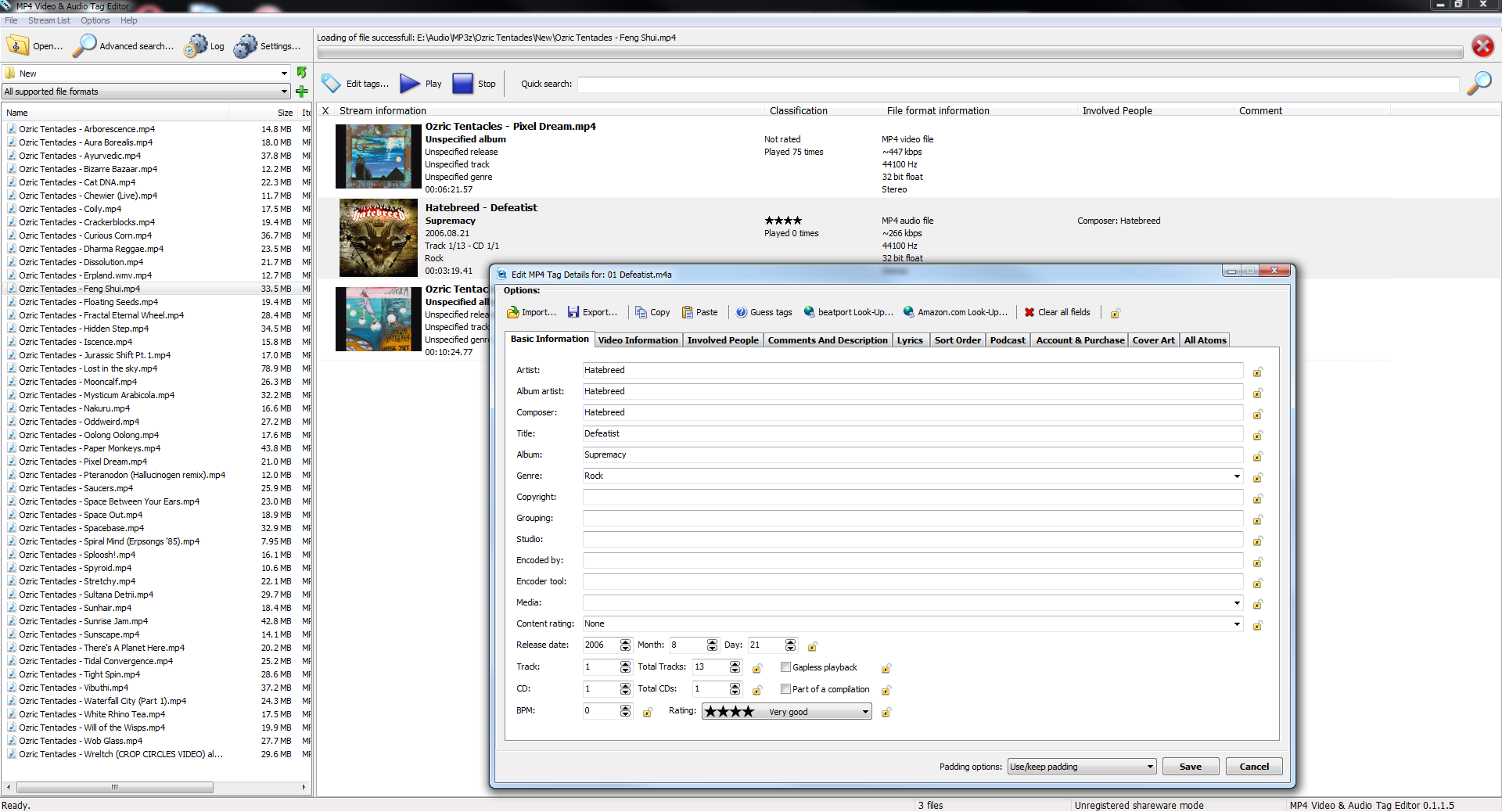
MP4 Video & Audio Tag Editor is a dedicated metadata management utility designed for MPEG-4 based files. It provides a comprehensive interface for modifying tags across various formats, including MP4 video files and audio formats such as M4A, M4B, and Apple Lossless (ALAC). The software allows for granular control over file information, enabling users to organize their digital libraries with precision.
Beyond basic labeling, the tool offers deep access to metadata atoms, which are the structural components of the MP4 container format. This level of access ensures that all technical and descriptive data fields can be adjusted manually. For visual organization, the application includes a cover art management system, allowing users to embed, remove, or replace high-resolution imagery within their media files.
To assist with large-scale library management, the editor features an integrated search engine capable of filtering files based on specific metadata criteria. The application supports full Unicode, ensuring compatibility with international character sets across all editable fields. This combination of technical depth and organizational tools makes it a functional solution for users needing consistent tag standardization across their media collections.
Top 5 Reasons To Download MP4 Video and Audio Tag Editor
- Total Metadata Mastery: Access and edit every single "atom" within your MP4 files for professional-grade organization.
- High-Fidelity Visual Management: Seamlessly embed, replace, or export high-resolution cover art for both video and audio libraries.
- Comprehensive Format Versatility: One tool to rule them all, supporting MP4 video, M4A audio, M4B audiobooks, and ALAC (Apple Lossless) files.
- Advanced Library Discovery: A built-in, powerful search engine that allows you to find specific files based on complex metadata criteria.
- Universal Compatibility through Unicode: Full support for international characters ensuring your library remains readable regardless of language or script.
Introduction: Why Your Digital Library Needs a Professional Touch
If you are anything like me, your digital media collection is a source of pride. You have spent years meticulously gathering high-definition movies, curated music playlists, and perhaps a massive collection of audiobooks for those long commutes. But there is a silent killer of a great media experience: bad metadata. We have all seen it—that movie in your Plex library with no poster, the "Unknown Artist" track in your music player, or the audiobook that refuses to sort correctly because the "Album Artist" tag is missing. It is frustrating, it is messy, and it makes your premium hardware feel cheap.
Today, I am looking at a tool that promises to end that frustration once and for all: the MP4 Video & Audio Tag Editor. This isn't just another lightweight utility; it is a powerhouse designed for the digital perfectionist. When I heard this was available as a giveaway, I knew I had to sit down and explain why this is a "must-download" for anyone who takes their media seriously. Whether you are an audiophile, a home-theater enthusiast, or a casual user who just wants their files to look right, this software is the missing piece of your digital puzzle. Let’s dive deep into why you need to grab this giveaway right now.
1. Total Metadata Mastery and the Power of Atoms
The first and most compelling reason to download this tool is the sheer depth of control it offers. Most basic tag editors only let you touch the "surface" tags—things like Title, Artist, and Year. But MP4 files are complex containers. They use a structure known as "atoms" to store information. If you really want to organize your media, especially for sophisticated servers like iTunes, Emby, or Kodi, you need a tool that can dig into these atoms.
The MP4 Video & Audio Tag Editor allows you to edit all metadata atoms. This is a game-changer for power users. It means you can adjust technical flags, modify specific sorting tags that determine how a series is ordered, and ensure that every piece of data is compliant with international standards. When you have this level of control, you aren't just "naming" a file; you are perfecting it. You can fix those annoying instances where a movie appears twice in your library because one file has a slightly different hidden tag than the other. This software gives you the surgical precision required to keep a massive library functioning perfectly.
Beyond the technical jargon, what this means for the average user is reliability. When you save a tag in this editor, it stays saved. It is written directly into the file's structure in a way that every modern media player will recognize. You are essentially future-proofing your library by ensuring that your metadata is as high-quality as your video and audio streams.
2. High-Fidelity Visual Management
We live in a visual world. A wall of text in a media folder is boring and inefficient. We want to see the movie poster; we want to see the album art. One of the standout features of this giveaway is its robust cover art management system. This isn't just about dragging and dropping a JPEG; it is about managing how your media is presented to the world.
With the MP4 Video & Audio Tag Editor, managing cover art is an absolute breeze. You can easily embed images directly into your MP4, M4A, or M4B files. This is crucial because it means the artwork travels with the file. If you move that file to a thumb drive, a phone, or a tablet, the artwork is already there. You don’t have to worry about "folder.jpg" files or hidden system icons that disappear when you move data.
Furthermore, the tool allows you to manage multiple pieces of art and export them if needed. If you have a high-resolution scan of a rare CD booklet embedded in an ALAC file, this software lets you extract it or replace it with an even better version. For movie collectors, this is the difference between a library that looks like a cluttered hard drive and a library that looks like a professional streaming service interface. In my experience, a library with consistent, high-quality cover art is much more enjoyable to navigate, and this software makes achieving that look effortless.
3. Comprehensive Format Versatility
One of the biggest headaches in digital media management is having to use four different programs for four different file types. You have one for your MP3s, one for your MKVs, and another for your audiobooks. The MP4 Video & Audio Tag Editor solves this by being a "one-stop shop" for anything within the MP4 container family. This includes MP4 video files, M4A audio files, M4B audiobooks, and even ALAC (Apple Lossless) files.
This versatility is a massive selling point. For the music lovers out there, ALAC support is huge. Audiophiles who prefer the Apple ecosystem use ALAC to maintain CD-quality sound, and having a dedicated tag editor that handles these files without corrupting the audio stream is vital. For those who love audiobooks, the M4B support is equally important. M4B files require specific tagging to handle chapters and "remember" playback positions, and this software handles those requirements with ease.
By downloading this one tool, you are essentially replacing several smaller, less capable utilities. It streamlines your workflow. You can jump from editing the tags on your latest 4K home movie to organizing a 50-track lossless music album without ever switching applications. This level of integration saves time and reduces the learning curve, making it an essential addition to any tech-savvy user's toolkit.
4. Advanced Library Discovery
As your library grows, finding what you need becomes a chore. It is fine when you have 50 movies, but when you have 5,000, "scrolling" is no longer a viable strategy. This is where the powerful search functionality of this software really shines. It isn't just a basic "find" box; it is a dedicated system designed to help you navigate your library based on the very tags you are editing.
Imagine being able to filter your entire collection to find all video files from a specific year that are missing a "Genre" tag. Or finding every ALAC file by a specific composer that doesn't have cover art. The search engine in MP4 Video & Audio Tag Editor allows you to query your files based on any of the metadata atoms you have access to. This makes "batch" cleaning your library incredibly fast. Instead of hunting through folders, you use the search tool to bring the problem files to you.
For me, this is the feature that transitions a tool from being "useful" to being "essential." It acknowledges that we don't just edit tags for the sake of it; we do it so we can use our media. By providing a way to quickly find and group files, the software helps you maintain your library over the long term. It turns a daunting task—like re-tagging an entire discography—into a manageable, organized process. If you value your time, this search functionality is worth the download alone.
5. Universal Compatibility through Unicode
We live in a globalized world, and our media collections reflect that. You might have J-Pop tracks with Japanese characters, Nordic Noir films with special accents, or classical compositions titled in Cyrillic. Basic, outdated tag editors often choke on these characters, resulting in those ugly "square boxes" or "garbled text" that ruin the look of your library. This is why full Unicode support is a non-negotiable feature for a modern tag editor.
The MP4 Video & Audio Tag Editor features full Unicode support, ensuring that every character, from every language, is rendered and saved correctly. This might seem like a small detail until you encounter a file that won't play or sort correctly because its filename or tag contains a character your software doesn't understand. With Unicode support, you have the peace of mind that your library is truly universal.
This also speaks to the professional nature of the software. It is built to handle the complexities of modern data. Whether you are tagging a French film or a Korean drama, the metadata will remain intact and readable across all your devices. This consistency is what separates a "pro" library from a "hobbyist" one. By ensuring that your tags are saved in a globally recognized format, you are ensuring that your media remains accessible and organized for years to come, no matter where in the world it was produced.
The User Experience: Why This Reviewer Is Impressed
Beyond the "Top 5" reasons, I want to talk about the "feel" of using this software. As a reviewer, I see a lot of utilities that are functional but ugly, or pretty but useless. This editor strikes a fantastic balance. The interface is clean and logical. Even though it offers deep "atom" editing, it doesn't overwhelm the user with complexity right out of the gate. You can do the simple things quickly, and the complex things are there when you need them.
The speed of the application is also noteworthy. When dealing with large 4K video files, some editors can lag or take forever to write changes because they are essentially rewriting the whole file. This software is optimized for MP4 structures, making the saving process efficient. It handles batch operations with grace, allowing you to select a hundred files and change the "Studio" or "Artist" tag in a single click. This efficiency is what makes it a joy to use rather than a chore.
Emphasizing the value of a giveaway: Usually, tools with this level of technical depth come with a premium price tag. The fact that you can get this professional-grade MP4 tag editor as a giveaway is an opportunity you shouldn't pass up. High-quality media management tools are often overlooked until you realize you need them, and by then, you're usually stuck with a mess that takes weeks to fix. By downloading this now, you're getting ahead of the curve.
Final Thoughts: A Must-Have for Your Digital Life
In conclusion, the MP4 Video & Audio Tag Editor is an indispensable tool for anyone who cares about their digital media. It solves the real-world problems of messy libraries, missing artwork, and incompatible file tags. It provides the technical depth required by power users while remaining accessible enough for someone who just wants to fix a few family videos. Let's recap why this is a priority download:
- It gives you unprecedented control over the underlying structure of your MP4 files.
- It makes your library visually stunning with easy cover art management.
- It consolidates your workflow by supporting audio, video, and lossless formats.
- It saves you hours of time with its powerful, metadata-based search engine.
- It guarantees global compatibility with full Unicode support.
Digital organization is often seen as a "boring" task, but with the right tools, it becomes an act of curation. There is a deep sense of satisfaction in opening your media player and seeing a perfectly organized, beautifully labeled, and fully searchable library. It makes you want to actually watch your movies and listen to your music. This giveaway provides you with the professional-grade toolset needed to achieve that perfection. Don't let your media library remain a cluttered mess of "File01.mp4" and missing thumbnails. Take control, download the MP4 Video & Audio Tag Editor today, and transform your digital collection into a professional-grade media library.
Final Verdict: If you have even a handful of MP4 or M4A files on your hard drive, you need this. If you have thousands, you essentialy cannot live without it. Grab this giveaway while it lasts and finally get the organized library you deserve!

Reviews for MP4 Video and Audio Tag Editor
Click Here to Read Reviews for MP4 Video and Audio Tag Editor >> Click Here to Submit Reviews for MP4 Video and Audio Tag Editor >>