What Does 1-abc.net Clipboard Organizer Do?
While the native Windows clipboard has remained largely stagnant for decades, 1-abc.net Clipboard Organizer expands its functionality by introducing multiple simultaneous buffers and persistent logging. The utility allows users to manage up to four distinct clipboards. The first remains the standard system clipboard, while the additional three are populated and accessed via user-defined hotkeys rather than the traditional Ctrl+C and Ctrl+V commands.
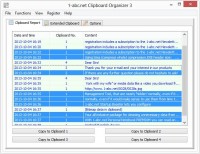
A centralized management interface provides an overview of all active content, enabling direct editing, manual entry, or one-click clearing of the default buffer. A core component of the software is the reporting feature, which logs all clipboard changes while the application is active. This local history allows users to retrieve previously deleted text and re-populate any of the four buffers with past entries. This data is searchable, sortable, and can be exported as a .txt file or sent to a local printer.
Designed for minimal system resource impact, the application runs in the background and can be minimized to the system tray. It supports automatic startup with Windows and is portable, meaning it can be executed from USB sticks or other external media. Users can customize the report file path and manage long-term data retention through integrated deletion and erase tools.
Top 5 Reasons To Download 1-abc.net Clipboard Organizer
- Revolutionary Multi-Clipboard Management: Break free from the "one copy at a time" limitation with four independent clipboard slots.
- Permanent Clipboard Logging: Never lose a snippet of text again with a persistent reporting feature that saves your history for years.
- Seamless Workflow Integration: Customizable hotkeys and background operation ensure that your productivity increases without changing your habits.
- Advanced Search and Organization: Easily locate, edit, and move data between clipboards using a dedicated, easy-to-use interface.
- Ultra-Lightweight and Portable Performance: Experience a feature-rich tool that consumes almost no system resources and can be run from a USB stick.
For over two decades, Windows users have been tethered to a clipboard system that has remained virtually unchanged since the early days of the operating system. We have seen revolutionary leaps in graphics, processing power, and user interface design, yet the humble act of copying and pasting has remained a "one-in, one-out" affair. We have all been there: you copy a long URL, then accidentally copy a single word before pasting that URL, losing the link forever. It is a frustration that has plagued power users, writers, and programmers for twenty years. Enter 1-abc.net Clipboard Organizer. This is not just a utility; it is a fundamental upgrade to the way you interact with your computer. As a tech reviewer, I see hundreds of "productivity" apps, but few address such a core deficiency in the Windows ecosystem with such elegance and efficiency. This giveaway is your chance to finally fix the most neglected part of your workflow.
1. Revolutionary Multi-Clipboard Management
The primary reason you need to download the 1-abc.net Clipboard Organizer today is its ability to expand your horizons beyond the single-item clipboard. In the standard Windows environment, your clipboard is a volatile, single-occupancy space. If you copy Item A, and then copy Item B, Item A is gone—vaporized into the digital ether. This creates a constant mental load where you must constantly switch windows, pasting every single item before you can move on to the next. It is inefficient, archaic, and frankly, a waste of your time.
1-abc.net Clipboard Organizer solves this by providing you with up to four distinct, user-defined clipboards. The first clipboard remains your standard system clipboard, working exactly as it always has with the traditional CTRL+C and CTRL+V commands. However, the software unlocks three additional "Extended Clipboards." These are not just passive storage areas; they are fully functional clipboards that you can feed and extract data from using simple, customizable shortcuts. Imagine you are researching an article. You can keep your primary source link in Clipboard 1, a key quote in Clipboard 2, a piece of formatting code in Clipboard 3, and a reference name in Clipboard 4. You can then populate your document by cycling through your hotkeys without ever having to navigate back to your web browser or source file. This is true multitasking.
The beauty of this system lies in its simplicity. You aren't learning a complex new software suite; you are simply adding three more "hands" to your digital workspace. The interface makes it incredibly easy to see what is stored in each slot, allowing you to move data between them with a single click. If you find yourself frequently repeating the same copy-paste cycles, this feature alone will save you hours of work every single month.
2. Permanent Clipboard Logging
How many times have you copied something important—a serial key, a customer’s address, or a specific line of code—only to realize three hours later that you need it again, but you’ve copied twenty other things since then? In the standard Windows environment, that data is lost once the system is rebooted or once the clipboard is overwritten. This is where the 1-abc.net Clipboard Organizer differentiates itself from basic clipboard managers. Its reporting feature is a genuine lifesaver for anyone who handles large amounts of data.
The software includes a robust logging mechanism that tracks every single change made to your clipboards while the program is active. This isn't just a temporary history that clears when you shut down your PC. The log file data is saved directly to your local system. This means that if you copied a specific paragraph of text six months ago, and you have the program running, you can actually go back into your reports, find that specific entry, and restore it. The software allows you to analyze exactly when you copied specific text, providing a chronological map of your digital activity.
This "time machine" for your clipboard data turns a volatile system into a permanent archive. You can easily add previous clipboard content back into any of the four active slots to paste it again. For researchers, legal professionals, and developers, this provides a layer of security and data redundancy that is simply unavailable in the stock Windows experience. You can even define the path for your report file, giving you total control over where this history is stored, and you can export the entire report to a standard .txt file for external archiving or sharing.
3. Seamless Workflow Integration
One of the biggest hurdles with third-party productivity tools is the "learning curve" or the way they disrupt your established habits. A tool is only useful if it feels like a natural extension of your workflow. 1-abc.net Clipboard Organizer excels here because it is designed to run nearly unrecognizably in the background. It is a "set it and forget it" utility that only makes its presence known when you actually need it.
The software is highly optimized to use very few system resources. In an age where even simple text editors can hog hundreds of megabytes of RAM, this program stays lean and fast. It can be set to execute automatically with Windows, ensuring that your extended clipboards and your logging features are ready the moment you reach your desktop. By minimizing to the system tray (systray), it stays out of your way, leaving your taskbar clean while remaining just one click away if you need to view the Extended Clipboard overview.
The integration goes deeper with its customizable hotkeys. You aren't forced into a specific way of working. While the default Windows shortcuts remain untouched, you can define how you interact with the other three clipboards. This level of customization ensures that the software adapts to your hands, not the other way around. Whether you are a gamer who needs quick access to chat macros or a data entry clerk who needs to juggle multiple fields, the seamless background operation of this tool makes your PC feel significantly more powerful without adding any perceived "bloat."
4. Advanced Search and Organization
Having a history of everything you’ve copied is great, but it’s only useful if you can find what you need quickly. If your clipboard log grows to contain thousands of entries over several months, manually scrolling through it would be a nightmare. This is where the 1-abc.net Clipboard Organizer’s management tools become essential. The software features a comprehensive "Extended Clipboard" screen that gives you a bird's-eye view of all your current content.
From this central hub, you can do much more than just view your text. You can manually enter or edit data directly into any of the clipboards if you prefer not to use the copy function. You can empty your default clipboard with a single click—a great feature for clearing sensitive data like passwords before sharing your screen. More importantly, the report overview allows you to sort your clipboard data, making it easy to organize by date or content type. If you are looking for a specific snippet, the built-in search function allows you to scan through your history to find exactly what you need in seconds.
This level of granular control extends to the physical world as well. The software includes a feature to print out your clipboard history, either to a local printer or via a network. While this might seem "old school," it is incredibly useful for creating physical backups of research notes or maintaining a paper trail of specific data transfers. You can also delete or erase specific entries or the entire report if you want to maintain your privacy. This isn't just a clipboard; it’s a fully featured database for your most frequently used data.
5. Ultra-Lightweight and Portable Performance
In today's tech landscape, portability is king. Many of us move between different workstations—from a home desktop to an office laptop, or perhaps a shared terminal. One of the most underrated features of the 1-abc.net Clipboard Organizer is its flexibility in installation. The program is so lightweight and well-engineered that it can be installed and run directly from USB sticks or other re-writable media. This means you can carry your entire "clipboard ecosystem" in your pocket.
When you run the software from a USB stick, you bring your four clipboards and your customized settings to any Windows machine you use. This is a massive advantage for IT professionals or freelancers who work on client machines. You don't have to worry about leaving a heavy footprint on a guest system, yet you can still benefit from the massive productivity boost of having multiple clipboards and a persistent history. The low system resource requirement ensures that even on older hardware or budget laptops, the program runs smoothly without lagging your other applications.
Furthermore, the ability to export your report to a .txt file means your data is never "trapped" inside the application. It is your data, and the software gives you every tool necessary to manage, move, and protect it. Whether you are using it on a high-end workstation or a portable drive, 1-abc.net Clipboard Organizer provides a consistent, reliable, and powerful experience. It bridges the gap between different devices and different eras of computing, finally bringing the Windows clipboard into the modern age.
Conclusion: Why You Should Download This Now
We often ignore the most basic tools we use every day, assuming they are "good enough." But "good enough" is the enemy of efficiency. The standard Windows clipboard is a relic of a simpler time, and it is holding you back. By downloading 1-abc.net Clipboard Organizer, you are not just getting a new app; you are upgrading your entire relationship with your computer. You are gaining the ability to juggle multiple pieces of information simultaneously, a safety net that protects your work from accidental overwrites, and a searchable archive of your digital life.
Efficiency is about saving time, and time is the one resource we cannot get back. Entering data or copying it back and again is boring, time-consuming, and prone to error. This software eliminates that friction. With its easy-to-use interface, robust reporting, and portable design, it is a quintessential tool for anyone who takes their PC usage seriously. Do not miss this opportunity to overhaul your workflow with a tool that is lightweight, powerful, and remarkably intuitive. 1-abc.net Clipboard Organizer is the upgrade that Windows should have given us years ago—now, it's finally yours to take.
In summary, if you value your time and want to eliminate one of the most persistent "pain points" in the Windows experience, this giveaway is a no-brainer. Download it, set up your hotkeys, and start experiencing a faster, smarter way to work. Your future self, searching for that lost snippet of text three months from now, will thank you.


Reviews for 1-abc.net Clipboard Organizer
Click Here to Read Reviews for 1-abc.net Clipboard Organizer >> Click Here to Submit Reviews for 1-abc.net Clipboard Organizer >>